Introduction
Сатып алганыңыз үчүн рахматasing the SINGING WOOD 030C Portable CD Player Boombox. This device offers versatile audio playback options, including CD, AM/FM radio, and auxiliary input. Designed for both indoor and outdoor use, it provides a portable audio experience with clear sound. Please read this manual thoroughly to ensure proper use and maintenance of your new boombox.
Кутуга камтылган:
- SINGING WOOD 030C Boombox
- AC Power Cord


Коопсуздук маалыматы
- Кубат булагы: Use only the specified AC power cord or 6 C batteries (sold separately). Do not mix old and new batteries, or different types of batteries.
- Суу жана ным: To reduce the risk of fire or electric shock, do not expose this appliance to rain or moisture. Do not place objects filled with liquids, such as vases, on the apparatus.
- Вентиляция: Адекваттуу вентиляцияны камсыз кылыңыз. Эч кандай желдетүүчү тешиктерди жаап албаңыз.
- Жылуулук: Аппаратты радиаторлор, жылуулук регистрлери, мештер же башка аппараттар (анын ичинде) сыяктуу жылуулук булактарынын жанына койбоңуз. ampкөтөргүчтөр) жылуулукту пайда кылуучу.
- Тазалоо: Unplug the unit from the wall outlet before cleaning. Use a soft, dry cloth. Do not use liquid cleaners or aerosol cleaners.
- Тейлөө: Бул өнүмдү өзүңүз тейлөөгө аракет кылбаңыз, анткени капкактарды ачуу же алып салуу сизди кооптуу көлөмгө дуушар кылышы мүмкүнtage же башка коркунучтар. Бардык тейлөөлөрдү квалификациялуу тейлөө кызматкерлерине тапшырыңыз.
Продукт бүттүview
Familiarize yourself with the various parts and controls of your SINGING WOOD 030C Boombox.
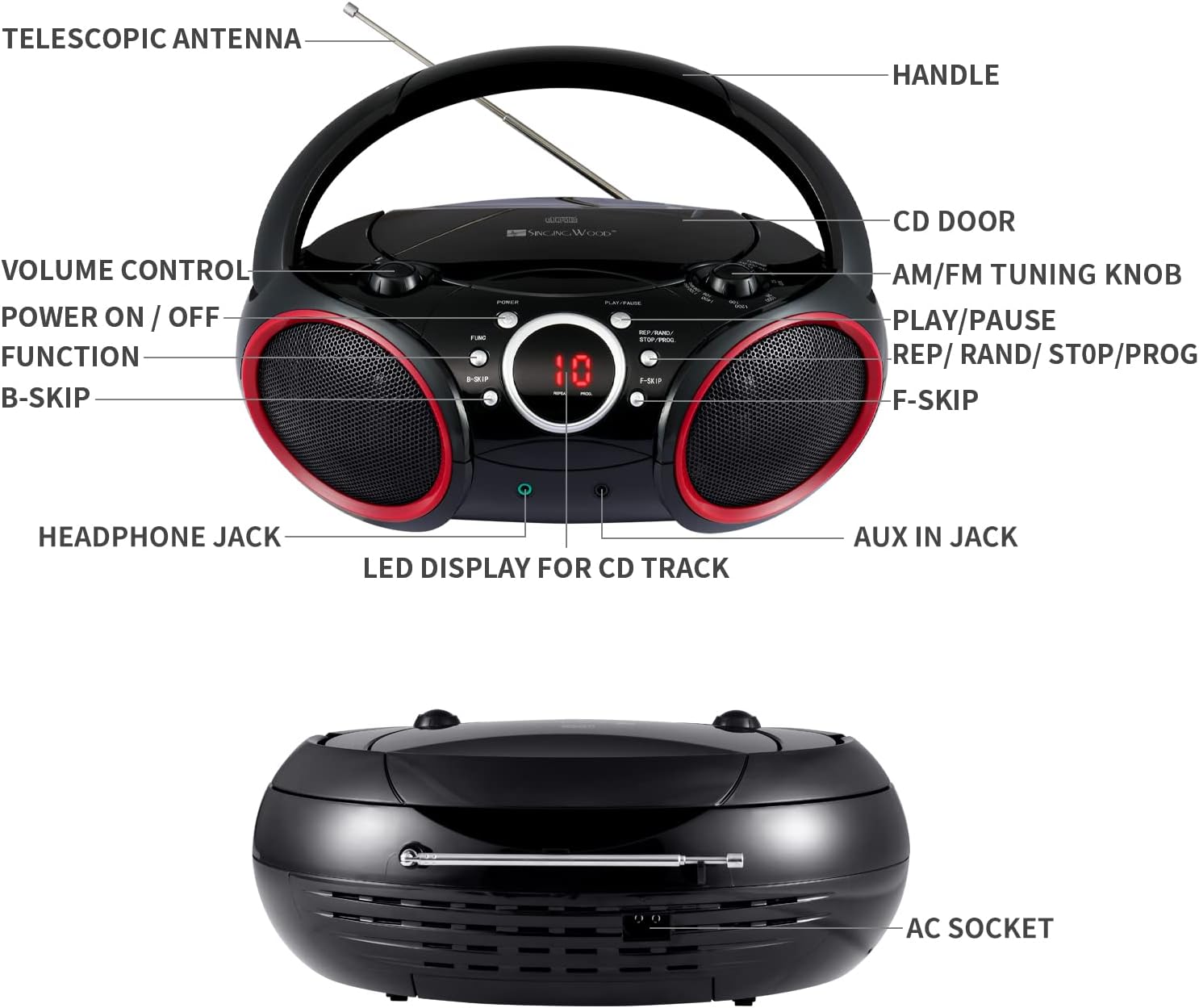
- туткасы: For portable carrying.
- Телескопиялык антенна: Extends for improved FM radio reception.
- CD Door: Opens to insert or remove CDs.
- AM/FM Tuning Knob: Радио жыштыгын тууралайт.
- Үндү көзөмөлдөө: Аудио чыгаруу деңгээлин тууралайт.
- Күйгүзүү / ӨЧҮРҮҮ: Агрегатты күйгүзөт же өчүрөт.
- Функция (FUNC) баскычы: Selects between CD, AM, FM, and AUX modes.
- Ойнотуу / Пауза баскычы: CD ойнотууну баштайт же токтотот.
- REP / RAND / STOP / PROG Button: Controls repeat modes, random play, stops CD playback, and initiates program mode.
- B-SKIP Button: Skips to the previous track on a CD.
- F-SKIP Button: Skips to the next track on a CD.
- LED Display for CD Track: Shows the current CD track number or other status indicators.
- Гарнитура уячасы: For private listening with headphones (3.5mm).
- AUX IN уячасы: For connecting external audio devices (3.5mm).
- AC розетка: AC кубат шнурын туташтыруу үчүн.
Жайгашуу
Бумбоксту кубаттоо
Your boombox can be powered by either AC power or batteries.
- AC кубаттуулугу: Connect the supplied AC power cord to the AC socket on the back of the unit and then plug it into a standard wall outlet.
- Батарея кубаттуулугу: For portable use, insert 6 C-size batteries (not included) into the battery compartment located on the bottom of the unit. Ensure correct polarity (+/-) as indicated inside the compartment.

Иштөө нускамалары
Жалпы операция
- Күйгүзүү/өчүрүү: басыңыз КҮЧ аппаратты күйгүзүү же өчүрүү үчүн баскыч.
- Функцияны тандоо: басыңыз FUNC (Function) button repeatedly to cycle through modes: CD, AM, FM, AUX.
- Үндү тууралоо: айлантыңыз ҮН БАШКАРУУ knob to increase or decrease the sound level.
CD ойноткучтун иштеши
- Ensure the unit is powered off or in a non-CD mode (AM/FM/AUX).
- ачыңыз CD DOOR by gently lifting it.
- Place a CD (CD-R/CD-RW compatible) onto the center spindle with the label side facing up.
- жабуу CD DOOR коопсуз.
- басыңыз FUNC button until the CD mode is selected. The LED display will show "-- --" indicating CD mode, then the total number of tracks.
- басыңыз ОЙНОО/ТЫНЫТТЫРУ button to start playback. The track number will appear on the LED display.
- Тыныгуу үчүн басыңыз ОЙНОО/ТЫНЫТТЫРУ кайра. Улантуу үчүн аны дагы бир жолу басыңыз.
- Кийинки трекке өтүү үчүн, басыңыз F-SKIP баскычы.
- To skip to the beginning of the current track or the previous track, press the B-SKIP баскычы.
- To stop playback, press and hold the РЕП/РАНД/ТОКТОТ/ПРОГ button until the display changes (e.g., from track number to total tracks or "-- --"). This ensures the CD stops completely and the player resets for the next operation.
- Кайталап ойнотуу: During CD playback, press the РЕП/РАНД/ТОКТОТ/ПРОГ button once for "Repeat One" (repeats current track) or twice for "Repeat All" (repeats all tracks on the CD).
- Программаны ойнотуу:
- Токтотуу режиминде, басыңыз РЕП/РАНД/ТОКТОТ/ПРОГ button. "PROG" will flash on the display.
- Колдонуу F-SKIP or B-SKIP to select your desired track.
- Басыңыз РЕП/РАНД/ТОКТОТ/ПРОГ again to confirm the track. Repeat for up to 20 tracks.
- Басыңыз ОЙНОО/ТЫНЫТТЫРУ программаланган ойнотууну баштоо үчүн.
AM/FM радиосу
- басыңыз FUNC button to select AM or FM radio mode.
- узартуу ТЕЛЕСКОПИК АНТЕННА for optimal FM reception. For AM reception, rotate the unit for best signal.
- айлантыңыз AM/FM ТУНИНГ ТУНАЧЫ to tune into your desired radio station.
Auxiliary Input Operation
- 3.5 мм аудио кабелдин бир учун (кошулмага кирбейт) туташтырыңыз AUX IN JEK on the boombox.
- Connect the other end of the audio cable to the headphone jack or audio output of your external audio device (e.g., smartphone, MP3 player).
- басыңыз FUNC AUX режимин тандоо үчүн баскычты басыңыз.
- Тышкы түзмөгүңүздөн ойнотууну жана үнүн башкарыңыз.

Наушникти колдонуу
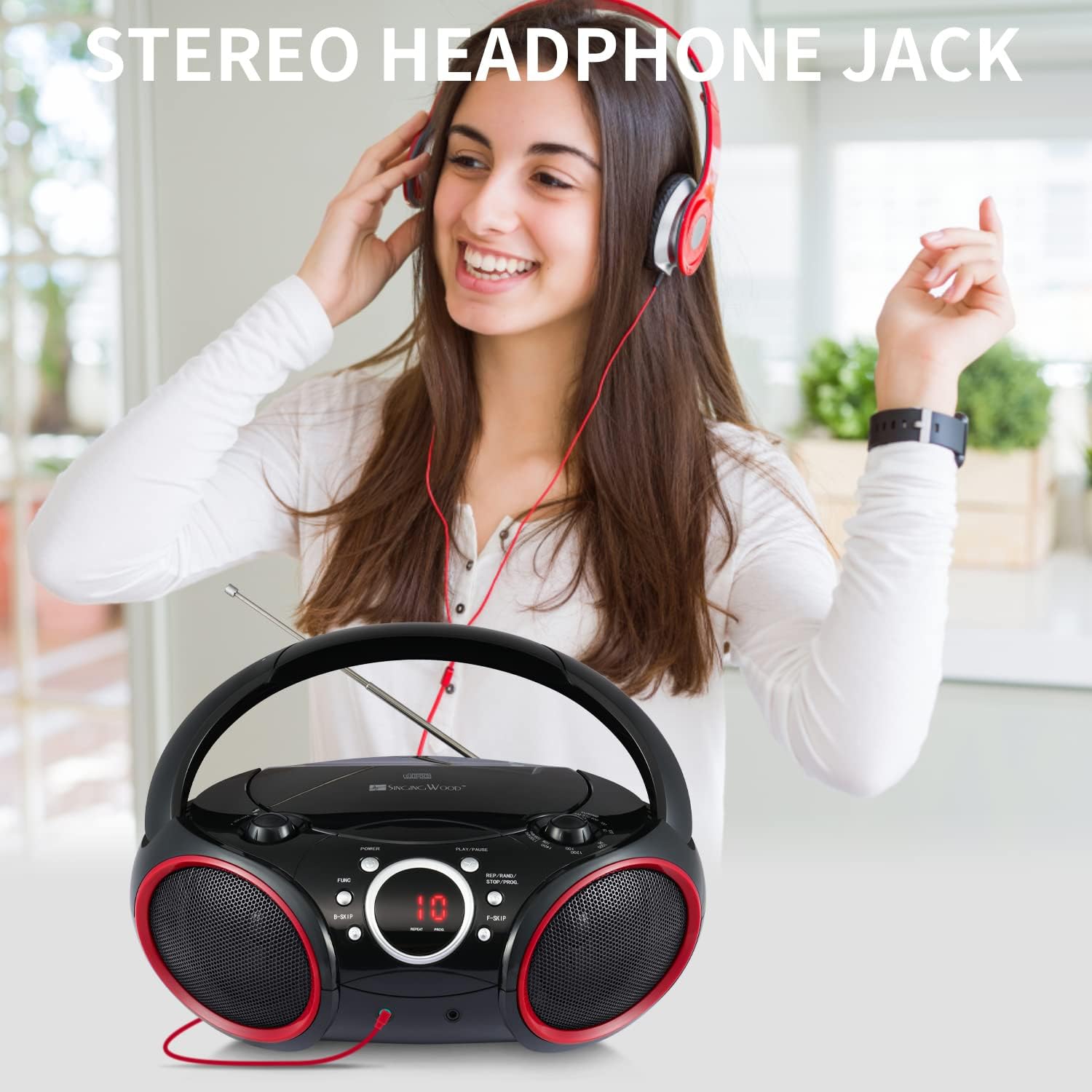
For private listening, plug any standard 3.5mm headphones (not included) into the НАДРФОН ДжЕК. The speakers will automatically mute when headphones are connected.
Техникалык тейлөө
- Агрегатты тазалоо: Wipe the exterior of the boombox with a soft, slightly damp кездеме. Абразивдүү тазалагычтарды же эриткичтерди колдонбоңуз.
- CD линзасына кам көрүү: To ensure optimal CD playback, occasionally clean the CD lens using a commercially available CD lens cleaner disc. Avoid touching the lens directly.
- Батареяны алмаштыруу: If using battery power, replace all 6 C-size batteries when the sound becomes distorted or the unit stops functioning. Remove batteries if the unit will not be used for an extended period.
Проблемаларды чечүү
If you encounter any issues with your boombox, please refer to the following common problems and solutions:
| Көйгөй | Мүмкүн себеп | Чечим |
|---|---|---|
| Күч жок | AC шнуру туташтырылган эмес; Батареялар түгөндү же туура эмес киргизилген. | Электр шнурунун бекем сайылганын текшериңиз. Батареяларды жаңыларына алмаштырыңыз, полярдуулукту текшериңиз. |
| CD not playing / "NO DISC" error | CD inserted incorrectly; CD dirty or scratched; CD door not closed; Incorrect mode selected; CD player stuck. | Insert CD with label side up. Clean CD. Close CD door firmly. Press FUNC to select CD mode. If CD player is unresponsive, ensure you stop playback by pressing and holding the РЕП/РАНД/ТОКТОТ/ПРОГ button until the display changes, then try again. |
| Радио кабыл алуу начар | Антенна узартылган эмес; Түзмөктүн абалы. | Fully extend the telescopic antenna for FM. Rotate the unit for optimal AM reception. |
| No sound from Aux-in | Aux cable not connected; Incorrect mode; Volume too low on external device. | Ensure Aux cable is fully inserted. Press FUNC to select AUX mode. Increase volume on both the boombox and the external device. |
| CD playback issues after previous use | CD player not properly stopped or reset. | Always ensure to stop CD playback by pressing and holding the РЕП/РАНД/ТОКТОТ/ПРОГ button until the display indicates a full stop (e.g., total tracks or "-- --") before changing modes or turning off the unit. If the unit is on, cycle through AM, FM, then back to CD mode if needed. |
Техникалык шарттар
| Өзгөчөлүк | Деталь |
|---|---|
| Модель номери | 030C (SBX030C-RD) |
| Продукциянын өлчөмдөрү (L x W x Y) | 11.8 x 9 x 4.8 дюйм |
| Элемент Салмагы | 3.2 фунт |
| Байланыш технологиясы | Көмөкчү |
| Динамик түрү | Стерео |
| Power Source | AC (120V, 60Hz) or 6 x C Batteries (not included) |
| CD шайкештиги | CD, CD-R, CD-RW |
| Radio Bands | AM/FM стерео |

Кепилдик жана колдоо
SINGING WOOD products are manufactured with quality and reliability in mind. For specific warranty information or technical support, please refer to the warranty card included with your purchase or visit the official SINGING WOOD webсайт.
Кошумча жардам алуу үчүн, сиз продукт сатылып алынган сатуучуга да кайрылсаңыз болот.


