1. Киришүү
This manual provides comprehensive instructions for the TechniSat DIGITRADIO 4 C digital stereo radio. It covers setup, operation, maintenance, and troubleshooting for its various functionalities, including DAB+, FM, Bluetooth audio streaming, and AUX input. Please read this manual thoroughly before using the device to ensure proper operation and to maximize your listening experience.
Пакеттин мазмуну
- DIGITRADIO 4 C unit
- Телескопиялык антенна
- F-plug tool (for removable antenna)
- Алыстан башкаруу
- Кубаттуу адаптер
- Колдонуучунун колдонмосу
2. Орнотуу
2.1 Пакеттен чыгаруу жана жайгаштыруу
Carefully remove all components from the packaging. Place the radio on a stable, flat surface away from direct sunlight, heat sources, and moisture. Ensure adequate ventilation around the unit.
2.2 Антеннаны туташтыруу
The DIGITRADIO 4 C comes with a telescopic antenna for DAB+ and FM reception. Extend the antenna fully for optimal signal reception. For areas with weak reception, an external antenna can be connected to the F-type connector on the rear of the unit. Use the provided F-plug tool if necessary to secure the connection.
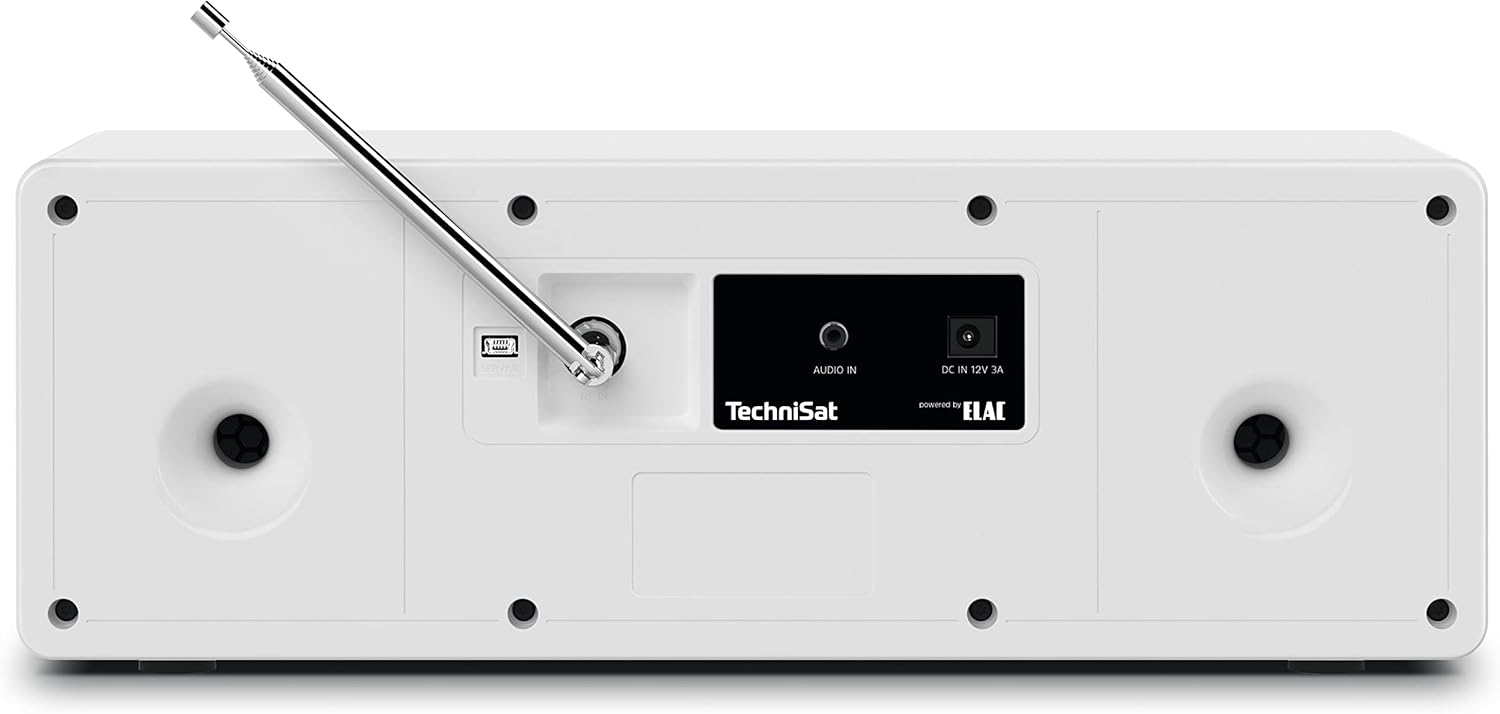
Сүрөт 2.2.1: Rear panel connections, including the F-type antenna connector, AUX IN, and DC power input.
2.3 Кубат туташтыруу
Connect the supplied power adapter to the DC IN 12V 3A port on the rear of the radio. Plug the adapter into a suitable wall outlet. The unit will enter standby mode.
2.4 Initial Power On and Scan
басыңыз ҮН / КҮТҮҮ РЕЖИМИНДЕ knob to turn on the radio. Upon first use, the radio may automatically initiate a scan for available DAB+ stations. This process can take a few minutes. Once complete, the radio will tune to the first available station.
3. Иштөө нускамалары

Сүрөт 3.0.1: Алдыңкы панелдин үстүндөview showing the display, controls, and headphone jack.
3.1 Негизги башкаруу каражаттары
- VOL / STANDBY Knob: Rotate to adjust volume. Press to switch between ON and Standby mode.
- SELECT / SNOOZE Knob: Rotate to navigate menus or change stations. Press to confirm selections or activate snooze during an alarm.
- MODE баскычы: Press to switch between DAB+, FM, Bluetooth, and AUX input modes.
- MENU баскычы: Орнотуулар жана параметрлер үчүн негизги менюга кирүү үчүн басыңыз.
- FAV баскычы: Press to access or save favorite stations.
- Navigation Buttons (◀◀, ▶▶, ■, ►►): Used for track control in Bluetooth mode or navigating lists.
3.2 DAB+ Радио операциясы
In DAB+ mode, the radio receives digital broadcasts. The 2.8-inch color display shows station information, program details, and potentially album art.

Сүрөт 3.2.1: The 2.8-inch TFT color display showing current DAB+ broadcast information.
- Басыңыз РЕЖИМ until DAB+ is selected.
- If a scan is needed, navigate to "Full Scan" in the menu and press ТАНДОО.
- айлантыңыз ТАНДОО knob to browse available stations. Press to select a station.
- Сүйүктүү станцияңызды сактоо үчүн, баскычын басып, кармап туруңуз FAV баскычын басып, андан кийин ТАНДОО knob to choose a preset number (1-20) and press to confirm.
3.3 FM радиосунун иштеши
In FM mode, the radio receives analog broadcasts. RDS (Radio Data System) information may be displayed if available.
- Басыңыз РЕЖИМ until FM is selected.
- айлантыңыз ТАНДОО жыштыкты кол менен жөндөө үчүн баскычты басыңыз.
- Кийинки жеткиликтүү станцияны авто-скандоо үчүн басып, кармап туруңуз ТАНДОО баскыч.
- Сүйүктүү станцияңызды сактоо үчүн, баскычын басып, кармап туруңуз FAV баскычын басып, андан кийин ТАНДОО knob to choose a preset number (1-20) and press to confirm.
3.4 Bluetooth аудио агымы
The DIGITRADIO 4 C can receive audio from Bluetooth-enabled devices such as smartphones or tablets.

Сүрөт 3.4.1: Bluetooth audio streaming from a smartphone to the radio.
- Басыңыз РЕЖИМ until Bluetooth is selected. The display will show "Pairing" or "Waiting for connection".
- On your mobile device, enable Bluetooth and search for "DIGITRADIO 4 C".
- Select "DIGITRADIO 4 C" from the list of available devices to pair.
- Once paired, you can play audio from your device, and control playback (play/pause, skip tracks) using the radio's navigation buttons.
3.5 AUX киргизүү
Connect external audio devices (e.g., MP3 players, CD players) using a 3.5mm audio cable to the AUX IN port on the rear of the radio.
- Connect your external device to the AUX IN port.
- Басыңыз РЕЖИМ until AUX is selected.
- Тышкы түзмөгүңүздөн ойнотууну башкарыңыз. Радионун үн башкаруусу иштей берет.
3.6 Ойготкуч саат жана уйку таймери
The radio includes an alarm clock and a sleep timer function.
- Ойготкуч: Ойготкуч жөндөөлөрүнө төмөнкү аркылуу кириңиз МЕНЮ button. You can set multiple alarms, choose the alarm source (buzzer, DAB+, FM), and adjust volume. Press ТАНДОО / ТЫЙЫНДАТУУ to snooze an active alarm.
- Уйку таймери: Set a sleep timer from the МЕНЮ белгилүү бир убакыттан кийин радиону автоматтык түрдө өчүрүү үчүн.
3.7 Эквалайзер
Үн профессионалын тууралаңызfile using the built-in equalizer. Access equalizer settings through the МЕНЮ to select from preset modes or customize bass and treble levels.

Сүрөт 3.7.1: The radio features two 10W stereo speakers, optimized for sound quality.
4. Техникалык тейлөө
4.1 Тазалоо
To clean the radio, disconnect it from the power supply. Use a soft, dry cloth to wipe the surfaces. For stubborn marks, a slightly damp cloth can be used, followed by a dry cloth. Do not use abrasive cleaners, solvents, or chemical sprays, as these can damage the finish.
4.2 Antenna Care
Handle the telescopic antenna with care to prevent bending or breakage. When not in use, it can be retracted. If using an external antenna, ensure its connection is secure and the cable is not damaged.
5. Кыйынчылыктарды
| Көйгөй | Мүмкүн себеп | Чечим |
|---|---|---|
| Күч жок | Кубат адаптери туташтырылган эмес; розетка иштебейт. | Кубат адаптери радиого жана иштеп жаткан розеткага бекем туташтырылганын текшериңиз. |
| DAB+/FM кабыл алуу начар | Антенна узартылган эмес; начар сигнал аймак; кийлигишүү. | Fully extend the telescopic antenna. Reposition the radio. Consider connecting an external antenna. |
| Bluetooth жупташуу катасы | Bluetooth not enabled on device; radio not in pairing mode; device too far. | Ensure Bluetooth is enabled on your device and the radio is in Bluetooth mode. Move device closer to the radio. Try re-pairing. |
| Үн жок | Volume too low; mute activated; incorrect input mode. | Increase volume. Check if mute is active. Ensure correct input mode (DAB+, FM, Bluetooth, AUX) is selected. |
| Пульт иштебей жатат | Batteries depleted; obstruction between remote and radio. | Replace remote control batteries (2x AAA). Ensure no obstructions are blocking the signal path. |
6. Техникалык шарттар
| Өзгөчөлүк | Деталь |
|---|---|
| Бренд | TechniSat |
| Модель номери | 0001/3937 |
| Байланыш технологиясы | Auxiliary, Bluetooth, External Antenna Connection (F-type) |
| Радио топтору колдоого алынат | DAB+, FM (RDS жана PLL менен) |
| Дисплей | 2.8-inch TFT Color Display (dimmable) |
| Аудио чыгаруу | 2 x 10W RMS stereo speakers (Powered by ELAC), Headphone jack (3.5mm) |
| Өзгөчөлүктөр | Bluetooth audio streaming (reception), Equalizer, Favorite memory (20 for DAB+, 20 for FM), Alarm clock, Sleep timer, Snooze function |
| Power Source | Тышкы кубат адаптери |
| Продукциянын өлчөмдөрү (L x W x Y) | 38 см x 16.5 см x 13.5 см (14.96 дюйм x 6.5 дюйм x 5.31 дюйм) |
| Алыстан башкаруунун батареялары | 2 x AAA (not included with main unit, typically for remote) |
7. Кепилдик маалыматы
The TechniSat DIGITRADIO 4 C comes with a 2 жылдык өндүрүүчүнүн кепилдиги. Please retain your proof of purchase for warranty claims. For detailed terms and conditions, refer to the warranty card included with your product or visit the official TechniSat webсайт.
8. Колдоо
For further assistance, technical support, or to download the latest version of this manual, please visit the official TechniSat webсайт:
You may also contact TechniSat customer service directly. Contact details can typically be found on the manufacturer's webсайтында же продуктунун таңгагында.


