1. Киришүү
Сатып алганыңыз үчүн рахматasing the Soundstream BTC-3100 Sound Tower Speaker. This device is designed to provide a versatile audio experience with its 360-degree sound output, integrated 20W subwoofer, and a unique detachable Bluetooth speaker for portable use. This manual provides essential information for safe operation, setup, and maintenance of your speaker system.
2. Коопсуздук нускамалары
- Продукцияны колдонуудан мурун бардык нускамаларды кылдат окуп чыгыңыз.
- Аппаратты сууга, нымдуулукка же экстремалдык температурага тийгизбеңиз.
- Агрегатты өз алдынча бөлүүгө же оңдоого аракет кылбаңыз. Бардык тейлөөлөрдү квалификациялуу кызматкерлерге тапшырыңыз.
- Динамикти радиаторлор, жылуулук регистрлери, мештер же башка аппараттар (анын ичинде) сыяктуу жылуулук булактарынан алыс кармаңыз. ampкөтөргүчтөр) жылуулукту пайда кылуучу.
- Өндүрүүчү белгилеген тиркемелерди/аксессуарларды гана колдонуңуз.
- Чагылган бороондо же узак убакыт бою колдонбогондо аппаратты розеткадан ажыратыңыз.
3. Пакеттин мазмуну
Сураныч, сиздин пакетиңизде төмөнкү заттар бар экенин текшериңиз:
- Soundstream BTC-3100 Sound Tower Speaker (Main Unit)
- Алынуучу Bluetooth динамиги
- Кубаттуу адаптер
- Көмөкчү аудио кабель
- Колдонуучунун колдонмосу (бул документ)
4. Продукт бүтүп калдыview
Familiarize yourself with the components of your Sound Tower Speaker system.

1-сүрөт: The Soundstream BTC-3100 Sound Tower Speaker, illustrating the main tower unit and the detachable portable speaker both connected and separated. The portable speaker sits atop the tower, and an arrow indicates its detachment.

2-сүрөт: Жогорку view of the detachable speaker, showing the control panel. From left to right, buttons include 'M' (Mode), '-' (Volume Down/Previous Track), '+' (Volume Up/Next Track), and the Power button.
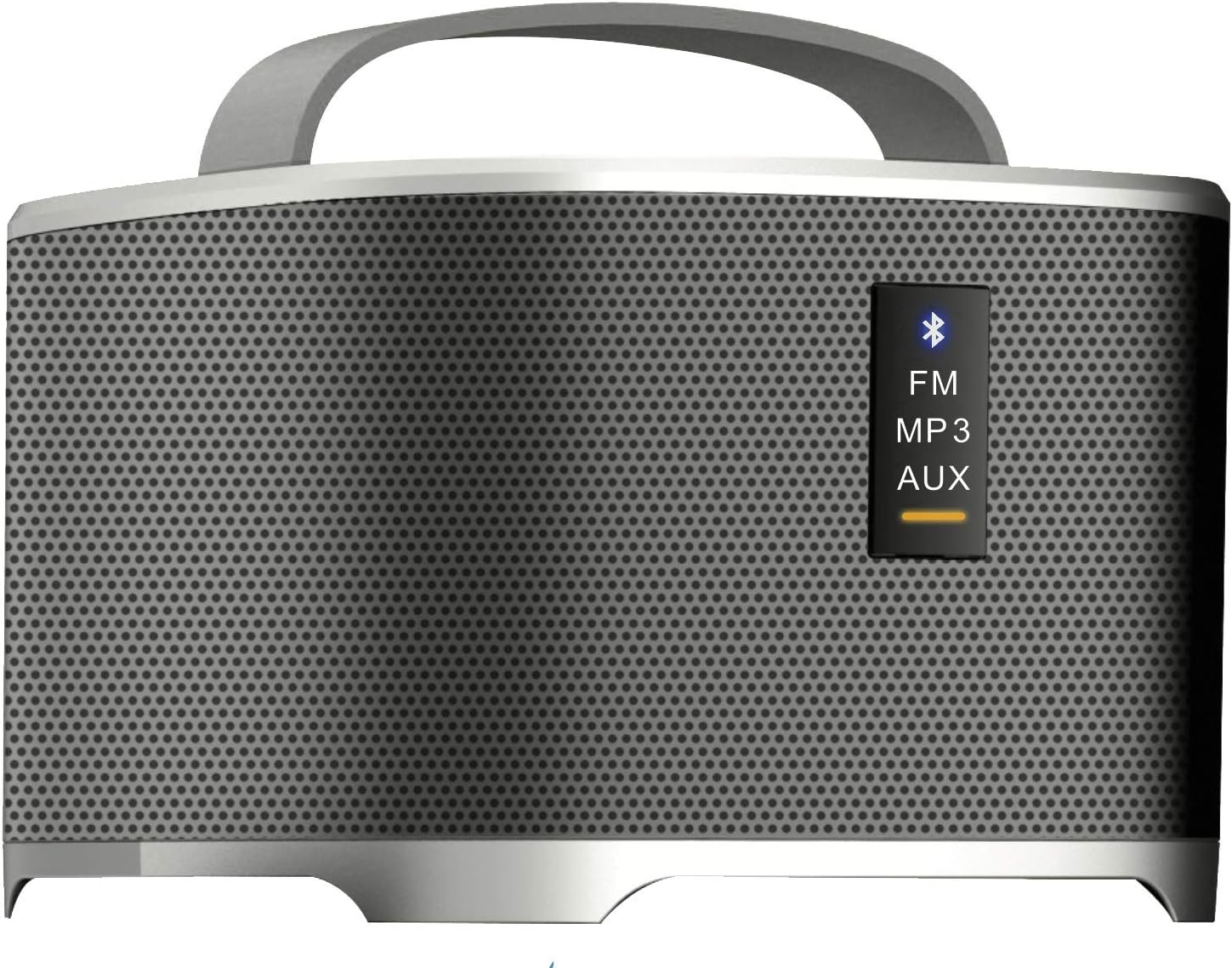
3-сүрөт: Front panel of the detachable speaker, displaying indicator lights for different modes: Bluetooth (blue icon), FM, MP3, and AUX. A yellow bar indicates the active mode.
Main Tower Unit
- Док станциясы: For charging and integrating the detachable speaker.
- Кубат киргизүү: Кубат адаптерине туташат.
- ЛГурченко: Provides enhanced bass audio.
Алынуучу Bluetooth динамиги
- Кубат баскычы: Динамикти күйгүзөт/өчүрөт.
- Режим баскычы (M): Switches between Bluetooth, FM, MP3, and AUX modes.
- Volume/Track Control (+/-): Adjusts volume with short presses; changes tracks/stations with long presses.
- Bluetooth көрсөткүчү: Flashes when pairing, solid when connected.
- Заряддоо порту: For direct charging when detached.
- AUX киргизүү: Зымдуу аудио туташуу үчүн.
5. Орнотуу
5.1 Баштапкы орнотуу
- Place the Sound Tower Speaker on a stable, flat surface.
- Ensure the detachable speaker is securely docked on top of the main tower unit.
- Connect the power adapter to the power input port on the main tower unit, then plug it into a wall outlet.
- The detachable speaker will begin charging automatically when docked and the main unit is powered.
5.2 Charging the Detachable Speaker
The detachable speaker has an internal rechargeable battery.
- While docked: The detachable speaker charges automatically when placed on the main tower unit, provided the tower is connected to power.
- While detached: Connect a compatible USB charging cable (not included, typically Micro-USB) to the charging port on the detachable speaker and a USB power source.
6. Иштөө нускамалары
6.1 Күйгүзүү/өчүрүү
- Main Tower Unit: The main unit powers on when connected to an electrical outlet. There is no separate power button for the tower itself.
- Detachable Speaker: Press and hold the Power button on the top panel of the detachable speaker for 2-3 seconds to turn it on or off.
6.2 Bluetooth Pairing (Detachable Speaker)
- Ensure the detachable speaker is powered on and in Bluetooth mode. The Bluetooth indicator light will flash. If not, press the 'M' (Mode) button until the Bluetooth indicator flashes.
- Аудио түзмөгүңүздө (смартфон, планшет ж.б.) Bluetooth функциясын иштетиңиз.
- Издөө available devices and select "BTC-3100" from the list.
- Туташтырылгандан кийин, Bluetooth индикатору туруктуу күйөт.
6.3 Using the Detachable Speaker Independently
When detached from the main tower, the portable speaker functions as a standalone Bluetooth speaker. All controls (power, mode, volume/track) are located on the speaker itself.
6.4 FM радио режими
- With the detachable speaker powered on, press the 'M' (Mode) button repeatedly until the FM indicator light is active.
- Long press the '+' or '-' buttons to scan for the next/previous available FM station.
- Short press the '+' or '-' buttons to fine-tune the frequency.
6.5 MP3/AUX Input Mode
- AUX: Connect one end of the auxiliary audio cable to the AUX input port on the detachable speaker and the other end to the audio output of your device. Press the 'M' button until the AUX indicator is active.
- MP3: If the speaker supports USB or MicroSD card input (check product specifications for confirmation), insert the storage device. Press the 'M' button until the MP3 indicator is active.
6.6 Үндү башкаруу
Short press the '+' button to increase volume and the '-' button to decrease volume on the detachable speaker. Volume can also be controlled from your connected audio device.
7. Техникалык тейлөө
- Тазалоо: Динамиктин сыртын тазалоо үчүн жумшак, кургак чүпүрөктү колдонуңуз. Суюк тазалагычтарды же абразивдүү материалдарды колдонбоңуз.
- Сактагыч: Узак мөөнөткө колдонулбаганда, динамикти салкын, кургак жерде, тике күн нурунан жана экстремалдык температурадан алыс сактаңыз.
- Батареяга кам көрүү: To prolong the life of the detachable speaker's battery, avoid fully discharging it frequently. Charge it regularly, even if not in use.
8. Кыйынчылыктарды
If you encounter issues with your Soundstream BTC-3100, refer to the following common problems and solutions:
- Кубат жок:
- Ensure the main tower unit's power adapter is securely plugged into both the speaker and a working wall outlet.
- For the detachable speaker, ensure it is charged or docked correctly.
- Үн жок:
- Check the volume level on both the speaker and your connected audio device.
- Ensure the correct input mode (Bluetooth, AUX, FM, MP3) is selected on the detachable speaker.
- Эгер Bluetooth колдонуп жатсаңыз, динамик туура жупташтырылганын жана түзмөгүңүзгө туташтырылганын текшериңиз.
- Bluetooth туташпай жатат:
- Make sure the detachable speaker is in Bluetooth pairing mode (indicator flashing).
- Ensure your audio device's Bluetooth is enabled and within range (typically 10 meters/33 feet).
- Түзмөгүңүздүн Bluetooth жөндөөлөрүнөн динамикти ажыратып, кайра жупташтырып көрүңүз.
- Динамикти да, түзмөгүңүздү да өчүрүп, кайра күйгүзүңүз.
- FM кабыл алуу начар:
- Динамикти сигнал жакшыраак кабыл алынган аймакка көчүрүңүз.
- Сигналдын өтүшүнө чоң металл буюмдар тоскоол болбой турганын текшериңиз.
9. Техникалык шарттар
| Бренд | Soundstream |
| Модель номери | BTC-3100 |
| Динамик түрү | Сабвуфер, айланадагы үн |
| Өзгөчө өзгөчөлүк | Portable (Detachable Speaker) |
| Шайкеш түзмөктөр | Ноутбук, смартфон, планшет |
| Көлөмдүү үн каналынын конфигурациясы | 4.2 |
| Power Source | Battery Powered (Detachable Speaker) |
| Башкаруу ыкмасы | App (if supported), On-device buttons |
| Динамиктин максималдуу чыгаруу күчү | 20 Watts (Subwoofer) |
| Байланыш технологиясы | Bluetooth |
| Аудио чыгаруу режими | Стерео, айлана |
| Монтаж түрү | Кабат туруктуу |
| Элемент Салмагы | 11.13 фунт |
| Пакеттин өлчөмдөрү | 36 x 8.8 x 7.9 дюйм |
| UPC | 709483059689 |
10. Кепилдик жана колдоо
Soundstream products are designed and manufactured to the highest quality standards. For information regarding warranty coverage, please refer to the warranty card included with your product or visit the official Soundstream website. For technical support or customer service inquiries, please contact Soundstream customer support through their official channels.


