1. Киришүү
Сатып алганыңыз үчүн рахматasing the Eonon 11.6-inch Flip-Down Car Monitor. This manual provides detailed instructions for the installation, operation, and maintenance of your new device. Please read this manual thoroughly before use to ensure proper functionality and to maximize your viewтажрыйбасы.

Figure 1.1: Eonon 11.6-inch Flip-Down Car Monitor L0154
This image shows the Eonon 11.6-inch Flip-Down Car Monitor in its deployed state, displaying a car image on its screen. The monitor is designed for overhead installation in vehicles.
2. Өзгөчөлүктөрү
The Eonon L0154 monitor is equipped with advanced features for an enhanced in-car entertainment experience:
- 11.6-inch IPS Wide Viewing Angle Screen: Provides clear and vibrant images from various angles.
- Full HD 1080p токтому: Supports high-definition video playback (1920x1080 via HDMI).
- Ультра жука дизайн: With a thickness of only 16mm when folded, it offers a sleek and discreet profile.
- HDMI (1.4) Input: Connect external devices like smartphones, tablets, or gaming consoles.
- USB туташуу: Supports MP3 music playback and 1080P high-definition video files.
- IR Headphone Compatible: Allows for wireless audio listening with compatible IR headphones.
- Multi-color LED Lights: Choose from seven ambient LED colors to match your vehicle's interior or mood.
- Dome Light Door Control Wiring: Integrates with your vehicle's dome light system for automatic illumination.
- Adjustable Image Settings: Brightness, contrast, hue, and saturation can be customized.
- Көп тилдүү меню: Supports English, Japanese, German, French, Spanish, Portuguese, Dutch, Italian, and Russian.
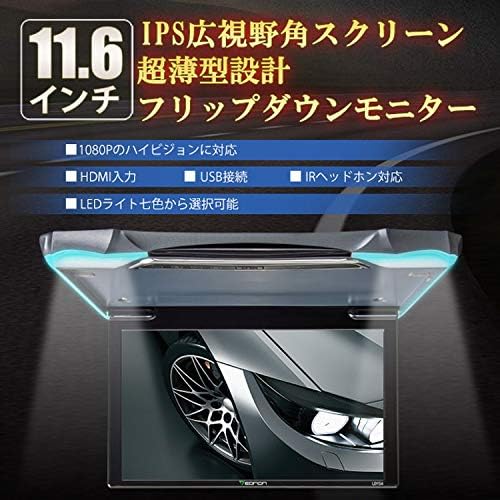
Figure 2.1: Key Features of the Eonon L0154 Monitor
This image highlights the main features of the Eonon L0154, including its 11.6-inch IPS wide viewing angle screen, ultra-thin design, 1080P high-definition support, HDMI and USB inputs, IR headphone compatibility, and selectable LED light colors.

Figure 2.2: 11.6-inch IPS Wide Viewing Angle Screen
This image illustrates the 11.6-inch IPS wide viewing angle screen of the monitor, emphasizing its ability to provide clear and vibrant visuals for an immersive viewтажрыйбасы.
3. Пакеттин мазмуну
Сураныч, кутудан чыгарганда пакеттин мазмунун текшерип, бардык буюмдар бар экенин текшериңиз:
- Eonon 11.6-inch Flip-Down Car Monitor (L0154)
- Japanese Instruction Manual (1 pc)
- Алыстан башкаруу (1 даана)
- AV Power Cable (1 pc)
- Dome Light Door Control Wiring (1 pc)
- Бургалар (10 даана)
- Screw Hole Covers (4 pcs)

Сүрөт 3.1: Камтылган аксессуарлар
This image displays all the accessories included with the Eonon L0154 monitor: the AV power cable, dome light door control wiring, remote control, screw hole covers, screws, and the instruction manual.
4. Орнотуу жана орнотуу
Professional installation is recommended for this product. Ensure the vehicle's power is disconnected before beginning installation. Refer to the wiring diagram for correct connections.
4.1 Зымдарды туташтыруу
Identify the following connections for proper installation:
- 1. Ground Wire: Connect to vehicle chassis.
- 2. ACC Power Connection: Connect to accessory power (switched 12V).
- 3. Видео чыгаруу: For connecting to other displays.
- 4. AUX Audio Output (Left): Сол каналдын аудио чыгышы.
- 5. AUX Audio Output (Right): Оң каналдын аудио чыгышы.
- 6. Video Input: Тышкы видео булактарын туташтыруу үчүн.
- 7. Audio Input (Left): Сол каналдын аудио киргизүүсү.
- 8. Audio Input (Right): Оң каналдын аудио киргизүүсү.
- 9. Door+ (Yellow): Positive trigger for dome light control.
- 10. Door- (Green): Negative trigger for dome light control.
- 11. 12V Battery Power Cord: Туруктуу 12V кубаттуулукка туташтырыңыз.
- 12. Ground Wire: Кошумча жерге туташтыруу.
- 13. HDMI: HDMI киргизүү порту.
- 14. USB: USB input port.

Figure 4.1: Wiring Diagram and Connections
Бул сүрөт майда-чүйдөсүнө чейин камсыз кылат view of the wiring harness and connection points for the Eonon L0154 monitor, with numbered labels corresponding to the description above for easy identification during installation.
4.2 Мониторду орнотуу
Securely mount the monitor to the vehicle's ceiling using the provided screws and screw hole covers. Ensure the mounting location is stable and does not obstruct airbags or other safety features.
5. Иштөө нускамалары
5.1 Күйгүзүү/өчүрүү
The monitor will power on automatically when the vehicle's ACC power is supplied. To turn off, turn off the vehicle's ignition. The monitor has a power state memory function.
5.2 Киргизүүнү тандоо
Use the remote control or the buttons on the monitor to switch between different input sources (HDMI, USB, AUX).
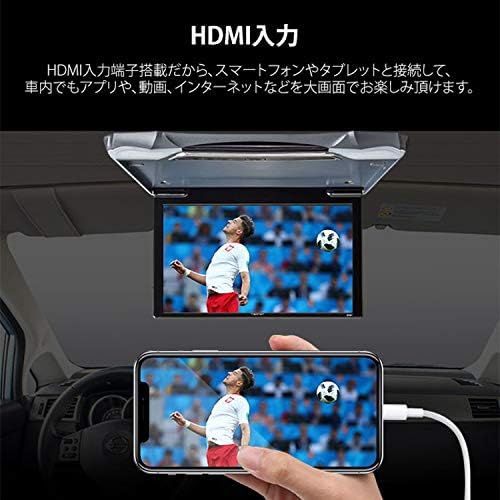
Figure 5.1: HDMI Input Connection
This image demonstrates the HDMI input capability, showing a smartphone connected to the monitor to display content, allowing for large-screen viewing of apps, videos, and internet content within the vehicle.

Figure 5.2: USB Connection for Media Playback
This image illustrates the USB connection feature, enabling playback of music (MP3) and 1080P high-definition videos directly from an external USB device on the car monitor.
5.3 Орнотууларды тууралоо
Navigate the on-screen menu using the remote control to adjust image brightness, contrast, hue, and saturation. You can also change the menu language.
5.4 LED айлана-чөйрөнү жарыктандыруу
Select your preferred LED light color from the seven available options (Red, Green, Blue, Yellow, Cyan, White, Purple) via the menu or remote control to enhance the interior ambiance.

Figure 5.3: Built-in LED Lights
This image highlights the built-in LED lights feature, allowing users to select from seven different colors to customize the ambient lighting around the monitor.
6. Техникалык тейлөө
To ensure the longevity and optimal performance of your Eonon L0154 monitor, follow these maintenance guidelines:
- Тазалоо: Экранды жана сыртын тазалоо үчүн жумшак, кургак чүпүрөктү колдонуңуз. өжөр тактар үчүн, бир аз гampen the cloth with water or a screen-safe cleaner. Avoid abrasive cleaners or solvents.
- Суюктуктардан алыс болуңуз: Суюктуктарды мониторго түз чачпаңыз.
- Температура: Avoid exposing the monitor to extreme temperatures or direct sunlight for prolonged periods.
- Колдонуу: When folding or unfolding the monitor, do so gently to prevent damage to the hinge mechanism.
7. Кыйынчылыктарды
Мониторуңузда көйгөйлөргө туш болсоңуз, төмөнкү жалпы көйгөйлөрдү жана чечимдерди караңыз:
| Көйгөй | Мүмкүн себеп | Чечим |
|---|---|---|
| Күч жок | Loose power connection; Blown fuse; Incorrect wiring. | Check all power cables and connections. Verify vehicle fuse. Ensure correct wiring as per Section 4.1. |
| Сүрөт/сигнал жок | Incorrect input source selected; Loose video cable; Incompatible resolution. | Select the correct input source (HDMI/USB/AUX). Check video cable connections. Ensure output resolution from source is compatible (max 1920x1080 for HDMI). |
| Аудио жок | Volume too low; Muted; Loose audio cables; Incorrect audio format. | Increase volume. Check if muted. Verify audio cable connections. Ensure audio format is supported (WMA, MP3, M4A). |
| Пульт иштебейт | Батареялар түгөнүп калган; Бөгөттөө; Алыстан башкаруу сенсору бөгөттөлгөн. | Replace remote control batteries. Remove any obstructions between remote and monitor. Ensure remote sensor on monitor is clear. |
| LED жарыктары түсүн өзгөртпөйт | Setting error; Malfunction. | Check LED light settings in the menu. If issue persists, contact support. |
If the problem persists after trying these solutions, please contact Eonon customer support.
8. Техникалык шарттар
| Өзгөчөлүк | Спецификация |
|---|---|
| Дисплей өлчөмү | 11.6 дюйм |
| Панел түрү | IPS Wide Viewбурч |
| HDMI Resolution | 1920 x 1080 Full HD |
| RCA Resolution | 720 x 480 VGA |
| Operating Voltage | DC 12V |
| Максималдуу иштөө агымы | 740мА |
| Бүктөлгөн өлчөмдөрү (L x W x Y) | 31cm x 24cm x 1.6cm |
| Fully Open Dimensions (L x W x H) | 31cm x 24cm x 18.5cm |
| Бирдик Салмагы | 1.1 кг |
| Gross Weight (with packaging) | 1.9 кг |
| Display Open Angle | 140° |
| Аспект катышы | 16:9 / 4:3 |
| Колдоого алынган аудио форматтар (USB) | WMA, MP3, M4A |
| Supported Image Formats (USB) | AAC, JPEG, PNG, BMP |
| Supported Video Formats (USB) | MPEG RM, AVI, MP4, RMVB, MOV, MJPEG, Divx |
| Max Video Resolution (USB) | 1920 x 1080 |
| Байланыш | HDMI (1.4), USB, RCA (Video In/Out, Audio In/Out), IR |
| Меню тилдери | English, Japanese, German, French, Spanish, Portuguese, Dutch, Italian, Russian |
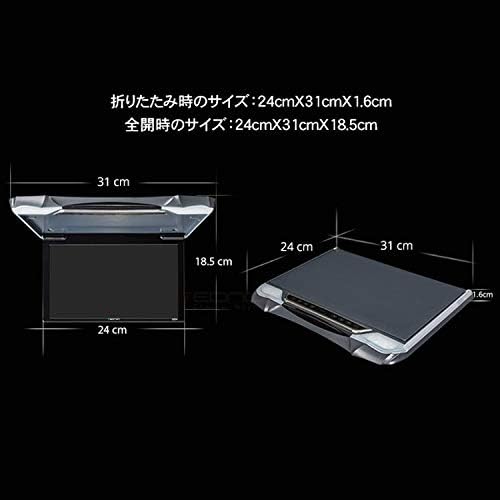
8.1-сүрөт: Монитордун өлчөмдөрү
This image provides a diagram showing the folded and fully open dimensions of the Eonon L0154 monitor, including length, width, and height measurements in centimeters.
9. Кепилдик жана колдоо
9.1 Өндүрүүчүнүн кепилдиги
This product comes with a 1-year manufacturer's warranty. For detailed warranty terms and conditions, please refer to the official Eonon website or the link provided at the time of purchase.
9.2 Кардарларды колдоо
If you have any questions regarding the operation, installation, or troubleshooting of your Eonon L0154 monitor, please contact Eonon customer service. When contacting support, please have your order number, name, and the product's serial number ready.
Eonon Customer Service Contact: 03-4405-5960
In case of product malfunction, warranty service can be obtained directly from Eonon customer service or the store where the product was purchased.


