Microsoft Surface Pro клавиатурасынын колдонуучу колдонмосу
Model: QJW-00001
Introduction
This manual provides essential information for the setup, operation, maintenance, and troubleshooting of your Microsoft Surface Pro Keyboard. Designed for seamless integration with Surface Pro X and Surface Pro 8 devices, this keyboard offers a full mechanical keyset, backlit keys, and a large trackpad for an optimal typing experience.
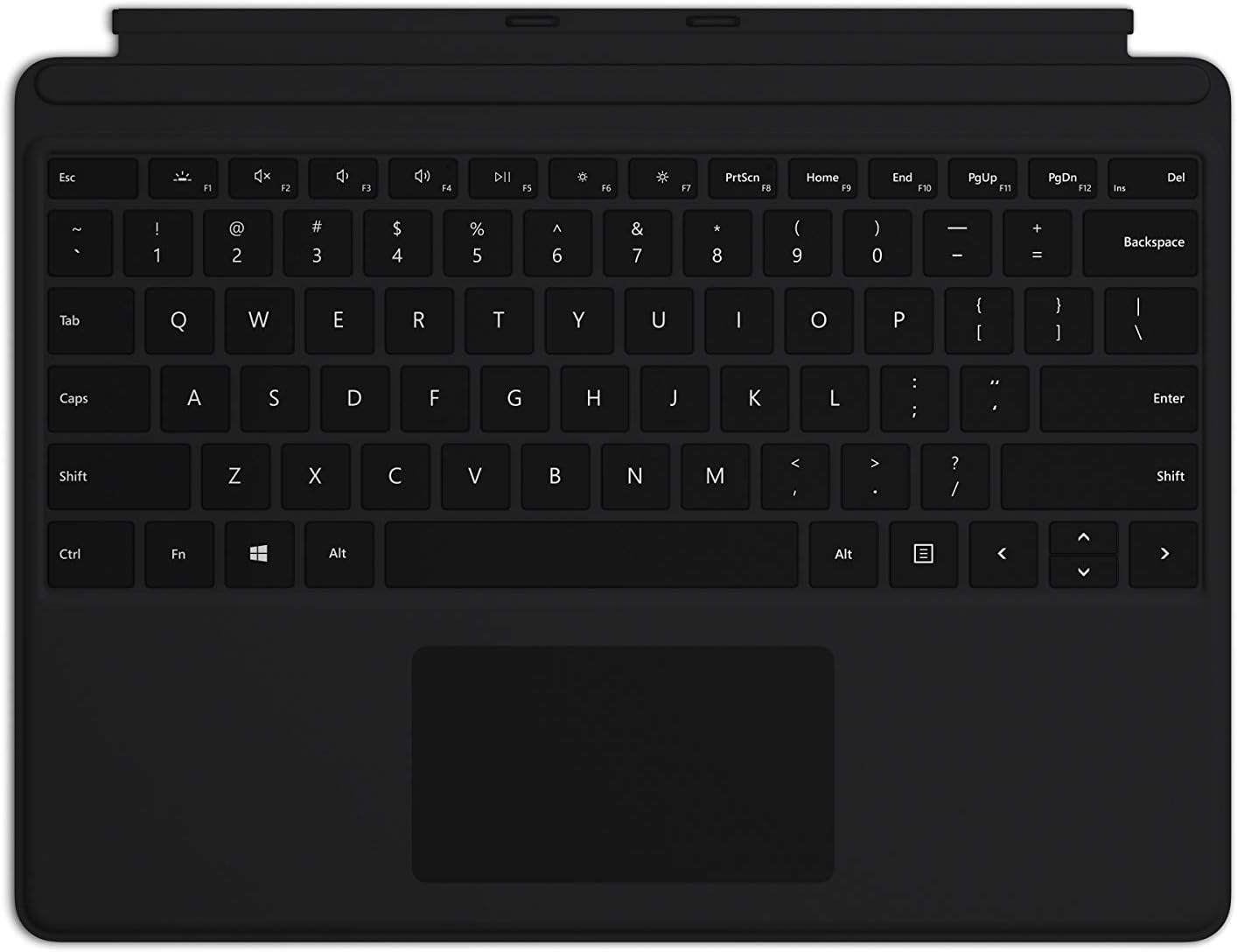
Image: The Microsoft Surface Pro Keyboard in black, showcasing анын толук QWERTY макети жана интегралдык трекпад.
Жайгашуу
Пакеттин мазмуну
- Surface Pro клавиатурасы
Баскычтопту туташтыруу
The Microsoft Surface Pro Keyboard connects instantly to your compatible Surface device via magnetic stability. Ensure your Surface Pro X or Surface Pro 8 device is powered on.
- Align the magnetic connector edge of the keyboard with the corresponding port at the bottom edge of your Surface Pro X or Surface Pro 8 device.
- Gently push the keyboard towards the device until it clicks securely into place. The magnetic connection will guide it.
- Once connected, the keyboard will be recognized automatically by your Surface device.
The keyboard is designed to adjust to almost any angle, providing a stable typing experience. It also serves as a protective cover for your screen when closed, helping to conserve battery life.

Сүрөт: жогорудан ылдыйга view of the Microsoft Surface Pro Keyboard, illustrating its compact design and how it integrates with a Surface device.
Баскычтопту иштетүү
Typing and Navigation
The keyboard features a full mechanical keyset with optimal key spacing for fast and fluid typing. The large trackpad provides precise navigation and control, supporting multi-touch gestures as configured in your Surface device's settings.
Арткы жарык баскычтары
The keys are backlit, allowing for comfortable use in low-light conditions. The backlight intensity can typically be adjusted through your Surface device's display settings or via dedicated function keys (if present on your specific model).
Protective and Power Saving Features
When not in use, fold the keyboard over the screen of your Surface device. This action protects the screen from scratches and helps conserve battery power by putting the device into a low-power state. To use your Surface as a tablet, fold the keyboard completely back behind the device.
Техникалык тейлөө
Тазалоо
To maintain the appearance and functionality of your keyboard, clean it regularly:
- Бир аз жумшак, түксүз кездемени колдонуңуз dampened with water or a mild cleaning solution (e.g., isopropyl alcohol diluted with water) to wipe the surface of the keys and trackpad.
- Суюктуктарды клавиатурага түздөн-түз чачуудан алыс болуңуз.
- Ачкычтардын ортосундагы чаң жана таштанды үчүн кысылган абаны колдонуңуз.
- Ensure the keyboard is completely dry before reattaching it to your Surface device.
Сактагыч
When storing the keyboard separately from your Surface device, keep it in a clean, dry environment away from extreme temperatures and direct sunlight.
Проблемаларды чечүү
Баскычтоп жооп бербейт
- Байланышты текшерүү: Ensure the keyboard is securely attached to your Surface device. Detach and reattach it firmly.
- Түзмөктү кайра иштетүү: Restart your Surface Pro X or Surface Pro 8. This can often resolve minor software glitches.
- Жаңыртууларды текшерүү: Ensure your Surface device's operating system and drivers are up to date. Go to Windows Update settings.
- Башка түзмөктө сыноо: If possible, test the keyboard with another compatible Surface device to determine if the issue is with the keyboard or the device.
Арткы жарык иштебейт
- Жарыктыкты жөндөө: Try adjusting the backlight brightness using the function keys or through Windows display settings.
- Кубатты үнөмдөө режими: Ensure your device is not in a power-saving mode that might disable the backlight.
Trackpad Issues
- Таза трекпад: Сенсордук панелдин бети таза жана таштандылардан таза экенин текшериңиз.
- Орнотууларды текшерүү: Verify trackpad settings in Windows (Settings > Devices > Touchpad).
- Драйверди кайра орнотуу: In Device Manager, try uninstalling and reinstalling the trackpad driver.
Техникалык шарттар
| Өзгөчөлүк | Деталь |
|---|---|
| Бренд | Microsoft |
| Модель номери | QJW-00001 |
| Шайкеш түзмөктөр | Surface Pro X, Surface Pro 8 |
| Байланыш технологиясы | Magnetic (Physical Connection) |
| Keyboard Description | Full mechanical keyset, backlit keys, large trackpad |
| Түс | Кара |
| Элемент Салмагы | 11.8 унция (болжол менен 334.5 грамм) |
| Продукциянын өлчөмдөрү (LxWxH) | 11.38 x 8.71 x 0.2 дюйм (болжол менен 28.9 x 22.1 x 0.5 см) |
| Ачкычтардын саны | 79 |
| Баскычтоптун арткы жарыгы | Бир түстүү LED |
Кепилдик жана колдоо
For warranty information and technical support, please refer to the documentation included with your Surface Pro X or Surface Pro 8 device, or visit the official Microsoft Support webсайты. Адатта, колдоо ресурстарын, көп берилүүчү суроолорду жана байланыш параметрлерин бул жерден таба аласыз support.microsoft.com.
Кепилдик дооматтары үчүн сатып алганыңыздын далилин сактап коюңуз.


