Introduction
This manual provides comprehensive instructions for the setup, operation, maintenance, and troubleshooting of your Logitech G703 Hero Lightspeed Wireless Gaming Mouse. Designed for precision and responsiveness, this mouse features the 16,000 DPI Hero optical sensor and Lightspeed wireless technology, along with customizable RGB illumination.
Продукт бүттүview
The Logitech G703 Hero is a high-performance wireless gaming mouse engineered for competitive play and daily use. Key features include:
- HERO 16K сенсору: Delivers precise 1:1 tracking and 16,000 max DPI.
- LIGHTSPEED зымсыз байланыш: Provides pro-grade connectivity with an incredibly fast 1 ms report rate.
- Эргономикалык дизайн: Shaped for comfort with rubber grips.
- Программалануучу баскычтар: Six customizable buttons for personalized control.
- Adjustable Weight: Includes an optional 10g removable weight.
- LIGHTSYNC RGB Lighting: Customizable 16.8M color illumination.
- POWERPLAY Compatible: Supports continuous wireless charging with a POWERPLAY mouse pad (sold separately).
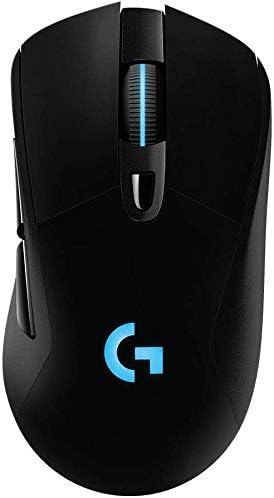
1-сүрөт: Жогорку view of the Logitech G703 Hero Wireless Gaming Mouse, showcasing its ergonomic design and illuminated 'G' logo.

2-сүрөт: жарылган view illustrating key components including 6 programmable buttons, advanced button tensioning, charging/data cable, wireless extension adapter, LIGHTSPEED wireless nano receiver, ergonomic design with rubber grip, and 16.8M color RGB lighting.

Figure 3: Bottom and side profile of the G703 mouse, highlighting the ON/OFF switch, HERO 16K sensor, and the slot for the 10g removable weight. Dimensions are also shown.

Figure 4: Details of the HERO 16K Sensor, emphasizing 1:1 tracking, 16,000 max DPI, and class-leading efficiency.

Figure 5: Illustration of LIGHTSPEED Wireless technology, providing pro-grade connectivity with an incredibly fast 1 ms report rate.

Figure 6: The G703 mouse shown with a POWERPLAY mouse pad, indicating compatibility for continuous wireless charging and up to 60 hours of rechargeable battery life.
Жайгашуу
- Чычканды заряддоо: Connect the included charging/data cable to the mouse and a USB port on your computer. Allow the mouse to fully charge before first use.
- Connect the LIGHTSPEED Receiver: Insert the LIGHTSPEED wireless nano receiver into an available USB port on your computer. For optimal performance, use the included wireless extension adapter to position the receiver closer to the mouse.
- Күйгүзүү: Locate the ON/OFF switch on the bottom of the mouse and slide it to the 'ON' position.
- Install G HUB Software: For full customization of buttons, DPI settings, and RGB lighting, download and install the Logitech G HUB software from the official Logitech webсайт.
- Optional Weight: If desired, insert the 10g removable weight into the designated slot on the bottom of the mouse for personalized feel and balance.
Иштөө нускамалары
Баскыч функциялары
The G703 Hero features six programmable buttons. By default, these buttons perform standard mouse functions. You can customize their actions using the Logitech G HUB software.
- Сол чыкылдатуу (1-баскыч): Негизги аракет.
- Оң баскычты чыкылдатуу (2-баскыч): Экинчилик аракет.
- Middle Click/Scroll Wheel (Button 3): Activates middle click, scrolls up/down.
- DPI Cycle (Button 4): Алдын ала коюлган DPI сезгичтик деңгээлдери аркылуу айланышат.
- Forward (Button 5): Алга карай жылдырат web браузерлер же тиркемелер.
- Back (Button 6): Артка карай багыт алат web браузерлер же тиркемелер.
DPI тууралоо
The DPI (Dots Per Inch) setting determines the mouse cursor's sensitivity. Use the DPI Cycle button (Button 4) to switch between different DPI profiles. You can configure these profiles in the G HUB software to match your preferences for various games or tasks.
RGB жарыктандырууну ыңгайлаштыруу
The G703 Hero features LIGHTSYNC RGB lighting on the 'G' logo and scroll wheel. Use the Logitech G HUB software to select from 16.8 million colors, synchronize lighting effects with other Logitech G devices, or create custom animations.
Батарея башкаруу
The mouse offers up to 60 hours of battery life on a single charge. When the battery is low, the RGB lighting may flash to indicate the need for recharging. Connect the charging/data cable to continue using the mouse while it charges. For continuous wireless charging, the mouse is compatible with the Logitech POWERPLAY Wireless Charging System (sold separately).
Техникалык тейлөө
To ensure optimal performance and longevity of your Logitech G703 Hero mouse, follow these maintenance guidelines:
- Тазалоо: Use a soft, lint-free cloth to wipe down the mouse surface. For stubborn dirt, slightly dampчүпүрөктү суу менен. Катуу химиялык заттардан же абразивдүү материалдардан алыс болуңуз.
- Сенсорго кам көрүү: Keep the optical sensor on the bottom of the mouse clean and free of dust or debris. Use a can of compressed air to gently clear any obstructions.
- Сактагыч: Узак мөөнөткө колдонулбаганда чычканды экстремалдык температурадан алыс, таза, кургак чөйрөдө сактаңыз.
Проблемаларды чечүү
| Көйгөй | Мүмкүн чечим |
|---|---|
| Чычкан жооп бербей жатат |
|
| Кечигип же үзгүлтүктүү байланыш |
|
| DPI or button settings not working |
|
| RGB жарыктандыруу иштебейт |
|
Техникалык шарттар
- Бренд: Logitech
- Модел: G703 Hero Lightspeed
- Байланыш технологиясы: Зымсыз (ЖАРЫК ЫЛДАМДЫГЫНДА)
- Кыймылды аныктоо технологиясы: Optical (HERO 16K Sensor)
- Макс DPI: 16,000
- Программалануучу баскычтар: 6
- RGB жарыктандыруу: LIGHTSYNC RGB (16.8M colors)
- Салмагы: 7.8 ounces (without optional weight)
- Optional Weight: 10г
- Батареянын иштөө мөөнөтү: Up to 60 hours (without lighting), up to 35 hours (with default lighting)
- Өлчөмдөрү (L x W x Y): 5.67 x 3.35 x 3.31 дюйм (Пакеттин өлчөмдөрү)
- Түсү: Кара
- Биринчи жеткиликтүү датасы: 11-декабрь, 2017-жыл
Кепилдик жана колдоо
This product is sold as "Renewed" and may come with specific return policies. Please refer to your purchase documentation for details on the return policy, which typically allows for returns or replacements within 90 days. For technical support, driver updates, and additional resources, please visit the official Logitech support webсайт.
Logitech колдоо Webсайт: support.logi.com


