Introduction
This manual provides detailed instructions for the safe and efficient use of your FONESTAR DOTS-N Bluetooth TWS Speaker. Please read this manual thoroughly before operating the device and retain it for future reference.
The FONESTAR DOTS-N is a portable Bluetooth TWS speaker featuring Bluetooth 4.2 and NFC connectivity. It offers powerful sound with enhanced bass, playback controls, and hands-free calling. Equipped with a rechargeable Li-Ion battery providing up to 10 hours of autonomy, it also includes a 3.5mm auxiliary input. Its compact design makes it suitable for home use.
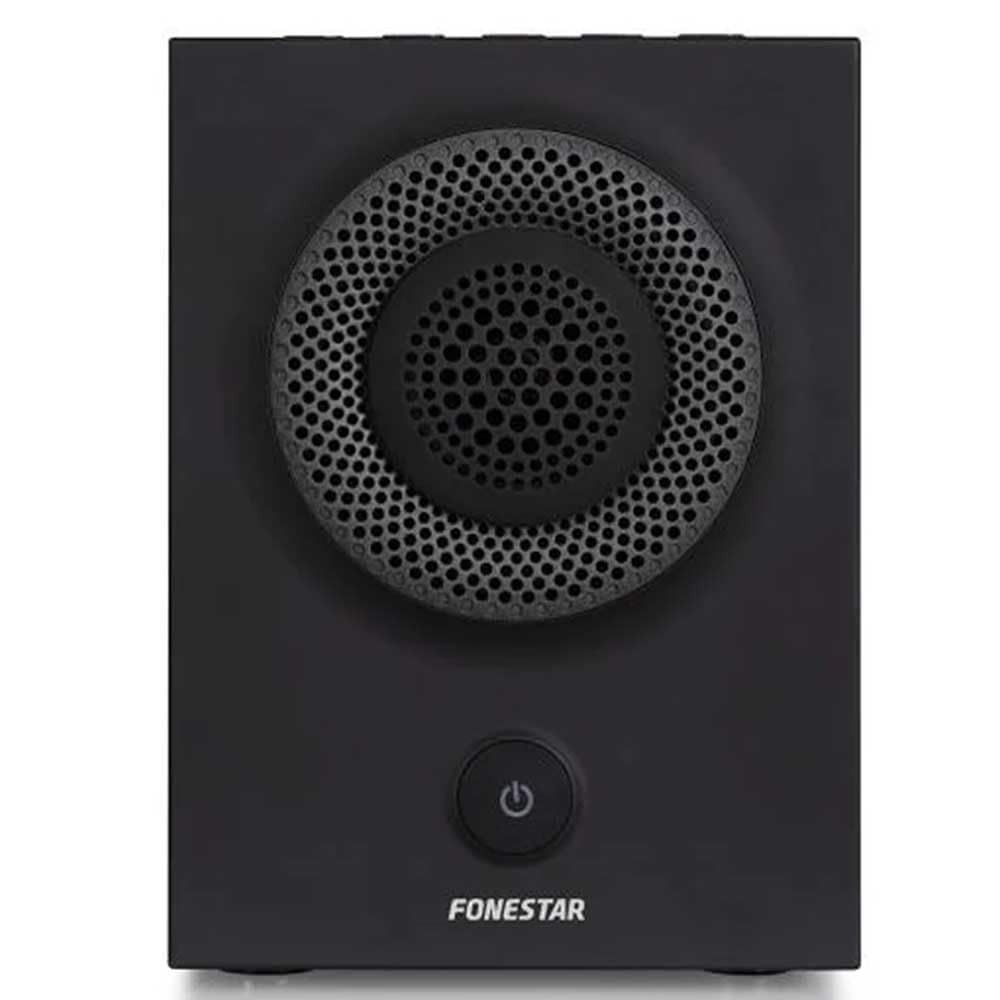
Сүрөт 1: Алдыңкы view of the FONESTAR DOTS-N Bluetooth TWS Speaker.
Жайгашуу
1. таңгактан чыгаруу
Бардык компоненттерди таңгактан кылдаттык менен алып салыңыз. Төмөндө саналып өткөн нерселердин бардыгы бар экенин текшериңиз:
- FONESTAR DOTS-N Bluetooth TWS Speaker
- USB - Micro USB заряддоо кабели
- 3.5 мм стерео аудио кабель
- Колдонуучунун Колдонмосу (бул документ)
2. Динамикти кубаттоо
Before first use, fully charge the speaker. Connect the Micro USB end of the charging cable to the speaker's charging port and the USB-A end to a compatible USB power adapter (not included) or a computer's USB port.
- Заряддоо индикатору заряддоо учурунда күйөт.
- Толук кубаттоо үчүн заряддоо убактысы болжол менен 3 саатты түзөт.
- Кубаттоо аяктагандан кийин индикатор жарыгы өзгөрөт же өчөт.
3. Күйгүзүү / Өчүрүү
To power on the speaker, press and hold the power button (usually indicated by a ⏻ symbol) for a few seconds until you hear an audible prompt or see an indicator light. To power off, repeat the process.
Иштөө нускамалары
1. Bluetooth Жупташтыруу
The speaker supports Bluetooth 4.2 for wireless audio streaming.
- Ensure the speaker is powered on and in pairing mode (usually indicated by a flashing LED). If not, press the Bluetooth pairing button or power button briefly to enter pairing mode.
- Смартфонуңузда, планшетиңизде же башка Bluetooth иштетилген түзмөгүңүздө Bluetooth жөндөөлөрүнө өтүңүз.
- Издөө available devices and select "FONESTAR DOTS-N" from the list.
- Once paired, the speaker will emit an audible confirmation, and the LED indicator will typically become solid.
2. NFC жупташтыруу (Жакынкы талаа байланышы)
For devices with NFC, pairing can be done quickly:
- Түзмөгүңүздө NFC иштетилгенин жана динамик күйгүзүлгөнүн текшериңиз.
- Tap your NFC-enabled device gently against the NFC area on the speaker (refer to product diagram for exact location, if available).
- Түзмөгүңүздөгү жупташтыруу өтүнүчүн ырастаңыз.
3. Чыныгы зымсыз стерео (TWS) функциясы
The TWS function allows you to pair two FONESTAR DOTS-N speakers together for a stereo sound experience.
- Ensure both DOTS-N speakers are powered on and not connected to any other Bluetooth device.
- On one speaker (this will be the primary speaker), press and hold the TWS button (if available) or a designated button for TWS pairing.
- Негизги динамик кошумча динамикти издейт. Туташтырылгандан кийин, эки динамик тең ырастоо үнүн чыгарат.
- Эми, "Bluetooth жупташтыруу" бөлүмүндө сүрөттөлгөндөй, Bluetooth түзмөгүңүздү негизги динамикке туташтырыңыз. Аудио эки динамик аркылуу тең стерео режиминде ойнотулат.
4. Көмөкчү киргизүү (AUX)
For non-Bluetooth devices, use the included 3.5mm stereo audio cable.
- 3.5 мм аудио кабелинин бир учун динамиктеги AUX-ин портуна туташтырыңыз.
- Экинчи учун аппаратыңыздын гарнитура уячасына же аудио чыгышына туташтырыңыз.
- The speaker will automatically switch to AUX mode or may require manual selection via a mode button.
5. Playback Control and Hands-Free Calls
The speaker features integrated controls for music playback and managing calls:
- Ойнотуу/тындыруу: Press the Play/Pause button (often combined with the power button or a dedicated button).
- Үнүн жогорулатуу/төмөндөтүү: Үн баскычтарын колдонуңуз (+ / -) динамикте.
- Кийинки / Мурунку трек: Long press or double-press the volume buttons, or use dedicated track skip buttons if present.
- Чалууга жооп берүү/аяктоо: Press the Play/Pause button during an incoming call to answer, and again to end the call.
- Чакырууну четке кагуу: Кирүүчү чалуу учурунда Play/Pause баскычын басып, кармап туруңуз.
Техникалык тейлөө
1. Тазалоо
- Тазалоодон мурун ар дайым динамикти өчүрүңүз.
- Сырткы беттерди сүртүү үчүн жумшак, кургак, түксүз чүпүрөктү колдонуңуз.
- Абразивдүү тазалагычтарды, момдорду же эриткичтерди колдонбоңуз, анткени алар финишке зыян келтириши мүмкүн.
- Ар кандай тешиктерге ным кирүүдөн сактаңыз.
2. Сактоо
- Динамикти түз күн нурунан жана өтө температурадан алыс салкын, кургак жерде сактаңыз.
- Узак мөөнөткө сактасаңыз, батарейканын ден соолугун сактоо үчүн бир нече ай сайын батареяны болжол менен 50% га чейин заряддаңыз.
3. Батареяга кам көрүү
- Do not expose the battery to excessive heat, fire, or direct sunlight.
- Батареяны бат-баттан толук кубаттап коюудан качыңыз, анткени бул анын иштөө мөөнөтүн кыскартат.
- Берилген кубаттоочу кабелди же сертификатталган эквивалентин гана колдонуңуз.
Проблемаларды чечүү
| Көйгөй | Мүмкүн себеп | Чечим |
|---|---|---|
| Динамик күйбөйт. | Батарея түгөнүп калды. | Берилген USB кабелин колдонуп динамикти заряддаңыз. |
| Bluetooth аркылуу жупташтыруу мүмкүн эмес. | Динамик жупташтыруу режиминде эмес; аппарат өтө алыс; кийлигишүү. | Ensure speaker is in pairing mode. Move device closer (within 10m). Turn off other Bluetooth devices. |
| Үн жок же үнү төмөн. | Volume too low on speaker or source device; incorrect input mode. | Increase volume on both speaker and source device. Check if the correct input (Bluetooth/AUX) is selected. |
| TWS жупташтыруу ишке ашпай калды. | Speakers are already paired to another device; incorrect TWS pairing procedure. | Эки динамик башка түзмөктөрдөн ажыратылганын текшериңиз. TWS жупташуу кадамдарын кылдаттык менен аткарыңыз. |
| Үндүн бузулушу. | Volume too high; low battery; poor signal. | Reduce volume. Charge the speaker. Move source device closer to the speaker. |
Техникалык мүнөздөмөлөр

Figure 2: Dimensions of the FONESTAR DOTS-N Bluetooth TWS Speaker.
| Модель аты | DOTS-N |
| Бренд | ФОНЕСТАР |
| Байланыш технологиясы | Bluetooth 4.2, NFC, 3.5mm AUX |
| Зымсыз диапазон | 10 метрге чейин (33 фут) |
| Аудио чыгаруу режими | Стерео (TWS менен) |
| Динамик түрү | 3" Coaxial Woofer with Tweeter, 3" Subwoofer, 4" Passive Radiator |
| Спикердин максималдуу чыгаруу күчү | 12 Ватт RMS |
| Frequency Response | 80 - 20,000 Гц |
| Ызы-чуунун катышы | ≥ 75 дБ |
| Power Source | Батарея менен иштейт (кайра заряддалуучу литий-ион) |
| Батарея сыйымдуулугу | 2200 мАч, 7.4 В |
| Батарея автономиясы | 10 саатка чейин (50% көлөмдө) |
| Заряддоо убактысы | Болжол менен 3 саат |
| Башкаруу ыкмасы | Тактиль (сенүү) |
| Өзгөчөлүктөр | High-res audio, Bluetooth, Integrated microphone, USB port (for charging) |
| Шайкеш түзмөктөр | Смартфондор, планшеттер |
| Сунушталган колдонуу | For home |
| Түс | Кара |
| Өлчөмдөрү (W x Y x D) | 125 x 175 x 158 мм (болжол менен 4.9 x 6.9 x 6.2 дюйм) |
| Элемент Салмагы | 1.82 кг (болжол менен 4.01 фунт) |
| Суу өткөрбөйт | Жок |
Note: Specifications are subject to change without prior notice. Battery autonomy may vary depending on usage, volume level, and music type.
Кепилдик маалымат
FONESTAR products are designed and manufactured to the highest quality standards. This product is covered by a limited warranty against manufacturing defects from the date of purchase. The specific terms and duration of the warranty may vary by region and retailer.
Please retain your proof of purchase (receipt or invoice) as it will be required for any warranty claims. The warranty does not cover damage caused by misuse, accident, unauthorized modification, or normal wear and tear.
For detailed warranty terms and conditions, please refer to the warranty card included with your product or contact your local FONESTAR distributor or retailer.
Кардарларды колдоо
If you encounter any issues that are not resolved by the troubleshooting guide, or if you require further assistance, please contact FONESTAR customer support or your authorized retailer.
Колдоо кызматына кайрылганда, төмөнкү маалыматты берүүгө даяр болуңуз:
- Product Model: FONESTAR DOTS-N
- Сатып алуу күнү
- Маселенин сүрөттөлүшү
- Сиздин байланыш маалыматыңыз
For the most up-to-date support information, including contact details and FAQs, please visit the official FONESTAR webсайт.


