Introduction
This manual provides detailed instructions for the installation, operation, and maintenance of your JVC KD-TD91BTS CD Receiver and the PAC Audio SWI-RC Steering Wheel Control Interface. Please read this manual thoroughly before use to ensure proper operation and to prevent damage.
Коопсуздук маалыматы
- Кыска туташуунун алдын алуу үчүн бардык туташуулардын коопсуз жана туура изоляцияланганын текшериңиз.
- Do not operate the unit in a manner that distracts from driving.
- Эгер кандайдыр бир кадамдарга ишене албасаңыз, орнотуу үчүн адиске кайрылыңыз.
- Агрегатты нымдуулуктан жана экстремалдык температурадан алыс кармаңыз.
Пакеттин мазмуну
Бардык элементтер бар экенин текшериңиз:
- JVC KD-TD91BTS CD Receiver
- PAC Audio SWI-RC Steering Wheel Control Interface
- Электр өткөргүчтөрү
- Монтаждоочу жабдык
- Instruction Manuals

Image: JVC KD-TD91BTS CD Receiver, PAC Audio SWI-RC Steering Wheel Control Interface, wiring, and installation tools.
Орнотуу жана орнотуу
JVC KD-TD91BTS CD Receiver Installation
- Даярдоо: Орнотуудан мурун унаанын терс батарея терминалын ажыратыңыз.
- Монтаждоо: Securely mount the JVC KD-TD91BTS receiver into the vehicle's dashboard opening using the provided mounting hardware. Ensure proper ventilation around the unit.
- Зымдарды туташтыруу:
- Connect the main power harness (yellow for constant 12V, red for switched 12V, black for ground).
- Connect speaker wires (typically color-coded).
- Антенна кабелин туташтырыңыз.
- Connect the external microphone for Bluetooth hands-free calling.
- Эгерде тышкы колдонулса amplifiers, connect RCA pre-out cables.
- Баштапкы кубаттоо: Reconnect the battery. Turn on the vehicle ignition and then the receiver to verify basic functionality.

Сүрөт: Арткы view of the JVC KD-TD91BTS CD Receiver, illustrating the various ports for power, speakers, and auxiliary connections.
PAC Audio SWI-RC Steering Wheel Control Interface Installation
- Унаанын зымдарын аныктоо: Refer to your vehicle's wiring diagram to identify the steering wheel control wires.
- Connect SWI-RC: Connect the SWI-RC interface to the JVC KD-TD91BTS receiver's wired remote control input. Connect the SWI-RC's vehicle-specific wires to the corresponding steering wheel control wires in your vehicle.
- Программалоо: Follow the specific programming instructions provided with the PAC Audio SWI-RC to configure it for your vehicle and the JVC receiver. This typically involves setting DIP switches or pressing a program button in a specific sequence.
- Сыноо функциясы: After programming, test all steering wheel control buttons to ensure they operate the receiver as expected (e.g., volume up/down, track skip, mode).
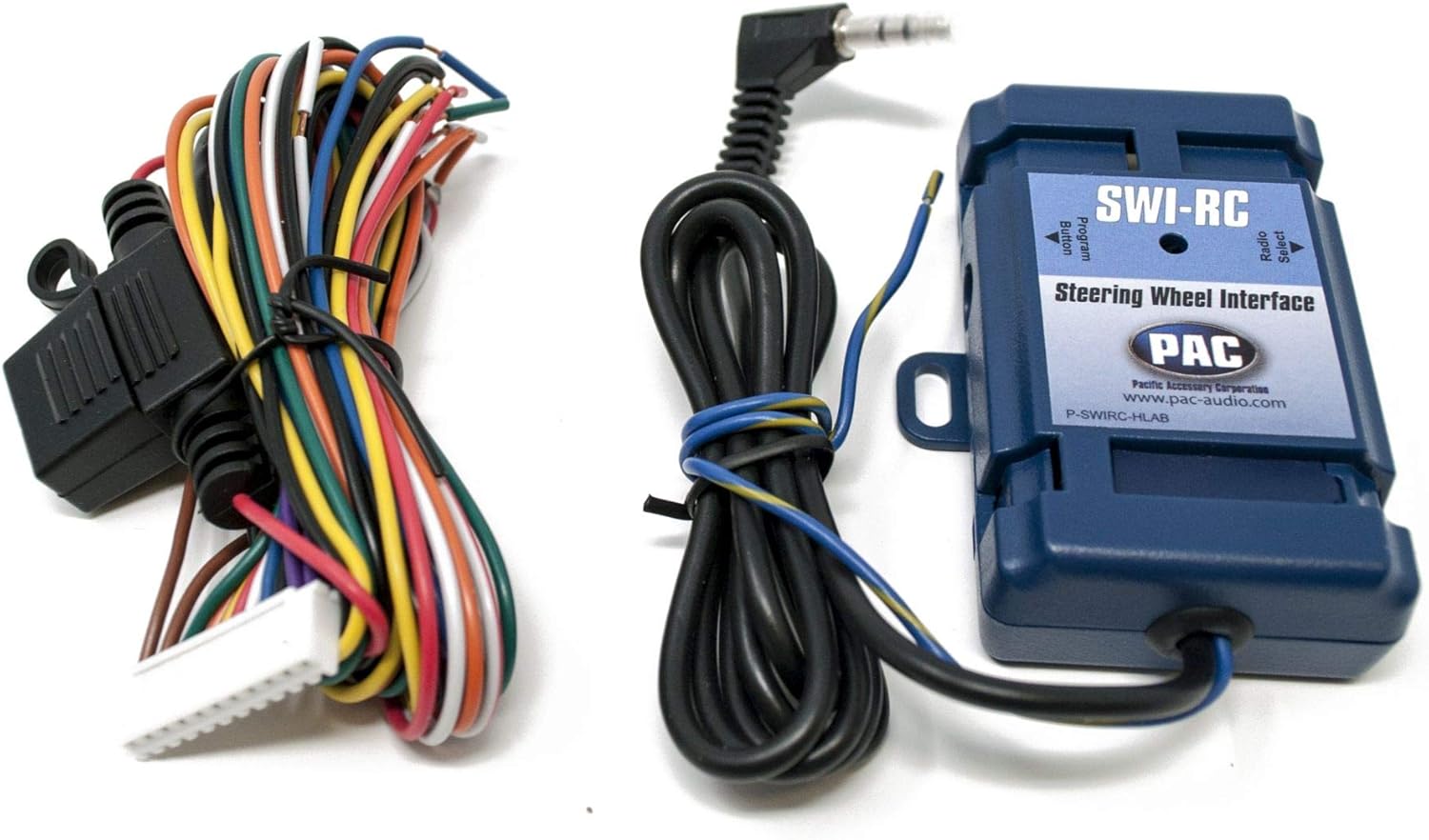
Image: The PAC Audio SWI-RC Steering Wheel Control Interface module with its associated wiring harness, ready for connection.
Иштөө нускамалары
Негизги операциялар
- Күйгүзүү/өчүрүү: Press the SRC button to turn the unit on. Press and hold SRC to turn off.
- Булак тандоо: Press the SRC button repeatedly to cycle through available sources (CD, USB, Bluetooth Audio, Tuner, AUX, SiriusXM).
- Үндү көзөмөлдөө: Rotate the large rotary knob to adjust volume.
- Меню навигациясы: Use the rotary knob and surrounding buttons to navigate menus and settings.

Image: Front panel of the JVC KD-TD91BTS CD Receiver, displaying its illuminated buttons and LCD screen with blue accents.
Bluetooth байланышы
- Жупташтыруу:
- Мобилдик түзмөгүңүздө Bluetooth иштетилгенин текшериңиз.
- On the KD-TD91BTS, select the Bluetooth source.
- Издөө "KD-TD91BTS" on your device and select it to pair.
- Эгер суралса, жупташтыруу кодун ырастаңыз.
- Hands Free Чалуу: Once paired, you can make and receive calls using the receiver's microphone and speakers.
- Аудио агым: Play audio from your paired device through the receiver.
USB ойнотуу
- Insert a USB device into the front USB port.
- The unit will automatically switch to the USB source and begin playback.
- Supported formats include MP3, WMA, WAV, and FLAC (up to 96kHz/24bit).
Amazon Alexa интеграциясы
- Download the JVC Remote App on your smartphone.
- Connect your smartphone to the KD-TD91BTS via Bluetooth.
- Launch the JVC Remote App and follow the instructions to link with your Amazon Alexa account.
- Press the dedicated Alexa button on the receiver or use the JVC Remote App to activate Alexa voice commands.
Аудио жөндөөлөрү
- Мадам: Access the 13-band graphic EQ to customize sound. 11 preset EQ settings are available.
- Убакытты тегиздөө: Оптималдуу үн сигналдары үчүн динамиктин чыгаруу убактысын тууралаңызtaging.
- Үндүн катуулугун көзөмөлдөө: Enhance bass and treble at low volumes.
- Бас жогорулатуу: Increase bass output.
- High-Pass/Low-Pass Filters: Configure for speaker and subwoofer optimization.
Техникалык тейлөө
- Тазалоо: Бөлүмдүн дисплейин жана баскычтарын тазалоо үчүн жумшак, кургак чүпүрөктү колдонуңуз. Абразивдүү тазалагычтарды же эриткичтерди колдонбоңуз.
- CD Slot: Keep the CD slot free of dust and debris. Avoid inserting damaged or irregular-shaped discs.
- Программалык камсыздоонун жаңыртуулары: JVCди мезгил-мезгили менен текшерип туруңуз webоптималдуу иштөөнү жана шайкештикти камсыз кылуу үчүн микропрограммалык камсыздоону жаңыртуу сайты.
Проблемаларды чечүү
| Көйгөй | Мүмкүн себеп | Чечим |
|---|---|---|
| Күч жок | Коргоочу күйүп кеткен, зымдар туура эмес, батарея ажыратылган. | Check vehicle fuses and receiver fuse. Verify power and ground connections. Reconnect battery. |
| Үн жок | Volume too low, mute activated, incorrect speaker wiring, incorrect source selected. | Increase volume. Deactivate mute. Check speaker connections. Select correct audio source. |
| Bluetooth жупташтыруу ишке ашпай калды | Bluetooth not enabled on device, device too far, interference, previous pairing issues. | Ensure Bluetooth is on. Bring device closer. Clear previous pairings on both devices and retry. |
| Рулдун башкаруулары иштебейт | SWI-RC incorrectly wired or programmed, incompatible vehicle. | Review SWI-RC installation and programming instructions. Verify compatibility with your vehicle. |
Техникалык шарттар
- Модел: JVC KD-TD91BTS
- Чыгуу кубаттуулугу: 50W x 4 (MOS-FET), 22W RMS x 4
- Pre-Outs: 2 Pairs (2.5V, Front + Rear/Subwoofer Selectable)
- USB: Front USB Input (1.5A Charging), supports MP3, WMA, WAV, FLAC (96kHz/24bit)
- Bluetooth: Yes (Wired-Mic Included), Phone Book Access Profile (PBAP), Automatic Pairing
- Мадам: 13-Band Graphic EQ with 11 Preset EQ Settings
- Дисплей: 2-Line VA (Vertical Alignment) LCD with Variable Color Illumination
- Шайкештик: Amazon Alexa, SiriusXM Ready (Tuner Sold Separately), Pandora/Spotify Control (Android/iPhone)
- Өлчөмдөрү: 17 x 15.25 x 9.75 дюйм (Продукт)
- Салмагы: 5 фунт
Кепилдик жана колдоо
Кепилдик маалыматы жана техникалык колдоо үчүн расмий JVCге кайрылыңыз webсайтына же JVC кардарларды тейлөөгө кайрылыңыз. Кепилдик дооматтар үчүн сатып алганыңыздын далилин сактаңыз.
JVC Support: Visit JVC USA Support
PAC Audio Support: For SWI-RC specific support, visit PAC Audio Support


