1. Киришүү
The Okaysou AirMic4S Air Purifier is designed to provide clean and fresh air in your home or office. It features an advanced filtration system to capture and reduce airborne particles, odors, and harmful gases, contributing to a healthier indoor environment.

Figure 1.1: Okaysou AirMic4S Air Purifier, illustrating its capability to filter various airborne contaminants including dust, pollen, dander, smoke, and VOCs.
This manual provides detailed instructions for the setup, operation, maintenance, and troubleshooting of your AirMic4S Air Purifier. Please read it thoroughly before use and keep it for future reference.
2. Коопсуздук маалыматы
Өрт, электр шок же жаракат алуу коркунучун азайтуу үчүн, төмөнкү коопсуздук чараларын сактаңыз:
- Аба тазалагычты жылдыруудан, тазалоодон же чыпкаларды алмаштыруудан мурун ар дайым розеткадан сууруп алыңыз.
- Аппаратты бузулган шнур же сайгыч менен иштетпеңиз.
- Электр шнурын ысытылган беттерден алыс кармаңыз.
- Аба кирүүчү тешиктерди жаппаңыз же жабдууну тешиктер тыгылып калышы мүмкүн болгон жумшак бетке койбоңуз.
- Аспапты сууга же башка суюктуктарга батырбаңыз.
- Бул шайман физикалык, сенсордук же акыл-эс жөндөмү начар же тажрыйбасы жана билими жок адамдар (анын ичинде балдар) тарабынан колдонууга арналбайт, эгерде алардын коопсуздугуна жооптуу адам тарабынан шайманды колдонуу боюнча көрсөтмө болбосо .
- Use only genuine Okaysou replacement filters to maintain optimal performance and warranty.
3. Продукт бүтүп калдыview
The Okaysou AirMic4S features a compact design with powerful air purification capabilities. It utilizes a multi-stage filtration system to effectively clean the air.

Сүрөт 3.1: Алдыңкы view of the Okaysou AirMic4S Air Purifier, showcasing анын кооз дизайны.
3.1 Негизги компоненттер
- Аба кирүүчү тор: Located on the lower section, designed to capture hair and large particles.
- Башкаруу панели: Top-mounted touch panel for all functions.
- Аба чыгаруу: Тазаланган абаны чыгаруу үчүн үстүнкү торчо.
- Фильтр бөлүмү: Houses the multi-stage фильтр.
3.2 Чыпкалоо Системасы
The AirMic4S employs an advanced 3-stage H13 True HEPA filtration system:
- Жуучу алдын ала чыпка: The first defense, capturing large particles like hair and fur.
- H13 Чыныгы HEPA чыпкасы: Captures pollen, dander, dust, smell, and smoke particles as small as 0.3 microns.
- Активдүү көмүр чыпкасы: Effectively absorbs stubborn and unwanted odors, harmful gases, and VOCs.

Figure 3.2: Illustration of the advanced 3-stage H13 True HEPA filtration system, detailing the washable pre-filter, H13 True HEPA filter, and active carbon filter.
4. Орнотуу
Follow these steps to set up your Okaysou AirMic4S Air Purifier:
- Агрегатты таңгактан чыгаруу: Аба тазалагычты таңгагынан кылдаттык менен чыгарып алыңыз.
- Фильтр таңгагын алып салуу: Before first use, unscrew the bottom cover (twist counter-clockwise) and remove the plastic packaging from the filter.
- Чыпканы кайра орнотуу: Фильтрдин туура орнотулганын текшерип, аны кайра блокко салыңыз.
- Secure Bottom Cover: Replace the bottom cover and twist clockwise to secure it.
- Жайгашкан жери: Place the air purifier on a firm, level surface. Ensure there is adequate space around the unit for proper airflow (at least 6 inches from walls or furniture).
- Плагин: Электр шнурын ылайыктуу электр розеткасына туташтырыңыз.
5. Иштөө нускамалары
The AirMic4S features an intuitive touch control panel for easy operation.

Figure 5.1: The control panel of the AirMic4S, showing buttons for power, fan speed, timer, filter reset, and night light/sleep mode.
5.1 Башкаруу панелинин функциялары
- Күйгүзүү/өчүрүү баскычы (⑁): Түзмөктү ON же ӨЧҮРҮҮ үчүн басыңыз.
- Fan Speed Button (✴): Cycles through fan speeds (Low, Medium, High).
- Timer Button (⌛): Иштөө таймерин 2, 4 же 8 саатка коёт. Тандалган убакыттан кийин түзмөк автоматтык түрдө өчөт.
- Night Light Mode (🌙): Activates or deactivates the night light feature.
- Sleep Mode (🌛): Activates a quiet operation mode (as low as 24dB) for undisturbed sleep.
- Filter Reset Indicator (📄): Lights up when it's time to replace the filter. Press and hold to reset after filter replacement.
5.2 Жалпы операция
- Күйгүзүү: Press the Power button to start the air purifier. It will typically start on a low fan speed.
- Желдетүүчү ылдамдыгын жөндөө: Press the Fan Speed button repeatedly to cycle through the desired fan speeds (Low, Medium, High).
- Таймерди коюу: Press the Timer button to select 2H, 4H, or 8H. The corresponding indicator will light up.
- Уйку режимин иштетүү: Press the Sleep Mode button to enter ultra-quiet operation. The night light may dim or turn off in this mode.
- Control Night Light: Use the Night Light button to toggle the light on or off independently.
- Өчүрүү: Press the Power button again to turn off the unit.
6. Техникалык тейлөө
Үзгүлтүксүз тейлөө оптималдуу иштешин камсыз кылат жана аба тазалагычыңыздын иштөө мөөнөтүн узартат.
6.1 Фильтрди алмаштыруу
The filter replacement indicator will illuminate when it's time to change the filter. Filter lifespan varies based on usage and air quality.
- Аба тазалагычты розеткадан сууруп алыңыз.
- Аны алып салуу үчүн түзмөктү оодарып, астыңкы капкакты саат жебесине каршы бураңыз.
- Эски чыпканы алып салыңыз.
- Insert a new genuine Okaysou filter into the unit.
- Replace the bottom cover and twist clockwise to secure it.
- Plug in the unit. With the unit powered on, press and hold the Filter Reset button for 3-5 seconds until the indicator light turns off.
Okaysou offers 4 optional replacement filters tailored to specific needs:
- Баштапкы чыпка: Best for general use, absorbing odors, dander, pollen, smoke.
- Customized Blue Filter (G-Defense Filter): Best for humid environments to absorb harmful substances.
- Customized Green Filter (Toxin Absorber Filter): Best for areas with high levels of toxins, vehicle exhaust, VOCs.
- Yellow Odor Remover Filter: Best for powerfully reducing odors from ash, wildfire, cooking.

Figure 6.1: Various optional replacement filters available for the AirMic4S, each designed for specific air purification needs.
6.2 Агрегатты тазалоо
- Аба тазалагычтын сыртын жумшак, кургак чүпүрөк менен сүртүңүз.
- The washable pre-filter can be gently cleaned with a soft brush or vacuum cleaner to remove large dust and hair particles. Ensure it is completely dry before reinstallation.
- Абразивдүү тазалагычтарды же эриткичтерди колдонбоңуз.
7. Кыйынчылыктарды
If you encounter issues with your AirMic4S Air Purifier, refer to the following table for common problems and solutions:
| Көйгөй | Мүмкүн себеп | Чечим |
|---|---|---|
| Түзмөк күйбөйт. | розеткага кошулбаган; күч уtagд) чыпка туура эмес орнотулган. | Ensure unit is securely plugged in. Check power supply. Verify filter is unwrapped and correctly seated, and bottom cover is secured. |
| Аба агымы начар же ызы-чуу. | Фильтр кир же тыгылып калган; аба кирүүчү/чыгаруучу тешиктери тосулган. | Clean or replace the filter. Ensure nothing is obstructing the air inlets or outlets. |
| Жыты сакталып турат. | Filter needs replacement; strong external odor source. | Replace the filter, especially if using the Original filter for strong odors. Consider using an Odor Remover filter. Ensure the room is adequately ventilated. |
| Filter Reset light remains on after replacement. | Чыпканы баштапкы абалга келтирүү туура эмес аткарылган. | With the unit powered on, press and hold the Filter Reset button for 3-5 seconds until the light turns off. |
If the problem persists after trying these solutions, please contact Okaysou customer support.
8. Техникалык шарттар
| Өзгөчөлүк | Деталь |
|---|---|
| Модель номери | AirMic 4S |
| Продукциянын өлчөмдөрү | 8.7"D x 8.7"W x 11.89"H |
| Салмагы | 6.6 фунт |
| Номиналдуу кубаттуулук | 25 ватт |
| Ызы-чуу деңгээли | 24 дБ (Уйку режими) |
| Камтуу аймагы | Up to 300 sq. ft. (5x per hour in 150 sq.ft, 3x per hour in 300 sq.ft, 2x per hour in 580 sq.ft) |
| Фильтрация түрү | H13 True HEPA (3-Stage) |
| Ozon Free | 100% Ozone Free |
| Сертификаттар | CARB, CE, RoHS, ETL Listed |
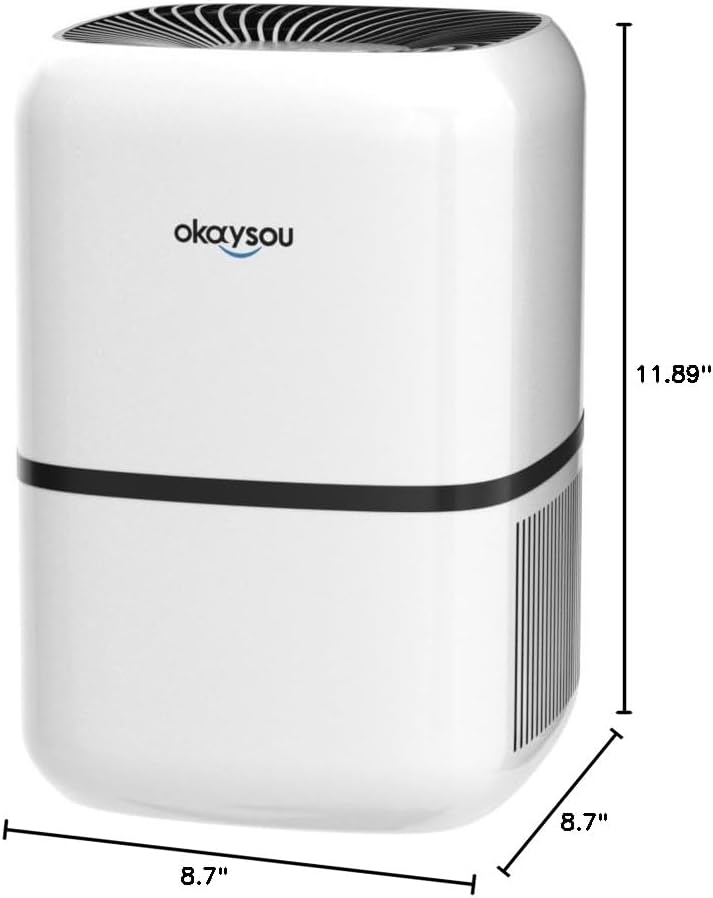
8.1-сүрөт: Өлчөмдүү view of the Okaysou AirMic4S Air Purifier, showing its height, depth, and width.
9. Кепилдик жана колдоо
The Okaysou AirMic4S Air Purifier comes with a 5 жылдык кепилдик. Okaysou also provides lifetime US-based customer support.
For warranty claims, technical assistance, or any questions regarding your product, please contact Okaysou customer support through their official channels or refer to the contact information provided with your purchase.
You can also visit the official Okaysou store on Amazon for more information and support: Okaysou Amazon Store


