1. Киришүү
CREATE NETBOT S15 робот чаң соргучту тандаганыңыз үчүн рахмат. Бул колдонмо түзмөгүңүздү коопсуз иштетүү, техникалык тейлөө жана мүчүлүштүктөрдү оңдоо боюнча маанилүү маалыматтарды берет. Биринчи жолу колдонуудан мурун аны кылдаттык менен окуп чыгып, келечекте колдонуу үчүн сактап коюңуз.
Продукт бүттүview

Жогорудагы сүрөттө CREATE NETBOT S15 робот чаң соргучу, анын атайын пультунун пульту жана тиркеме интерфейсин көрсөткөн смартфондун экраны көрсөтүлгөн. Робот кара түстө, текстураланган үстүнкү бети жана борбордук жашыл күйгүзүү баскычы бар. Пультта санариптик дисплей жана ар кандай башкаруу баскычтары бар. Колдонмодо тазаланган аймактын картасы көрсөтүлгөн.
NETBOT S15 тазалоо процессиңизди жөнөкөйлөтүү үчүн иштелип чыккан, ал бир нече тазалоо режимдерин жана полду натыйжалуу тейлөө үчүн акылдуу функцияларды сунуштайт.
2. Коопсуздук нускамалары
Коопсуз эксплуатацияны камсыз кылуу жана зыян келтирбөө үчүн төмөнкү коопсуздук чараларын сактаңыз:
- Шайманды колдонуудан мурун бардык нускамаларды окуп чыгыңыз.
- Балдарга робот чаң соргучту иштетүүгө уруксат бербеңиз. Робот иштеп жатканда балдарды жана үй жаныбарларын көзөмөлдөп туруңуз.
- Заряддоочу негиз катуу, тегиз бетке дубалга такалып, айланасында жетиштүү бош орун калтырыңыз.
- Чачты, кенен кийимдерди, манжаларды жана дененин бардык бөлүктөрүн тешиктерден жана кыймылдуу бөлүктөрдөн алыс кармаңыз.
- Чоң буюмдарды, курч буюмдарды, суюктуктарды же күйүп жаткан/түтөп жаткан материалдарды көтөрбөңүз.
- Роботту нымдуу чөйрөдө же нымдуу беттерде колдонбоңуз.
- Иштетүүдөн мурун, чаташуу же бузулуу коркунучун алдын алуу үчүн, электр зымдарын, майда буюмдарды жана морт буюмдарды полдон алып салыңыз.
- Өндүрүүчү тарабынан берилген оригиналдуу кубаттагычты жана батарейканы гана колдонуңуз.
- Робот чаң соргучту өз алдынча өзгөртпөңүз же оңдоого аракет кылбаңыз. Оңдоо үчүн квалификациялуу тейлөө кызматкерлерине кайрылыңыз.
3. Пакеттин мазмуну
Пакетте бардык компоненттер бар экенин текшериңиз:

Сүрөттө CREATE NETBOT S15 робот чаң соргучунун чекене сатуу кутучасы көрсөтүлгөн, анда продукт жана анын негизги функциялары көрсөтүлгөн.
- NETBOT S15 робот чаң соргучту түзүү
- Заряддоо базасы
- Кубаттуу адаптер
- Алыстан башкаруу
- Таштанды челек (600 мл сыйымдуулукта)
- Суу куюлган бак (400 мл сыйымдуулугу)
- Каптал щеткалар (2 + 2 алмаштыруу)
- HEPA чыпкасы (1 + 1 алмаштыруу)
- Тазалоочу швабра (1 + 1 алмаштыруучу)
- Тазалоочу щетка
- Магниттик тилке
- User Manual
4. Орнотуу
4.1 Заряддоо базасын жайгаштыруу

Сүрөттө CREATE NETBOT S15 робот чаң соргучунун кубаттоо станциясына туура орнотулганы көрсөтүлгөн, бул кайра кубаттоо үчүн туура жайгаштырууну көрсөтүп турат.
- Заряддоочу негизди ачык жерге дубалга такап коюңуз.
- Заряддоочу базанын эки тарабында тең кеминде 1 метр (3 фут) жана анын алдында 2 метр (6 фут) бош орун бар экенин текшериңиз.
- Кубат адаптерин кубаттоочу базага туташтырып, аны розеткага сайыңыз.
- Кубаттоочу базадагы кубаттуулук индикаторунун жарыгы күйүп турганын текшериңиз.
4.2 Алгачкы заряддоо

Бул сүрөттө CREATE NETBOT S15 робот чаң соргучу заряддоочу станциясынын жанында, заряддоого даяр же заряддалууда турган бөлмөдө көрсөтүлгөн.
Биринчи жолу колдонуудан мурун, робот чаң соргучту толугу менен заряддаңыз. Роботту заряддоочу негизге коюңуз, заряддоочу контакттар бир сызыкта экенин текшериңиз. Роботтогу индикатор жарыгы заряддоо абалын көрсөтөт. Толук заряддоо адатта 4-5 саатты талап кылат.
4.3 Колдонмону орнотуу жана туташуу
CREATE NETBOT S15ти Alexa жана Google Home менен шайкеш келген смартфон тиркемеси аркылуу башкарууга болот.
- Смартфонуңуздун колдонмолор дүкөнүнөн расмий CREATE тиркемесин жүктөп алыңыз.
- Каттоо эсебин жана кирүү.
- NETBOT S15 түзмөгүңүздү кошуу үчүн колдонмодогу көрсөтмөлөрдү аткарыңыз. Бул, адатта, роботту жупташтыруу режимине өткөрүп, аны үйүңүздөгү Wi-Fi тармагына туташтырууну камтыйт.
- Туташкандан кийин, сиз тазалоо графигин программалап, тазалоо режимдерин тандап, роботтун абалын телефонуңуздан көзөмөлдөй аласыз.
- Үн менен башкаруу үчүн, CREATE колдонмосун Alexa же Google Home аккаунтуңуз менен алардын тиешелүү тиркемелери аркылуу байланыштырыңыз.
5. Иштөө нускамалары
5.1 Тазалоо режимдери
NETBOT S15 төрт тазалоо функциясын сунуштайт:
- Шыпыруу: Таштандыларды чогултуу үчүн каптал щеткаларды колдонот.
- Вакуум: Чаңды жана кирди чогултуу үчүн сордуруу күчүн колдонот. 1500 Па чейин сордуруу күчү менен жөнгө салынуучу деңгээлдерге ээ.
- Швабра: Полдорду жарнама менен сүртөтamp суу куюлган идиштен кездеме алыңыз.
- Жуу: Комплекстүү тазалоо үчүн шыпыруу, чаң соргуч менен тазалоо жана сүртүү функцияларын айкалыштырат.

Бул сүрөттө CREATE NETBOT S15 робот чаң соргучунун дивандын астын активдүү тазалап, тар мейкиндиктерге жете ала тургандыгын көрсөтүп турат. Алдыңкы планда эки ит көрүнүп турат, бул үй жаныбарларына ыңгайлуу чөйрөнү билдирет.
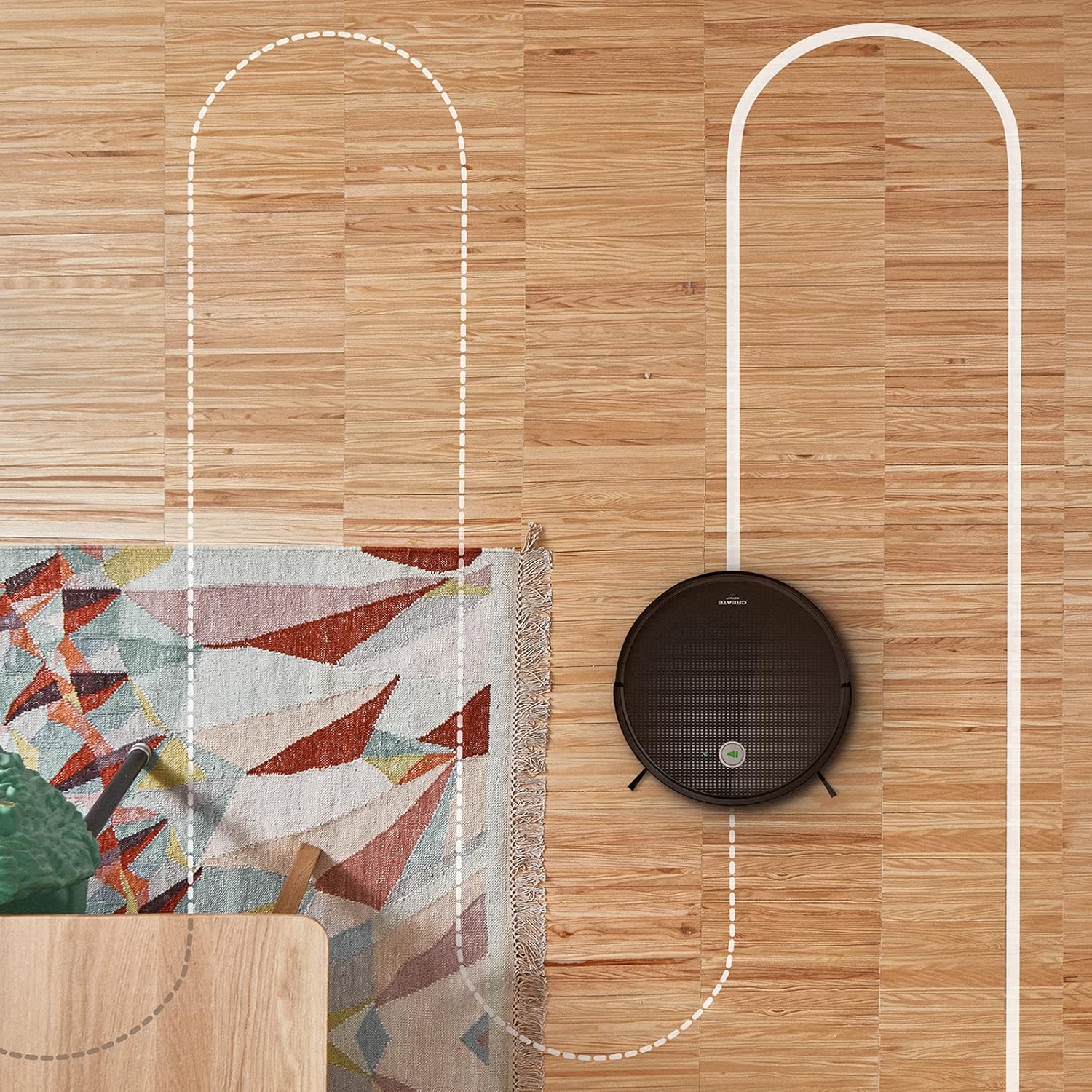
Антенна view CREATE NETBOT S15 робот чаң соргучунун жыгач полдо кыймылдап баратканы, анын гироскопиялык навигациясын баса белгилеп, системалуу тазалоо жолун көрсөткөн чекиттүү сызык менен көрсөтүлгөн.
5.2 Алыстан башкарууну колдонуу
Кошумча пульт робот чаң соргучту түз иштетүүгө мүмкүндүк берет. Баскыч функциялары үчүн тез баштоо колдонмосундагы алыстан башкаруунун схемасын караңыз. Жалпы функцияларга төмөнкүлөр кирет:
- Тазалоону баштоо/тындыруу
- Заряддоо базасы барагына кайтуу
- Багыттоо башкаруусу (кол менен башкаруу)
- Тазалоо
- Кырды тазалоо
- Расписаниени коюу
5.3 Магниттик тилкени колдонуу
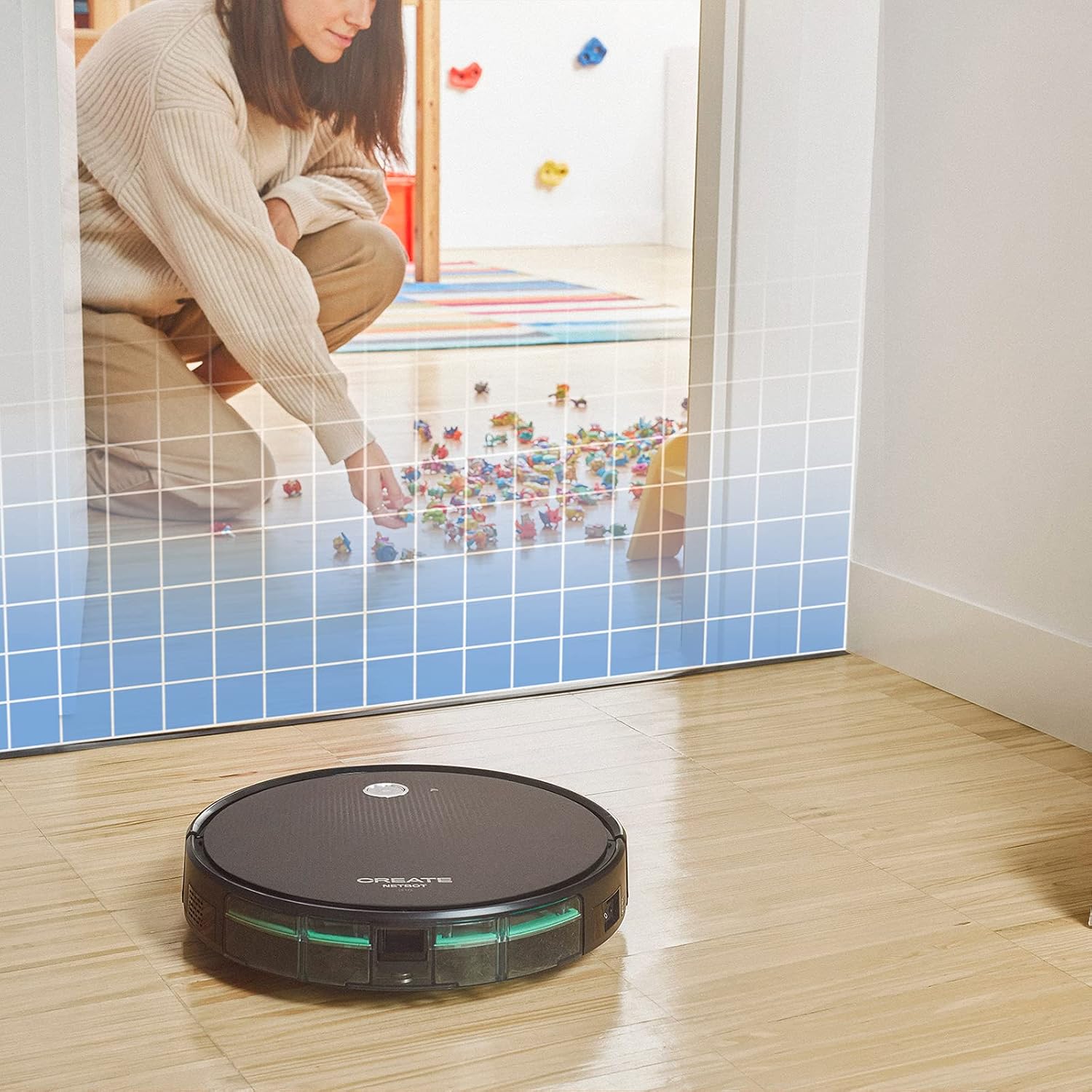
Бул сүрөттө CREATE NETBOT S15 робот чаң соргучунун оюнчуктар жайгашкан сыяктуу белгилүү бир аймакка кирүүсүнө жол бербеген торчо менен көрсөтүлгөн виртуалдык чек арага жакындап келе жатканы көрсөтүлгөн.
Берилген магниттик тилкени робот кесип өтпөй турган виртуалдык чек араларды түзүү үчүн колдонуңуз. Робот кирбеши керек болгон жерлерди, мисалы, үй жаныбарларын тамактандыруу зоналарын же назик буюмдар бар жерлерди белгилөө үчүн тилкени полго коюңуз.
5.4 Батареянын иштөө мөөнөтү
NETBOT S15 узакка чыдамдуу LG литий батареясы менен жабдылган, ал тандалган кубат режимине жараша бир заряддоо менен 120 мүнөткө чейин тазалоо автономиясын камсыз кылат.
6. Техникалык тейлөө
Үзгүлтүксүз техникалык тейлөө оптималдуу иштешин камсыздайт жана робот чаң соргучуңуздун иштөө мөөнөтүн узартат.
6.1 Чаң челектерин жана суу бактарын тазалоо
Ар бир колдонгондон кийин таштанды челекти бошотуңуз. 600 мл таштанды челекти оңой алып салууга болот. Эгерде сүртүү функциясын колдонсоңуз, көктүн же жагымсыз жыттардын алдын алуу үчүн ар бир колдонгондон кийин 400 мл суу куюлган бактын ичин бошотуп, чайкаңыз.
6.2 Щетканы тазалоо

Жакын план view CREATE NETBOT S15 робот чаң соргучунун каптал щеткасынын, анын негизги соргуч жолуна таштандыларды шыпыруу үчүн иштелип чыккан конструкциясын көрсөтөт.
- Каптал щеткалар: Чачтын же таштандылардын чырмалышып калганын үзгүлтүксүз текшерип туруңуз. Зарылдыгына жараша алып салып, тазалаңыз. Эскирген щеткаларды берилген запастык бөлүктөргө алмаштырыңыз.
- Негизги щетка: Негизги щетканын капкагын алып, щетканы көтөрүп алыңыз. Чаташкан чачтарды жана таштандыларды кетирүү үчүн тазалоочу куралды колдонуңуз.
6.3 Фильтрди тазалоо/алмаштыруу
Робот кош чыпка системасын колдонот: губка чыпкасы жана HEPA чыпкасы. Бош кирди кетирүү үчүн чыпкаларды басыңыз. HEPA чыпкаларын суу менен жуубаңыз. Соруунун натыйжалуулугун сактоо үчүн чыпкаларды ар бир 3-6 ай сайын же көп колдонулганда тез-тез алмаштырып туруңуз.
6.4 Сенсорду тазалоо
Туура багыттоону жана тоскоолдуктарды аныктоону камсыз кылуу үчүн, роботтун астыңкы жагында жайгашкан жар сенсорлорун жана бампер сенсорлорун (алдыңкы жагында) таза, кургак чүпүрөк менен сүртүңүз.
7. Кыйынчылыктарды
Эгерде сиз NETBOT S15 менен көйгөйлөргө туш болсоңуз, төмөнкү кеңири таралган көйгөйлөрдү жана чечимдерди караңыз:
| Көйгөй | Мүмкүн себеп | Чечим |
|---|---|---|
| Робот башталбайт же жооп бербейт. | Батареянын аздыгы; Электр өчүрүү; Робот тыгылып калды. | роботту заряддоо; кубат которгучу ON экенин текшериңиз; Бардык тоскоолдуктарды тазалаңыз. |
| Начар тазалоо көрсөткүчү. | Таштанды челек толуп калган; Щеткалар/чыпкалар бүтөлүп калган; Щеткалардын эскиргендиги. | Таштанды челекти бошотуңуз; Щеткаларды жана чыпкаларды тазалаңыз; Щеткаларды/чыпкаларды алмаштырыңыз. |
| Робот заряддоочу базаны таба албай жатат. | Заряддоо базасы тосулган; Робот базадан өтө алыс; Негизги электр энергиясы жок. | Негиздин айланасында бош орун бар экенин текшериңиз; Роботту кол менен жакыныраак коюңуз; Негизге электр кубатынын туташуусун текшериңиз. |
| Робот бат-баттан тыгылып калат. | Полдогу кабелдер/майда буюмдар; Тегиз эмес беттер; Кара түстөгү килемдер. | Тоскоолдуктарды жок кылыңыз; Көйгөйлүү жерлер үчүн магниттик тилкелерди колдонуңуз; Робот өтө караңгы беттерде кыйналышы мүмкүн. |
| Wi-Fi туташуу маселелери. | Wi-Fi сырсөзү туура эмес; Роутер өтө алыс; 5 ГГц тармак. | Сырсөздү текшериңиз; Роботту роутерге жакындатыңыз; 2.4 ГГц Wi-Fi тармагына туташканыңызды текшериңиз. |
8. Техникалык шарттар
CREATE NETBOT S15 робот чаң соргучунун негизги техникалык мүнөздөмөлөрү:
- Бренд: ТҮЗҮҮ
- Модель номери: Netbot S15
- Түсү: Кара - Бирюза
- Өлчөмдөрү (L x W x Y): 33 x 33 x 7.5 см
- Салмагы: 3 килограмм
- Күч: 25 Ватт
- Соруу күчү: 1500 Па чейин
- Ызы-чуу деңгээли: 62 дБ
- Батарея түрү: Литий-ион
- Батареянын иштөө мөөнөтү: 120 мүнөткө чейин
- Таштанды урнасынын сыйымдуулугу: 600 мл
- Суу резервуарынын сыйымдуулугу: 400 мл
- Фильтр системасы: Кош губка менен тазалоо + HEPA чыпкасы
- Байланыш: Wi-Fi, Колдонмону башкаруу
- Үн жардамчысынын шайкештиги: Google Home, Alexa
- Өзгөчөлүктөр: Гироскопиялык навигация, магниттик тилке менен чектеш, 4 тазалоо режими (шыпыруу, чаң соргуч, швабра, жуу)
9. Кепилдик жана колдоо
Кепилдик жөнүндө маалымат, техникалык колдоо же тейлөө боюнча суроолор үчүн, өнүмүңүз менен кошо берилген кепилдик картасын караңыз же расмий CREATE веб-сайтына кириңиз. webсайт. Сатып алганыңыздын далили катары сатып алуу дүмүрчөгүңүздү сактаңыз.


