1. Маанилүү коопсуздук нускамалары
Please read all instructions carefully before using the ProfiCare PC-BSR 3043 Robot Vacuum Cleaner. Keep this manual for future reference.
- Бул шайман тиричиликте гана колдонууга арналган.
- Do not immerse the robot, charging station, or power adapter in water or other liquids.
- Роботту ачык оттон жана жылуулук булактарынан алыс кармаңыз.
- кубаттуулукту камсыз кылыңызtage matches the rating label on the charging adapter.
- Роботту нымдуу беттерде же суу токтоп турган жерлерде колдонбоңуз.
- Балдар шайман менен ойнобосун текшериңиз.
- Only use original accessories and spare parts provided or approved by ProfiCare.
- The robot contains a lithium-ion battery. Do not expose it to high temperatures or direct sunlight.
- Электр зымы бузулган болсо, коркунучту болтурбоо үчүн аны өндүрүүчү, анын тейлөө агенти же ушуга окшогон квалификациялуу адамдар алмаштырышы керек.
2. Пакеттин мазмуну
Таңгактан чыгарганда бардык компоненттер бар экенин жана жакшы абалда экендигин текшериңиз:
- ProfiCare PC-BSR 3043 Robot Vacuum Cleaner
- Кубаттоочу станция
- Кубаттоочу станция үчүн кубат адаптери
- Алыстан башкаруу
- 2 x Side Brushes (one pair)
- 1 x HEPA Filter (pre-installed or spare)
- Көрсөтмө (бул документ)

Image: The ProfiCare PC-BSR 3043 robot vacuum cleaner, showcasing its sleek design, along with its remote control and a smartphone displaying the companion app interface.
3. Продукт бүтүп калдыview
The ProfiCare PC-BSR 3043 is a high-quality robot vacuum cleaner designed for efficient and autonomous floor cleaning. It features rotating floor and side brushes to effectively remove dirt, dust, crumbs, and pet hair from various surfaces.
- Ар тараптуу тазалоо: Suitable for all hard floors and short-pile carpets.
- Акылдуу навигация: Utilizes gyroscope technology for systematic and efficient cleaning paths.
- Компакт дизайн: Extra-flat dimensions (only 7.5 cm high) allow cleaning under furniture.
- Өркүндөтүлгөн чыпкалоо: Equipped with a HEPA filter for high-efficiency particle air filtration.
- Автоматташтырылган функциялар: Automatic return to charging station, stair and obstacle detection.
- Бир нече башкаруу параметрлери: Sensor touch display, multi-function remote control, and Wi-Fi app control.

Сүрөт: каптал view of the ProfiCare PC-BSR 3043 robot vacuum cleaner, highlighting its compact height of 75 mm and a diameter of 300 mm, ideal for cleaning under furniture.
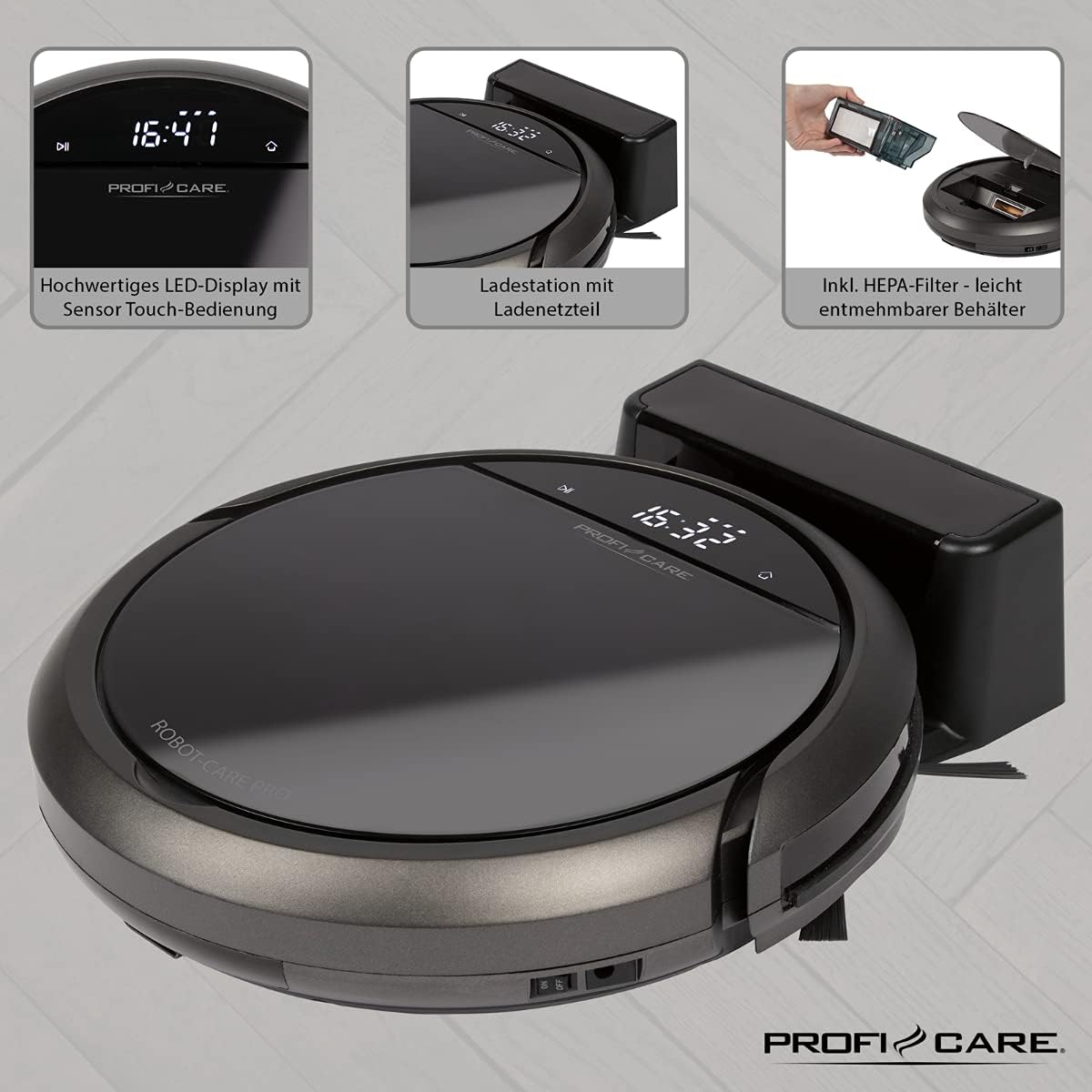
Сүрөт: Жогорку view of the ProfiCare PC-BSR 3043 robot vacuum cleaner with key features labeled, including LED display, sensor touch operation, Wi-Fi app control, auto-return function, 2600 mAh / 14.8 V Lithium-ion battery, and 120 minutes runtime.
4. Орнотуу
4.1 Роботту заряддоо
- Заряддоочу станцияны дубалга каршы ачык жерге коюп, капталдарына 1 метр жана алды жагына 2 метр аралыкта эч кандай тоскоолдуктар болбошу керек.
- Connect the power adapter to the charging station and plug it into a power outlet. The indicator light on the charging station will illuminate.
- Place the robot vacuum onto the charging station. Ensure the charging contacts on the robot align with those on the station. The robot will emit a sound and the display will show charging status.
- Allow the robot to fully charge before first use (approximately 3 hours).

Image: The ProfiCare PC-BSR 3043 robot vacuum cleaner docked on its charging station, illustrating the automatic return and charging capability.
4.2 Каптал щеткаларды орнотуу
Gently push the side brushes onto the square posts on the underside of the robot until they click into place.
4.3 Wi-Fi жана колдонмону орнотуу
- Download the ProfiCare app from the Google Play Store (for Android 4.4 or higher) or Apple App Store (for iOS 9.0 or higher).
- Open the app and follow the on-screen instructions to register an account and add your PC-BSR 3043 robot.
- Ensure your Wi-Fi network is 2.4 GHz, as 5 GHz is not supported.
5. Робот вакуумду иштетүү
5.1 Күйгүзүү/өчүрүү
Press and hold the power button on the robot's display or the remote control to turn the robot on or off.
5.2 Тазалоо режимдери
The robot offers four distinct cleaning programs:
- Авто режим: The robot cleans systematically, covering the entire area.
- Spot режими: The robot cleans a concentrated area in a spiral pattern, ideal for heavily soiled spots.
- Corners Mode: The robot focuses on cleaning along walls and in corners.
- Systematic Mode (Gyroscope Controlled): Ensures independent orientation for faster and more efficient cleaning results.
5.3 Башкаруу параметрлери
- Sensor Touch Display: Use the integrated LED display with touch controls for basic operations.
- Алыстан башкаруу: The multi-function remote allows for timer settings, individual control, and recalling the robot to the charging station.
- Колдонмону башкаруу: The smartphone app provides advanced features like 2D map function, live tracking, remote control functions, cleaning plan creation (day, time, frequency), cleaning program selection, and battery status display.
- Үн менен башкаруу: The robot supports voice control for convenient operation.
5.4 Автоматтык функциялар
- Автоматтык кайтаруу: The robot automatically returns to the charging station after completing a program or when the battery level is low.
- Тоскоолдуктарды аныктоо: Infrared sensors detect obstacles, allowing the robot to navigate around furniture and other items. Mechanical soft protection is also included for sensitive furniture.
- Stair Detection: Infrared sensors prevent the robot from falling down stairs.
- Автоматтык абалга келтирүү: After recharging, the robot continues cleaning from the last cleaned position.

Image: The ProfiCare PC-BSR 3043 robot vacuum cleaner actively cleaning a wooden floor in a home environment, demonstrating its ability to navigate and clean open spaces.
6. Техникалык тейлөө
Үзгүлтүксүз тейлөө оптималдуу иштешин камсыз кылат жана робот чаң соргучуңуздун иштөө мөөнөтүн узартат.
6.1 Таштанды кутусун бошотуу
- Press the dustbin release button and pull out the 400 ml dirt tank.
- Таштанды челектин капкагын ачып, анын ичиндегисин таштанды челекке төгүңүз.
- Таштанды челектин капкагын жаап, ордуна чыкылдаган үн чыкканча роботко кайра салыңыз.
6.2 HEPA чыпкасын тазалоо
The HEPA filter should be cleaned regularly and replaced periodically (e.g., every 3-6 months, depending on usage).
- Жогоруда сүрөттөлгөндөй, таштанды челекти алып салыңыз.
- HEPA чыпкасын таштанды челектен этияттык менен алып чыгыңыз.
- Tap the filter gently over a trash can to remove loose dust. Do not wash the HEPA filter with water.
- Brush off any remaining debris with a soft brush.
- Reinsert the clean filter and dustbin.
6.3 Каптал жана негизги щеткаларды тазалоо
Regularly check the side brushes and main brush for tangled hair or debris. Use scissors to cut away any tangled hair and pull out debris.
6.4 Сенсорлорду жана заряддоо контакттарын тазалоо
Wipe the infrared sensors (located around the robot's bumper and underside) and the charging contacts on both the robot and the charging station with a clean, dry cloth to ensure proper function.
7. Кыйынчылыктарды
If you encounter issues with your ProfiCare PC-BSR 3043, refer to the following common problems and solutions:
| Көйгөй | Мүмкүн себеп | Чечим |
|---|---|---|
| Робот күйбөйт. | Батарея аз же түгөнүп калган. | Place the robot on the charging station and allow it to fully charge. |
| Робот заряддалбайт. | Заряддоо контакттары кир же туура эмес туураланган. | Clean the charging contacts on both the robot and the station. Ensure proper alignment. |
| Робот бат-баттан тыгылып калат. | Too many obstacles or tangled cables. | Clear the cleaning area of excessive clutter, cables, and small objects. |
| Начар тазалоо көрсөткүчү. | Dustbin is full, filter is clogged, or brushes are tangled. | Empty the dustbin, clean or replace the HEPA filter, and clean the side and main brushes. |
| Робот Wi-Fiга туташпайт. | Incorrect Wi-Fi band (5 GHz not supported) or incorrect password. | Ensure your Wi-Fi network is 2.4 GHz. Re-enter Wi-Fi password carefully. Restart router and robot. |
| Робот тепкичтен кулап түшөт. | Stair sensors are dirty or obstructed. | Clean the stair sensors on the underside of the robot. |
For issues not listed here, or if problems persist, please contact ProfiCare customer support.
8. Техникалык шарттар
| Өзгөчөлүк | Спецификация |
|---|---|
| Модель номери | PC-BSR 3043 |
| Бренд | ProfiCare |
| Өлчөмдөрү (L x W x Y) | 33 x 33 x 7 см (таңгакталган болжол менен 31 x 22 x 13 см) |
| Салмагы | 2.5 килограмм |
| Батарея түрү | Литий-ион |
| Батарея сыйымдуулугу | 14.8 В, 2600 мАч |
| Иштөө убактысы | Болжол менен 120 мүнөт |
| Заряддоо убактысы | Болжол менен 3 саат |
| Таштанды кутусунун сыйымдуулугу | 400 мл |
| Чыпка түрү | HEPA чыпкасы |
| Ызы-чуу деңгээли | Болжол менен 61 дБ |
| Байланыш | Wi-Fi 2.4 GHz (5 GHz not supported) |
| Башкаруу түрү | App Control, Remote Control, Sensor Touch |
| Surface Recommendation | Tiles, Hard Floors, Short-Pile Carpets |
9. Кепилдик жана колдоо
ProfiCare products are manufactured with high quality standards. For information regarding warranty terms and conditions, please refer to the warranty card included with your product or visit the official ProfiCare webсайт.
If you require technical assistance, have questions about product operation, or need to order spare parts, please contact ProfiCare customer support. Contact details can typically be found on the product packaging, the official webсайты же сатуучу аркылуу.
Please note that information regarding the availability of spare parts for this specific model is currently unavailable through standard channels. It is recommended to contact ProfiCare directly for any spare part inquiries.


