1. Киришүү
Thank you for choosing the EMOS P4533 Rechargeable LED Work Light. This manual provides essential information for the safe and effective operation, maintenance, and troubleshooting of your device. Please read this manual thoroughly before first use and retain it for future reference.
2. Коопсуздук нускамалары
- Always ensure the work light is fully charged before extended use to avoid unexpected power loss.
- Do not look directly into the LED light when it is on, as this may cause eye strain or temporary vision impairment.
- Аппаратты экстремалдык температурадан, түз күндүн нурунан жана ачык оттон алыс кармаңыз.
- Do not attempt to disassemble, modify, or repair the device. Refer all servicing to qualified personnel.
- Ensure the micro-USB charging port cover is securely closed when not charging to maintain IP44 water resistance.
- Use only the provided micro-USB cable or a certified equivalent for charging.
- Батареяны жергиликтүү эрежелерге ылайык жок кылыңыз. Өрттөбө.
3. Пакеттин мазмуну
Пакетте бардык буюмдар бар экенин текшериңиз:
- 1 x EMOS P4533 Rechargeable LED Work Light
- 1 x Micro-USB заряддоо кабели
- 1 х Колдонуучунун колдонмосу (бул документ)
4. Продукт бүтүп калдыview
Familiarize yourself with the components and features of your EMOS P4533 work light.

4.1-сүрөт: Фронт view of the EMOS P4533 Rechargeable LED Work Light, showcasing the COB LED panel and robust black and green casing.
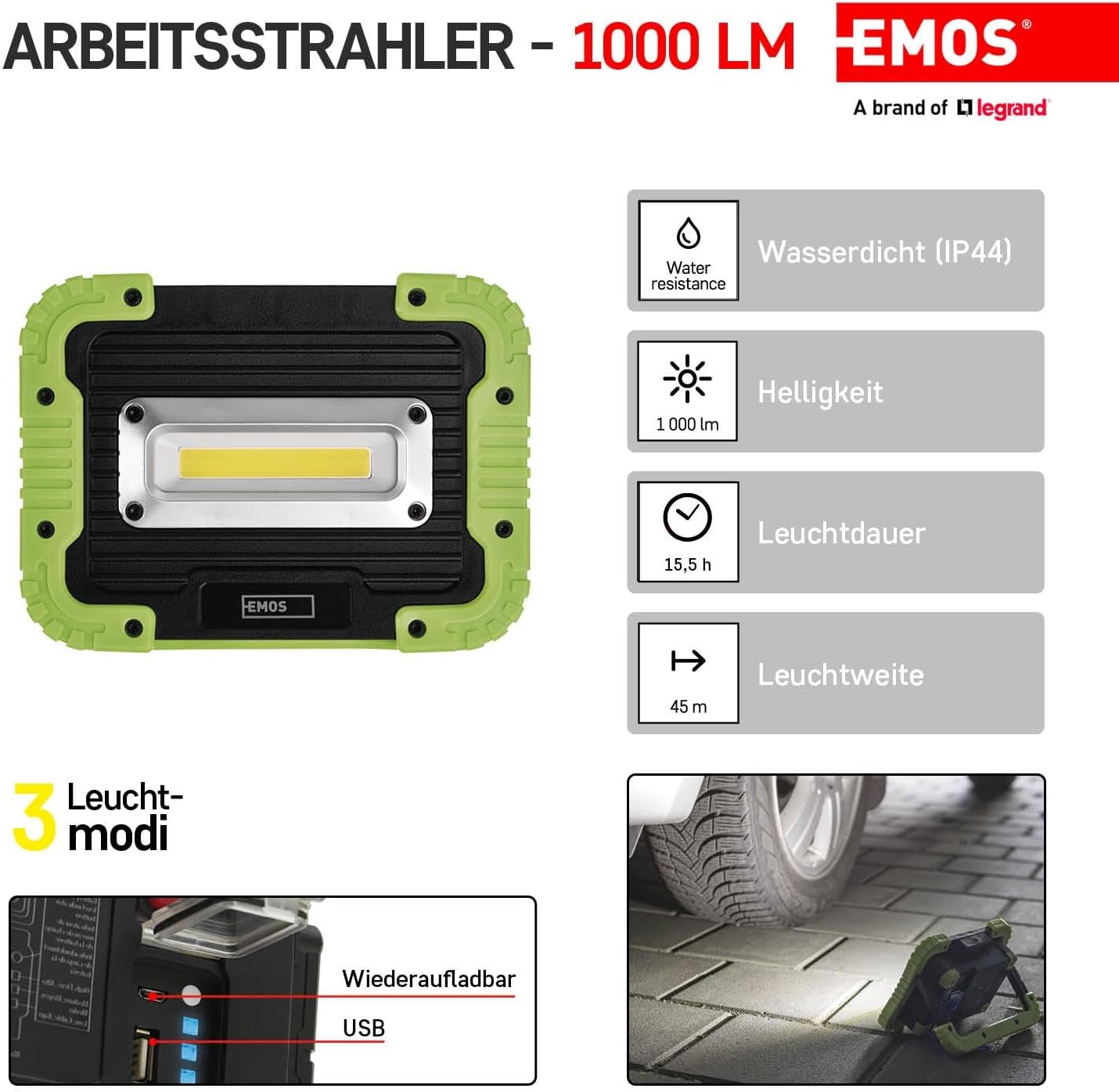
4.2-сүрөт: Бүттүview of key features including IP44 water resistance, 1000 lumens brightness, 15.5 hours battery life, and 45 meters beam range.

4.3-сүрөт: The work light featuring an adjustable handle that doubles as a stand, a powerful COB LED, shock-resistant ABS plastic and rubber construction, a quick-off function, and a battery indicator.

4.4-сүрөт: The back panel showing the power switch, battery charge level indicator button, charging power input (micro-USB), and USB output charging port for devices.
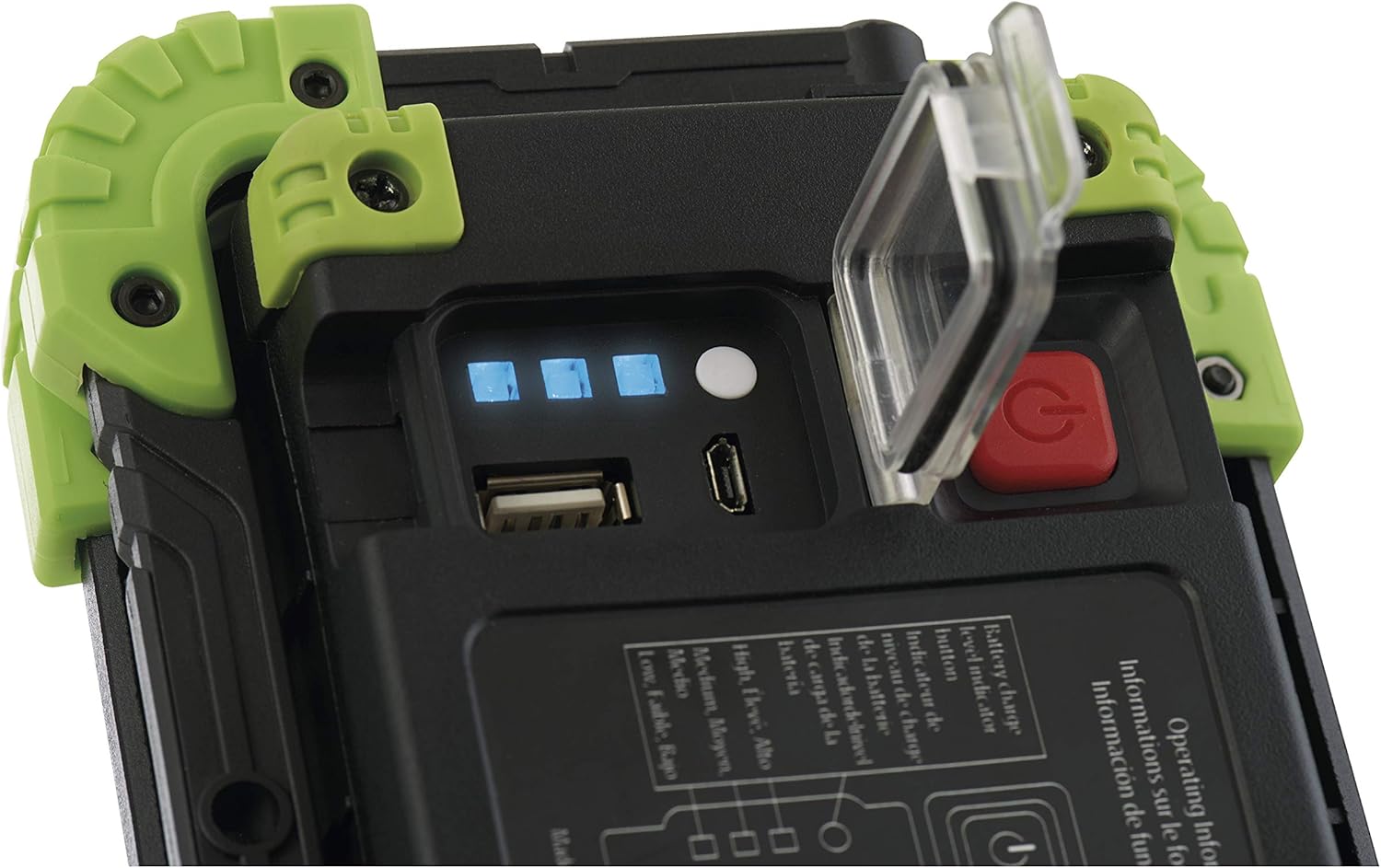
4.5-сүрөт: Жакын план view of the charging ports and battery level indicators, showing four blue LEDs indicating charge status.

4.6-сүрөт: The EMOS P4533 work light being used outdoors, demonstrating its portability and utility in various environments.
5. Орнотуу
5.1 Алгачкы заряддоо
- Before first use, fully charge the work light.
- Open the protective cover on the back panel to access the micro-USB charging port.
- Connect the provided micro-USB cable to the charging port on the work light and the other end to a suitable USB power adapter (not included).
- The battery indicator LEDs (Figure 4.5) will illuminate to show the charging progress. All four LEDs will be solid blue when fully charged.
- Заряддоо аяктагандан кийин, кабелди ажыратып, сууга туруштук берүү үчүн коргоочу капкакты бекем жабыңыз.
6. Иштөө нускамалары
6.1 Күйгүзүү/өчүрүү жана жарык режимдери
- Press the red power button (Figure 4.4) once to turn on the light at 100% brightness (Mode 1).
- Press the power button again within a few seconds to cycle to 50% brightness (Mode 2).
- Press the power button a third time to cycle to 20% brightness (Mode 3).
- Press the power button a fourth time to turn the light off.
- Quick Off Function: If the light has been on in any mode for more than a few seconds, a single press of the power button will turn it off directly, without cycling through other modes.
6.2 Батареянын деңгээлин текшерүү
Press the small white button next to the charging ports (Figure 4.4) to display the current battery charge level via the blue indicator LEDs.
6.3 Charging External Devices (Power Bank Function)
The EMOS P4533 can be used to charge other USB-powered devices:
- Open the protective cover on the back panel.
- Connect your device's USB charging cable to the USB output port on the work light (Figure 4.4).
- The work light will begin charging your device.
- Monitor the battery level of the work light to ensure sufficient power remains for its primary function.
- Заряддоо аяктагандан кийин, кабелди сууруп, коргоочу капкакты бекем жабыңыз.
7. Техникалык тейлөө
7.1 Тазалоо
- Ensure the device is turned off and disconnected from any power source before cleaning.
- сыртын жумшак менен сүртүңүз, гamp кездеме. Абразивдүү тазалагычтарды, эриткичтерди же катуу химиялык заттарды колдонбоңуз.
- Ensure the charging port cover is closed during cleaning to prevent water ingress.
7.2 Сактоо
- Жумушчу лампаны салкын, кургак жерде, күндүн түз нурунан жана өтө жогорку температурадан алыс сактаңыз.
- For long-term storage, charge the battery to approximately 50% every 3-6 months to prolong battery life.
8. Кыйынчылыктарды
| Көйгөй | Мүмкүн себеп | Чечим |
|---|---|---|
| Жарык күйбөйт. | Батарея түгөнүп калды. | Жумушчу лампаны толугу менен заряддаңыз. |
| Жарыктын чыгышы күңүрт. | Батареянын деңгээли төмөн. | Жумушчу чырактын кубатын кайра заряддаңыз. |
| Жумушчу чырак заряддалбай жатат. | Кабель же кубат адаптери бузулган. | Try a different micro-USB cable or USB power adapter. Ensure connections are secure. |
| External device not charging from USB output. | Work light battery too low; incompatible cable; device not supported. | Ensure work light is sufficiently charged. Try a different USB cable. Verify your device supports charging via a standard USB-A port. |
9. Техникалык шарттар
| Өзгөчөлүк | Спецификация |
|---|---|
| Модель номери | P4533 |
| Жарык булагы | COB LED |
| Light Output (Max) | 1000 Lumens |
| Жарык режимдери | 100%, 50%, 20% |
| Beam Range (Max) | 45 метр |
| Батарея түрү | 1 x Литий иону (кошулган) |
| Батарея сыйымдуулугу | 4400 мАч |
| Батареянын иштөө мөөнөтү (макс.) | 15.5 саат |
| Заряддоо киргизүү | Микро-USB |
| USB чыгышы | Yes (for charging external devices) |
| Суу каршылык | IP44 (чачууга каршы) |
| Сокку каршылык | Ооба |
| Материал | ABS Plastic, Rubber |
| Өлчөмдөрү (L x W x Y) | 17 x 4.5 x 12.5 см |
| Салмагы | 552 г |
10. Кепилдик жана колдоо
For warranty information and customer support, please refer to the documentation provided at the point of purchase or contact your local EMOS distributor. Keep your proof of purchase for any warranty claims.


