1. Киришүү
This manual provides detailed instructions for the installation, operation, and maintenance of your Anlapus 1080P Home CCTV Security Camera System. This system includes an 8-channel 2MP Surveillance DVR with a pre-installed 1TB hard drive and four weatherproof 1080P dome cameras, designed for both indoor and outdoor use. The system offers features such as night vision and motion alerts to enhance your security monitoring.

Figure 1.1: Anlapus 1080P Home CCTV Security Camera System components, including the DVR, four dome cameras, and a 1TB hard drive.
2. Пакеттин мазмуну
Төмөндө тизмеленген нерселердин баары пакетиңизге камтылганын текшериңиз. Эгерде кандайдыр бир нерселер жок болсо же бузулса, кардарларды колдоо менен байланышыңыз.
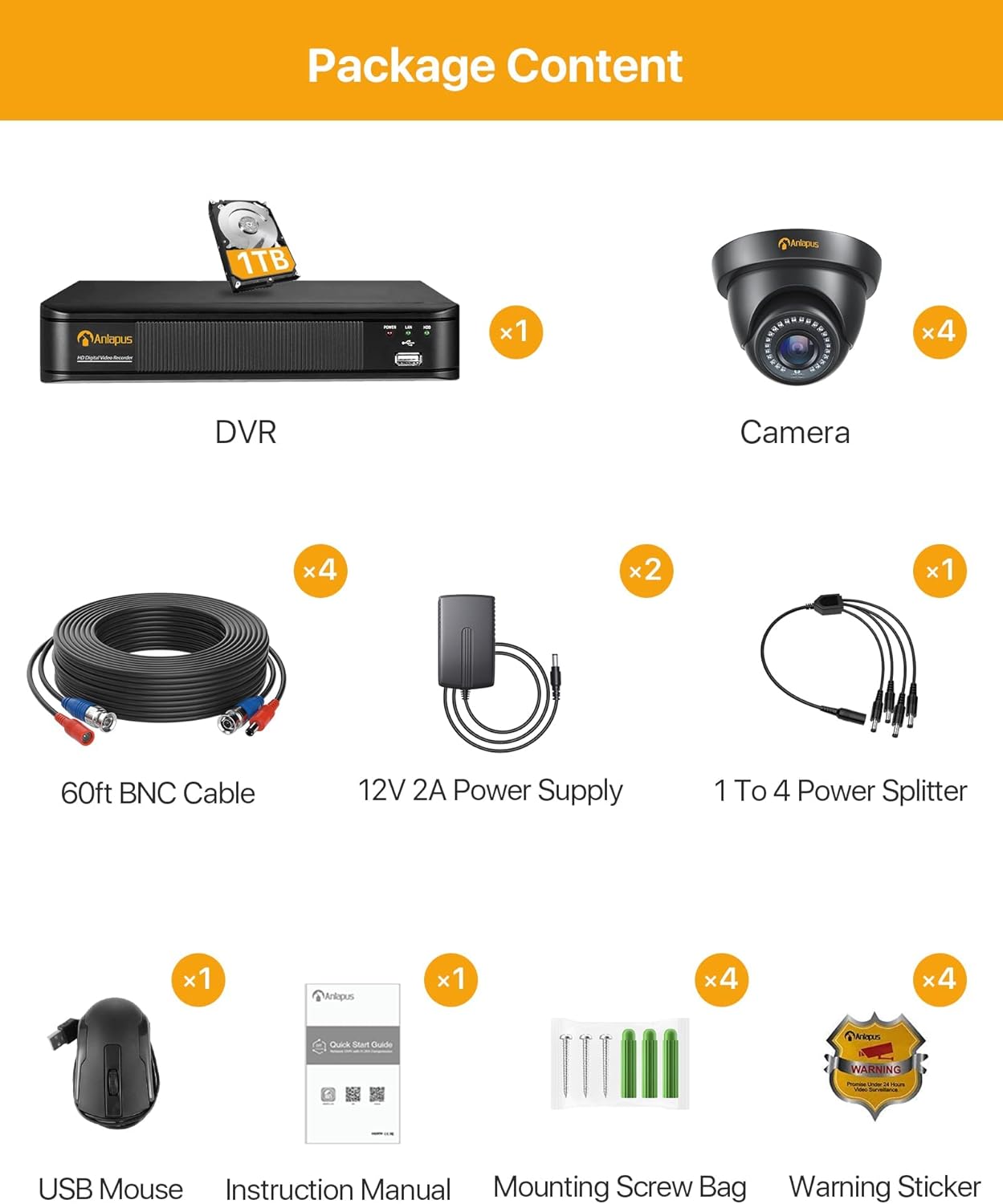
2.1-сүрөт: Таңгактын мазмунунун визуалдык көрүнүшү.
- 1 x Anlapus HD Digital Video Recorder (DVR) with 1TB Hard Drive pre-installed
- 4 x Anlapus 1080P Dome Cameras
- 4 x 60ft BNC кабелдери
- 2 x 12V 2A Кубат булактары
- 1 х 1ден 4кө чейин Power Splitter
- 1 х USB чычкан
- 1 х Инструкция (бул документ)
- 4 x Монтаждык бурамалар баштыктары
- 4 x эскертүү чаптамалары
3. Продукт бүтүп калдыview
The Anlapus security system consists of a Digital Video Recorder (DVR) and 1080P dome cameras. Understanding the components and their connections is crucial for proper setup and operation.

Figure 3.1: Anlapus Dome Camera features and DVR rear panel connections.
3.1 Dome камерасынын өзгөчөлүктөрү
- IP66 аба ырайы: Designed for both indoor and outdoor use, resistant to dust and water.
- 24 даана инфракызыл-светодиоддор: Provides up to 80ft (24 meters) of night vision.
- 3.6 мм HD линза: Offers a 90° wider viewбурч.
- Айнек капкагы: Protects the lens from rain, dust, and fog.
- Электр порту: For connecting the camera to a power supply.
- Видео чыгаруу: For connecting the camera to the DVR via BNC cable.
3.2 DVR Rear Panel Ports
- Видео киргизүү (BNC): Connects up to 8 cameras (4 included).
- Аудио киргизүү/чыгаруу (RCA): For connecting an external microphone (not included) and audio output.
- Monitor (VGA): VGA мониторуна туташат.
- Monitor (HDMI): Connects to an HDMI monitor or TV.
- Тармак (RJ45): Connects to your router for remote access.
- USB 2.0: For connecting the USB mouse and for USB backup.
- DC 12V кубат киргизүү: For connecting the DVR power supply.
4. Орнотуу жана орнотуу
The Anlapus system is designed for easy plug-and-play installation. Follow these steps to set up your security system.

Figure 4.1: Easy Installation and Mobile Access Steps.
4.1 Баштапкы жабдык туташуусу
- Камераларды туташтыруу: Connect each camera to the DVR using the provided 60ft BNC cables. Ensure the connections are secure.
- Кубаттуу камералар: Use the 1 to 4 power splitter and 12V 2A power supplies to power the cameras. Connect the splitter to the power supply, then connect each camera's power port to the splitter.
- Мониторго DVR туташтыруу: Connect the DVR to a monitor or TV using either an HDMI or VGA cable. Ensure your display supports at least 1080p (1920x1080 pixels) resolution for optimal viewing.
- USB чычканды туташтыруу: USB чычканды DVRдеги USB порттордун бирине сайыңыз.
- Кубаттуу DVR: Connect the DVR to its dedicated 12V power supply and plug it into a power outlet. The DVR will power on automatically.
- Network Connection (Optional for Remote Access): Алыскы үчүн viewing, connect the DVR's RJ45 network port to your router using an Ethernet cable.
4.2 Mobile App Setup for Remote Access
To access your security system remotely via smartphone or tablet, download the free SANNCE HOME APP.
- Колдонмону жүктөп алуу: Издөө "SANNCE HOME" in the Google Play Store (for Android) or Apple App Store (for iOS) and install the application.
- Каттоо эсеби: Open the app and follow the on-screen instructions to register a new account.
- Түзмөк кошуу: In the app, select the option to add a new device. You will typically scan a QR code displayed on your DVR's monitor (found in the network settings) or manually enter the device ID.
- Орнотууларды конфигурациялоо: Once the device is added, you can configure various settings, including motion detection alerts and recording schedules, directly from the app.
5. Системаны иштетүү
This section covers the primary operational features of your Anlapus security system.
5.1 Live View
Сенин колуңдан келет view жаша фооtage from your cameras on a connected monitor/TV or remotely via the mobile app or computer software.

5.1-сүрөт: Жандуу viewing options across various devices.
- Жергиликтүү View: Use the USB mouse to navigate the DVR's on-screen menu. You can switch between single-camera view жана көп камералуу тор view.
- Алыстан View: Access the SANNCE HOME APP on your smartphone/tablet or use compatible client software on your PC/laptop to view live feeds from anywhere with an internet connection.
5.2 Жазуу
The system supports continuous 24/7 recording and motion-triggered recording.

Figure 5.2: Motion detection capabilities.
- 24/7 жаздыруу: The pre-installed 1TB hard drive is designed for continuous security recording. It provides approximately 10 days of loop recording for all 4 cameras in FHD 1080p before overwriting the oldest footage автоматтык түрдө.
- Кыймылды аныктоо жазуусу: Configure the DVR to record only when motion is detected. This saves hard drive space and focuses on important events. You can define specific motion detection areas (masks) to avoid false alarms from constant, non-changing movements.
- Кыймыл эскертүүлөрү: Receive instant notifications on your smartphone when motion is detected, ensuring you are aware of any activity in real-time.
5.3 Ойнотуу
Review foo жазылганtage directly from the DVR or remotely via the mobile app.
- Жергиликтүү ойнотуу: Access the playback menu on the DVR using the USB mouse. Select the date and time to review foo жазылганtage.
- Алыстан ойнотуу: Use the SANNCE HOME APP to access and play back recorded videos stored on the DVR.
5.4 Түнкү көрүнүш
The cameras are equipped with EXIR LEDs for clear night vision.

5.3-сүрөт: Күндүзгү жана түнкү көрүү мүмкүнчүлүктөрү.
The cameras automatically switch to night vision mode in low-light conditions, providing crisp black and white images up to 100 feet (30 meters).
5.5 Видеону кысуу (H.265+)
The DVR utilizes advanced H.265+ video compression technology.

Figure 5.4: Benefits of H.265+ Video Compression.
H.265+ compression significantly reduces file sizes, allowing for up to 4 times longer recording times compared to H.264, while maintaining video quality. This also contributes to faster remote viewing due to reduced bandwidth requirements.
6. Техникалык тейлөө
Туура тейлөө сиздин коопсуздук тутумуңуздун узак мөөнөттүү жана оптималдуу иштешин камсыз кылат.

Figure 6.1: Cameras are designed to work in various weather conditions.
- Камераны тазалоо: Мезгил-мезгили менен камеранын линзаларын жумшак, гamp тоскоол боло турган чаңды, кирди же суу тактарын тазалоо үчүн кездеме view. Абразивдүү тазалагычтардан алыс болуңуз.
- Катуу дискти башкаруу: The 1TB hard drive is designed for continuous loop recording. No manual intervention is typically required for overwriting old footage. However, if you experience recording issues, check the DVR's hard drive status in the system settings.
- Программалык камсыздоонун жаңыртуулары: Anlapus расмий текшерүү website periodically for any available firmware updates for your DVR. Updating firmware can improve system stability and add new features.
- Экологиялык эске алуулар: While cameras are weatherproof (IP66), extreme temperatures (-10°C to 60°C) or direct exposure to harsh elements for prolonged periods should be avoided if possible to maximize lifespan. Ensure proper ventilation for the DVR.
7. Кыйынчылыктарды
Бул бөлүмдө сиз кабылышы мүмкүн болгон жалпы көйгөйлөр каралат жана аларды чечүү жолдору каралган.
- No Video Display on Monitor:
- DVR күйгүзүлгөнүн жана кубат адаптери бекем туташтырылганын текшериңиз.
- DVR менен монитордун ортосундагы HDMI/VGA кабелинин туташуусун текшериңиз.
- Монитордун киргизүү булагы туура тандалганын текшериңиз (HDMI/VGA).
- Ensure your monitor supports 1080p resolution.
- Камера сүрөтү жок:
- Check if the camera is receiving power. The IR LEDs should glow faintly in the dark if powered.
- Ensure the BNC cable is securely connected at both the camera and DVR ends.
- Try connecting the camera to a different BNC input on the DVR to rule out a faulty DVR port.
- Test the camera with a known working power supply and cable if available.
- Алыстан кирүү мүмкүнчүлүгү жок:
- Ensure the DVR is connected to your router via an Ethernet cable and the network indicator lights on the DVR's RJ45 port are active.
- Роутериңизде активдүү интернет байланышы бар экенин текшериңиз.
- Check the network settings on the DVR to ensure it has obtained an IP address.
- Ensure the SANNCE HOME APP is updated to the latest version.
- Confirm the device ID or QR code was correctly added to the app.
- Кыймылды аныктоо иштебей жатат/өтө сезгич:
- Access the DVR's motion detection settings.
- Сезгичтик деңгээлин тууралаңыз.
- Define or refine the motion detection area (mask) to exclude areas with constant, irrelevant movement (e.g., swaying trees, busy roads).
- Ensure motion recording is enabled for the specific channels.
- Жаздыруу жок:
- Check the hard drive status in the DVR's system settings. Ensure it is detected and healthy.
- Verify that recording schedules are properly configured for continuous or motion-triggered recording.
- If the hard drive is full and not set to overwrite, enable the overwrite function.
8. Техникалык шарттар
Detailed technical specifications for the Anlapus 1080P Home CCTV Security Camera System.
| Өзгөчөлүк | Спецификация |
|---|---|
| Модель номери | AM8M4B-4B41K-202S |
| DVR каналдары | 8 Channel (Supports Analog/AHD/TVI/CVI/IP Connection) |
| Видео киргизүү | 8CH BNC Input |
| Video Output | 1CH HDMI, 1CH VGA |
| Аудио киргизүү/чыгаруу | 1CH/1CH (RCA) |
| Тармак интерфейси | RJ45 10M/100M self-adaption |
| Катуу диск | 1TB Professional Hard Drive Pre-installed (Supports up to 8TB) |
| Камеранын чечилиши | 1080P (1920x1080 pixels) |
| Камера сүрөт сенсору | 1/4 "Прогрессивдүү сканерлөө CMOS |
| Камера линзасы | 3.6mm (82.2° Angle View) |
| Түнкү көрүнүш аралык | Up to 100 ft (30 meters) with EXIR LED |
| Камеранын аба ырайынын рейтинги | IP66 (Ички / тышкы) |
| Видеону кысуу | H.265 + |
| Remote Access | SANNCE HOME APP (iPhone/iPad/Android/Android Pad), IE, Firefox, Chrome Browser |
| Операциялык системаны колдоо | Android, iOS |
| Power Source | Электр зымдары |
| Продукциянын өлчөмдөрү | 40 x 18 x 33 см |
| Элемент Салмагы | 4.98 килограмм |
9. Кепилдик жана колдоо
Anlapus өнүмдөрү ишенимдүүлүк жана иштөө үчүн иштелип чыккан. Кепилдиктин чоо-жайын билүү үчүн, таңгагыңызга кирген кепилдик картасын караңыз же расмий Anlapus дүкөнүнө баш багыңыз. webсайт.
If you encounter any issues not covered in this manual or require further assistance, please contact Anlapus customer support through their official website or the contact information provided with your purchase. When contacting support, please have your product model number (AM8M4B-4B41K-202S) and purchase details ready.


