HXSJ V100 35 баскычтар оюн клавиатурасы Колдонуучунун колдонмосу
Модел: V100
1. Киришүү
Thank you for choosing the HXSJ V100 35 Keys Gaming Keyboard. This compact, single-hand membrane keyboard is designed to enhance your gaming experience with its ergonomic design, programmable features, and vibrant LED backlighting. This manual provides detailed instructions on how to set up, operate, and maintain your keyboard to ensure optimal performance.
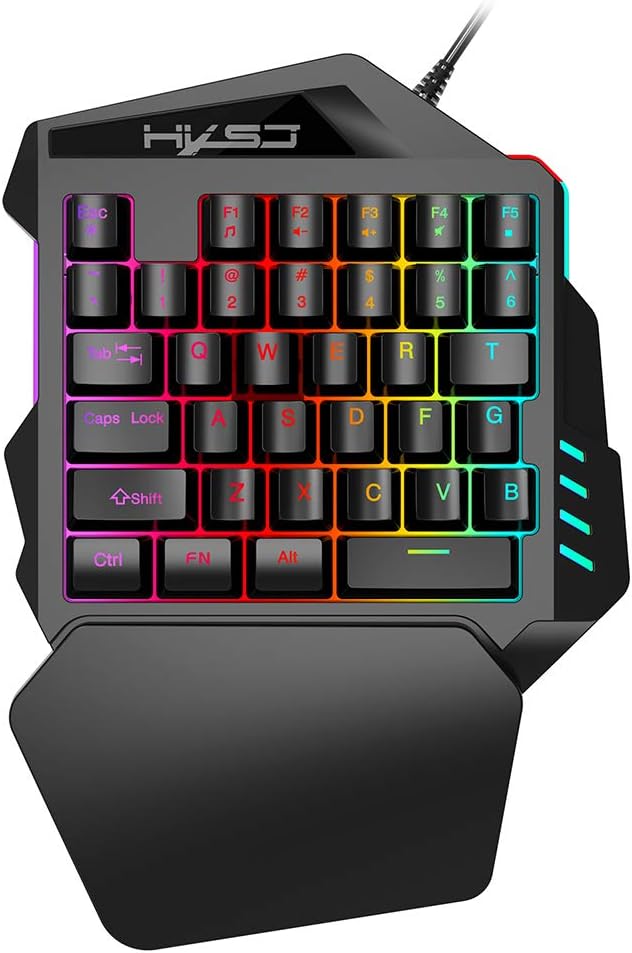
Figure 1: HXSJ V100 35 Keys Gaming Keyboard Overview
The HXSJ V100 is engineered for precision and comfort, making it an ideal companion for games like PUBG, LOL, and CS. Its mini design allows for easy single-hand operation, while the integrated wrist rest provides support during extended gaming sessions.
2. Негизги өзгөчөлүктөрү
- Luminous LED Backlight: Features vibrant LED color backlighting for an immersive gaming atmosphere, especially in low-light conditions.
- Programmable Advanced Control: Offers customizable lighting and key functions for a personalized gaming setup.
- Мини портативдик дизайн: Compact 35-key layout provides a super easy single-hand operating experience, optimizing desk space.
- Эргономикалык билек эс алуу: Designed to fit your hand and wrist comfortably, simplifying complex operations and reducing fatigue.
- Кеңири шайкештик: Supports various operating systems including Win 2000, Win XP, Win ME, Vista, Win7, Win8, Android, Linux, and Apple.

Figure 2: Ergonomic Hand Rest for Enhanced Comfort
3. Пакеттин мазмуну
Сураныч, кутудан чыгарганда пакеттин мазмунун текшерип, бардык буюмдар бар экенин текшериңиз:
- 1 x HXSJ V100 35 Keys Gaming Keyboard
- 1 x User Manual
4. Орнотуу колдонмосу
Setting up your HXSJ V100 Gaming Keyboard is straightforward. Follow these steps to get started:
- Түзмөккө туташуу: Locate an available USB 2.0 port on your computer, laptop, or compatible gaming device.
- Плагин: Баскычтоптун USB туташтыргычын USB портуна кыстарыңыз.
- Автоматтык орнотуу: Сиздин иштөө тутумуңуз керектүү драйверлерди автоматтык түрдө таап, орнотууга тийиш. Бул процесс бир нече мүнөткө созулушу мүмкүн.
- Колдонууга даяр: Once the drivers are installed, the keyboard's LED backlight will illuminate, indicating it is ready for use.

Figure 3: Connecting the HXSJ V100 Keyboard to a Device
5. Иштөө нускамалары
The HXSJ V100 keyboard is designed for intuitive use. Here are the primary functions and special key combinations:
5.1 Стандарттык баскыч функциялары
The keyboard features 35 standard keys, including alphanumeric keys, function keys (F1-F5), and modifier keys (Ctrl, Shift, Alt, FN). These keys operate as standard input devices for your computer or gaming system.

Figure 4: HXSJ V100 Keyboard Key Layout
5.2 FN Combination Functions
The FN key allows access to multimedia functions. Press and hold the FN key, then press the corresponding function key:
- FN + F1: Музыка ойноткуч
- FN + F2: Volume Decrement
- FN + F3: Volume Increment
- FN + F4: Үнсүз
- FN + F5: Тыныгуу/ойнотуу
Эскертүү: This keyboard features a single backlight color mode as depicted in the product images. The backlight is not customizable to different colors, but provides a consistent, vibrant illumination.
6. Техникалык тейлөө жана кам көрүү
To ensure the longevity and optimal performance of your HXSJ V100 Gaming Keyboard, follow these maintenance guidelines:
- Тазалоо: Клавиатуранын бетин жумшак, кургак чүпүрөк менен сүртүңүз. Өтө кир болсо, бир аз сүртүңүз.ampчүпүрөктү суу же жумшак, абразивдүү тазалагыч менен жууп салыңыз. Ашыкча нымдуулуктан сактаныңыз.
- Чаңды тазалоо: Баскычтардын ортосундагы чаңды жана калдыктарды тазалоо үчүн кысылган абаны колдонуңуз.
- Суюктуктардан алыс болуңуз: Do not spill liquids on the keyboard. If a spill occurs, immediately unplug the keyboard and allow it to dry completely before reconnecting.
- Сактагыч: Клавиатураны узак убакыт бою колдонбогондо, күндүн тике тийген нурунан жана экстремалдык температурадан алыс, салкын, кургак жерде сактаңыз.
- Этияттык менен мамиле кылуу: Avoid dropping the keyboard or subjecting it to strong impacts, which can damage internal components.
7. Кыйынчылыктарды
If you encounter issues with your HXSJ V100 Gaming Keyboard, please refer to the following common problems and solutions:
| Көйгөй | Мүмкүн себеп | Чечим |
|---|
| Баскычтоп жооп бербей жатат | Бош USB туташуу, туура эмес USB порт, драйвер маселеси. | USB кабелинин бекем сайылганын текшериңиз. Башка USB портун колдонуп көрүңүз. Компьютериңизди өчүрүп-күйгүзүңүз. Драйвер көйгөйлөрү үчүн Түзмөк башкаргычын текшериңиз. |
| Арткы жарык иштебейт | Keyboard not powered, backlight setting. | Ensure keyboard is properly connected and receiving power. The backlight is always on when powered. If not, try reconnecting. |
| Ачкычтар катталбайт | Dust/debris under keys, software conflict. | Use compressed air to clean around and under the affected keys. Test the keyboard on another computer to rule out software issues. |
| FN multimedia keys not working | Incorrect key combination, software conflict. | Ensure you are pressing and holding the FN key before pressing the desired F key. Check if other multimedia software is interfering. |
8. Продукттун спецификациялары
Detailed technical specifications for the HXSJ V100 Gaming Keyboard:
| Параметр | Нарк |
|---|
| Продукт аты | One-handed Gaming Keyboard |
| Продукт модели | V100 |
| Продукт интерфейси | USB 2.0 |
| Стандарттык баскычтоп | Мини клавиатура |
| Операция стили | Мембрана |
| Ачкычтардын саны | 35 ачкыч |
| Продукт линиясынын узундугу | 1.6 метр |
| Иштөө агымы | 100мА |
| Продукттун таза салмагы | 350г |
| Продукт өлчөмү (L*W*H) | 26 x 18 x 4 см |
| Пакет Салмагы | 415г |
| Пакеттин өлчөмү | 26 x 19 x 4 см |
| Шайкеш OS | Win 2000, Win XP, Win ME, Vista, Win7, Win8, Android, Linux, Apple |
| Арткы жарык түсү | RGB (fixed mode) |

Figure 5: Product Label on the Bottom of the Keyboard
9. Кепилдик жана колдоо
HXSJ products are manufactured to high-quality standards. For information regarding warranty coverage, technical support, or service inquiries, please refer to the warranty card included with your product or visit the official HXSJ webсайт. Сураныч, кепилдик дооматтар үчүн сатып алуу далилиңизди сактап коюңуз.


