1. Киришүү
The HUAWEI B311-221 4G LTE WiFi Router is designed to provide high-speed internet access. It supports 4G LTE CAT4 with download speeds up to 150Mbps and Wi-Fi speeds up to 300Mbps (802.11n). This router allows you to share a 3G/4G network connection with up to 32 Wi-Fi enabled devices, including tablets, mobile phones, and laptops. Its plug-and-play functionality makes it suitable for various environments where traditional broadband internet may not be available. The HUAWEI HiLink app offers convenient management of your network and connected devices.
2. Пакеттин мазмуну
Сураныч, таңгактын ичиндегисин кылдаттык менен текшериңиз. Эгерде кандайдыр бир буюм жок болсо же бузулуп калса, сатуучуга кайрылыңыз.
- 1 x HUAWEI B311-221 4G LTE WiFi Router
- 1 х Ethernet кабели
- 1 х кубат адаптери
- 1 x Quick Start Guide
3. Продукт бүтүп калдыview
3.1 Фронт View

This image shows the front of the HUAWEI B311-221 router, featuring a clean white design with indicator lights for power, network status, Wi-Fi, and signal strength. The HUAWEI logo is visible at the bottom center.
3.2 Арткы View жана порттор
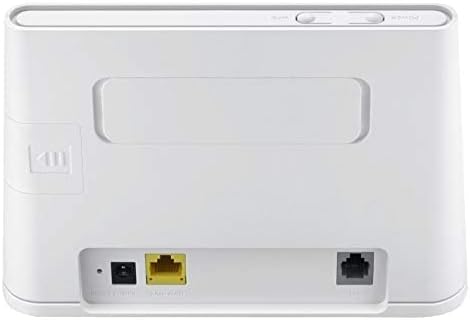
арткы view of the router displays the various ports for connectivity. These include the power input, a Gigabit Ethernet LAN/WAN port (yellow), and an RJ11 port for voice services.
3.3 SIM карта уячасы

This image highlights the integrated SIM card slot located on the side of the router, which is essential for 4G LTE connectivity. The slot is shown open, indicating where the SIM card should be inserted.
3.4 Индикатор жарыктары

A close-up of the router's top panel, showing the indicator lights for Power, Wi-Fi, Network Mode, and Signal Strength. These lights provide visual feedback on the router's operational status.
4. Орнотуу нускамалары
Follow these steps to set up your HUAWEI B311-221 router:
- SIM картаны салыңыз: Locate the SIM card slot on the side of the router. Carefully insert your standard-sized 3G/4G SIM card into the slot until it clicks into place. Ensure the SIM card is activated by your service provider.
- Туташуу кубаты: Кубат адаптерин роутердин электр киргизүү портуна туташтырыңыз, андан кийин аны электр розеткасына сайыңыз. Роутер автоматтык түрдө күйөт.
- Күйгүзүү: Press the Power button on the router. The Power indicator light should turn on.
- Тармак туташуусу: Wait for the Network Mode and Signal Strength indicator lights to stabilize. A solid blue or green light typically indicates a successful 4G LTE connection.
- Түзмөктөрдү туташтыруу:
- Wi-Fi: On your device (laptop, phone, tablet), search for available Wi-Fi networks. Select the network name (SSID) printed on the label at the bottom of your router. Enter the Wi-Fi password (Key) also found on the label.
- Ethernet: For wired connections, connect an Ethernet cable from the router's LAN/WAN port to your computer or other network device.
- Кирүүнү башкаруу интерфейси: ачуу а web browser on a connected device and enter the default IP address (usually 192.168.8.1) to access the router's web management page. Log in using the default username and password (found on the router label or in the Quick Start Guide).
- HUAWEI HiLink App: For easier management, download the HUAWEI HiLink app from your device's app store. Connect your phone to the router's Wi-Fi and use the app to monitor network status, manage connected devices, and configure settings.
5. Иштөө нускамалары
5.1 Түзмөктөрдү туташтыруу
The router supports up to 32 Wi-Fi devices simultaneously. Ensure your devices are within the Wi-Fi coverage area for optimal performance.

This diagram illustrates the Wi-Fi coverage provided by the HUAWEI B311-221 router within a typical home environment, showing multiple devices connected wirelessly.
5.2 Интернетке кирүү
Once connected, devices can access the internet via the 4G LTE network. The router provides high-speed data for streaming, browsing, and online activities.

This image demonstrates the router's capability to deliver 4G internet at speeds up to 150Mbps to a connected laptop, facilitating fast downloads and online activities.
5.3 Using the HUAWEI HiLink App
The HUAWEI HiLink app allows you to:
- Check network strength and status.
- Read SMS messages received on the router's SIM card.
- Set data usage limits.
- View and manage all connected devices.
- Modify Wi-Fi settings (SSID, password).
Ensure your smartphone is connected to the router's Wi-Fi network to use the app.
6. Техникалык тейлөө
HUAWEI B311-221 роутериңиздин оптималдуу иштешин жана узак иштөөсүн камсыз кылуу үчүн төмөнкү тейлөө көрсөтмөлөрүн аткарыңыз:
- Жайгашкан жери: Маршрутизаторду ачык жерге, тоскоолдуктарды, чоң металл буюмдарды жана тоскоолдуктарды жаратышы мүмкүн болгон башка электрондук шаймандардан алыс жерге коюңуз.
- Тазалоо: Роутерди тазалоо үчүн жумшак, кургак чүпүрөктү колдонуңуз. Суюк тазалоочу каражаттарды же аэрозольдорду колдонбоңуз.
- Вентиляция: Ensure the router's ventilation openings are not blocked to prevent overheating.
- Программалык камсыздоонун жаңыртуулары: Роутер аркылуу микропрограмма жаңыртууларын мезгил-мезгили менен текшерип туруңуз web management interface or the HUAWEI HiLink app. Keeping the firmware updated ensures the best performance and security.
- Power Cycle: If you experience minor issues, try power cycling the router by unplugging it from the power outlet for 10 seconds and then plugging it back in.
7. Кыйынчылыктарды
Эгер роутериңизде көйгөйлөргө туш болсоңуз, төмөнкү жалпы маселелерди жана чечимдерди караңыз:
| Көйгөй | Мүмкүн чечим |
|---|---|
| Интернет байланышы жок |
|
| Wi-Fi ылдамдыгы жай |
|
| Cannot access router management page |
|
| Wi-Fi сигналы тез-тез төмөндөйт |
|
8. Техникалык шарттар
| Өзгөчөлүк | Деталь |
|---|---|
| Бренд | HUAWEI |
| Модель аты | B311-221 |
| Элемент моделинин номери | B311-221 |
| Продукциянын өлчөмдөрү | 18.1 x 12.6 x 3.6 см |
| Элемент Салмагы | 218 грамм |
| Түс | Ак |
| Байланыш технологиясы | Wi-Fi, 4G LTE |
| Зымсыз байланыш стандарты | 802.11n |
| Жыштык тилкесинин классы | Жалгыз тилке (2.4 ГГц) |
| Wi-Fi'дын максималдуу ылдамдыгы | 300 Мбит/сек чейин |
| Максималдуу 4G LTE ылдамдыгы | 150 Мбит/сек чейин |
| Ethernet порттору | 1 x Gigabit Ethernet LAN/WAN port |
| Үн порту | 1 x RJ11 порту |
| SIM карта уячасы | Integrated (Standard SIM) |
| Өзгөчө өзгөчөлүк | WPS, HUAWEI HiLink App Management |
| Шайкеш түзмөктөр | Smart TV, Tablet, Personal Computer, Laptops, Phones, Gaming Devices |
| Батареялар камтылган | Жок |
| Operating System (Compatibility) | Windows (and other OS via Wi-Fi/Ethernet) |
9. Кепилдик маалыматы
This HUAWEI product is covered by a limited warranty. The specific terms and duration of the warranty may vary depending on your region and local regulations. Please refer to the warranty card included in your product package or visit the official HUAWEI webтолук кепилдик маалымат алуу үчүн сайт. Кепилдик дооматтар үчүн сатып алганыңыздын далилин сактаңыз.
10. Колдоо
For technical support, product inquiries, or service requests, please contact HUAWEI customer support through one of the following methods:
- Онлайн колдоо: HUAWEI расмий колдоо бөлүмүнө баш багыңыз webКөп берилүүчү суроолор, көйгөйлөрдү жоюу колдонмолору жана байланыш параметрлери үчүн сайт.
- HUAWEI HiLink App: Use the support features available within the HiLink application.
- Кызматтын ишеним телефону: Refer to your Quick Start Guide or HUAWEI's official website for regional service hotline numbers.
When contacting support, please have your product model (B311-221) and serial number ready.


