1. Киришүү
This manual provides essential information for the proper setup, operation, and maintenance of your new SUNPIN 11.5" Portable DVD Player. Please read it thoroughly before using the device.
The SUNPIN Portable DVD Player is designed for versatile entertainment, featuring a 9.5" swivel brightness-enhanced screen. It is ideal for use in cars, at home, or during travel, offering a reliable solution for media playback.
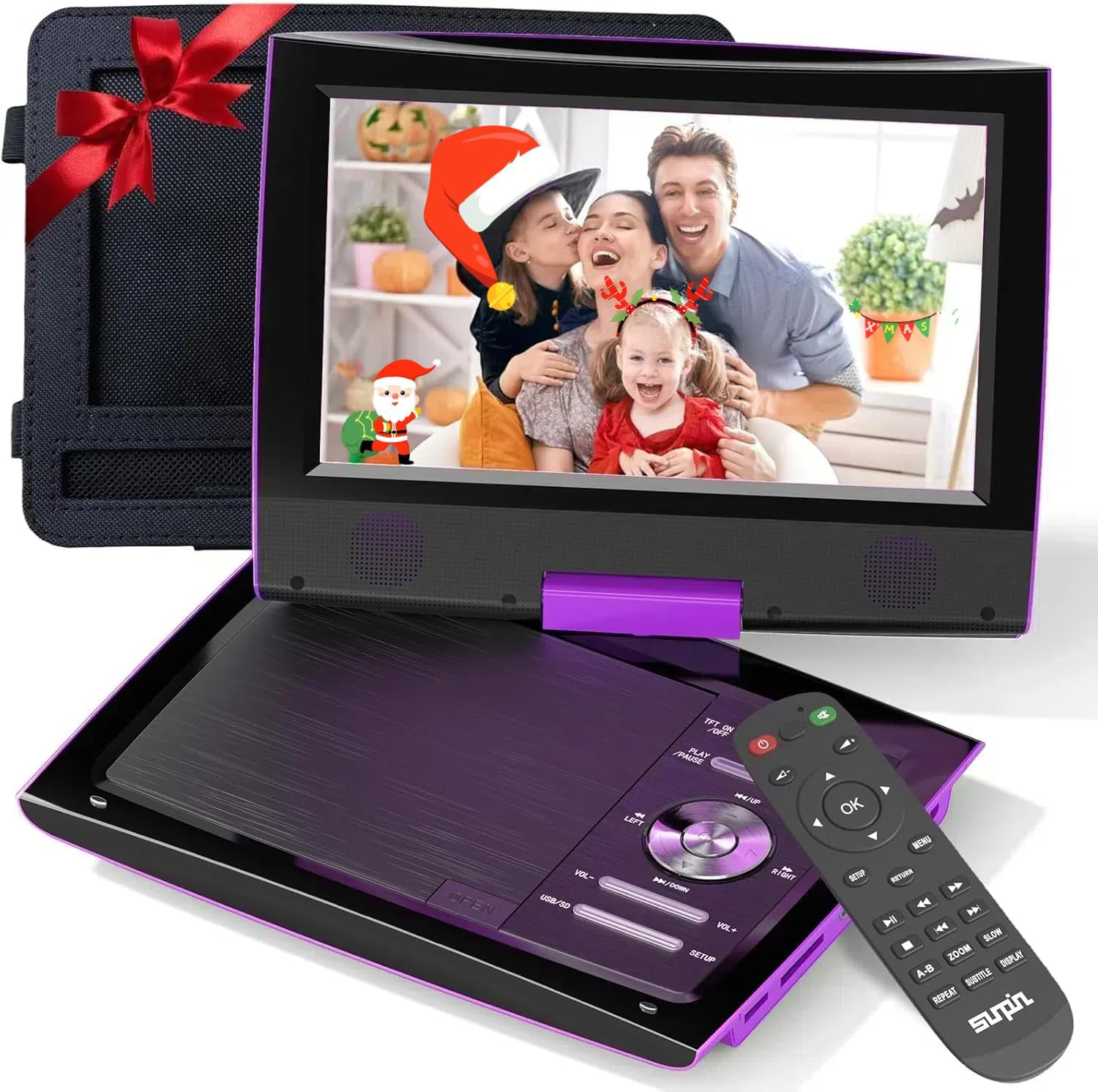
Figure 1: SUNPIN 11.5" Portable DVD Player (Purple)
2. Негизги өзгөчөлүктөрү
- 11.5" Swivel Screen: The 9.5" HD swivel screen rotates 270° and folds 180° for flexible viewбурчтар.
- Узартылган батареянын иштөө мөөнөтү: Built-in rechargeable lithium polymer battery provides up to 5 hours of continuous playback.
- Dual Earphone Jacks: Allows two users to listen simultaneously for private viewing.
- Кеңири шайкештик: Supports DVD, CD, USB, SD, and various video/audio formats.
- Car Use Ready: Includes a car charger and headrest mount for convenient in-vehicle entertainment.
- Акыркы эс тутум функциясы: Resumes playback from the last watched point.

Figure 2: Up to 5 Hours Battery Life
3. Пакеттин мазмуну
Төмөндө тизмеленген нерселердин баары пакетиңизге камтылганын текшериңиз:
- SUNPIN Portable DVD Player (Model: PD969)
- Алыстан башкаруу
- Power Adapter (Wall Charger)
- Унаа заряддагыч
- Headrest Mount Holder
- AV Cable
- Колдонуучунун Колдонмосу (бул документ)

Сүрөт 3: Камтылган аксессуарлар
4. Продукт бүтүп калдыview
4.1. Player Layout

Figure 4: 11.5" Large LCD Display
4.2. Порттар жана байланыштар

Figure 5: Side Ports and Controls
- USB порт: Медиа ойнотуу үчүн USB флэш-дисктерин туташтыруу үчүн files.
- SD карта уячасы: For inserting SD memory cards to play media files.
- AV-IN: Audio/Video input for connecting external devices.
- AV-OUT: Audio/Video output for connecting to a larger screen like a TV.
- DC-IN: Power input for connecting the power adapter or car charger.
- Headphone Jacks (Dual 3.5mm): Купуя угуу үчүн кулакчындарды туташтыруу үчүн.
- OFF/ON Switch: Аппаратты күйгүзүү же өчүрүү үчүн.
5. Орнотуу
5.1. Charging the Player
Before first use, fully charge the portable DVD player. Use either the provided wall adapter or car charger.
- Connect the power adapter to the DC-IN port on the player and plug it into a wall outlet.
- For car charging, connect the car charger to the DC-IN port and plug it into your vehicle's cigarette lighter socket.
The charging indicator light will typically show red while charging and turn green when fully charged.
5.2. Inserting a DVD/CD
- Gently press the 'OPEN' button or slide the latch to open the disc cover.
- Place the DVD or CD onto the spindle with the label side facing up. Ensure it clicks securely into place.
- Close the disc cover firmly until it latches. The player will begin loading the disc automatically.
5.3. Using the Headrest Mount
The included headrest mount allows for easy viewing in a vehicle.
- Open the DVD player and swivel the screen 180 degrees so it lies flat over the control panel, with the screen facing outwards.
- Insert the player into the headrest mount holder, securing it with the straps.
- Attach the mount to the back of a car seat headrest using the adjustable straps.
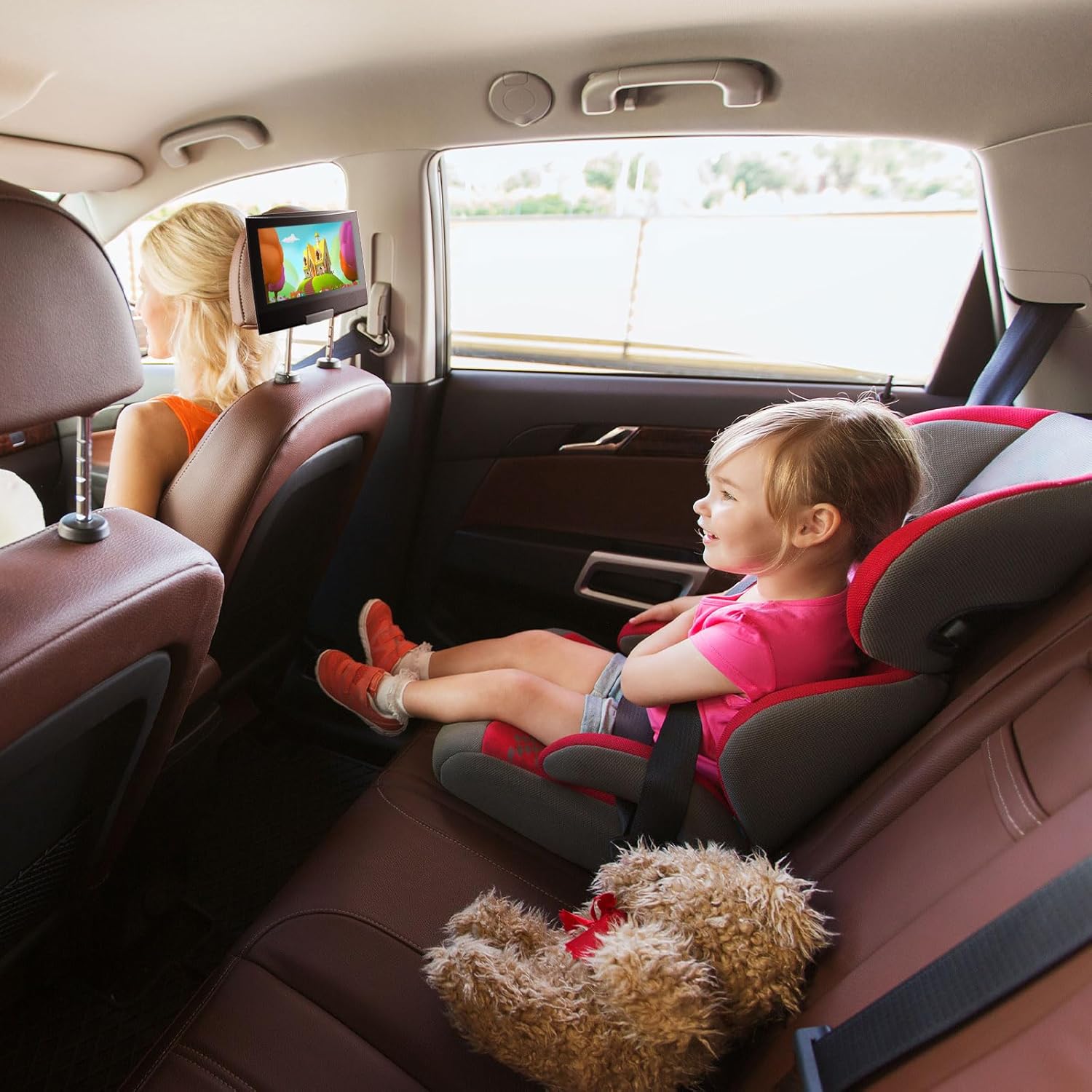
Figure 6: Player Mounted in Car
5.4. Connecting to a TV (AV Out)
үчүн view content on a larger screen, use the provided AV cable.
- Connect one end of the AV cable to the AV-OUT port on the DVD player.
- Connect the other end of the AV cable to the corresponding AV-IN (RCA) ports on your television (Yellow for Video, White for Left Audio, Red for Right Audio).
- Select the correct AV input source on your television.
6. Иштөө нускамалары
6.1. Негизги ойнотуу
- Power on the device using the OFF/ON switch.
- Insert a DVD/CD as described in Section 5.2. Playback should start automatically.
- колдонуу ОЙНОО/ТЫНЫТТЫРУ ойнотууну баштоо же тындыруу үчүн баскыч.
- колдонуу ТОКТОТ ойнотууну токтотуу үчүн баскыч.
- колдонуу АЛГА/КИЙИНКИ buttons to skip tracks or chapters.
- Үнүн колдонуп, үнүн жөндөңүз VOL+ жана VOL- баскычтар.
6.2. USB/SD медиасын колдонуу
Оюнчу USB флэш-дисктерден жана SD карталарынан медиа ойнотууну колдойт.
- Insert your USB flash drive into the USB port or your SD card into the SD card slot.
- The player should automatically detect the media and display a file браузер.
- Сиздин аркылуу чабыттоо files using the directional buttons and press OK тандоо жана ойнотуу үчүн.
6.3. Swivel Screen Functionality
The screen can be swiveled for optimal viewбурчтар:
- The screen can rotate up to 270 degrees clockwise or counter-clockwise.
- It can also fold flat against the base, covering the control panel, which is useful for headrest mounting or compact storage.
6.4. Алыстан башкаруу операциясы
Алыстан башкаруу пульту алыстан толук функцияларды камсыз кылат.
- Пульттун батареялары иштеп жатканын текшериңиз.
- Point the remote directly at the player's infrared receiver.
- All functions available on the player's control panel are also accessible via the remote.
7. Медиа интеграциясы
7.1. Расмий продукт Videos
SUNPIN 11.5" Portable DVD Player with 9.5" HD Swivel Screen
Бул видеодо толук маалымат берилетview of the SUNPIN 11.5" Portable DVD Player, highlighting its 9.5" HD swivel screen and various features. It demonstrates the player's design, functionality, and ease of use for different scenarios.
SUNPIN Portable DVD Player for Car, What you should know?
This video focuses on the SUNPIN Portable DVD Player's suitability for car use, offering practical tips and insights for maximizing entertainment during road trips. It covers aspects relevant to in-vehicle setup and usage.
Easy, compact, so smart to use this! (Preview)
Кыскача алдын алаview video demonstrating the compact design and ease of use of the SUNPIN Portable DVD Player, highlighting its convenience for various applications.
8. Техникалык тейлөө
- Cleaning the Disc: Use a clean, soft, lint-free cloth to wipe the disc outwards from the center.
- Линзаны тазалоо: Use cotton swabs with less than 75% alcohol to clean the lens. Do not touch the lens with your fingers, as this may make the DVD player unable to read discs.
- Сактагыч: Ойноткучту салкын, кургак жерде, күн нуру түз тийбеген жана өтө жогорку температурадан алыс сактаңыз.
- Батареяга кам көрүү: If the player will not be used for an extended period, charge it once every 3 months to preserve battery life.
9. Кыйынчылыктарды
| Көйгөй | Мүмкүн себеп | Чечим |
|---|---|---|
| Оюнчу күйбөйт. | Low battery or power adapter not connected. | Connect the power adapter and charge the player. Ensure the ON/OFF switch is in the 'ON' position. |
| Disc cannot be read / No Disc. | Диск кир, чийилген же туура эмес салынган. Объектив кир. | Clean the disc with a soft cloth. Ensure the disc is inserted correctly. Clean the player's lens as per maintenance instructions. Try a different disc. |
| Үн жок. | Volume too low, headphones not connected properly, or external device issue. | Increase volume. Check headphone connection. If connected to TV, ensure TV volume is up and correct input is selected. |
| Пульт иштебей жатат. | Batteries are dead or remote is not pointed correctly. | Replace remote control batteries. Ensure remote is pointed directly at the player's IR receiver. |
Solution for not being able to read the disk properly! (Preview)
This short video provides a visual guide on how to troubleshoot common disc reading issues with the portable DVD player, including cleaning the disc and checking the lens.
10. Техникалык шарттар
| Өзгөчөлүк | Деталь |
|---|---|
| Модель номери | PD969 |
| Screen Size | 9.5 дюйм (диагоналы 11.5 дюйм) |
| Дисплей түрү | LCD |
| Медиа түрү колдоого алынат | DVD, CD, USB, SD |
| Батарея түрү | Литий полимери (1 талап кылынат) |
| Элемент Салмагы | 2.82 фунт |
| Пакеттин өлчөмдөрү | 12.71 x 9.06 x 3.23 дюйм |
| Түс | Кызгылт көк |
11. Кепилдик жана колдоо
SUNPIN is committed to providing quality products and customer satisfaction.
- Кепилдик: Бул продукт сатып алынган күндөн тартып 12 айлык кепилдик менен келет.
- Кайтаруу кызматы: Enjoy a 30-day return service from the date of purchase.
- Сатуудан кийинки тейлөө: For any inquiries or support, please contact SUNPIN customer service. 7x24 hour after-sales service is available.
For further assistance, please visit the official SUNPIN store or contact their customer support channels.


