Introduction
The Ring Alarm 8-Piece Kit is a comprehensive wireless smart home security system designed for easy setup and mobile app control. This kit provides essential components to secure your home, offering peace of mind through expandable protection and optional professional monitoring.
This manual provides detailed instructions for setting up, operating, and maintaining your Ring Alarm system, along with troubleshooting tips and product specifications.
Компоненттер камтылган
Your Ring Alarm 8-Piece Kit includes the following components:
- One (1) Base Station
- One (1) Keypad
- Four (4) Contact Sensors
- One (1) Motion Detector
- One (1) Range Extender
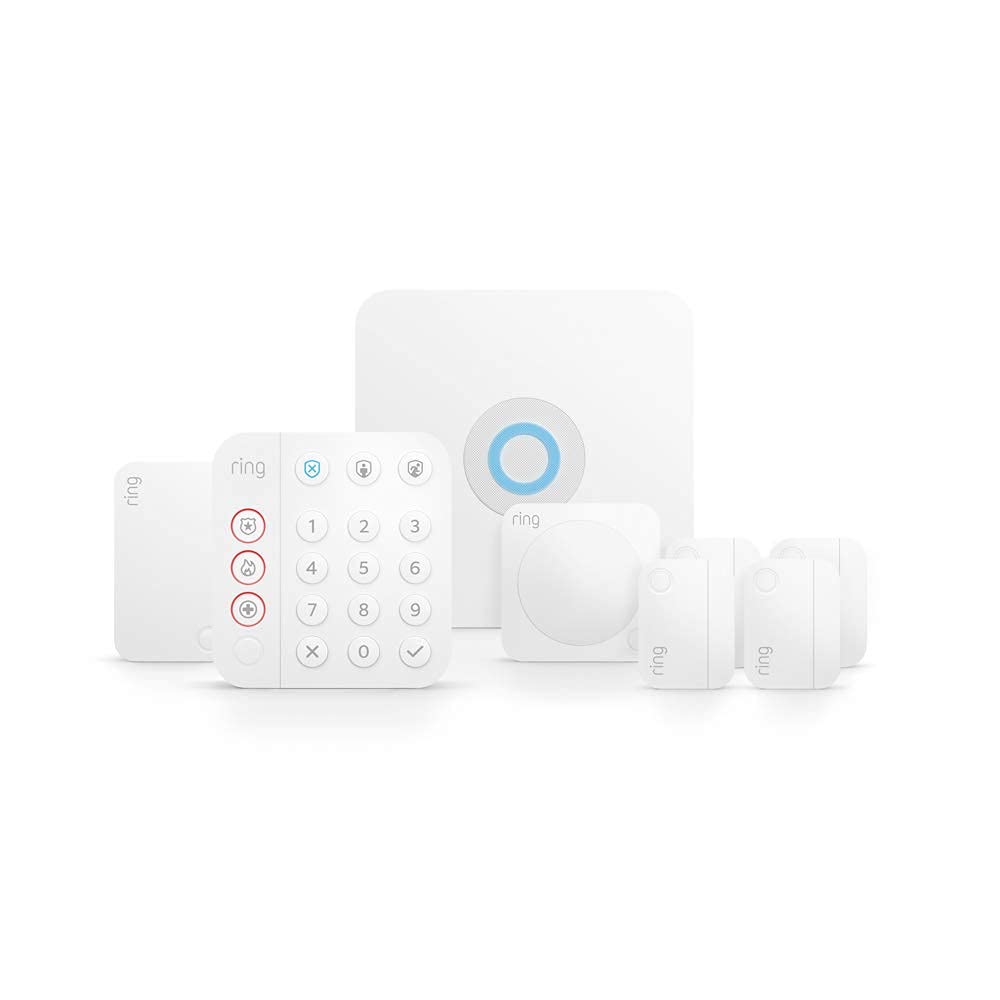
Figure 1: Ring Alarm 8-Piece Kit components, including the Base Station, Keypad, Contact Sensors, Motion Detector, and Range Extender.
Жайгашуу
1. Initial Setup and App Download
- Ring колдонмосун жүктөп алыңыз: Издөө "Ring" in your mobile device's app store and download the official Ring app.
- Каттоо эсебин түзүү: If you don't have one, create a Ring account and follow the on-screen prompts to set up your home location.
- Add Your Alarm System: In the Ring app, select "Set Up a Device" and choose "Security Devices" then "Alarm." Follow the in-app instructions to scan the QR code on your Base Station.
2. Base Station Installation
The Base Station is the central hub of your Ring Alarm system. It should be placed in a central location in your home, preferably near your internet router for optimal connectivity.
- Күч: Plug the Base Station into a standard power outlet using the included AC adapter.
- Байланыш: Connect the Base Station to your internet via Wi-Fi or an Ethernet cable for a more stable connection. Follow the in-app prompts to connect to your home Wi-Fi network.
3. Баскычтоптун жайгашуусу
The Keypad allows you to arm and disarm your system manually. Place it near your main entry/exit door or in a convenient location where you can easily access it.
- The Keypad can be wall-mounted using the Quick-Release Bracket or placed on any flat surface.
- Ensure it is within range of the Base Station.

Figure 2: The Ring Alarm Keypad, typically placed on a flat surface or mounted near an entry point.
4. Contact Sensor Installation
Contact Sensors detect when a door or window is opened. Install them on frequently used entry points.
- Mount the sensor and its magnet component on the door/window frame and the door/window itself, respectively.
- Ensure the sensor and magnet are within 1 inch of each other when the door/window is closed.
- Use the included double-sided tape or screws for installation.

Figure 3: Installation of a Ring Alarm Contact Sensor on a door frame, demonstrating the ease of DIY setup.
5. Motion Detector Placement
Motion Detectors sense movement within a room. Place them in corners or on flat walls to cover key areas.
- Install at a height of approximately 7.5 feet (2.3 meters) for optimal detection.
- Avoid placing near heat sources or direct sunlight, which can cause false alarms.
6. Range Extender Setup
The Range Extender boosts the Z-Wave signal from your Base Station, ensuring all your sensors have a strong connection. Plug it into a standard power outlet halfway between your Base Station and the furthest sensor.
Операция
Коопсуздук режимдери
The Ring Alarm system operates in three main security modes:
- Куралсыздандырылган: The system is off, and no sensors will trigger the alarm.
- Үй: Activates select sensors (e.g., perimeter sensors like Contact Sensors) while allowing you to move freely inside your home. Motion Detectors are typically bypassed in this mode.
- Алыста: Activates all sensors, including Motion Detectors, for full protection when no one is home.
Куралдануу жана куралсыздандыруу
You can arm and disarm your Ring Alarm system using the Keypad or the Ring App.
- Баскычтопту колдонуу: Enter your 4-digit access code, then press the desired mode button (Disarmed, Home, or Away).
- Ring тиркемесин колдонуу: Open the Ring app, navigate to the Alarm dashboard, and tap the desired mode button.

Figure 4: The Ring App provides convenient remote control for arming and disarming your security system.
Alexa шайкештиги
The Ring Alarm system is compatible with Alexa. You can enable the Ring Skill in the Alexa app to arm and disarm your system using voice commands (requires a verbal PIN for disarming for security).
Техникалык тейлөө
Батареяны алмаштыруу
- Байланыш сенсорлору: Use CR2032 coin cell batteries. The Ring app will notify you when battery levels are low.
- Кыймыл детектору: Uses 2 AA batteries.
- Баскычтоп: Features a rechargeable battery. Plug it into a power outlet when the battery is low.
Base Station Battery Backup
The Base Station includes a rechargeable 24-hour battery backup, ensuring your system remains operational during power outages. If you have a Ring Home Standard subscription, cellular backup will also keep your system online if Wi-Fi goes down.
Программалык камсыздоо жаңыртуулары
Your Ring Alarm devices receive automatic software security updates to ensure optimal performance and security. Ensure your Base Station is connected to the internet for these updates.
Проблемаларды чечүү
Жалпы маселелер жана чечимдер
- Түзмөк оффлайн:
- Check the power connection of the device.
- Ensure the device is within range of the Base Station or Range Extender.
- Verify your home Wi-Fi network is active and the Base Station is connected.
- Сенсор жооп бербей жатат:
- Сенсордун батареясын текшерип, керек болсо алмаштырыңыз.
- Ensure the sensor and its magnet (for Contact Sensors) are correctly aligned and within the specified distance.
- Try removing and re-adding the sensor in the Ring app.
- Жалган ойготкучтар:
- For Motion Detectors, ensure they are not placed near heat sources, vents, or in direct sunlight.
- Verify Contact Sensors are securely mounted and not shifting.
- Adjust sensitivity settings for Motion Detectors in the Ring app if available.
- Клавиатура жооп бербейт:
- Ensure the Keypad is charged or plugged in.
- Verify it is within range of the Base Station.
For further assistance, refer to the official Ring support page or contact Ring customer service.
Техникалык шарттар
| Өзгөчөлүк | Деталь |
|---|---|
| Бренд | Ring |
| Модел | Ring Alarm 8-Piece Kit |
| Түс | АК |
| Базалык станциянын өлчөмдөрү | 6.65 дюйм x 6.65 дюйм x 1.46 дюйм |
| Баскычтоптун өлчөмдөрү | 4.13 дюйм x 4.41 дюйм x 0.75 дюйм |
| Contact Sensor Dimensions | 1.56 дюйм x 2.09 дюйм x 0.55 дюйм |
| Motion Detector Dimensions | 2.6 дюйм x 2.6 дюйм x 1.53 дюйм |
| Range Extender Dimensions | 1.86 дюйм x 3.19 дюйм x 1.66 дюйм |
| Байланыш | Ethernet, Wi-Fi, Z-Wave, Bluetooth (for setup) |
| Базалык станциянын күчү | 100-240V 50/60Hz AC Adapter (Included) |
| Base Station Battery Backup | 24 сааттык батареянын резервдик көчүрмөсү |
| Contact Sensor Battery | CR2032 coin cell batteries (Approx. 3 years life) |
| Motion Detector Battery | 2 АА батарейка |
| Operating Conditions (Base Station) | -4°F – 104°F (-20°C – 40°C) |
| Operating Conditions (Indoor Sensors) | 32°F – 120°F (0°C – 49°C) |
| Коопсуздук режимдери | Куралсызданган, алыста жана үйдө |
Кепилдик жана колдоо
Кепилдик маалымат
Ring Alarm Kit 1 жылдык чектелген кепилдикти жана тейлөөнү камтыйт. Ring сигнал топтомун колдонуу белгилүү бир шарттарга жана шарттарга ылайык келет.
Кардарларды колдоо
For additional information, troubleshooting, or to view monitoring licenses, please visit the official Ring support resources:
- Ring Licenses Information
- Ring Support Page (General support and FAQs)


