1. Продукт бүтүп калдыview
The EARISE M37 is a portable 100W PA system designed for various audio applications, including home parties, small events, and karaoke. It features a wooden cabinet for enhanced acoustics, built-in Bluetooth connectivity, and comes with two wireless microphones for immediate use. The system supports multiple audio inputs including AUX and USB, offering versatile playback options.

Image: The EARISE M37 PA system, showcasing its wooden box design and two included wireless microphones.
2. Коопсуздук маалыматы
- Өрт же электр тогуна урунуп калбаш үчүн аппаратты жамгырга же нымга тийгизбеңиз.
- Do not open the cabinet. There are no user-serviceable parts inside. Refer all servicing to qualified personnel.
- Агрегаттын айланасын туура желдетүүнү камсыз кылыңыз. Вентиляция тешиктерин жаап албаңыз.
- Аппаратты радиаторлор, жылуулук регистрлери, мештер же башка аппараттар (анын ичинде) сыяктуу жылуулук булактарынын жанына коюудан алыс болуңуз. ampкөтөргүчтөр) жылуулукту пайда кылуучу.
- Электр шнурунун басылып кетүүсүнөн же кысып калуудан сактаңыз, өзгөчө сайгычтарда, розеткаларда жана алар аппараттан чыга турган жеринде.
- Бул аппаратты чагылгандуу бороондордо же узак убакыт бою колдонбогондо электр розеткасынан ажыратыңыз.
3. Пакеттин мазмуну
Сураныч, пакетте төмөнкү нерселерди текшериңиз:
- EARISE M37 PA System Unit
- 2 x зымсыз микрофондор
- Remote Controller
- Кубаттуу адаптер
- Колдонуучунун Колдонмосу (бул документ)

Image: A visual representation of key features and included accessories: wireless microphone, Bluetooth 4.2, USB auto-play, and remote controller.
4. Продукттун өзгөчөлүктөрү жана компоненттери
Familiarize yourself with the main components and controls of your EARISE M37 PA System.

Image: The control panel of the EARISE M37, showing various inputs and adjustment knobs. Key controls include: Mode, Previous/Next Track, Play/Pause, Record, EQ, Light, Mic 1/2 inputs, AUX In/Out, USB, TF card slot, DC Power In, ON/OFF switch, Charging indicator, ECHO, DELAY, MIC VOL, MASTER VOL, TREBLE, EXTRA BASS, and BASS.
Башкаруу панелинин функциялары:
- РЕЖИМ: Switches between input modes (Bluetooth, AUX, USB, TF Card).
- Мурунку/Кийинки трек: Navigates tracks during media playback.
- Ойнотуу/тындыруу: Медианы ойнотууну көзөмөлдөйт.
- Жаздыруу: Initiates or stops recording (requires USB/TF storage).
- EQ: Adjusts equalization settings.
- Жарык: Интегралдык LED жарыктандыруусун башкарат.
- MIC 1 / MIC 2: Inputs for wired microphones (if used).
- AUX IN / AUX OUT: Audio input and output jacks for external devices.
- USB: USB port for media playback or recording.
- TF: TF (MicroSD) card slot for media playback or recording.
- DC Power IN: Power input for charging and operation.
- КҮЙГҮЗҮҮ ӨЧҮРҮҮ: Түзмөк үчүн кубат которгучу.
- Заряддоо көрсөткүчү: Заряддоо абалын көрсөткөн жарык.
- ЭХО: Микрофондор үчүн жаңырык эффектин тууралайт.
- КЕЧИК: Микрофондордун кечигүү эффектин тууралайт.
- MIC VOL: Микрофондордун үнүн тууралайт.
- МАСТЕР ТОМ: Controls the overall master volume of the system.
- ҮЧТҮҮ: Жогорку жыштыктагы аудио чыгарууну тууралайт.
- КОШУМЧА БАС: Төмөн жыштыктагы аудио чыгарууну жакшыртат.
- Бас: Төмөн жыштыктагы аудио чыгарууну тууралайт.
5. Орнотуу
5.1 PA системасын кубаттоо
Before first use, fully charge the PA system. Connect the provided power adapter to the "DC Power IN" port on the unit and plug it into a standard wall outlet. The charging indicator light will show the charging status. A full charge provides up to 7 hours of play time.

Image: Illustration highlighting the 3600mAh battery capacity, providing up to 7 hours of continuous play time.
5.2 Зымсыз микрофонду орнотуу
The two wireless microphones are pre-paired with the PA system. Insert AA batteries (not included) into each microphone. Turn on the microphones using their respective power switches. They should automatically connect to the PA system.
5.3 Аудио булактарын туташтыруу
Bluetooth байланыш:
- Turn on the EARISE M37 PA system.
- басыңыз РЕЖИМ Дисплейде "Bluetooth" же Bluetooth сөлөкөтү көрсөтүлгөнгө чейин баскычын басыңыз.
- Мобилдик түзмөгүңүздө (смартфон, планшет ж.б.) Bluetooth иштетип, жеткиликтүү түзмөктөрдү издеңиз.
- Select "EARISE M37" from the list. Once connected, you will hear a confirmation sound.

Image: A hand holding a smartphone displaying a Bluetooth connection screen, indicating the ease of pairing with the EARISE M37 PA system.
USB/TF картасын ойнотуу:
MP3 аудиосу бар USB флеш-дискти же TF (MicroSD) картасын салыңыз files into the respective port. The system will automatically detect and begin playing music. Use the Previous/Next Track and Play/Pause buttons to control playback.
AUX киргизүү:
Тышкы аудио түзмөгүн (мисалы, MP3 ойноткуч, компьютер) туташтырыңыз AUX IN 3.5 мм аудио кабелин колдонуу порту (киргизилген эмес). басыңыз РЕЖИМ button until AUX input is selected.
6. Иштөө нускамалары
6.1 Күйгүзүү/өчүрүү
To turn the unit on or off, use the КҮЙГҮЗҮҮ/ӨЧҮРҮҮ башкаруу панелинде жайгашкан которгуч.
6.2 Үндү жана эффекттерди жөндөө
- МАСТЕР ТОМ: Rotate this knob to adjust the overall volume of the PA system.
- MIC VOL: Туташкан микрофондордун үнүн тууралайт.
- ECHO / DELAY: Use these knobs to add or reduce echo and delay effects to the microphone sound.
- TREBLE / BASS / EXTRA BASS: Adjust these knobs to fine-tune the high and low frequencies of the audio output.
6.3 Микрофондорду колдонуу
Once the wireless microphones are powered on and connected, speak into them. Adjust the MIC VOL, ECHO, жана КЕЧИКТИРҮҮ knobs on the PA system to achieve the desired sound. For optimal performance, hold the microphone a few inches from your mouth.

Image: Two individuals enjoying karaoke with the EARISE M37 PA system and its wireless microphones, demonstrating typical usage.
6.4 Жазуу функциясы
To record audio (e.g., microphone input or music playback), ensure a USB flash drive or TF card is inserted into the corresponding slot. Press the ЖАЗУУ button to start recording. Press it again to stop. Recorded files киргизилген сактоо түзмөгүнө сакталат.
7. Техникалык тейлөө
- Агрегатты жумшак, кургак чүпүрөк менен тазалаңыз. Абразивдүү тазалагычтарды же эриткичтерди колдонбоңуз.
- Store the PA system in a cool, dry place away from direct sunlight and extreme temperatures.
- If the unit will not be used for an extended period, fully charge the battery before storage and recharge it every few months to maintain battery health.
8. Кыйынчылыктарды
| Көйгөй | Мүмкүн себеп | Чечим |
|---|---|---|
| Күч жок | Батарея түгөндү; Кубат кабели туташтырылган эмес. | Charge the unit; Ensure power cable is securely connected. |
| Микрофондордон үн жок | Microphones off; Batteries low/dead; MIC VOL too low. | Turn on microphones; Replace batteries; Increase MIC VOL. |
| Bluetooth туташпай жатат | PA system not in Bluetooth mode; Device too far; Interference. | Press MODE button to select Bluetooth; Move device closer; Restart both devices. |
| USB/TF картасы ойнотулбай жатат | Туура эмес file формат; Карта/диск туура салынган эмес; Бузулган files. | камсыз кылуу files are MP3; Reinsert card/drive; Try different files/device. |
9. Техникалык шарттар
| Өзгөчөлүк | Деталь |
|---|---|
| Бренд | ERISE |
| Модел | M37 |
| Чыгуу Wattage | 100 Ватт |
| Power Source | Батарея менен иштейт |
| Байланыш технологиясы | Bluetooth, USB, AUX |
| Bluetooth версиясы | 4.2 (from image) |
| Аудио киргизүү | Wireless Microphone, AUX |
| Каналдардын саны | 2 |
| Элемент Салмагы | 11.62 фунт |
| Пакеттин өлчөмдөрү | 18.7 x 12 x 11.9 дюйм |
| Продукциянын өлчөмдөрү (болжол менен) | 32.5 cm (12.8 in) H x 25.5 cm (10 in) W x 23.8 cm (9.4 in) D |
| Түс | Кара |
| Монтаж түрү | Стол үстү |
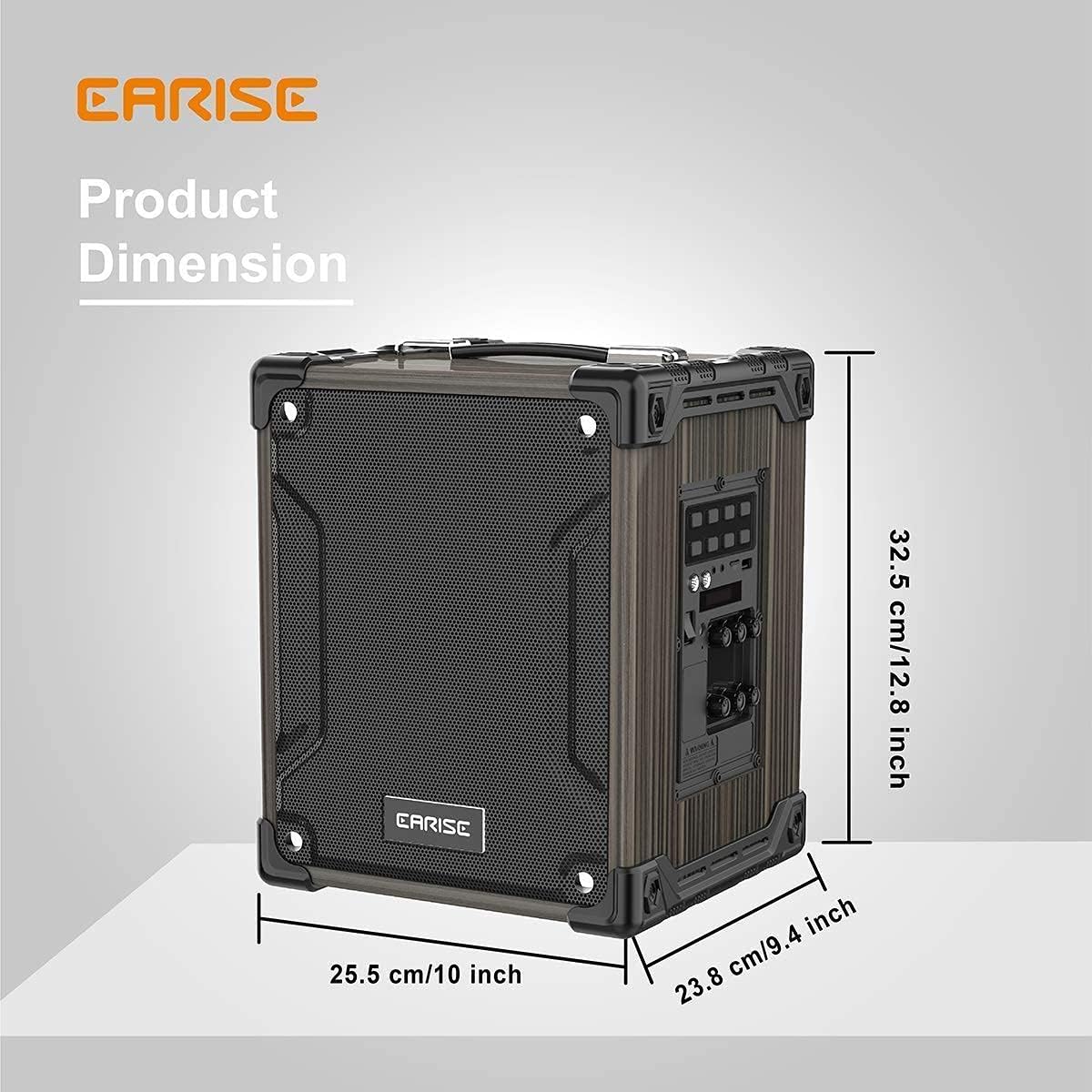
Image: Product dimensions of the EARISE M37, measuring approximately 32.5 cm (12.8 inches) in height, 25.5 cm (10 inches) in width, and 23.8 cm (9.4 inches) in depth.
10. Кепилдик жана колдоо
For warranty information or technical support, please refer to the contact details provided with your purchase or visit the official EARISE webсайт. Кепилдик дооматтар үчүн сатып алганыңыздын далилин сактаңыз.


