1. Киришүү
The REOLINK E1 4MP Indoor WiFi Pan Tilt Camera is a versatile security solution designed for indoor monitoring. It offers high-definition video, advanced detection capabilities, and flexible control options to help you keep an eye on your home, pets, or baby. This manual provides essential information for setting up, operating, and maintaining your camera.
2. Кутуда эмне бар
- REOLINK E1 Camera
- 5V1A Power Adapter (with 3m power cable)
- Монтаждоо плитасы
- Монтаждык тешик шаблону
- Quick Start Guide
3. Орнотуу колдонмосу
3.1 Күйгүзүү
Connect the provided 5V1A power adapter to the camera's power port and plug it into a standard electrical outlet. The camera will power on and initiate its startup sequence.
3.2 Downloading the Reolink App
Download the official Reolink App from the Apple App Store (for iOS devices) or Google Play Store (for Android devices). Create an account or log in if you already have one.
3.3 Wi-Fiга туташуу
Open the Reolink App and tap the '+' icon to add a new device. Scan the QR code located on the bottom of your camera. Follow the on-screen prompts to connect the camera to your 2.4GHz Wi-Fi network. Ensure your Wi-Fi password is correct. The camera will provide voice prompts during the connection process.
3.4 MicroSD картасын салуу (милдеттүү эмес)
For local storage, gently slide the camera lens upwards to reveal the microSD card slot. Insert a microSD card (up to 512GB, not included) into the slot until it clicks into place. The camera supports continuous recording or motion-triggered recording to the card.
3.5 Монтаждоо параметрлери
The camera can be placed on a flat surface or mounted to a wall or ceiling using the included mounting plate and screws. Use the mounting hole template to mark drilling positions. Ensure the camera is positioned to cover your desired monitoring area.

Image: REOLINK E1 4MP Indoor WiFi Camera showing various mounting positions (tabletop, wall, ceiling).
4. Иштөө нускамалары
4.1 Live View жана панорамалоо/кыйшайтуу башкаруусу
Once connected, open the Reolink App and tap on your camera to access the live view. Use the on-screen joystick or swipe gestures to remotely pan (355°) and tilt (50°) the camera lens, providing 360° coverage of your room.

Image: REOLINK E1 4MP Indoor WiFi Camera demonstrating 360-degree pan and tilt functionality for comprehensive room coverage.
4.2 Эки тараптуу сүйлөшүү
Түз эфирде микрофон сүрөтчөсүн басыңыз view interface to enable two-way audio. You can speak through your phone, and your voice will be transmitted through the camera's speaker. This feature is ideal for communicating with family members, pets, or deterring intruders.
4.3 Акылдуу аныктоо жана эскертүүлөр
The camera features smart human and pet detection, reducing false alarms. It also includes instant cry alerts for baby monitoring. Configure alert settings (push notifications, email alerts) in the app to receive real-time notifications when motion or crying sounds are detected.
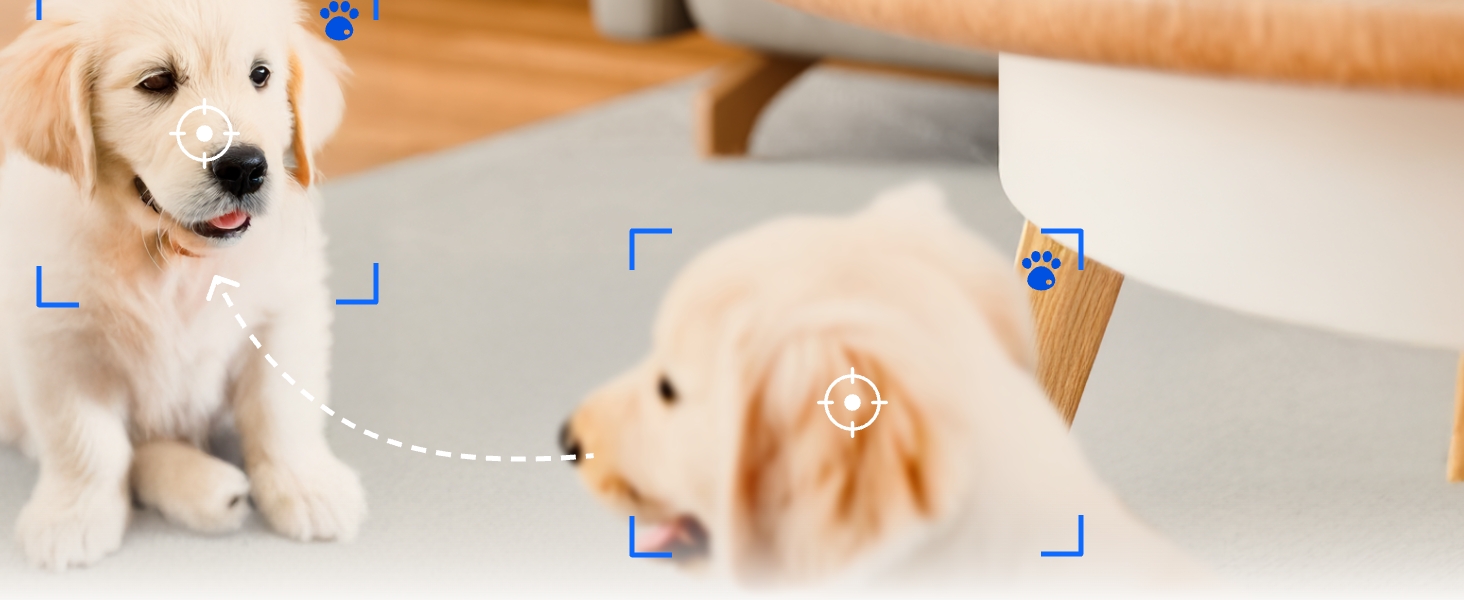
Image: REOLINK E1 4MP Indoor WiFi Camera showcasing intelligent detection of people and pets, with notification icons.
4.4 Auto Tracking
Enable auto-tracking in the app settings. The camera will automatically follow detected human or pet movement within its field of view, ensuring continuous monitoring of activity.
4.5 Купуялык режими
Activate Privacy Mode via the Reolink App to physically block the camera's view and mute audio when privacy is desired. This ensures no recording or live viewing occurs during this period.

Image: REOLINK E1 4MP Indoor WiFi Camera with Privacy Mode enabled, showing the camera lens obscured and audio muted.
4.6 Жазуу жана ойнотуу
Жазылган footage can be accessed and played back through the Reolink App. If a microSD card is installed, you can review historical recordings. Cloud storage options are also available via subscription.
4.7 Multi-User Remote Access
Share access to your camera with up to 10 users. Up to 4 users can view the live feed simultaneously. Manage user permissions within the app settings.
4.8 Smart Home интеграциясы
The REOLINK E1 camera is compatible with Amazon Alexa and Google Assistant, allowing for voice-controlled monitoring and integration into your smart home ecosystem.
5. Features Overview
- 4MP HD & Night Vision: Enjoy 4MP clarity with enhanced infrared night vision for sharper images, even in low light conditions.
- Instant Cry Alerts & Two-Way Talk: Receive immediate alerts for crying sounds and communicate remotely using the two-way audio feature.
- 360° камтуу жана автоматтык көзөмөлдөө: With 355° pan and 50° tilt, the camera provides full 360° coverage and automatically tracks movement.
- Бир нече сактагыч параметрлери: Supports up to a 512GB microSD card, Reolink NVR, and Reolink Home Hub/Home Hub Pro for local storage.
- Convenient Management & Privacy Mode: Manage your camera easily with the free Reolink App. Activate Privacy Mode to disable camera view and audio when needed.

Image: REOLINK E1 4MP Indoor WiFi Camera, showcasing анын компакттуу дизайны жана линзасы.
Video: Official Reolink video demonstrating the E1 4MP Indoor WiFi Camera's features for baby and pet monitoring.
6. Техникалык тейлөө
- Тазалоо: Камера линзасын жана корпусун тазалоо үчүн жумшак, кургак чүпүрөктү колдонуңуз. Катуу химиялык заттарды же абразивдүү материалдарды колдонбоңуз.
- Программалык камсыздоонун жаңыртуулары: Regularly check the Reolink App for firmware updates to ensure your camera has the latest features and security enhancements.
- Power Cycle: If the camera experiences issues, unplug the power adapter for 10 seconds and then plug it back in to restart the device.
7. Кыйынчылыктарды
- Камера оффлайн: Check Wi-Fi connection, ensure the camera is powered on, and try restarting your router.
- Wi-Fi'га туташуу мүмкүн эмес: Verify your Wi-Fi password, ensure you are connecting to a 2.4GHz network, and try moving the camera closer to the router.
- Жалган ойготкучтар: Adjust motion detection sensitivity and set up custom motion zones in the app to reduce unwanted alerts.
- MicroSD картасына жаздыруу жок: Ensure the microSD card is correctly inserted, formatted within the app, and not full.
8. Техникалык шарттар
| Видео тартуунун резолюциясы | 4MP |
| Байланыш технологиясы | 2.4 ГГц WiFi |
| Өзгөчөлүктөр | 4MP, Auto Tracking, Instant Cry Alerts, 2.4G WiFi, Night Vision, 2-Way Talk |
| Ички/тышкы колдонуу | Indoor |
| Шайкеш түзмөктөр | Reolink PoE NVR, Reolink WiFi NVR, Reolink Home Hub Pro, Reolink Home Hub |
| Controller Type | Amazon Alexa, Google Жардамчысы |
| Power Source | Зымдуу электр (5V DC, 3W) |
| Түнкү көрүү диапазону | 40 Фут |
| Field Of View | 80 градус |
| Элементтин өлчөмдөрү | 2.99 x 2.76 x 4.21 дюйм |
9. Кепилдик жана колдоо
The REOLINK E1 camera comes with a 2-year manufacturer warranty. For technical support, troubleshooting, or warranty claims, please visit the official REOLINK webсайтка же түздөн-түз кардарларды тейлөөгө кайрылыңыз.


