Продукт бүттүview
This manual provides instructions for the Elekpia Replacement Remote Control, designed for use with various MAG IPTV Linux Set-Top Box models. This remote offers a direct replacement solution, requiring no complex programming or pairing.
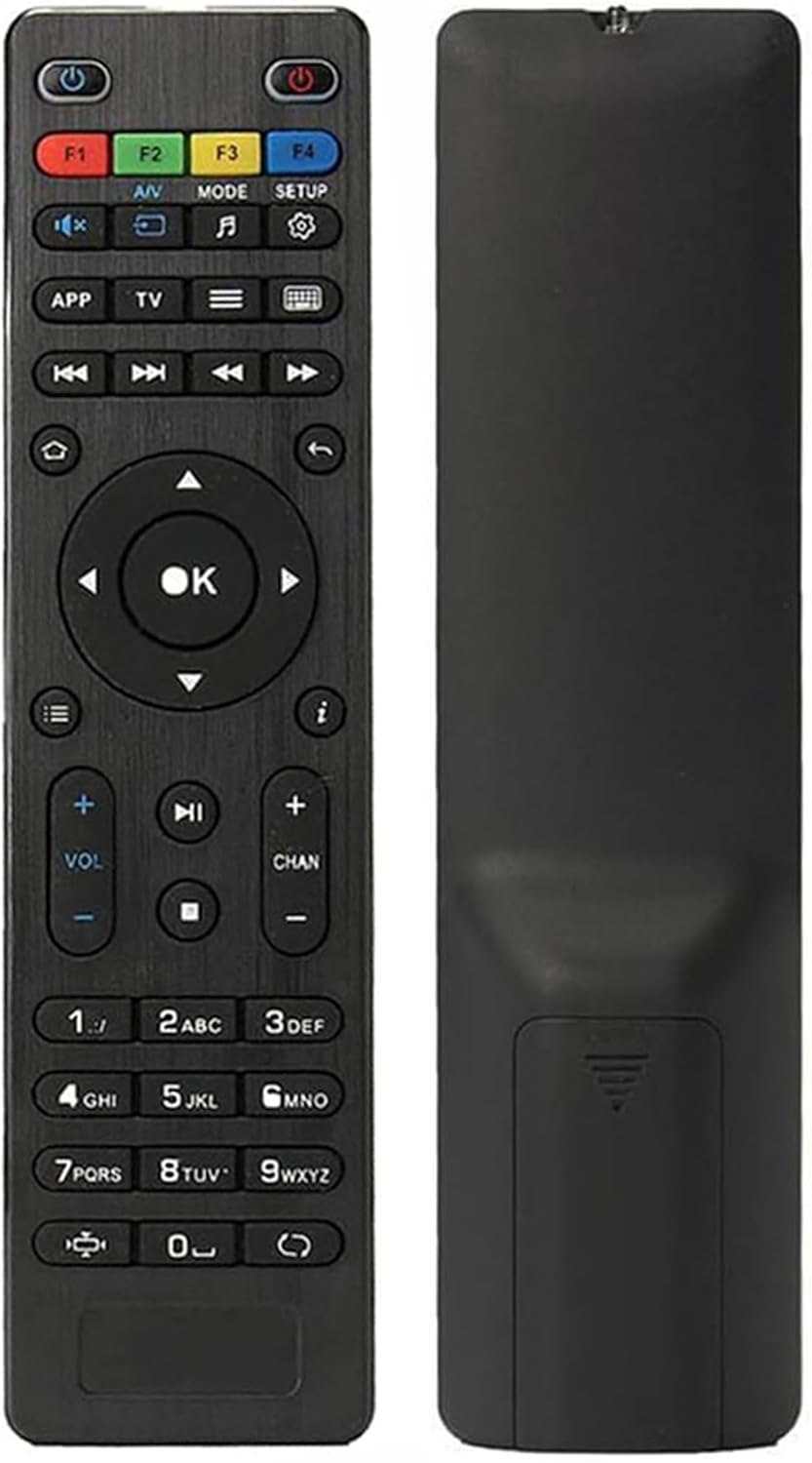
Сүрөт: алдыңкы жана арткы view of the Elekpia replacement remote control. The remote is black with clearly labeled buttons on the front, and a smooth, ergonomic back.
Негизги өзгөчөлүктөрү:
- Compatible with a wide range of MAG IPTV Linux Set-Top Box models, including MAG250, MAG254, 255, 256, 257, 260, 275, 349, 350, 351, 352, and MAG322W1.
- No programming or pairing required; functions immediately upon battery installation.
- Powered by two AAA batteries (not included).

Image: The remote control is shown alongside a list of compatible MAG models, emphasizing its broad compatibility with various MAG IPTV Linux Set-Top Boxes.
Жайгашуу
Setting up your new Elekpia remote control is a straightforward process. Follow these steps to begin using your remote.
1. Батареяны орнотуу
- Пульттун артындагы батарея отсегин табыңыз.
- Батарея бөлүмүнүн капкагын жылдырып ачыңыз.
- Эки (2) AAA батарейкасын салып, оң (+) жана терс (-) терминалдары бөлүмдүн ичиндеги индикаторлорго туура дал келгенин текшериңиз.
- Батарея уясынын капкагын бекем жабыңыз.
2. Алгачкы колдонуу
This remote control is designed to work directly with compatible MAG IPTV Linux Set-Top Boxes without the need for programming or pairing. Once batteries are installed, point the remote at your set-top box and begin using it.
Иштөө нускамалары
Familiarize yourself with the functions of each button on your Elekpia remote control to effectively navigate and control your MAG IPTV Linux Set-Top Box.

Image: A detailed diagram illustrating the layout and function of each button on the remote control, including power, navigation, volume, channel, and media playback controls.
Алыстан башкаруу баскычынын функциялары| баскыч | Функция |
|---|
| Кубат баскычы (⏻) | Turns the Media Player On/Off. |
| F1, F2, F3, F4 | Additional functions (may vary by device). |
| A/V | Changes audio mode. |
| РЕЖИМ | Accesses setup menu. |
| ЖАЙГАШУУ | Accesses setup menu. |
| APP | Контексттик меню. |
| TV | Quick TV access. |
| Меню (☰) | TV Guide. |
| Баскычтоп (⌨) | Virtual keyboard. |
| Чабыттоо жебелери (Өйдө, Төмөн, Солго, Оңго) | Менюлар жана параметрлер боюнча чабыттайт. |
| OK баскычы | Тандоолорду ырастайт. |
| Артка/кайтуу (↩) | Мурунку экранга кайтат. |
| Үй (⌂) | Башкы экранга кайтып келет. |
| Маалымат (ⓘ) | Маалыматты көрсөтөт. |
| Үнүн жогорулатуу/төмөндөтүү (VOL + / -) | Үн деңгээлин тууралайт. |
| Канал өйдө/төмөн (CHAN + / -) | Switches channels. |
| Үнсүз (🔇) | Үндү күйгүзөт/өчүрөт. |
| Ойнотуу/Тыныгуу (▶⏸) | Медианы ойнотот же тындырат. |
| Токто (⏹) | Медиа ойнотууну токтотот. |
| Алдыга/Арткага өткөрүп жиберүү (⏭⏮) | Кийинки/мурунку трекке же бөлүмгө өткөрөт. |
| Fast Play (⏩) | Fast forwards through media. |
| Сандык баскычтоп (0-9) | Direct input for channel numbers or other numerical data. |
| Аспект катышы (◧) | Аспект катышын өзгөртөт. |
| Жаңыртуу (↻) | Initiates an update (functionality may vary). |
Техникалык тейлөө
Туура тейлөө алыстан башкаруу пультуңуздун узак иштөөсүн жана оптималдуу иштешин камсыз кылат.
1. Батареяны алмаштыруу
Replace batteries when the remote's responsiveness decreases or it stops functioning. Always use new AAA batteries and dispose of old batteries responsibly according to local regulations.
2. Тазалоо
Пультту тазалоо үчүн, анын бетин жумшак, кургак чүпүрөк менен акырын сүртүңүз. Өжөр кир үчүн, бир азampкездемени суу же жумшак, абразивдүү эмес тазалоочу каражат менен сүртүңүз. Ашыкча суюктукту же катуу химиялык заттарды колдонуудан алыс болуңуз, анткени алар пульттун электроникасына же жасалгасына зыян келтириши мүмкүн.
3. Сактоо
When not in use for extended periods, it is recommended to remove the batteries to prevent potential leakage and damage to the remote.
Проблемаларды чечүү
If you encounter issues with your remote control, refer to the following common problems and their solutions.
Жалпы маселелер жана чечимдер| Көйгөй | Мүмкүн себеп | Чечим |
|---|
| Пульт жооп бербей жатат. | Dead or incorrectly installed batteries. Obstruction between remote and set-top box. Remote out of range. | Replace batteries with new AAA batteries, ensuring correct polarity. Remove any obstructions. Ensure you are within effective range of the set-top box. |
| Buttons are sticky or hard to press. | Accumulation of dirt or debris under the buttons. Internal mechanism issue. | Gently clean around the buttons with a soft, dry cloth or a cotton swab. If the issue persists, it may indicate internal wear. |
| Алыстан башкаруу үзгүлтүксүз иштейт. | Low battery power. Infrared sensor on remote or set-top box is dirty or obstructed. | Replace batteries. Clean the infrared sensor on both the remote and the set-top box. Ensure a clear line of sight. |
| Remote does not control the set-top box. | Incompatible set-top box model. | Verify that your MAG IPTV Linux Set-Top Box model is listed as compatible (MAG250, MAG254, 255, 256, 257, 260, 275, 349, 350, 351, 352, MAG322W1). |
Техникалык шарттар
Продукт спецификациялары| Өзгөчөлүк | Деталь |
|---|
| Модель номери | Elekpia mag 254 remote |
| Шайкеш түзмөктөр | MAG250, MAG254, 255, 256, 257, 260, 275, 349, 350, 351, 352 IPTV Linux Set-Top Box, MAG322W1 |
| Power Source | 2 x AAA Батареялар (киргизилген эмес) |
| Өлчөмдөрү (L x W x Y) | 7 x 1.8 x 0.6 дюйм (болжол менен) |
| Элемент Салмагы | 1.76 унция (болжол менен) |
| Түс | Кара |
| Өзгөчө өзгөчөлүк | Эргономикалык дизайн |
Кепилдик жана колдоо
Information regarding product warranty and customer support is not provided within this instruction manual. For warranty details or technical assistance, please refer to the product packaging or contact the retailer/manufacturer directly.
Manufacturer: Elekpia Factory


