1. Киришүү
Сатып алганыңыз үчүн рахматasing the Homealexa Cute Rabbit Induction Alarm Clock. This intelligent alarm clock features a charming rabbit design, automatic light adjustment, breathing light, time/date/temperature display, and voice/shake control. This manual provides detailed instructions for setup, operation, and maintenance to ensure optimal performance and a pleasant user experience.
2. Коопсуздук маалыматы
- Аппаратты экстремалдык температурага, түз күндүн нуруна же жогорку нымдуулукка дуушар кылбаңыз.
- Суу жана башка суюктуктардан алыс кармаңыз.
- Түзмөктү өз алдынча бөлүктөргө бөлбөңүз же оңдоого аракет кылбаңыз. Тейлөө үчүн квалификациялуу адистерге кайрылыңыз.
- Берилген заряддоо кабелин же тастыкталган эквивалентти гана колдонуңуз.
- Keep out of reach of small children to prevent accidental ingestion of small parts.
3. Пакеттин мазмуну
Сураныч, пакетте төмөнкү нерселерди текшериңиз:
- Homealexa Cute Rabbit Induction Alarm Clock (Model: XR-MM-C03)
- USB заряддоо кабели
- User Manual
- Metal Sticker (for magnetic mounting)
4. Продукт бүтүп калдыview
Familiarize yourself with the various parts and functions of your alarm clock.

Сүрөт 4.1: Алдыңкы View of the Alarm Clock
This image displays the main unit of the Homealexa Cute Rabbit Induction Alarm Clock. It is pale pink with prominent rabbit ears that illuminate. The circular digital display shows the time, and there are small feet at the base.

Figure 4.2: Dimensions and Magnetic Function
This image illustrates the dimensions of the alarm clock: approximately 9.5 cm (3.74 inches) in width and 18 cm (7.08 inches) in height. It also highlights the magnetic adsorption function, allowing the clock to be mounted on metallic surfaces, and the soft, environmentally friendly silicone shell.
Башкаруу каражаттары жана көрсөткүчтөр:
- Санариптик дисплей: Shows time, date, temperature, and alarm status.
- Rabbit Ears: Serve as the night light and wake-up light.
- Башкаруу баскычтары: Located on the sides and back for setting time, alarms, and other functions.
- Микрофон: For voice control features (e.g., activating display).
- USB кубаттоо порту: Кубат киргизүү үчүн.
5. Орнотуу
5.1 Алгачкы заряддоо
Before first use, fully charge the alarm clock. Connect the provided USB cable to the charging port on the device and plug the other end into a USB power adapter (not included) or a computer USB port. The display will indicate charging status. A full charge typically provides several weeks of operation.
Note: The display remains lit while charging. A carrot icon will appear on the screen when the battery is low.
5.2 Күйгүзүү/өчүрүү
The device typically powers on automatically when charged. To turn off the display for complete darkness, the clock will automatically turn off its display after a period of inactivity to save power. To reactivate the display, gently tap the clock, clap your hands, or shake the device.
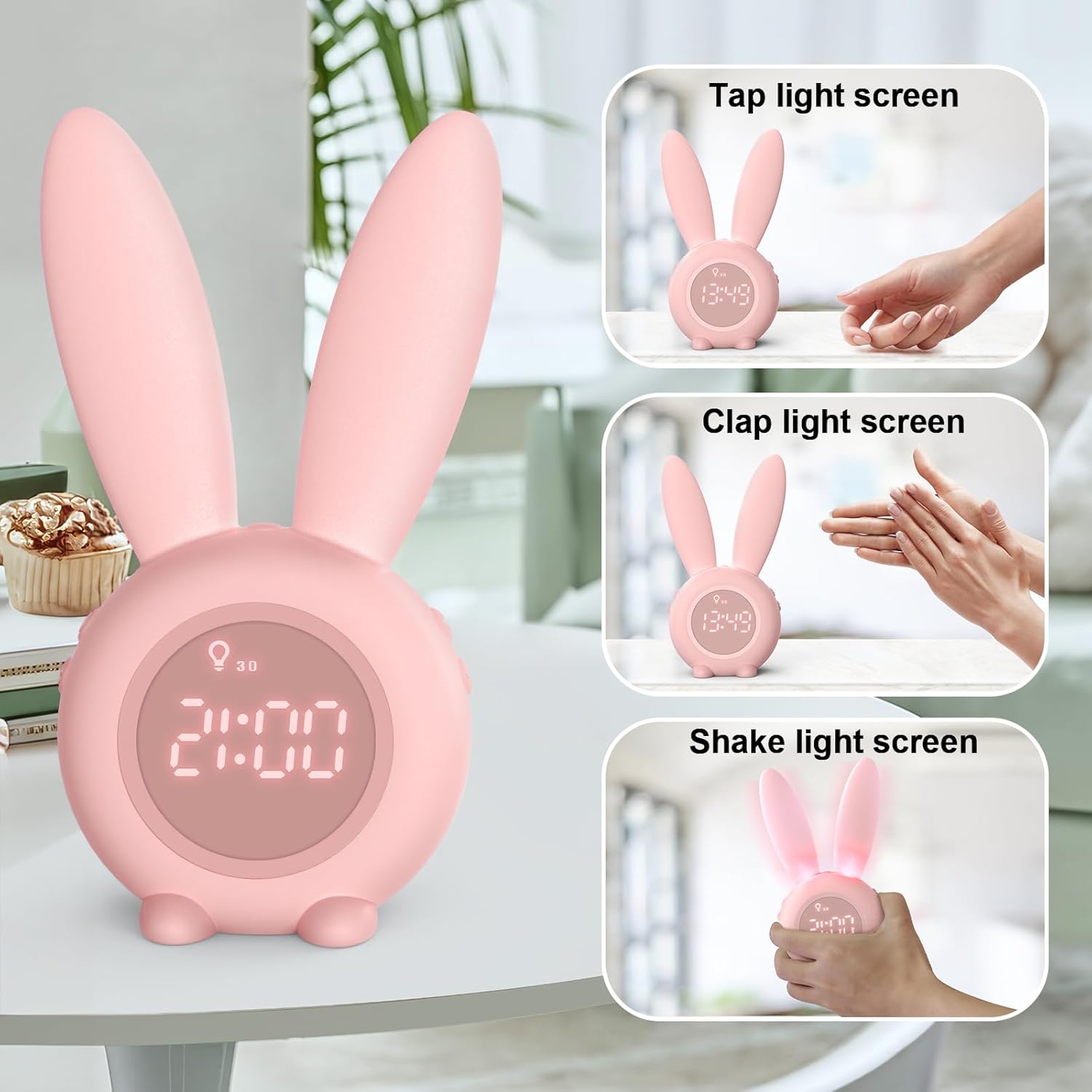
Figure 5.1: Screen Activation Methods
This image shows three ways to activate the alarm clock's display: by tapping the surface it rests on, by clapping your hands nearby, or by gently shaking the clock itself.
6. Иштөө нускамалары
6.1 Убакытты жана датаны орнотуу
- Locate the "Time Setting" button (often marked with a clock icon or "SET").
- Press and hold the button to enter time setting mode.
- Use the "+" and "-" buttons to adjust the hour, then press the "SET" button to confirm and move to minutes.
- Repeat for minutes, then date (year, month, day).
- To switch between 12-hour and 24-hour format, press the "SET" button briefly when the time is displayed.
- үчүн view the date, briefly press the "Time Setting" button.

Figure 6.1: 12h/24h Time Format Selection
This image demonstrates the alarm clock's ability to display time in either 12-hour (AM/PM) or 24-hour format, which can be toggled via settings.

Figure 6.2: Time Setting Button
Жакын план view showing the specific button used for adjusting the time settings on the alarm clock.
6.2 Setting Alarms (R1, R2)
The alarm clock supports two independent alarms (R1 and R2).
- Press the "Alarm Setting" button (often marked with an alarm icon) to select R1 or R2.
- Press and hold the "Alarm Setting" button to enter alarm time setting mode for the selected alarm.
- Use the "+" and "-" buttons to adjust the hour, then press the "Alarm Setting" button to confirm and move to minutes.
- мүнөткө кайталаъыз.
- After setting the time, you can select the ringtone and volume.
- To activate/deactivate an alarm, briefly press the "Alarm Setting" button until the alarm icon appears/disappears on the display.

Figure 6.3: Alarm R1 and R2 Settings
This image illustrates the display when setting Alarm 1 (R1) and Alarm 2 (R2), indicating the ability to configure two separate wake-up times.

Figure 6.4: Alarm Setting Button
Жакын план view showing the specific button used for adjusting the alarm settings on the alarm clock.
6.3 Ringtone Selection and Volume
The alarm clock offers 6 different ringtones. During alarm setting, or by pressing a dedicated ringtone button, you can cycle through the available sounds. Use the volume control buttons (often "+" and "-") to adjust the alarm volume to your preference.
6.4 Timed Night Light and Sleep Function
The rabbit ears can function as a timed night light. You can set the night light to stay on for 30 or 60 minutes, providing a soft, breathing light that gradually dims, ideal for accompanying sleep without disturbing it.
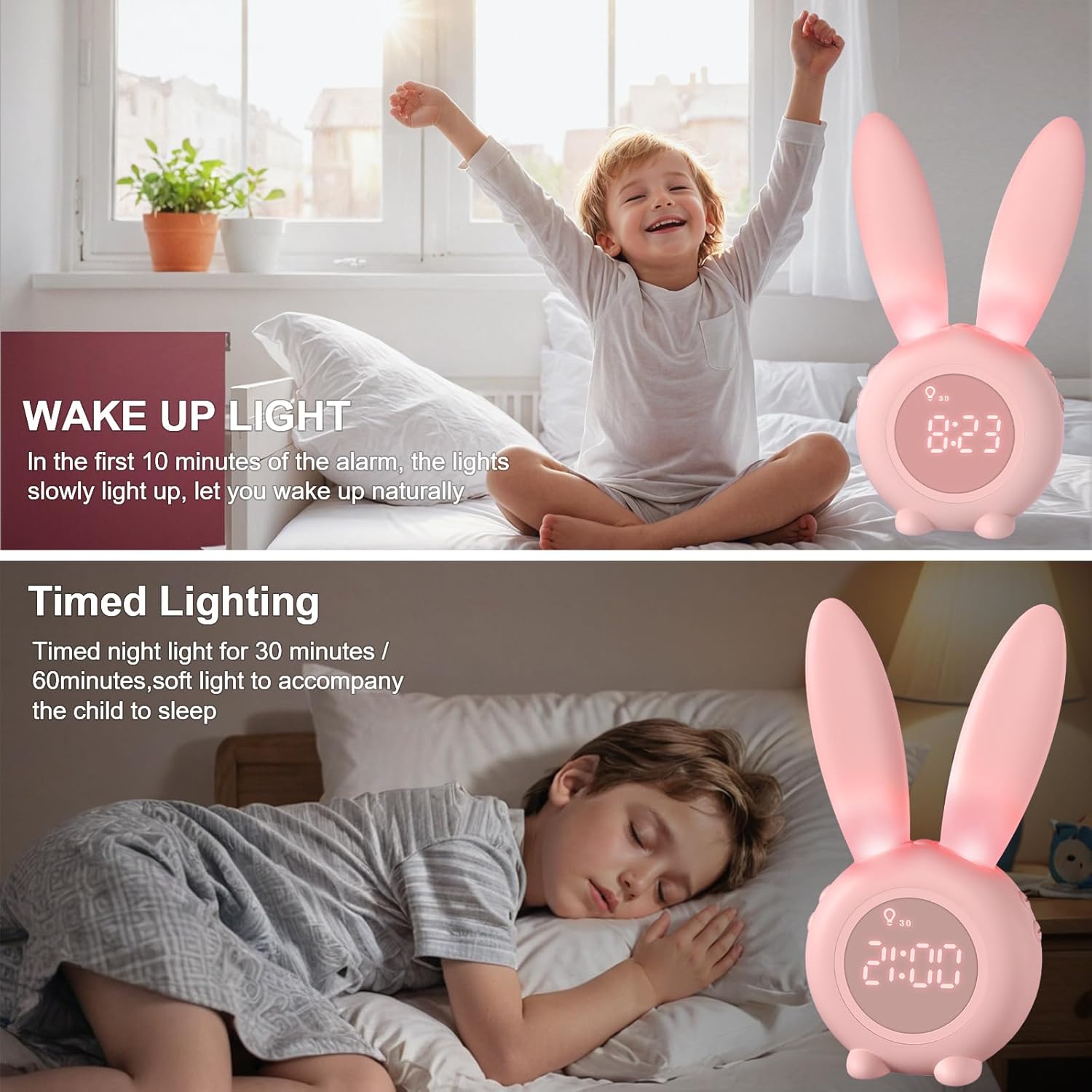
Figure 6.5: Timed Lighting Feature
This image illustrates the alarm clock's timed lighting feature, where the rabbit ears emit a soft glow for a set duration (30 or 60 minutes) to aid sleep.
6.5 Wake-Up Light Function
For a more natural awakening, the alarm clock features a wake-up light. If an alarm is set between noon and 8 AM, the light will slowly illuminate 10 minutes before the alarm sounds, gradually brightening to help you wake up gently.
6.6 Sleep Sound Machine
The alarm clock includes a sleep sound machine with 6 soothing sounds to help you relax and fall asleep. These sounds include waves, violin, birdsong, wind, ticking, and piano. Refer to the specific button for activating and cycling through these sounds.

Figure 6.6: Sleep Sound Machine Features
This image displays the alarm clock's sleep sound machine functionality, listing six available sleep sounds (waves, violin, birdsong, wind, ticking, piano) and sleep timer options (5, 30, 60 minutes).
6.7 Артка эсептөө таймери
The alarm clock features a countdown timer function, adjustable from 1 to 59 minutes. This is useful for short tasks or reminders. After the countdown, the clock will provide a reminder with 3 points and a long-term dazzling reminder to prevent forgetting important tasks.

Figure 6.7: Countdown Timer Display
This image shows the alarm clock's display indicating "DP1" and "DP2" modes, which are likely related to the countdown timer or other display settings.
6.8 Температура дисплейи
The digital display shows the current ambient temperature in Celsius. You can switch to Fahrenheit by pressing a specific button (refer to the device's side buttons or manual for exact control).

Figure 6.8: Temperature Unit Selection
This image demonstrates the alarm clock's capability to display temperature in both Celsius (°C) and Fahrenheit (°F) units.
7. Техникалык тейлөө
- Аппаратты жумшак, кургак чүпүрөк менен тазалаңыз. Абразивдүү тазалагычтарды же эриткичтерди колдонбоңуз.
- Заряддоо портунда чаң жана таштанды жок экенин текшериңиз.
- Ойготкуч саатты узак убакытка колдонбогондо салкын, кургак жерде сактаңыз.
8. Кыйынчылыктарды
| Көйгөй | Мүмкүн себеп | Чечим |
|---|---|---|
| Display is off or unresponsive. | Battery is low or dead; display is in power-saving mode. | Charge the alarm clock. Tap, clap, or shake the device to activate the display. |
| Ойготкуч угулбайт. | Alarm is not activated; volume is too low; incorrect alarm time set. | Ensure the alarm is enabled (icon visible). Increase alarm volume. Verify alarm time. |
| Температураны окуу туура эмес көрүнөт. | Device placed near heat sources or in direct sunlight. | Relocate the alarm clock to a stable ambient temperature. Note that the temperature sensor provides an approximation. |
| Voice/Shake control not working. | Microphone blocked; ambient noise too high; feature deactivated. | Ensure the microphone opening is clear. Try in a quieter environment. Check settings if feature can be toggled. |
| Батарея бат эле түгөнөт. | Frequent use of light/sound features; aging battery. | Reduce continuous use of light and sound features. Ensure full charge cycles. |
9. Техникалык шарттар
| Өзгөчөлүк | Деталь |
|---|---|
| Бренд | HomeAlexa |
| Модель номери | XR-MM-C03 |
| Өлчөмдөрү (L x W x Y) | 9.5 x 3.81 x 18 см (3.74 x 1.5 x 7.08 дюйм) |
| Салмагы | 323 грамм (0.71 фунт) |
| Түс | A-rose Pâle (Pale Pink) |
| Материал | Акрилонитрил бутадиен стирол (ABS) |
| Батарея | 1 Литий-ион (кошулган) |
| Power Source | Cable Electric (USB charging) |
| Өзгөчөлүктөр | Temperature Display, Alarm, Timed Night Light, Wake-up Light, Sleep Sound Machine, Voice/Shake Control, Magnetic Mounting |
| Орнотуу түрү | Стол орнотуу |
| Келип чыккан өлкө | Кытай |
10. Кепилдик жана колдоо
For warranty information and customer support, please refer to the product packaging or contact your retailer. Keep your purchase receipt as proof of purchase.
For further assistance, please visit the Homealexa official webсайтка же кардарларды тейлөө бөлүмүнө кайрылыңыз.


