1. Киришүү
Сатып алганыңыз үчүн рахматasing the OREI DVD-Z9H Region Free HDMI DVD Player. This manual provides essential information for the proper setup, operation, and maintenance of your new device. Please read these instructions thoroughly before use and retain them for future reference.
The OREI DVD-Z9H is designed to play DVDs from any region (0-6) and supports both PAL and NTSC formats, with built-in conversion. It offers 1080p upscaling for enhanced video quality and includes a USB input for media playback.
2. Коопсуздук маалыматы
- Электр камсыздоо: Ensure the player is connected to a power source within the specified voltage диапазону (100-240V).
- Вентиляция: Желдетүү тешиктерин жаппаңыз. Аба агымынын туура болушу үчүн ойноткучтун айланасында жетиштүү орун калтырыңыз.
- Нымдуулук: Keep the player away from water or excessive moisture. Do not operate with wet hands.
- Тазалоо: Use a soft, dry cloth for cleaning. Avoid liquid or aerosol cleaners.
- Тейлөө: Do not attempt to service the player yourself. Refer all servicing to qualified personnel.
- Лазердик коопсуздук: This product utilizes a laser. Do not open the player casing as it may expose you to invisible laser radiation.
3. Пакеттин мазмуну
Пакетте бардык буюмдар бар экенин текшериңиз:
- 1 x OREI DVD-Z9H HDMI DVD Player
- 1 х алыстан башкаруу (батареялар киргизилген эмес)
- 1 x AV Cable (RCA)
- 1 х Инструкция (бул документ)
Note: An HDMI cable is not included and must be purchased separately for HDMI connectivity.
4. Продукт бүтүп калдыview
4.1. Алдыңкы панель
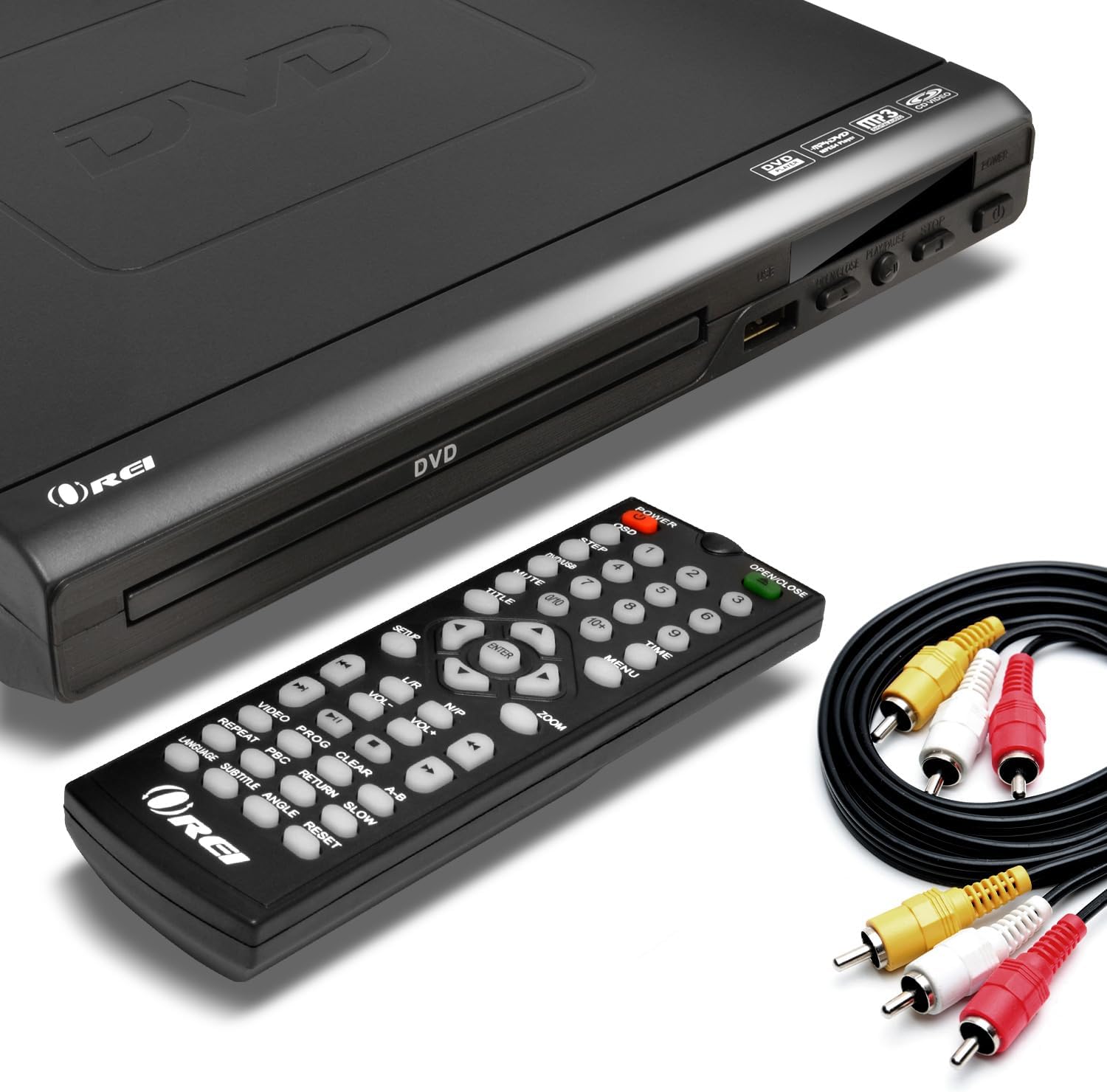
Image: The OREI DVD-Z9H DVD player, its remote control, and included AV cables. The player features a disc tray, power button, and USB port on the front.
- Диск лоток: Бул жерге DVD же CD дисктерин салыңыз.
- USB порт: Connect a USB flash drive for media playback.
- Кубат баскычы: Ойноткучту күйгүзөт же өчүрөт.
- Play/Pause, Stop, Open/Close Buttons: Basic control functions.
4.2. Арткы панель

Image: The rear panel of the OREI DVD-Z9H DVD player, displaying the HDMI output, composite video/audio (RCA) outputs, coaxial audio output, and power input. Labels indicate model number DVD-Z9H and power specifications.
- HDMI чыгышы: Connects to a TV or display for high-definition video and audio.
- Composite Video/Audio Output (RCA x3): Connects to older TVs using red, white, and yellow RCA cables.
- Coaxial Audio Output: For digital audio connection to a compatible receiver.
- Кубат киргизүү: Connect the power cord here.
4.3. Алыстан башкаруу

Image: The OREI DVD-Z9H DVD player with its remote control positioned above it. The remote features numerous buttons for playback, menu navigation, volume, and special functions.
The remote control provides full functionality for the DVD player. Insert two AAA batteries (not included) into the remote before use. Key functions include:
- Күч: On/Off.
- Ачык жабык: Диск тактасын ачат жана жабат.
- Сандык баскычтар (0-9): For direct track selection.
- Navigation (Up/Down/Left/Right, Enter): Меню багыттоо үчүн.
- Play, Pause, Stop, Fast Forward, Rewind: Playback controls.
- Көлөм +/-: Аудио чыгаруу деңгээлин тууралайт.
- Жайгашуу: Системанын жөндөөлөр менюсуна кирет.
- Subtitle, Audio, Angle: Controls for DVD features.
- Чоңойтуу: Adjusts screen zoom level.
5. Орнотуу
5.1. Телевизорго туташуу
Төмөнкү туташуу ыкмаларынын бирин тандаңыз:
- HDMI туташуу (HD үчүн сунушталат):
- Connect one end of an HDMI cable (not included) to the HDMI OUT port on the back of the DVD player.
- Connect the other end of the HDMI cable to an HDMI IN port on your television.
- Алыстан башкаруу пультун колдонуп, телевизоруңуздагы тиешелүү HDMI киргизүүсүн тандаңыз.

Image: A diagram illustrating how to connect the OREI DVD-Z9H DVD player to a TV using an HDMI cable and how to connect a USB flash drive to the player.
- Composite Video/Audio Connection (Standard Definition):
- Connect the yellow plug of the supplied AV cable to the VIDEO OUT port on the DVD player.
- Connect the red and white plugs of the AV cable to the AUDIO OUT (R/L) ports on the DVD player.
- Connect the other ends of the AV cable to the corresponding VIDEO IN and AUDIO IN ports on your television.
- Сыналгыңыздагы тиешелүү AV киргизүүсүн тандаңыз.
5.2. Power Connection
- Plug the power cord into the power input on the rear of the DVD player.
- Электр шнурунун экинчи учун стандарттуу электр розеткасына сайыңыз.
5.3. Баштапкы орнотуу
After connecting and powering on the player, you may need to configure basic settings:
- басыңыз ЖАЙГАШУУ алыстан башкаруудагы баскыч.
- Navigate through the menu to set preferences such as:
- Тил: Select your preferred menu and audio language.
- TV системасы: Choose between NTSC or PAL based on your region (the player has built-in conversion).
- Аспект катышы: Select 16:9 for widescreen TVs or 4:3 for standard TVs.
- Видеонун сапаты: Adjust brightness, contrast, etc.
- Басыңыз ЖАЙГАШУУ кайра менюдан чыгуу үчүн.
6. Иштөө нускамалары
6.1. Playing a DVD/CD
- басыңыз КҮЧ ойноткучту күйгүзүү үчүн баскычты басыңыз.
- басыңыз АЧУУ/ЖАБУУ диск баскычын ачуу үчүн баскыч.
- DVD же CD дискти диск лотокко этикеткасы менен өйдө каратып салыңыз.
- басыңыз АЧУУ/ЖАБУУ лотокту жабуу үчүн кайра басыңыз.
- Ойноткуч автоматтык түрдө ойнотууну баштайт же диск менюсун көрсөтөт.
- Use the remote control's navigation and playback buttons (ОЙНОТУУ, ТЫНДЫРУУ, ТОКТОТУУ, FF, REW) ойнотууну башкаруу.

Image: The OREI DVD-Z9H DVD player and its remote control in front of a television displaying a movie scene, illustrating the player's ability to play DVDs from any region.
6.2. USB медиа ойнотуу
The player supports playback of video, picture, and music fileUSB флешкасынан.
- Insert a USB 2.0 flash drive (up to 16GB) into the USB port on the front of the player.
- The player should automatically detect the USB drive and display a menu for file selection. If not, press the USB button on the remote (if available) or navigate to the USB input source.
- Use the navigation buttons to browse files жана басыңыз ENTER тандоо жана ойнотуу үчүн.
Колдоого алынган форматтар: DVD, AVI, CD, CD-R/RW, DVD-R/RW, DVD+R/RW, Vc1, MPEG1, MPEG-2, MP3.
Note: The HDMI DVD player can only support USB 2.0 Flash drives up to 16 GB and plays video files up to 720p via USB. Blu-ray discs are not supported.

Image: The OREI DVD-Z9H DVD player positioned below a TV displaying a high-definition image. Icons represent various supported media formats including DVD, AVI, CD, CD-R/RW, DVD-R/RW, VCI, MPEG1, MPEG-2, and MP3, highlighting its 1080p upscaling capability.
7. Техникалык тейлөө
7.1. Ойноткучту тазалоо
- Unplug the player from the power outlet before cleaning.
- Use a soft, dry, lint-free cloth to wipe the exterior of the player.
- Суюк тазалоочу каражаттарды, абразивдүү жаздыкчаларды же химиялык эриткичтерди колдонбоңуз, анткени алар бетине зыян келтириши мүмкүн.
7.2. Disc Care
- Оюн аянтында манжа издери калбашы үчүн дисктерди четтеринен кармаңыз.
- Keep discs clean and free from scratches. Wipe discs gently from the center outwards with a soft, dry cloth if cleaning is necessary.
- Дисктерди колдонбогон учурларда сактаңыз.
8. Кыйынчылыктарды
If you encounter issues with your OREI DVD-Z9H player, refer to the following common problems and solutions:
| Көйгөй | Мүмкүн себеп | Чечим |
|---|---|---|
| Күч жок | Электр шнуру туташтырылган эмес; Розетка иштебейт | Ensure power cord is securely plugged into player and outlet; Test outlet with another device. |
| Телевизордо сүрөт жок | Incorrect TV input selected; Loose video cable connection | Select the correct HDMI or AV input on your TV; Check that HDMI or AV cables are securely connected. |
| Үн жок | TV/player volume too low; Loose audio cable connection; Incorrect audio settings | Increase volume on TV and player; Check audio cable connections; Verify audio settings in the player's setup menu. |
| Диск ойнобой жатат / "Диск жок" катасы | Disc inserted incorrectly; Disc is dirty or scratched; Unsupported disc format | Insert disc with label side up; Clean disc with a soft cloth; Ensure disc is a supported format (not Blu-ray). |
| Пульт иштебей жатат | Батареялар түгөнгөн же туура эмес салынган; Пульт менен ойноткучтун ортосундагы тоскоолдук | Replace batteries with new ones, ensuring correct polarity; Remove any objects blocking the remote's signal path to the player's sensor. |
| USB ойнотуу көйгөйлөрү | Unsupported USB drive size/type; Unsupported file format; Video resolution too high | Use a USB 2.0 flash drive up to 16GB; Ensure files are in supported formats (e.g., AVI, MPEG); Video resolution should not exceed 720p. |
9. Техникалык шарттар
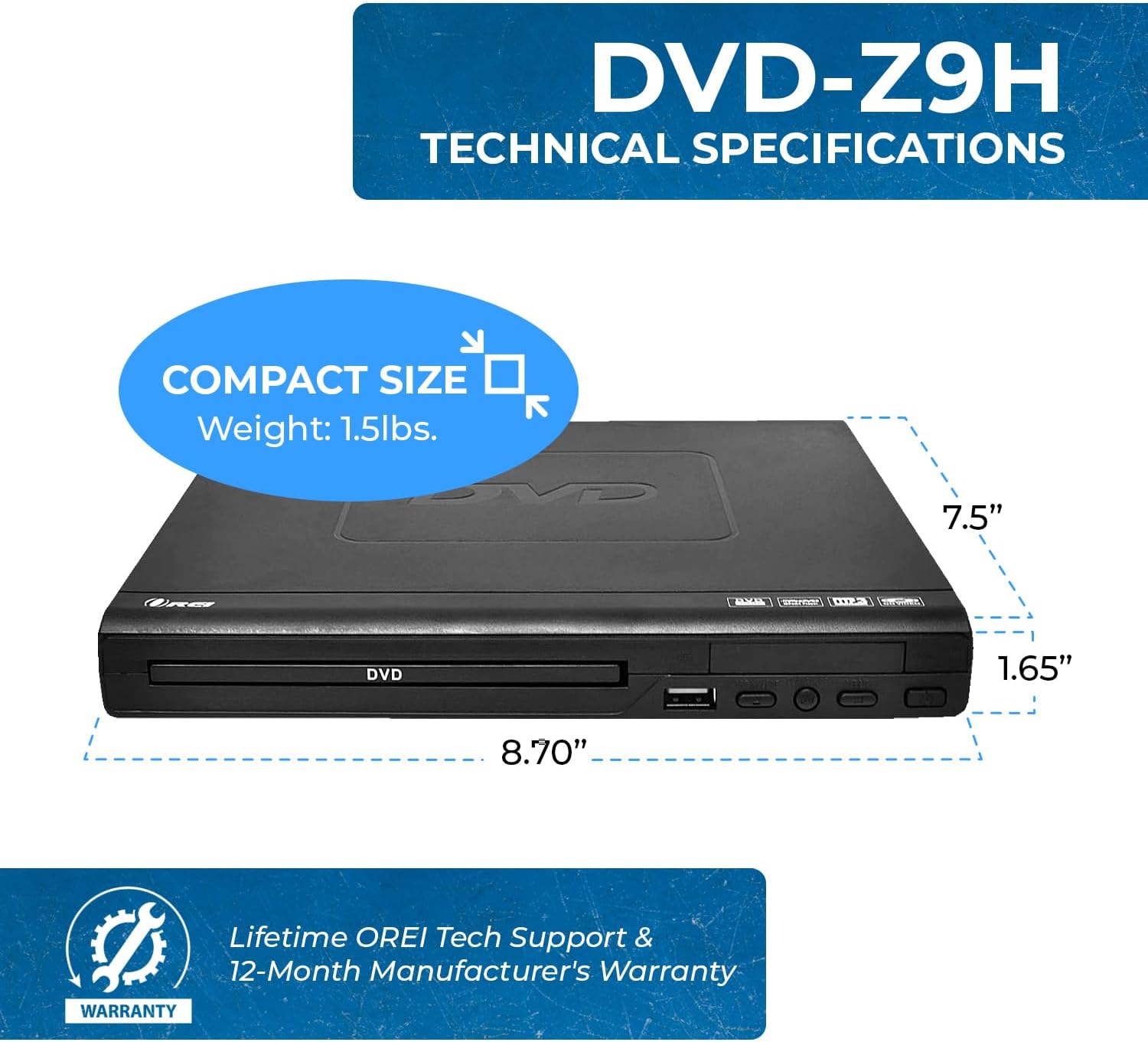
Image: The OREI DVD-Z9H DVD player shown with its compact dimensions: 8.70 inches (length), 7.5 inches (width), and 1.65 inches (height), and a weight of 1.5 lbs.
- Модел: DVD-Z9H
- Өлчөмдөрү (L x W x Y): Болжол менен 8.70 x 7.5 x 1.65 дюйм (22.1 x 19.05 x 4.19 см)
- Салмагы: Болжол менен 1.5 фунт (0.68 кг)
- Медиа түрү: CD, DVD (Does not support Blu-ray discs)
- Колдоого алынган форматтар: DVD, AVI, CD, CD-R/RW, DVD-R/RW, DVD+R/RW, Vc1, MPEG1, MPEG-2, MP3
- Чечим: 1080p (upscaling)
- Байланыш: HDMI, RCA (Composite Video/Audio), Coaxial Audio, USB 2.0
- USB колдоо: Up to 16GB USB 2.0 flash drives, video files up to 720p
- Тtage: Worldwide Dual Voltage (100-240 В)
- Өзгөчөлүктөр: Region Free (0-6), Built-in PAL/NTSC Converter
10. Кепилдик жана колдоо
The OREI DVD-Z9H comes with a 1 жылдык өндүрүүчүнүн кепилдиги from the date of purchase. OREI also offers a 30-day money-back guarantee.
For technical support, warranty claims, or any product-related inquiries, please contact OREI customer service. Refer to the contact information provided with your purchase or visit the official OREI webжардам үчүн сайт.


