1. Киришүү
The GAMEMAX PWM+Rainbow HUB V1.61 is designed to centralize control over your PC's cooling fans and RGB lighting. This hub provides both PWM fan speed control and a variety of Rainbow RGB lighting effects, enhancing both performance and aesthetics of your computer system. It supports automatic and manual control options, brightness adjustment, and compatibility with motherboard RGB synchronization technologies.
2. Коопсуздук маалыматы
- Орнотуудан же техникалык тейлөөдөн мурун компьютериңиздин тутуму өчүрүлгөндүгүн жана розеткадан суурулгандыгын текшериңиз.
- Handle the hub with care to avoid damage to electronic components.
- Do not expose the hub to moisture or extreme temperatures.
- Only use the provided or recommended cables for connections.
- Орнотуу кадамдарына ишенбесеңиз, квалификациялуу техникке кайрылыңыз.
3. Продукт бүтүп калдыview
The GAMEMAX PWM+Rainbow HUB V1.61 integrates multiple fan and RGB lighting connections into a single unit, powered by a SATA connector. It features built-in lighting programs and offers options for external control via a compatible motherboard.
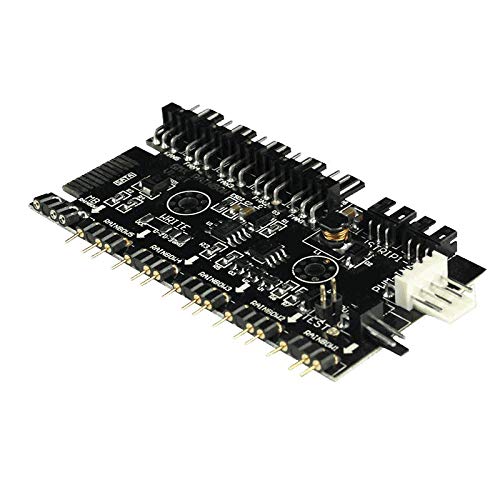
3.1-сүрөт: Жогорудан төмөн view of the GAMEMAX PWM+Rainbow HUB V1.61. This image displays the layout of the hub, including multiple fan headers at the top, Rainbow RGB headers at the bottom, a SATA power input on the left, and PWM-IN and MB Rainbow connectors on the right side.
Негизги өзгөчөлүктөрү:
- Over 100 built-in lighting programs.
- 7 dynamic color options.
- Автоматтык жана кол менен башкаруу режимдери.
- Adjustable lighting mode, color, and brightness.
- SATA power supply for stable operation.
- Enables PWM fan speed control for standard 3-pin fans when connected to the hub.
- Compatible with programmable Rainbow RGB interfaces and SYNC AURA motherboards.
- Supports connection of ASUS light strips.
4. Орнотуу жана орнотуу
Follow these steps to properly install and connect your GAMEMAX PWM+Rainbow HUB V1.61.
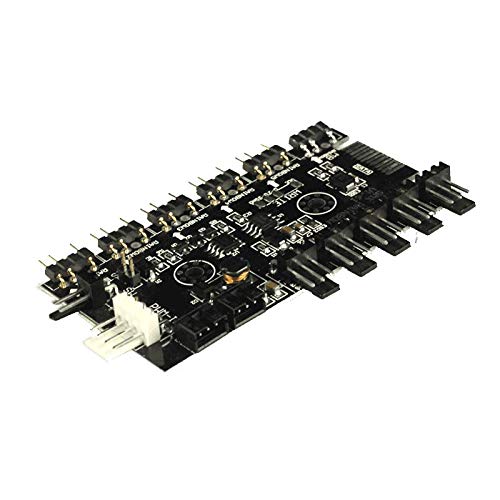
4.1-сүрөт: Бурчтуу view of the GAMEMAX PWM+Rainbow HUB V1.61, illustrating the various connection ports. This perspective helps in identifying where to connect fans, RGB devices, and power cables.
- Mounting the Hub: Choose a suitable location inside your PC case, away from heat sources and obstructions. The hub can be secured using double-sided adhesive tape (not included) or screws if mounting points are available.
- SATA кубатын туташтырыңыз: Locate the SATA power input on the hub (labeled 'SATA') and connect it to an available SATA power connector from your power supply unit (PSU). This provides power to both the fans and RGB lighting.
- Connect PWM Fans: Connect your PC fans to the fan headers on the hub (labeled 'FANS'). The hub supports multiple fans. Even 3-pin fans connected to these headers will benefit from PWM speed control functionality.
- Connect Rainbow RGB Devices: Connect your Rainbow RGB fans, LED strips, or other compatible devices to the Rainbow headers on the hub (labeled 'RAINBOW1' through 'RAINBOWX'). Ensure correct pin orientation.
- Connect to Motherboard (Optional - for Motherboard Control):
- PWM-IN: For motherboard-controlled fan speed, connect the 'PWM-IN' port on the hub to a 4-pin PWM fan header on your motherboard.
- MB Rainbow: For motherboard-controlled RGB lighting synchronization (e.g., ASUS Aura Sync), connect the 'MB Rainbow' port on the hub to a compatible 3-pin 5V addressable RGB header on your motherboard. Do not connect to a 12V RGB header as this may damage the hub and connected devices.
5. Иштөө нускамалары
Once installed, the GAMEMAX PWM+Rainbow HUB V1.61 offers various ways to control your fans and RGB lighting.
5.1. Built-in Program Control
The hub features over 100 built-in lighting programs and 7 dynamic colors. If not connected to a motherboard for sync, the hub will cycle through these programs automatically or can be controlled manually via a dedicated button on the hub (if present, refer to physical hub for button location, often labeled 'MODE' or 'COLOR').
- Режимди тууралоо: Press the mode button to cycle through different lighting effects.
- Түс жөндөө: Press the color button to change static colors or color patterns within dynamic modes.
- Жарыктыкты жөндөө: Press the brightness button (if available) to increase or decrease the intensity of the lighting.
5.2. Motherboard Synchronization (SYNC AURA)
If the 'MB Rainbow' port is connected to a compatible 3-pin 5V addressable RGB header on your motherboard, you can control the lighting effects using your motherboard's RGB software (e.g., ASUS Aura Sync). This allows for synchronized lighting across all compatible components in your system.
- Install the appropriate RGB control software for your motherboard.
- Ensure the software detects the connected RGB devices.
- Use the software interface to select lighting modes, colors, and effects.
5.3. Желдетүүчү ылдамдыкты көзөмөлдөө
When the 'PWM-IN' port is connected to a motherboard's PWM header, the fan speeds of all connected fans will be controlled by the motherboard's fan control settings or software. This allows for dynamic fan speed adjustments based on system temperature.
6. Техникалык тейлөө
To ensure optimal performance and longevity of your GAMEMAX PWM+Rainbow HUB V1.61:
- Keep the hub free from dust accumulation. Periodically use compressed air to clean the hub and surrounding areas.
- Ensure good airflow within your PC case to prevent overheating of components, including the hub.
- Avoid pulling on cables directly; always grasp the connector when disconnecting.
7. Кыйынчылыктарды
If you encounter issues with your hub, refer to the following common problems and solutions:
- Fans or RGB devices not powering on:
- Check if the SATA power cable is securely connected to both the hub and the PSU.
- Ensure your PSU is providing power.
- Verify that individual fans and RGB devices are correctly plugged into the hub's headers.
- RGB lighting not working or incorrect colors:
- Confirm that RGB devices are connected to the correct 'RAINBOW' headers and that pin orientation is correct.
- If using motherboard sync, ensure the 'MB Rainbow' cable is connected to a 3-pin 5V addressable RGB header, not a 12V RGB header.
- Check your motherboard's RGB software settings for proper configuration.
- If using built-in control, try cycling through modes and colors using the hub's physical buttons.
- Fan speed not controllable:
- Ensure the 'PWM-IN' cable is connected from the hub to a 4-pin PWM fan header on your motherboard.
- Check your motherboard's BIOS/UEFI settings or fan control software to ensure PWM control is enabled and configured correctly for the connected header.
8. Техникалык шарттар
| Өзгөчөлүк | Деталь |
|---|---|
| Модел | PWM+Rainbow HUB V1.61 |
| Бренд | GAMEMAX |
| Power Input | SATA Power Connector |
| Fan Бөрктөр | Multiple (typically 6, refer to product image) |
| RGB аталыштары | Multiple Rainbow RGB (typically 6-8, refer to product image) |
| Motherboard Sync | PWM-IN (4-pin), MB Rainbow (3-pin 5V ARGB) |
| Камтылган программалар | >100 modes |
| Dynamic Colors | 7 |
| Өлчөмдөр | 16.26 x 13.97 x 0.25 см (болжол менен) |
| Салмагы | 45 г (болжол менен) |
9. Кепилдик жана колдоо
Кепилдик жөнүндө маалымат жана техникалык колдоо алуу үчүн, расмий GAMEMAX сайтына кайрылыңыз webсайтка же сатуучуга кайрылыңыз. Ар кандай кепилдик дооматтары үчүн сатып алганыңыздын далилин сактаңыз.


