1. Киришүү
This manual provides essential instructions for the safe and effective use of your Unitech MS652 800mAh rechargeable battery. Please read this manual thoroughly before using the battery to ensure proper operation and to prevent damage or injury.
2. Продукт бүтүп калдыview
The Unitech MS652 800mAh battery is a genuine replacement or spare battery designed specifically for the Unitech MS652 ring scanner. It provides reliable power to ensure continuous operation of your device.
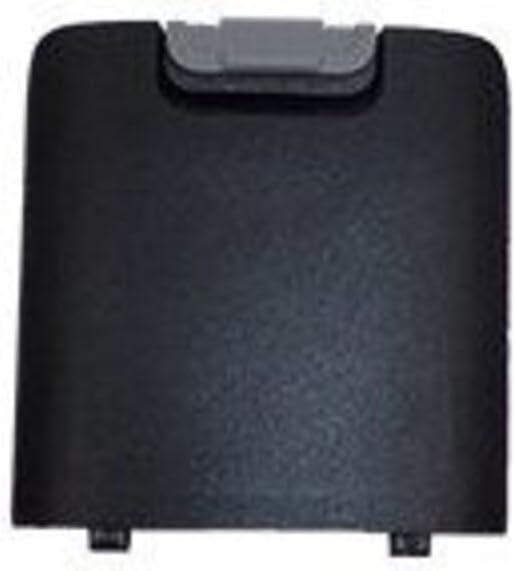
1-сүрөт: Unitech MS652 800mAh Battery. This image shows the black rectangular battery pack with a grey latch mechanism at the top, designed to fit into the Unitech MS652 ring scanner.
3. Орнотуу жана орнотуу
Follow these steps to install the battery into your Unitech MS652 ring scanner:
- Түзмөктү өчүрүү: Ensure your Unitech MS652 ring scanner is completely powered off before attempting battery installation or removal.
- Батарея бөлүмүн табыңыз: Identify the battery compartment on your MS652 scanner. Refer to your scanner's user manual for exact location if unsure.
- Ачык бөлүм: Carefully open the battery compartment cover. This may involve sliding a latch or unscrewing a small screw, depending on the scanner model.
- Батарея салыңыз: Align the battery with the contacts inside the compartment. Gently push the battery into place until it clicks or sits securely. Ensure the grey latch mechanism on the battery aligns with the scanner's locking mechanism.
- Жабуу бөлүм: Батарея уясынын капкагын ордуна коюп, аны бекитиңиз.
- Баштапкы төлөм: For optimal performance, fully charge the battery before its first use.
4. Иштөө нускамалары
The Unitech MS652 800mAh battery is designed for seamless integration with your MS652 ring scanner.
- Заряддоо: Use only the charger supplied or approved by Unitech for the MS652 scanner. Connect the scanner with the installed battery to the charger. The charging indicator on the scanner will typically show the charging status.
- Биринчи колдонуу: It is recommended to fully charge the battery before its initial use to calibrate the battery meter and ensure maximum capacity.
- Кадимки колдонуу: The battery will power your MS652 scanner during operation. Monitor the battery level indicator on your scanner to determine when recharging is necessary.
- Батареянын иштөө мөөнөтү: Battery life varies depending on usage patterns, scanner settings, and environmental conditions.
5. Техникалык тейлөө
Батареяңыздын иштөө мөөнөтүн туура тейлөө төмөнкүлөрдү узартышы мүмкүн:
- Кадимки заряддоо: Avoid completely draining the battery frequently. Recharge it when the device indicates low power.
- Сактагыч: If storing the battery for an extended period, charge it to approximately 50% and store it in a cool, dry place (between 0°C and 25°C or 32°F and 77°F). Avoid extreme temperatures.
- Тазалоо: Keep battery contacts clean. Use a dry, soft cloth to wipe away any dust or debris.
- Физикалык зыянды болтурбоо: Батареяны түшүрбөңүз, тешип албаңыз же бөлбөңүз.
6. Кыйынчылыктарды
Батареяңызга байланыштуу көйгөйлөргө туш болсоңуз, төмөнкүлөрдү карап көрүңүз:
- Батарея заряддалбай жатат:
- Ensure the charger is properly connected to both the power source and the scanner.
- Verify that the charger is the correct one for your Unitech MS652 scanner.
- Батареяда же заряддоочу түзүлүштө кандайдыр бир көрүнүктүү бузулуулар бар-жогун текшериңиз.
- Clean the battery contacts on both the battery and the scanner.
- Кыска батареянын иштөө мөөнөтү:
- Колдонуудан мурун батареянын толук заряддалганын текшериңиз.
- Reduce screen brightness or disable unnecessary features on the scanner to conserve power.
- If the battery is old, its capacity may have degraded over time. Consider replacing it.
- Түзмөк күйбөй жатат:
- Confirm the battery is correctly installed and fully charged.
- Try a different, known-good battery if available.
If problems persist, contact Unitech customer support for assistance.
7. Техникалык шарттар
| Өзгөчөлүк | Деталь |
|---|---|
| Бренд | Unitech |
| Моделдин шайкештиги | Unitech MS652 Ring Scanner |
| Батарея түрү | Зарядкалуу |
| Кубаттуулугу | 800 мАч (миллиamp Саат) |
| Бөлүмдүн номери | 1400-900050G |
| Элемент Салмагы | Болжол менен 3.92 унция |
| Бирдик саны | 1 Сан |
8. Коопсуздук маалыматы
Жарааттарды же зыяндарды болтурбоо үчүн төмөнкү коопсуздук чараларын сактаңыз:
- Бекитилген заряддагычтарды колдонуңуз: Only use chargers specifically designed and approved for the Unitech MS652 scanner and its battery. Using incompatible chargers can cause fire, explosion, or other hazards.
- Ашыкча температурадан сактаныңыз: Do not expose the battery to extreme heat (e.g., direct sunlight, near heaters) or cold. High temperatures can cause the battery to overheat, swell, or explode. Low temperatures can significantly reduce battery performance.
- Бөлүнбөңүз: Never attempt to disassemble, puncture, or modify the battery. This can lead to short circuits, fire, or exposure to hazardous materials.
- Туура жок кылуу: Do not dispose of batteries in household waste. Follow local regulations for proper disposal of rechargeable batteries. Many retailers and recycling centers offer battery recycling programs.
- Суудан алыс болуңуз: Do not immerse the battery in water or expose it to excessive moisture.
- Балдардан алыс болуңуз: Батареяларды балдар жетпеген жерде сактаңыз.
- Этияттык менен мамиле кылуу: Avoid dropping the battery or subjecting it to strong impacts.
9. Кепилдик жана колдоо
For warranty information or technical support regarding your Unitech MS652 800mAh battery or compatible device, please refer to the documentation provided with your Unitech MS652 ring scanner or visit the official Unitech website. You may also contact Unitech customer service directly for assistance.
Unitech Official Webсайт: www.unitech.com


