1. Киришүү
Thank you for choosing the KLARSTEIN DryFy Connect 80 Dehumidifier. This manual provides essential information for the safe and efficient operation, maintenance, and troubleshooting of your appliance. Please read these instructions thoroughly before first use and keep them for future reference.
The DryFy Connect 80 is designed to effectively reduce humidity in indoor spaces, helping to prevent mold, mildew, and other moisture-related issues. Its advanced features include Wi-Fi connectivity for app control, adjustable humidity settings, and a continuous drainage option.
2. Коопсуздук нускамалары
WARNING: Please read all safety warnings and instructions carefully before using this appliance to avoid electric shock, fire, or serious injury.
- кубат менен камсыз кылуу Voltage рейтинг белгисинде көрсөтүлгөн.
- Нымдандыргычты шнуру же сайгычы бузулган абалда иштетпеңиз. Эгерде электр шнуру бузулган болсо, коркунучту болтурбоо үчүн аны өндүрүүчү, анын тейлөө агенти же ушул сыяктуу квалификациялуу адамдар алмаштырышы керек.
- Түзмөктү ар дайым туруктуу, тегиз бетке коюңуз.
- Do not block the air inlet or outlet. Maintain at least 20 cm (8 inches) clearance around the unit for proper airflow.
- Аба желдеткичтерине нерселерди салбаңыз.
- Unplug the appliance before cleaning, moving, or performing any maintenance.
- Do not use the appliance in areas where flammable gases or liquids are stored.
- Бул шайман физикалык, сезүү же акыл-эс жөндөмү начар же тажрыйбасы жана билими жок адамдар (анын ичинде балдар) үчүн, эгерде алардын коопсуздугуна жооптуу адам тарабынан көзөмөлсүз же шайманды колдонуу боюнча көрсөтмө болбосо, колдонууга арналбайт.
- Балдар шайман менен ойнобошу үчүн аларды көзөмөлгө алуу керек.
- Шайманды сыртта колдонбоңуз.
- Do not tilt the unit more than 45 degrees or turn it upside down.
3. Продукт бүтүп калдыview
The KLARSTEIN DryFy Connect 80 Dehumidifier is a powerful and efficient appliance designed for optimal humidity control. Below is an image illustrating the main unit and its key features, including the integrated control panel and the Klarstein app control interface.

Сүрөт: алдыңкы view of the KLARSTEIN DryFy Connect 80 Dehumidifier alongside a smartphone displaying the Klarstein app control interface. The dehumidifier is white with a green light indicator on top and a visible water level indicator on the front.
The unit features a robust design with integrated handles and castor wheels for easy portability. The control panel is located on the top surface, providing access to all operational settings. The water tank is located at the bottom front for easy access.
4. Орнотуу
4.1 Пакеттен чыгаруу
- Кургаткычты анын таңгагынан кылдаттык менен алып салыңыз.
- Бардык таңгактоочу материалдарды, анын ичинде ленталарды же коргоочу пленкаларды алып салыңыз.
- Агрегаттын бузулуу белгилерин текшериңиз. Эгерде бузулуп калса, иштетпеңиз жана кардарларды колдоо кызматына кайрылыңыз.
4.2 Орнотуу
Proper placement is crucial for efficient dehumidification. Consider the following:
- Place the dehumidifier on a firm, level surface in the area where humidity control is needed.
- Ensure there is at least 20 cm (8 inches) of clear space around all sides of the unit to allow for adequate airflow. Do not place it against a wall or furniture that would obstruct air intake or exhaust.
- Avoid placing the unit near heat sources (e.g., heaters, ovens) or in direct sunlight, as this can reduce its efficiency.
- Do not place the unit in an area where it might be exposed to splashing water or excessive moisture (e.g., directly next to a shower).
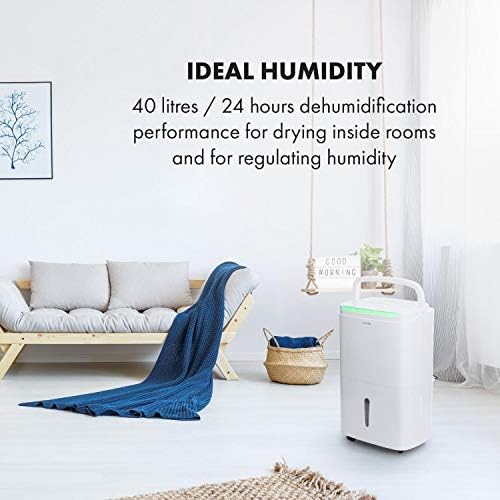
Image: The KLARSTEIN DryFy Connect 80 Dehumidifier placed in a modern living room, demonstrating appropriate placement away from furniture for optimal air circulation. Text overlay indicates "IDEAL HUMIDITY" and "40 litres / 24 hours dehumidification performance".
4.3 Кубат туташтыруу
Электр шнурун жерге туташтырылган розеткага сайыңыз. Розетка түзмөктүн кубаттуулук талаптарына жооп берерин текшериңиз.
4.4 Суу дренажынын параметрлери
The DryFy Connect 80 offers two drainage methods:
- Суу резервуарынын дренажы: The unit collects condensed water in its internal 7-liter water tank. When the tank is full, the unit will automatically shut off and an indicator light will illuminate. The tank must then be manually emptied.
- Үзгүлтүксүз дренаж: For extended operation without manual emptying, you can connect a drainage hose (included) to the continuous drainage port on the back of the unit. Ensure the hose is routed downwards to a suitable drain (e.g., floor drain, sink) to allow gravity to drain the water.
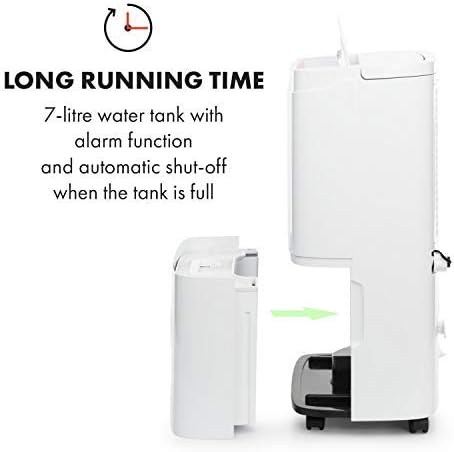
Сүрөт: бир тарап view of the KLARSTEIN DryFy Connect 80 Dehumidifier with its 7-liter water tank being removed from the main unit. An arrow indicates the direction of removal. Text overlay highlights "LONG RUNNING TIME" and "7-litre water tank with alarm function and automatic shut-off when the tank is full".
5. Иштөө нускамалары
5.1 Башкаруу панелинин үстүнөview
The control panel on the top of the unit allows you to manage all functions. Refer to the image below for a visual guide to the buttons and display.

Image: A detailed close-up of the KLARSTEIN DryFy Connect 80 Dehumidifier's control panel. It features a digital display showing "50%" and various touch-sensitive buttons for functions like power, mode, humidity setting, timer, and Wi-Fi. Text overlay indicates "MANY FUNCTIONS" and "With adjustable target humidity and a timer between 1 and 24 hours".
- Кубат баскычы: Агрегатты КҮЙГҮЗӨТ же ӨЧҮРөт.
- Режим баскычы (M): Cycles through operating modes (e.g., Auto, Continuous, Laundry Drying).
- Humidity Setting Buttons (%): Adjusts the desired humidity level (30% - 80%).
- Таймер баскычы: Автоматтык түрдө күйүү же өчүрүү таймерин орнотот (1-24 саат).
- Желдетүүчү ылдамдык баскычы: Желдеткичтин ылдамдыгын (төмөн, жогорку) тууралайт.
- Wi-Fi көрсөткүчү: Wi-Fi байланыш абалын көрсөтөт.
- Дисплей: Учурдагы нымдуулукту, коюлган нымдуулукту же таймер жөндөөлөрүн көрсөтөт.
5.2 Күйгүзүү/өчүрүү
басыңыз Кубат баскычы once to turn the unit ON. Press it again to turn the unit OFF.
5.3 Каалаган нымдуулукту орнотуу
Авто режимде, басыңыз Humidity Setting Buttons (%) to select your desired humidity level between 30% and 80%. The unit will operate until the room humidity reaches the set level, then cycle on and off to maintain it.
5.4 Таймер функциясы
басыңыз Таймер баскычы to set an auto-on or auto-off time from 1 to 24 hours. Each press increases the time by one hour. The timer indicator will illuminate when active.
5.5 Желдетүүчү ылдамдык
басыңыз Желдетүүчү ылдамдык баскычы to toggle between Low and High fan speeds. Higher fan speed results in faster dehumidification but may produce more noise.
5.6 Continuous Dehumidification
Select the Continuous mode using the Режим баскычы (M). In this mode, the unit will run continuously regardless of the humidity level. This is ideal for very damp conditions or for use with continuous drainage.
5.7 App Control (Wi-Fi Setup)
The DryFy Connect 80 can be controlled remotely via the Klarstein app. Follow these steps to connect:
- Download the "Klarstein" app from your smartphone's app store (iOS or Android).
- Ensure your dehumidifier is plugged in and within range of your Wi-Fi router.
- Open the Klarstein app and follow the on-screen instructions to add a new device. You may need to put the dehumidifier into pairing mode (refer to the app or unit's specific Wi-Fi pairing instructions, usually involving holding a button for a few seconds).
- Once connected, you can control all functions of the dehumidifier from your smartphone, including setting humidity, modes, and timers.

Image: A person relaxing on a couch, using a smartphone to control the KLARSTEIN DryFy Connect 80 Dehumidifier via the Klarstein app. The phone screen shows humidity settings. Text overlay indicates "EASY TO USE" and "WiFi interface for easy control via Klarstein app".
5.8 Auto-Swing Function
The auto-swing function helps distribute dry air more evenly and can be particularly useful for drying laundry. Activate this function via the control panel or the Klarstein app. The internal louvers will oscillate to direct airflow across a wider area.

Image: The KLARSTEIN DryFy Connect 80 Dehumidifier positioned in a laundry room setting, with clothes drying on a rack in the background. A child and adult are interacting in the foreground. Text overlay states "ESPECIALLY HANDY" and "Auto-swing function for fast drying of wet laundry".
6. Техникалык тейлөө
Үзгүлтүксүз тейлөө сиздин нымдандыргычыңыздын узак жана натыйжалуу иштешин камсыздайт.
6.1 Аба чыпкасын тазалоо
Аба чыпкасын колдонууга жана абанын сапатына жараша эки жумада же андан көп жолу тазалап туруу керек.
- Ным кургаткычты өчүрүп, аны розеткадан сууруп алыңыз.
- Аба чыпкасын табыңыз (адатта, түзмөктүн арткы же каптал жагында).
- Чыпканы алып салыңыз.
- Clean the filter with a vacuum cleaner to remove dust and debris. For heavy dirt, wash it gently with warm, soapy water. Rinse thoroughly and allow it to air dry completely before reinserting.
- Кургак фильтрди блокко кайра салыңыз.
6.2 Суу багын бошотуу
When the water tank is full, the unit will stop operating and an indicator light will signal. Empty the tank as follows:
- Кургаткычты өчүрүп, аны розеткадан ажыратыңыз.
- Агрегаттын алдынан суу сактагычты этияттык менен сууруп алыңыз.
- Чогулган сууну төгүңүз.
- Clean the tank with mild detergent and water if necessary, then rinse thoroughly.
- Reinsert the empty tank firmly into the unit. Ensure it is properly seated to allow the unit to resume operation.
6.3 Агрегаттын сыртын тазалоо
Кургаткычтын сыртын жумшак, г менен сүртүңүзamp кездеме. Катуу химиялык заттарды, абразивдүү тазалагычтарды же эриткичтерди колдонбоңуз, анткени алар бетке зыян келтириши мүмкүн.
6.4 Сактоо
Агрегатты узак мөөнөткө сактасаңыз:
- Суу куюлган идишти бошотуп, тазалаңыз.
- Аба чыпкасын тазалаңыз.
- Агрегатты розеткадан сууруп, кубат шнурын тыкан ороп алыңыз.
- Чаңдан коргоо үчүн аппаратты желим баштык же кездеме менен жаап коюңуз.
- Салкын, кургак жерде сактаңыз.
7. Кыйынчылыктарды
Кардарларды тейлөө кызматына кайрылуудан мурун, кеңири таралган көйгөйлөрдү чечүү үчүн төмөнкү көрсөтмөнү карап чыгыңыз:
| Көйгөй | Мүмкүн себеп | Чечим |
|---|---|---|
| Түзмөк күйбөйт. | Электр энергиясы жок. Электр зымы туура эмес сайылган. Суу куюлган бак толуп калган же туура эмес орнотулган. | Электр розеткасын жана өчүргүчтү текшериңиз. Электр шнурунун бекем сайылганын текшериңиз. Empty water tank and ensure it is correctly reinserted. |
| Түзмөк иштеп жатат, бирок нымдуулукту кетирбейт. | Аба чыпкасы бүтүп калган. Бөлмөнүн температурасы өтө төмөн. Нымдуулук өтө жогору коюлууда. Аба кирүүчү/чыгаруучу бөлүгү бөгөттөлгөн. | Аба чыпкасын тазалаңыз. Ным кургаткычтар 5°Cден (41°F) төмөн эффективдүү эмес. Каалаган нымдуулук параметрин төмөндөтүңүз. Түзмөктүн айланасында жетиштүү боштук бар экенин камсыз кылыңыз. |
| Агрегат ызы-чуу. | Агрегат түз жерде эмес. Аба чыпкасы бүтүп калган. Normal operating noise. | Агрегатты тегиз, туруктуу жерге коюңуз. Аба чыпкасын тазалаңыз. Some fan noise is normal during operation, especially at high fan speed. |
| Суу агып жатат. | Суу багы туура эмес орнотулган. Continuous drainage hose improperly connected or blocked. | Ensure the water tank is fully and correctly inserted. Check the continuous drainage hose for kinks or blockages and ensure it is securely attached and sloped downwards. |
| Wi-Fi туташуу маселелери. | Туура эмес Wi-Fi сырсөзү. Unit too far from router. Маршрутизатор маселелери. Колдонмо жаңыртылган жок. | Wi-Fi сырсөзүн ырастаңыз. Түзмөктү роутерге жакыныраак жылдырыңыз же Wi-Fi кеңейткичин колдонуңуз. Wi-Fi роутериңизди өчүрүп күйгүзүңүз. Update the Klarstein app to the latest version. |
8. Техникалык шарттар
| Өзгөчөлүк | Спецификация |
|---|---|
| Модел | DryFy Connect |
| нымдуулуктун күч жөндөмдүүлүгү | Up to 40 Liters / 24 hours |
| Суу резервуарынын сыйымдуулугу | 7 литр |
| Энергияны керектөө | 2650 Ватт (Note: This value seems unusually high for a dehumidifier. Please verify with product label if possible.) |
| Иштөө режими | Auto, Continuous, Laundry Drying |
| Нымдуулукту орнотуу диапазону | 30% - 80% Relative Humidity |
| Таймер | 1 - 24 саат |
| Өлчөмдөрү (W x D x H) | 10.24 x 14.57 x 24.21 дюйм (болжол менен 26 x 37 x 61.5 см) |
| Салмагы | 40.7 фунт (18.5 кг) |
| Байланыш | Wi-Fi for App Control |
Эскертүү: Техникалык мүнөздөмөлөр продуктуну жакшыртуу үчүн эскертүүсүз өзгөртүлүшү мүмкүн.
9. Кепилдик жана колдоо
For warranty information, technical support, or service inquiries, please refer to the warranty card included with your product or visit the official KLARSTEIN website. Please have your model number (DryFy Connect) and purchase date ready when contacting support.
Көбүрөөк маалымат жана байланыш маалыматтарын даректен таба аласыз KLARSTEIN Store on Amazon.


