1. Киришүү
Welcome to the user manual for your BenQ MX525A DLP Video Projector. This document provides essential information for the safe and efficient operation, setup, and maintenance of your projector. Please read this manual thoroughly before using the device.
The BenQ MX525A is designed for clear and vibrant presentations, featuring a bright 3300 ANSI lumens display, XGA (1024 x 768) resolution, and a remarkable 13,000:1 contrast ratio. It is also 3D-Ready and offers versatile connectivity with HDMI and VGA inputs.
2. Коопсуздук нускамалары
To ensure safe operation and prevent damage to the projector, please observe the following safety guidelines:
- Электр камсыздоо: Use only the power cord and adapter supplied with the projector. Ensure the power outlet meets the specified voltagд талаптар.
- Вентиляция: Желдетүүчү тешиктерди жаппаңыз. Ашыкча ысып кетүүнүн алдын алуу үчүн проектордун айланасында абанын туура айланышы үчүн жетиштүү орун бар экенин текшериңиз.
- Жайгашкан жери: Place the projector on a stable, level surface. Avoid placing it in direct sunlight, near heat sources, or in environments with high humidity or excessive dust.
- Колдонуу: Do not drop or subject the projector to strong impacts. Avoid looking directly into the lens when the lamp күйүп турат, анткени жаркыраган жарык көзгө зыян келтириши мүмкүн.
- Тазалоо: Тазалоодон мурун электр шнурын ажыратыңыз. Жумшак, кургак чүпүрөктү колдонуңуз. Суюктук же аэрозолдук тазалоочу каражаттарды колдонбоңуз.
- Тейлөө: Проекторду өзүңүз тейлөөгө аракет кылбаңыз. Бардык тейлөө иштерин квалификациялуу тейлөө кызматкерлерине тапшырыңыз.
3. Продукт бүтүп калдыview
Familiarize yourself with the main components of your BenQ MX525A projector.
3.1 Front and Angled View
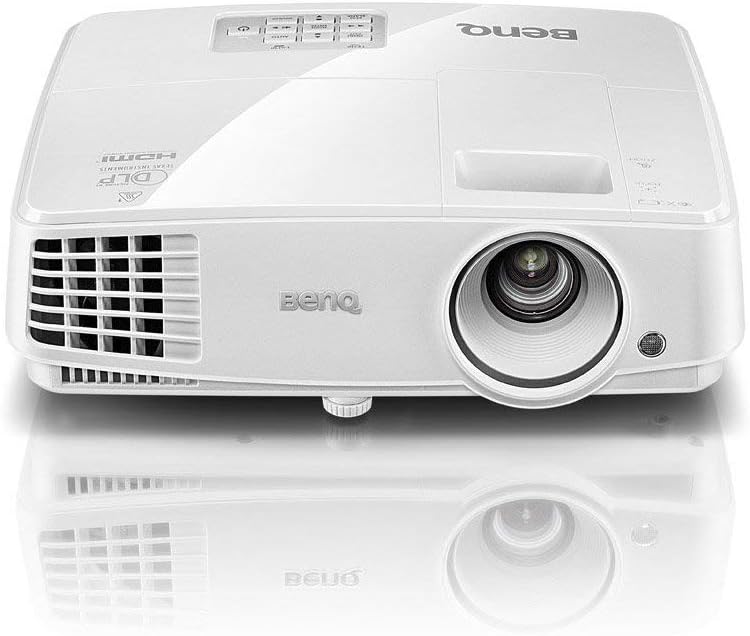
Figure 1: Front-top angled view of the BenQ MX525A DLP Projector. This image shows the projector's lens, front ventilation, and the BenQ logo on the top casing.
3.2 тарап View with Ventilation
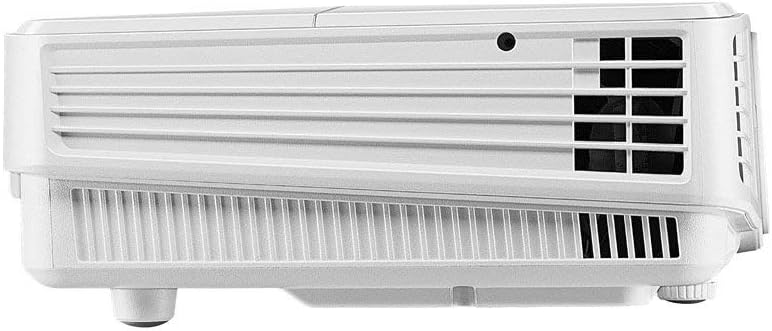
2-сүрөт: Каптал view of the BenQ MX525A DLP Projector, highlighting the ventilation grilles essential for heat dissipation.
3.3 Жогору View Башкаруу панели менен

3-сүрөт: Жогорку view of the BenQ MX525A DLP Projector, displaying the integrated control panel buttons for navigation and settings, along with the focus and zoom rings.
4. Орнотуу
4.1 Пакеттен чыгаруу
Carefully remove the projector and all accessories from the packaging. Retain the original packaging for future transport or storage.
4.2 Орнотуу
Position the projector on a flat, stable surface. Ensure the projection path is clear of obstructions. Adjust the projector's height and angle using the adjustable feet to achieve the desired image position on your screen or wall.
4.3 Кубатты туташтыруу
- Кубат шнурунун проектордун кубат розеткасына туташтырыңыз.
- Электр шнурунун экинчи учун жерге туташтырылган электр розеткасына сайыңыз.
4.4 Видео булактарын туташтыруу
The BenQ MX525A supports multiple input sources:
- HDMI: For high-definition digital video and audio. Connect an HDMI cable from your source device (e.g., laptop, Blu-ray player) to the HDMI port on the projector.
- VGA (x2): For analog video input. Connect a VGA cable from your computer to one of the VGA ports on the projector.
5. Проекторду иштетүү
5.1 Күйгүзүү/өчүрүү
- Күйгүзүү үчүн: Press the power button on the projector's control panel or remote control. The power indicator light will turn green.
- Өчүрүү үчүн: Press the power button again. A confirmation message may appear. Press the power button a second time to confirm shutdown. The power indicator will turn red.
5.2 Фокусту жана масштабды тууралоо
Use the focus and zoom rings located around the lens (refer to Figure 3) to adjust the image clarity and size:
- Масштабдуу шакек: Rotate to increase or decrease the image size.
- Фокус шакеги: Rotate until the projected image appears sharp and clear.
5.3 Киргизүү булагын тандоо
Press the 'Source' button on the control panel or remote control to cycle through available input sources (HDMI, VGA1, VGA2). Alternatively, use the menu to select the desired input.
5.4 Сүрөттү тууралоо
Access the projector's OSD (On-Screen Display) menu to fine-tune picture settings:
- Жарыктык: Сүрөттүн жалпы жарыктыгын же караңгылыгын тууралайт.
- Контраст: Controls the difference between the lightest and darkest parts of the image.
- Түсү: Түстөрдүн интенсивдүүлүгүн тууралайт.
- Аспект катышы: Select the appropriate aspect ratio (e.g., 4:3, 16:9) to match your content.
5.5 3D функциясы
The BenQ MX525A is 3D-Ready. To enjoy 3D content, you will need compatible 3D glasses and a 3D-enabled source device. Refer to your 3D source device's manual for specific setup instructions.
5.6 SmartEco Power Saving Technology
The projector features SmartEco technology, which dynamically adjusts lamp power to conserve energy and extend lamp life up to 10,000 hours. This mode is automatically engaged to optimize power consumption based on content brightness.
6. Техникалык тейлөө
Regular maintenance helps ensure optimal performance and extends the lifespan of your projector.
6.1 Линзаны тазалоо
Use a soft, lint-free cloth specifically designed for optical lenses to gently wipe the projector lens. Avoid using abrasive materials or harsh chemicals.
6.2 Лamp Алмаштыруу
Проектор лamp 10,000 саатка чейин иштөө мөөнөтү бар.amp иштөө мөөнөтү аяктаганда, эскертүүчү билдирүү пайда болот жанаamp indicator light may flash. Refer to the full service manual for detailed lamp replacement instructions or contact qualified service personnel.
6.3 Фильтрди тазалоо
Periodically check and clean the air filter to prevent dust buildup, which can affect performance and cause overheating. Consult the full service manual for instructions on accessing and cleaning the air filter.
7. Кыйынчылыктарды
Проекторуңузда көйгөйлөргө туш болсоңуз, төмөнкү жалпы көйгөйлөрдү жана чечимдерди караңыз:
| Көйгөй | Мүмкүн себеп | Чечим |
|---|---|---|
| Экранда сүрөт жок | Power cord disconnected, incorrect input source, lamp маселе | Электр кубатына туташууну текшериңиз, туура киргизүү булагын тандаңыз,amp статус көрсөткүчү |
| Dim or blurry image | Out of focus, low brightness setting, dirty lens | Adjust focus/zoom rings, increase brightness in OSD, clean the lens |
| Проектор ысып кетти | Blocked ventilation, dirty air filter | Ensure clear space around vents, clean air filter |
| Үн жок | Volume too low, incorrect audio input, mute enabled | Adjust volume, check audio cable connection, disable mute function |
8. Техникалык шарттар
Detailed technical specifications for the BenQ MX525A DLP Video Projector:
- Дисплей технологиясы: DLP
- Түпкү резолюция: XGA (1024 x 768)
- Жарыктык: 3300 ANSI челинин
- Контраст катышы: 13,000:1
- Lamp Жашоо: 10,000 саатка чейин (SmartEco режими)
- Байланыш: HDMI, VGA (x2)
- Өзгөчөлүктөр: 3D-Ready, Portable, SmartEco Power Saving Technology
- Продукциянын өлчөмдөрү: 8.7 x 3.7 x 11.1 дюйм
- Элемент Салмагы: 6.29 фунт
- Биринчи жеткиликтүү болгон күнү: 13-ноябрь, 2019-жыл
9. Кепилдик жана колдоо
The BenQ MX525A DLP Video Projector comes with a Тетиктерге жана эмгекке 1 жылдык кепилдик. This warranty covers manufacturing defects and ensures your product functions as intended under normal use.
For technical support, warranty claims, or further assistance, please visit the official BenQ support website or contact their customer service department. Refer to your product packaging or the BenQ webакыркы байланыш маалыматы үчүн сайт.


