1. Киришүү
This manual provides essential instructions for setting up, operating, and maintaining your LG Phoenix 4 X210 smartphone. Please read this manual thoroughly to ensure proper use and to maximize the device's features.
The LG Phoenix 4 X210 is a GSM unlocked smartphone featuring a 5.0-inch display, 8 MP rear camera, 5 MP front camera, 16 GB internal memory, 2 GB RAM, and runs on Android 7.1 Nougat.
2. Түзмөктүн жайгашуусу
Familiarize yourself with the physical components of your LG Phoenix 4 X210.
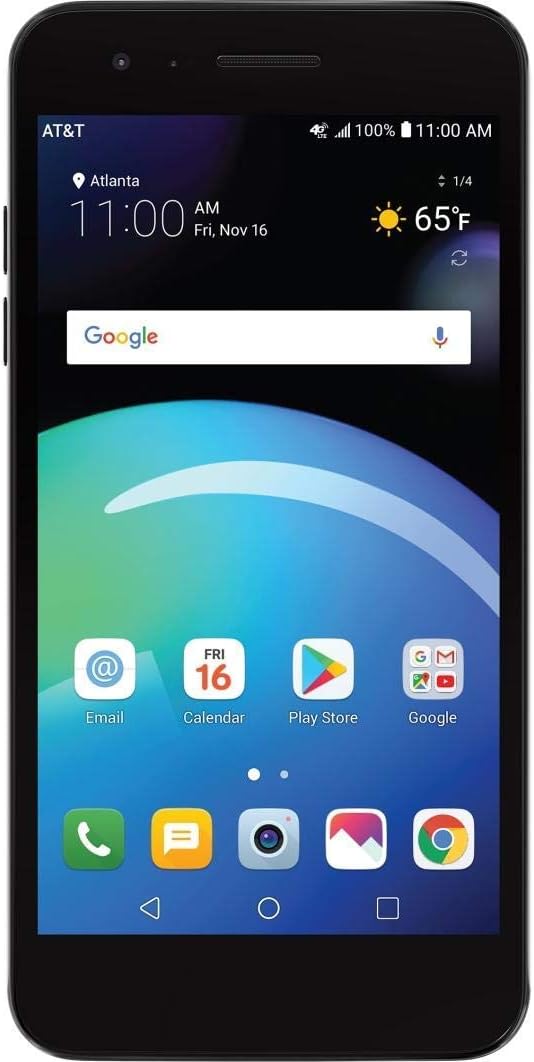
Сүрөт 2.1: Алдыңкы View. This image shows the front of the LG Phoenix 4 X210 smartphone. The screen is active, displaying the home screen with various application icons, the current time, date, and weather information. The AT&T carrier logo is visible in the top left corner, indicating network connectivity.

2.2-сүрөт: Арткы View. This image displays the back of the LG Phoenix 4 X210. Prominently featured are the main camera lens, the LED flash, and a circular fingerprint sensor located below the camera. The LG logo is visible towards the bottom of the device.

2.3-сүрөт: Оң жак View. This image illustrates the right side of the LG Phoenix 4 X210, where the volume up and down buttons, along with the power/lock button, are located.

2.4-сүрөт: Төмөнкү View. This image shows the bottom edge of the LG Phoenix 4 X210, featuring the 3.5mm headphone jack, the micro USB charging/data port, and the primary microphone opening.
3. Орнотуу
3.1 SIM картаны салуу
The LG Phoenix 4 X210 requires a Nano-sized SIM card for network connectivity. The SIM card is not included with the device.
- Power off the device completely.
- Locate the SIM card slot, typically on the side or under the back cover. Refer to the device diagram for exact location.
- Insert the Nano SIM card into the designated slot with the gold contacts facing down, ensuring it is correctly oriented.
- Close the SIM card tray or replace the back cover securely.
Эскертүү: This device is GSM unlocked and compatible with GSM carriers such as AT&T and T-Mobile. It will not work with CDMA carriers like Verizon or Sprint.
3.2 Баштапкы күйгүзүү
- Press and hold the Power button (located on the right side of the device) until the LG logo appears on the screen.
- Тил тандоо, Wi-Fi туташуусу, Google каттоо эсебин орнотуу жана коопсуздук жөндөөлөрү сыяктуу баштапкы орнотууну аяктоо үчүн экрандагы көрсөтмөлөрдү аткарыңыз.
4. Иштөө нускамалары
4.1 Негизги навигация
- Сенсордук экран: Tap, swipe, pinch, and spread gestures are used to interact with the device.
- Башкы экран: Access apps, widgets, and notifications. Customize by long-pressing on empty space.
- Чабыттоо тилкеси: The bottom of the screen typically features Back, Home, and Recent Apps buttons.
4.2 Чалууларды жасоо жана билдирүүлөрдү жөнөтүү
- Чалуулар: Телефон сөлөкөтүн таптап, номерди киргизип, чалуу баскычын таптаңыз.
- Кабарлар: Tap the Messages icon, start a new conversation, enter the recipient and message, then send.
4.3 Камераны колдонуу
The device features an 8 MP rear camera with autofocus and flash, and a 5 MP front camera with Auto Shot for selfies.
- Камера тиркемесин ачыңыз.
- Камераны которуштуруу сүрөтчөсүн колдонуп, алдыңкы жана арткы камераларды тандаңыз.
- Tap the screen to focus, then tap the shutter button to capture a photo or start/stop video recording.
4.4 Батареяны башкаруу
The LG Phoenix 4 X210 is equipped with a 2,500 mAh removable battery. To optimize battery life:
- Экран жарыктыгын тууралаңыз.
- Колдонулбаган учурда Wi-Fi, Bluetooth жана GPSти өчүрүңүз.
- Фондо иштеп жаткан колдонулбаган колдонмолорду жабуу.
- Utilize power-saving modes available in Settings.
5. Техникалык тейлөө
5.1 Аппаратты тазалоо
- Телефондун экранын жана корпусун тазалоо үчүн жумшак, түксүз чүпүрөктү колдонуңуз.
- Катуу химиялык заттарды же абразивдүү материалдарды колдонуудан алыс болуңуз.
- Заряддоодон мурун бардык порттор кургак экенин текшериңиз.
5.2 Программалык камсыздоо жаңыртуулары
Regularly check for software updates to ensure optimal performance and security. Updates can typically be found in Орнотуулар > Телефон жөнүндө > Программалык камсыздоону жаңыртуу.
5.3 Батареяга кам көрүү
- Батареяны экстремалдуу температурага тийгизүүдөн сактаңыз.
- Бекитилген заряддагычтарды жана кабелдерди гана колдонуңуз.
- Эгерде батарея алынып салынса, анын туура орнотулганын текшериңиз.
6. Кыйынчылыктарды
6.1 Жалпы маселелер жана чечимдер
| Маселе | Мүмкүн чечим |
|---|---|
| Түзмөк күйбөй жатат | Батарея заряддалганын текшериңиз. Заряддагычты туташтырыңыз жана кайра күйгүзүү аракетинен мурун бир нече мүнөт күтүңүз. |
| Тармак сигналы жок | Verify SIM card is correctly inserted. Check network settings (Settings > Network & internet > Mobile network). Ensure you are within a GSM network coverage area. |
| Батарея бат эле түгөнөт | Reduce screen brightness, disable unused features (Wi-Fi, Bluetooth, GPS), close background apps, and check for power-intensive apps in Battery settings. |
| Колдонмолор бузулуп же катып калууда | Restart the device. Clear the cache of the problematic app (Settings > Apps & notifications > App info > Storage > Clear cache). If the issue persists, consider uninstalling and reinstalling the app. |
| Device is slow or unresponsive | Close unnecessary apps. Clear device cache. Consider performing a factory reset as a last resort (backup data first). |
6.2 Заводдук абалга кайтаруу
A factory reset will erase all data from your device and restore it to its original factory settings. Улантуудан мурун бардык маанилүү маалыматтардын камдык көчүрмөсүн сактаңыз.
- барыңыз Орнотуулар > Система > Параметрлерди кайра орнотуу.
- Тандоо Бардык дайындарды өчүрүү (дескриптке кайтаруу).
- Чечимиңизди ырастап, суралса, PIN/сырсөзүңүздү киргизиңиз.
7. Техникалык шарттар
- Модел: LG Phoenix 4 X210 (LM-X210APM-cr)
- Операция системасы: Android 7.1 Nougat
- Дисплей: 5.0 дюйм
- Процессор: 1.4GHz Quad-Core Qualcomm Snapdragon (MSM8917)
- Ички сактагыч: 16 GB (approximately 9 GB available to user)
- RAM: 2 ГБ
- Арткы камера: Flash менен 8 МП автофокус
- Алдыңкы камера: 5 MP Auto Shot
- Батарея: 2,500 mAh Removable Lithium Ion
- Сүйлөшүү убактысы: 14 саатка чейин
- Күтүү убактысы: 16.5 күнгө чейин
- Өлчөмдөрү: 5.69 x 2.86 x 0.31 дюйм
- Салмагы: 4.8 унция (136 грамм)
- Тармак шайкештиги: GSM 850/900/1800/1900 MHz, UMTS Bands 2/4/5, LTE Bands 2/4/5/12
- Байланыш: Wi-Fi, Bluetooth, GPS
8. Кепилдик жана колдоо
For warranty information and technical support, please refer to the documentation provided with your purchase or visit the official LG support webсайт. Кепилдик дооматтар үчүн сатып алганыңыздын далилин сактаңыз.
This device is sold as an unlocked unit. For network-specific issues, contact your chosen GSM carrier.