1. Киришүү
This user manual provides detailed instructions for the installation, operation, and maintenance of the GATEMAN WV-40 Digital Door Lock. Please read this manual thoroughly before using the product to ensure proper function and safety. Keep this manual for future reference.

1-сүрөт: GATEMAN WV-40 Digital Door Lock. This image displays the front panel of the lock, featuring a touch keypad with numbers 1-9, *, 0, #, and a card reader area. The design is modern and minimalist.
2. Коопсуздук маалыматы
To prevent injury, damage to the product, or property loss, please observe the following safety precautions:
- Do not attempt to disassemble, repair, or modify the lock yourself. This may void the warranty and cause malfunction or electric shock. Contact qualified service personnel for assistance.
- Keep the product away from water and excessive humidity. While the lock has a waterproof function, prolonged exposure to water or submersion can cause damage.
- Use only the specified battery type and ensure correct polarity during installation. Incorrect battery usage can lead to leakage, overheating, or explosion.
- Avoid applying excessive force to the keypad or internal components.
- Do not expose the lock to direct sunlight or extreme temperatures for extended periods.
- In case of fire, the lock is designed to automatically unlock at high temperatures (around 55°C) to facilitate escape. However, always prioritize personal safety and follow fire safety procedures.
- The lock is equipped with an electric shock safety system to prevent damage from external electrical shocks. However, avoid intentional exposure to high voltage.
3. Продукт бүтүп калдыview жана Негизги өзгөчөлүктөрү
The GATEMAN WV-40 is a high-performance digital door lock designed for enhanced security and convenience. It incorporates several advanced features:
3.1 Негизги өзгөчөлүктөрү
- Виртуалдык сырсөз функциясы: Prevents unauthorized viewing of your password by allowing you to enter random numbers before or after your actual password.
- Residual Fingerprint Prevention: After entering your password, touching the keypad prevents residual fingerprints from being used to guess your code.
- Smart Etiquette Function: Enables silent operation of the lock, ideal for late-night entry or exit, by touching the pad for 3 seconds.
- 3-Minute Door Lock Function: Activates a 3-minute lockout period for all external buttons if an unregistered password or smart key is entered incorrectly 5 times consecutively.
- Automatic/Manual Lock Function: The door can be set to automatically lock upon closing or require manual locking. When internal forced lock is set, external access is prevented even with registered keys/passwords.
- 2-жолдуу аутентификация ыкмасы: Unlock the door using either a registered password or a smart key. Lost smart keys can be easily deleted and new ones registered.
- Суу өткөрбөйт функциясы: Designed to operate normally even when exposed to external moisture.
- Damage and Intrusion Warning: A strong alarm sounds if an attempt is made to forcibly enter or damage the lock.
- Electric Shock and High Temperature Alarm Safety System: Built-in chip absorbs electrical shocks to protect the circuit. In case of fire, the lock detects heat (around 55°C) and automatically unlocks while sounding an alarm.

2-сүрөт: GATEMAN WV-40 High-Performance Digital Door Lock. This image shows the lock from a slight angle, highlighting its modern aesthetic and robust build quality.
4. Орнотуу жана орнотуу
Proper installation is crucial for the optimal performance and security of your GATEMAN WV-40 Digital Door Lock. While some users may attempt DIY installation, it is highly recommended to consult a professional for installation to ensure correct fitting and avoid damage to your door or the lock.
4.1 Орнотууга чейинки текшерүү
- Verify that your door thickness and type are compatible with the lock.
- Ensure all components listed in the packaging are present before beginning installation.
4.2 Батареяны орнотуу
- Open the battery cover on the indoor unit of the lock.
- Insert the specified number of AA alkaline batteries, ensuring correct polarity (+/-).
- Close the battery cover securely. The lock will typically emit a sound or light up to indicate successful power-on.
4.3 Initial Password Registration
Upon first use or after a factory reset, you will need to register a master password. This password is used for managing other settings and user registrations.
- From the inside, press the [Registration] button.
- On the external keypad, enter your desired master password (4-12 digits).
- Press the [#] button to confirm.
- Кулпу ырастоо үн чыгарат.
5. Иштөө нускамалары
5.1 Эшиктин кулпусун ачуу
5.1.1 Using a Password
- Аны иштетүү үчүн баскычтопту басыңыз.
- Катталган сырсөзүңүздү киргизиңиз.
- Press the [#] button. The door will unlock.
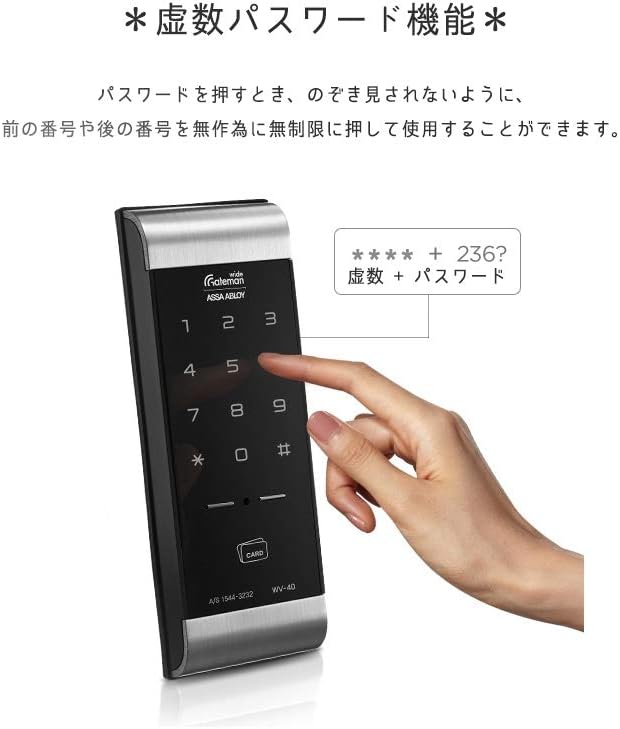
3-сүрөт: Virtual Password Function. This image illustrates how to use the virtual password feature by entering arbitrary numbers before or after your actual password to prevent it from being observed by others.
5.1.2 Using a Smart Key (Card)
- Place your registered smart key on the card reader area of the keypad.
- The door will unlock automatically.

4-сүрөт: 2-Way Authentication Method. This image shows a smart key being presented to the lock's card reader, demonstrating one of the two authentication methods available for unlocking the door.
5.2 Эшикти кулпулоо
5.2.1 Автоматтык кулпу
If the automatic lock function is enabled, the door will lock automatically a few seconds after it is closed.
5.2.2 Manual Locking
If the manual lock function is enabled, you can lock the door by pressing the [Lock] button on the indoor unit or by touching the keypad on the outdoor unit after closing the door.

5-сүрөт: Automatic/Manual Lock Function and 3-Minute Door Lock Function. This image illustrates the internal settings for automatic or manual locking and depicts the lockout feature that activates after multiple incorrect entry attempts.
5.3 Өркүндөтүлгөн функциялар
5.3.1 Smart Etiquette Function (Silent Mode)
To operate the lock silently, touch and hold the keypad for approximately 3 seconds until the numbers illuminate. Then proceed with entering your password or using a smart key. This will suppress the normal operation sounds.
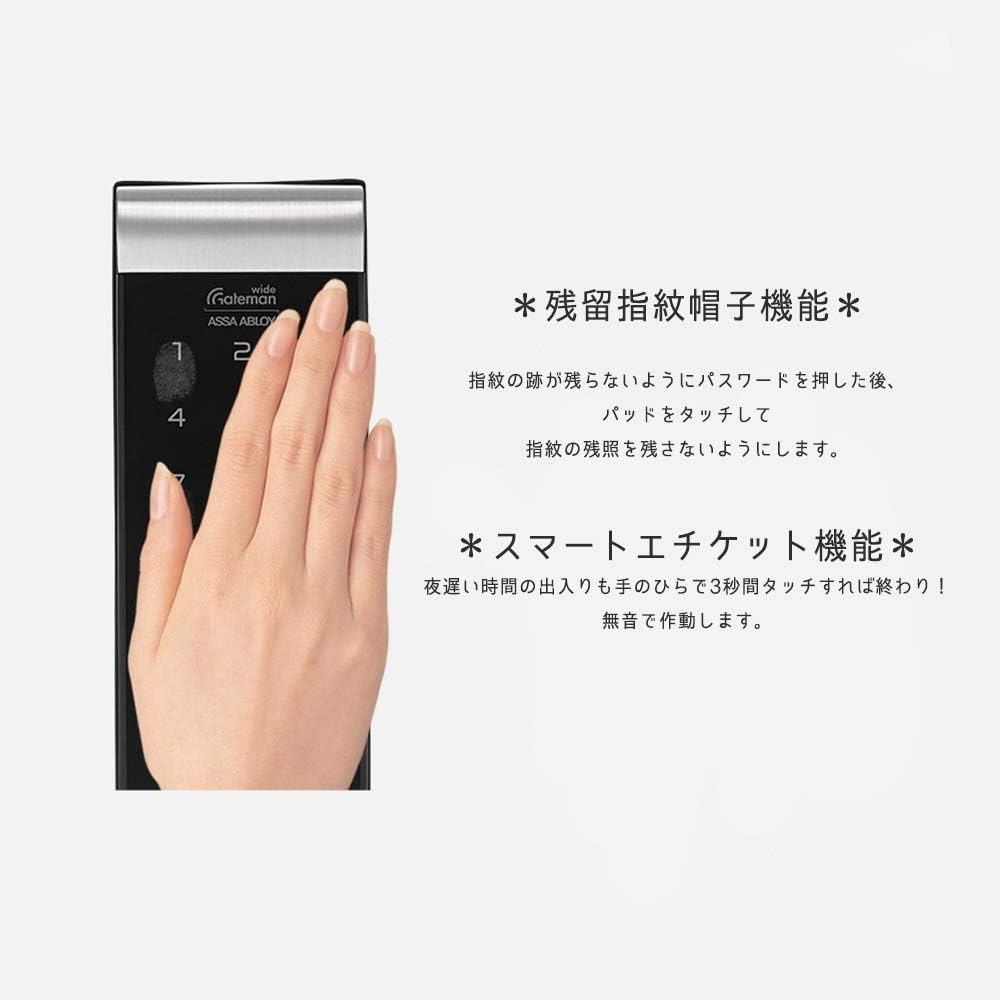
6-сүрөт: Residual Fingerprint Prevention and Smart Etiquette Function. This image shows a user interacting with the keypad, demonstrating how to prevent leaving traceable fingerprints and how to activate the silent operation mode for discreet entry/exit.
6. Техникалык тейлөө
6.1 Батареяны алмаштыруу
When the battery low indicator appears or the lock emits a low battery warning sound, replace all batteries immediately. Using depleted batteries can lead to lock malfunction or complete power loss, preventing access.
- Ички блоктогу батареянын капкагын ачыңыз.
- Бардык эски батареяларды алып салыңыз.
- Туура полярдуулукту камсыз кылып, жаңы AA щелочтуу батареяларын салыңыз.
- Батареянын капкагын жабыңыз.
Эскертүү: It is recommended to replace all batteries at the same time with new ones of the same type and brand for optimal performance.
6.2 Тазалоо
To clean the lock, use a soft, dry cloth. Do not use abrasive cleaners, solvents, or chemical sprays, as these can damage the finish or electronic components.
7. Кыйынчылыктарды
If you encounter issues with your GATEMAN WV-40 Digital Door Lock, refer to the following common problems and solutions:
| Көйгөй | Мүмкүн себеп | Чечим |
|---|---|---|
| Кулпу баскычтоп киргизүүгө жооп бербейт. | Dead batteries; Keypad not activated; Lockout mode active. | Replace batteries; Touch the keypad to activate; Wait 3 minutes if lockout is active. |
| Эшик автоматтык түрдө кулпуланбайт. | Automatic lock function is disabled; Door not fully closed. | Check settings to enable automatic lock; Ensure door is completely closed. |
| Күтүүсүздөн ойготкуч шыңгырайт. | Intrusion attempt; Damage detected; High temperature detected. | Check for signs of tampering; Verify environmental conditions. If false alarm, consult support. |
| Smart key not recognized. | Smart key not registered; Smart key damaged. | Register the smart key; Try another registered smart key; Replace damaged smart key. |
| Кулпу адаттан тыш үндөрдү чыгарат. | Internal mechanism issue; Obstruction. | Ensure no obstructions in the door frame; Contact customer support if noise persists. |

7-сүрөт: Waterproof Function and Damage/Intrusion Warning. This image visually represents the lock's resistance to water and its ability to trigger an alarm in response to forced entry attempts or damage.

8-сүрөт: Electric Shock and High Temperature Alarm Safety System. This image depicts the lock's advanced safety features, including protection against electrical surges and an automatic unlocking mechanism with an alarm in high-temperature conditions like a fire.
8. Техникалык шарттар
| Өзгөчөлүк | Деталь |
|---|---|
| Бренд | ГЕЙТМАН |
| Модел | WV-40 |
| Продукциянын өлчөмдөрү (LxWxH) | 21 x 26 x 10 см |
| Элемент Салмагы | 1.14 килограмм |
| Форма | Төрт бурчтуу |
| Башкаруу ыкмасы | тийүү |
| Power Source | AA Alkaline Batteries (not specified quantity, typically 4 or 8) |
| ASIN | B081V8Y4JD |
| Биринчи жеткиликтүү күн | 26-март, 2019-жыл |
Эскертүү: Техникалык мүнөздөмөлөр продуктуну жакшыртуу үчүн алдын ала эскертүүсүз өзгөртүлүшү мүмкүн.
9. Кепилдик жана колдоо
Specific warranty details for the GATEMAN WV-40 Digital Door Lock are not provided in this manual. Please refer to your purchase documentation or contact the retailer/seller for information regarding warranty coverage and terms.
For technical support, troubleshooting assistance beyond this manual, or service inquiries, please contact the GATEMAN customer service or your authorized dealer. Contact information may be available on the product packaging or the official GATEMAN webсайт.


