1. Киришүү
Thank you for choosing the Rapoo H1030 Bluetooth Stereo Headset. This manual provides detailed instructions to help you set up, operate, and maintain your headset for optimal performance. Please read this manual thoroughly before using the product.
2. Продукт бүтүп калдыview
The Rapoo H1030 is a wireless over-ear stereo headset designed for comfortable audio listening and communication. It features Bluetooth connectivity, an integrated microphone, and volume controls.

2.1-сүрөт: Фронт view of the Rapoo H1030 Bluetooth Stereo Headset. This image shows the overall design of the headset, with both earcups and the headband visible from the front.

2.2-сүрөт: Side view of the Rapoo H1030 Bluetooth Stereo Headset, illustrating the adjustable headband and the design of the over-ear cushions.
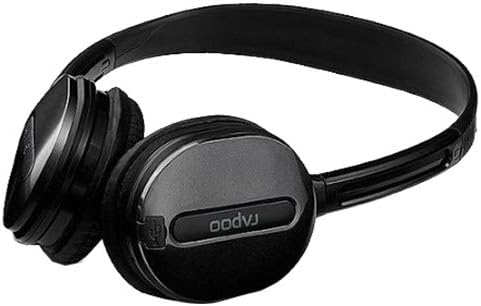
2.3-сүрөт: Жакын план view of an earcup, highlighting the integrated controls and the "rapoo" branding. This image details the buttons for volume and playback control, and potentially the charging port or microphone location.
2.1 Негизги өзгөчөлүктөрү
- Wireless Bluetooth connectivity (2.4 GHz, up to 10 meters / 33 feet range)
- Over-ear design for comfort
- Built-in omni-directional microphone with noise cancelling
- Интегралдык үндү көзөмөлдөө
- Кайра заряддалуучу литий батарейка (360mAh)
- Жөнгө салынуучу баш боо
3. Орнотуу
3.1 Гарнитураны заряддоо
Before initial use, fully charge the headset. The Rapoo H1030 features a built-in 360mAh rechargeable lithium battery.
- Locate the charging port on the headset (refer to Figure 2.3 for general control area).
- Connect the charging cable (typically Micro-USB) to the headset and the other end to a USB power source (e.g., computer USB port, USB wall adapter).
- The charging indicator light will illuminate (color may vary, refer to product packaging for specifics).
- Толук кубаттоо болжол менен 2 саатты алат. Кубаттоо аяктагандан кийин индикатор жарыгы өзгөрөт же өчөт.
A fully charged headset provides approximately 6 hours of usage time.
3.2 Bluetooth жупташтыруу
The headset uses smart connection technology for easy pairing.
- Гарнитура заряддалганын жана өчүрүлгөнүн текшериңиз.
- Press and hold the power button (or pairing button, if separate) on the headset until the indicator light begins to flash rapidly, indicating it is in pairing mode.
- Түзмөгүңүздө (смартфон, планшет, компьютер) Bluetooth иштетип, жеткиликтүү түзмөктөрдү издеңиз.
- Select "RAPOO H1030" (or similar name) from the list of found devices.
- Once connected, the indicator light on the headset will typically stop flashing and remain solid, or turn off.
- The headset is now ready for use. It should automatically reconnect to the last paired device when powered on and within range.
4. Иштөө нускамалары
4.1 Күйгүзүү/өчүрүү
- Күйгүзүү: Индикатор жарыгы күйгөнгө чейин кубат баскычын болжол менен 3 секунд басып туруңуз.
- Өчүрүү: Press and hold the power button for approximately 3-5 seconds until the indicator light turns off.
4.2 Үндү башкаруу
The headset features integrated volume controls.
- Көлөмүн жогорулатуу: Үнүн жогорулатуу баскычын басыңыз.
- Көлөмдү азайтуу: Үндү азайтуу баскычын басыңыз.
4.3 Чалууларды башкаруу
When connected to a smartphone, the headset can manage phone calls.
- Чалууга жооп берүү/аяктоо: Press the Multi-function button (often the power button or a dedicated call button) once.
- Чакырууну четке кагуу: Көп функциялуу баскычты болжол менен 2 секунд басып, кармап туруңуз.
- Акыркы номерди кайра терүү: Көп функциялуу баскычты эки жолу басыңыз.
4.4 Музыканы ойнотуу
When playing music from a connected device, use the headset controls.
- Ойнотуу/тындыруу: Көп функциялуу баскычты бир жолу басыңыз.
- Кийинки трек: Press and hold the Volume Up button (or a dedicated 'Next' button).
- Мурунку трек: Press and hold the Volume Down button (or a dedicated 'Previous' button).
5. Техникалык тейлөө
- Тазалоо: Гарнитураны тазалоо үчүн жумшак, кургак чүпүрөктү колдонуңуз. Абразивдүү тазалагычтарды же эриткичтерди колдонбоңуз.
- Сактагыч: Store the headset in a cool, dry place away from direct sunlight and extreme temperatures. When not in use, consider folding the headset (refer to Figure 5.1) to save space and protect it.
- Батареяга кам көрүү: Батареянын иштөө мөөнөтүн узартуу үчүн, бат-баттан батарейканы толук зарядсыздандырбаңыз. Үзгүлтүксүз колдонууда болбосо да, гарнитураны дайыма заряддаңыз.
- Суу таасири: Гарнитура суу өткөрбөйт. Суунун же ашыкча нымдуулуктун таасиринен алыс болуңуз.

5.1-сүрөт: The Rapoo H1030 headset in a folded position, demonstrating its portability and ease of storage. This compact form helps protect the earcups and headband when not in use.
6. Кыйынчылыктарды
| Көйгөй | Мүмкүн себеп | Чечим |
|---|---|---|
| Гарнитура күйбөйт. | Батарея аз. | Гарнитураны кеминде 2 саат кубаттаңыз. |
| Түзмөк менен жупташтыруу мүмкүн эмес. | Гарнитура жупташтыруу режиминде эмес; түзмөктө Bluetooth өчүрүлгөн; түзмөк өтө алыс. | Ensure headset is in pairing mode (flashing light). Enable Bluetooth on your device. Move headset closer to the device (within 10 meters). Try restarting both devices. |
| Үн жок же үнү төмөн. | Volume too low on headset or device; headset not properly connected. | Increase volume on both headset and connected device. Re-pair the headset. |
| Үн сапаты начар же ажыратылган. | Interference; device out of range; low battery. | Move closer to the connected device. Avoid obstacles between headset and device. Charge the headset. Avoid environments with strong Wi-Fi or other 2.4 GHz signals. |
7. Техникалык шарттар
| Модел | H1030 |
| Бренд | РАПУ |
| Байланыш | Wireless (Bluetooth, 2.4 GHz) |
| Берүүнүн диапазону | 10 метрге чейин (33 фут) |
| Наушник түрү | Ашыкча кулак |
| Микрофон | Built-in, Omni-Directional, Noise Cancelling |
| Батарея түрү | Кайра заряддалуучу литий батареясы |
| Батарея сыйымдуулугу | 360mAh |
| Заряддоо убактысы | Болжол менен 2 саат |
| Колдонуу убактысы | Болжол менен 6 саат |
| Өлчөмдөрү (L x W x Y) | 6.85 x 5.43 x 2.17 дюйм |
| Салмагы | 80 г |
| Түс | Кара |
| Материал | Металл, каучук |
8. Кепилдик жана колдоо
For warranty information and technical support, please refer to the warranty card included with your product or visit the official RAPOO webсайт. Сатып алуу квитанциясын кепилдик дооматтары үчүн сатып алуунун далили катары сактаңыз.
Өндүрүүчү: Rapoo


