Introduction
This Walfront AC Contactor features a unique 4-position switch, supporting both manual control and automatic operation. It offers optimized space and improved performance, with a 70% volume reduction compared to traditional contactors. Designed for energy efficiency, it reduces power consumption by 75% compared to traditional models. The unit operates quietly, with noise levels below 15 dB, ensuring safe and silent use. A reliable electromagnetic system provides fast response and switching. Its excellent electrical conductivity and unique gas jet arc extinguishing structure enhance electrical safety.
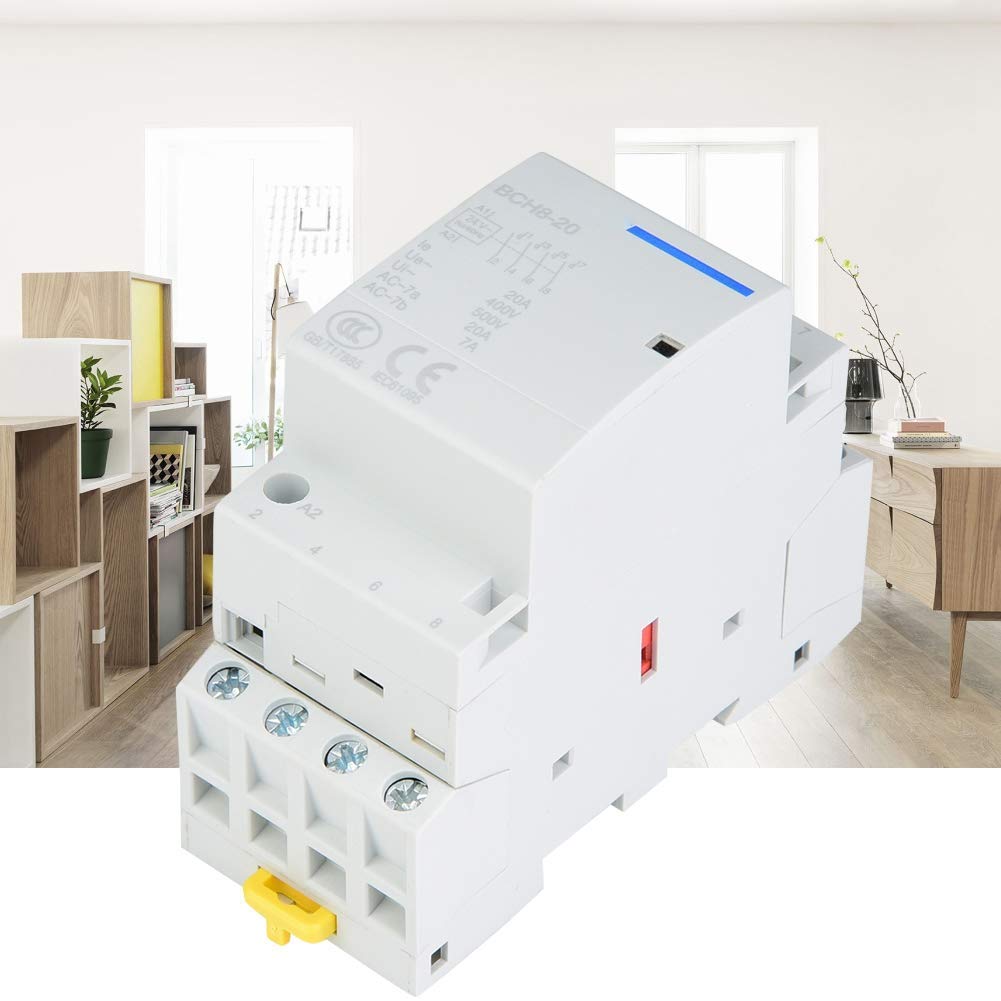
Сүрөт 1: Алдыңкы view of the Walfront AC Contactor.
Орнотуу жана орнотуу
Proper installation is crucial for the safe and efficient operation of the AC contactor. Ensure all power sources are disconnected before beginning installation.
- Монтаждоо: The contactor is designed for DIN rail mounting. Securely attach the contactor to a standard 35mm DIN rail within an electrical enclosure.
- Зымдар: Connect the main power lines to the appropriate terminals (L1, L2, L3, N for 4-pole, or L1, L2 for 2-pole configurations). Connect the load lines to the corresponding output terminals. Ensure all connections are tight and secure.
- Башкаруу схемасы: Connect the control circuit wiring to the A1 and A2 terminals for coil activation. Refer to your specific control scheme for detailed connections.
- Терминал байланыштары: Use appropriate tools for terminal connections. A screwdriver is recommended for tightening terminal screws. Avoid using power drills, which can overtighten and damage terminals.

2-сүрөт: Мисample installation of the AC Contactor within an electrical panel.

Figure 3: Use a screwdriver for terminal connections to prevent damage.
After all connections are made, double-check wiring against your electrical diagram before restoring power.
Иштөө нускамалары
The Walfront AC Contactor features a versatile 4-position control switch for flexible operation modes.

Figure 4: The 4-position control switch for manual and automatic operation.
- Автоматтык иштетүү: In this mode, the contactor responds to signals from the control circuit (e.g., thermostat, timer, PLC). The contactor will switch on or off automatically based on the control input.
- Manual Switching On: This position allows for manual activation of the contactor, overriding the automatic control. The contactor will remain ON until manually switched off or to another mode.
- Manual Forced Switching Off: This position forces the contactor OFF, overriding automatic control. The contactor will remain OFF until manually switched on or to another mode.
- Manual Permanent Switching On: Similar to "Manual Switching On" but designed for continuous manual operation. Consult your specific model's documentation for any subtle differences between "Manual Switching On" and "Manual Permanent Switching On."
Always ensure the desired operating mode is selected carefully to prevent unintended equipment operation.
Техникалык тейлөө
Regular maintenance helps ensure the longevity and reliable performance of your AC contactor. Always disconnect power before performing any maintenance.
- Визуалдык текшерүү: Periodically inspect the contactor for any signs of physical damage, discoloration, or loose connections. Check for dust or debris accumulation.
- Тазалоо: Use a dry, soft cloth or a small brush to gently remove dust and dirt from the contactor's exterior. Do not use liquids or abrasive cleaners.
- Терминалдын тыгыздыгы: Over time, terminal screws can loosen due to vibration or thermal cycling. Periodically check and retighten all terminal connections to the recommended torque.
- Байланыш инспекциясы: If accessible and safe to do so, inspect the main contacts for excessive wear or pitting. This typically requires professional assessment.
If any issues are detected during maintenance, consult a qualified electrician or contact support.
Проблемаларды чечүү
This section provides solutions to common issues you might encounter with your AC contactor.
| Көйгөй | Мүмкүн себеп | Чечим |
|---|---|---|
| Contactor does not switch ON/OFF | No control signal; Incorrect wiring; Coil failure; Manual switch in wrong position. | Check control circuit power and signal; Verify wiring connections; Test coil continuity; Ensure manual switch is in 'Auto' or correct manual position. |
| Contactor hums loudly | Loose connections; Contaminated pole faces; Incorrect voltage. | Tighten mounting screws and terminal connections; Clean pole faces (power off); Verify supply voltage matches contactor rating. |
| Ашыкча ысып кетүү | Overload condition; Poor ventilation; Loose connections; Incorrect contactor sizing. | Check load current; Ensure adequate airflow around contactor; Tighten all connections; Verify contactor rating is suitable for the application. |
| Contacts welded shut | Excessive current; Short circuit; Frequent switching under heavy load. | Replace contactor; Investigate and correct overload/short circuit condition; Consider a higher-rated contactor or different switching strategy. |
For issues not listed or if solutions do not resolve the problem, contact a qualified technician.
Техникалык мүнөздөмөлөр
Below are the key technical specifications for the Walfront AC Contactor.
| Өзгөчөлүк | Нарк |
|---|---|
| Rated Voltage (Ue) | 400 VAC |
| Жыштык | 50Hz |
| Электрдик өмүр | 100,000 XNUMX цикл |
| Max. Switching Operations | Күнүнө 100 жолу |
| Insulation Voltage (Ui) | 500 VAC |
| Булгануу деңгээли | 2 |
| Rated Impulse Stend Voltage (Uimp) | 2.5 kV (4 kV at 12/24/48VAC) |
| Protection Rating (IEC 60529) | IP20 (IP40 after installation in distributor) |
| Иштөө температурасы | -5°Cден +60°Cге чейин |
| Сактоо температурасы | -40°Cден +70°Cге чейин |
| Humidity and Heat Resistance (IEC60068.1) | Category 2 (95% RH at 55°C) |
| Байланыш параметрлери | 4NO, 2NO 2NC (This model is 2NO 2NC) |
| Учурдагы рейтинг | 25 А |
| Иштөө режими | ON-OFF-ON |
| Туташтыргыч түрү | DIN Rail Connector |
| Которуу түрү | Mechanical and Electromechanical |
| Терминал түрү | Blade |
| Материал | Пластик |
| Circuit Type | 4-way or 2-way |
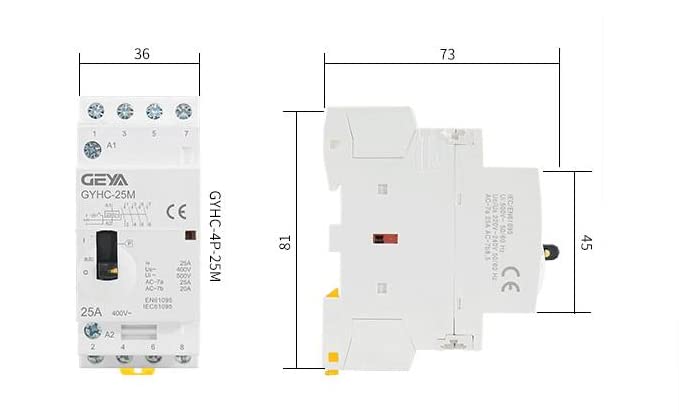
Figure 5: Dimensions of the Walfront AC Contactor.

Figure 6: Note on potential variations between new and old models. Functionality remains consistent.
Кепилдик маалымат
Specific warranty details for this product are not provided in the available information. Please refer to the retailer's return policy or contact the seller directly for warranty terms and conditions. Generally, electrical components come with a limited manufacturer's warranty against defects in materials and workmanship.
Кардарларды колдоо
For technical assistance, troubleshooting beyond this manual, or inquiries regarding your Walfront AC Contactor, please contact your point of purchase or the Walfront customer service department. You may find contact information on the product packaging or the retailer's webсайт.
For more information about Walfront products, visit the official Walfront Brand Store.
