1. Киришүү
This manual provides essential information for the safe operation, setup, and maintenance of your SYMA S39 RC Helicopter. The S39 features a 3.5-channel control system, a built-in gyro stabilizer for enhanced flight stability, and a durable alloy construction. It operates on 2.4GHz spread spectrum technology, allowing for multiple aircraft to fly simultaneously without interference.
Please read this manual thoroughly before operating the helicopter to ensure proper function and to prevent damage or injury.
2. Кутуда эмне бар
Төмөндө тизмеленген бардык компоненттер пакетиңизде бар экенин текшериңиз:
- SYMA S39 RC Helicopter
- Алыстан башкаруу өткөргүч
- USB заряддоо кабели
- Instruction Manual
- Screwdriver
- Spare Tail Rotor Blade (Spoiler)

3. Components Overview
3.1. SYMA S39 Helicopter

The S39 helicopter is constructed with a high-strength plastic body and an alloy frame for durability and resistance to impacts. It features flexible blades designed to withstand minor crashes.

3.2. Алыстан башкаруу передачасы
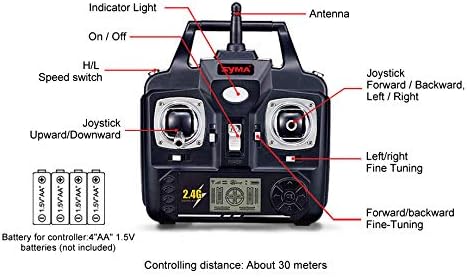
алыстан башкаруу өзгөчөлүктөрү:
- Индикатор жарыгы: Күч абалын көрсөтөт.
- Антенна: Сигнал берүү үчүн.
- Күйгүзүү/өчүрүү: Powers the remote control.
- H/L Speed Switch: Toggles between High and Low-speed flight modes.
- Left Joystick (Upward/Downward): Controls throttle (ascend/descend) and yaw (turn left/right).
- Right Joystick (Forward/Backward, Left/Right): Controls pitch (forward/backward) and roll (sideways movement).
- Left/Right Fine-Tuning: Adjusts yaw trim for stable hovering.
- Forward/Backward Fine-Tuning: Adjusts pitch trim for stable hovering.
4. Орнотуу
4.1. Алыстан башкаруунун батареясын орнотуу
- Пульттун артындагы батарея отсегин табыңыз.
- Батареянын капкагын ачыңыз.
- Insert four (4) 1.5V AA batteries (not included), ensuring correct polarity (+/-).
- Батареянын капкагын бекем жабыңыз.
4.2. Тик учактын аккумуляторун кубаттоо
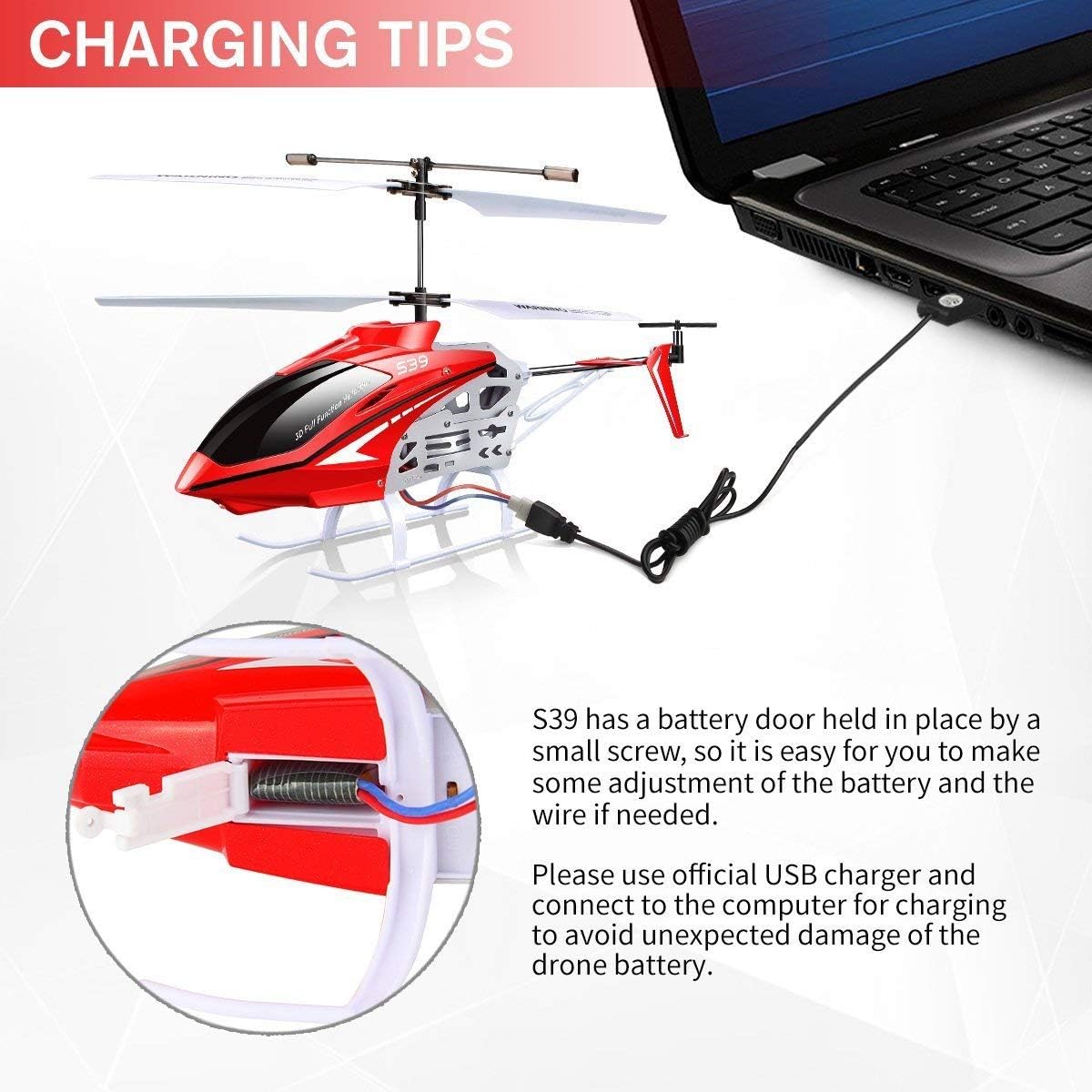
The S39 helicopter uses an internal rechargeable battery. To charge:
- Тик учактын кубат которгучу ӨЧҮК абалында экенин текшериңиз.
- Locate the battery door on the helicopter, typically secured by a small screw. Use the provided screwdriver to open it.
- Connect the helicopter's internal battery wire to the charging port inside the helicopter. This is a critical step for charging.
- Connect the USB charging cable to the helicopter's charging port.
- Plug the other end of the USB charging cable into a computer's USB port or a suitable USB power adapter.
- The indicator light on the USB cable will typically illuminate during charging and turn off or change color when fully charged.
- Once charging is complete, disconnect the USB cable, and ensure the internal battery wire is securely connected for flight. Close the battery door.
Эскертүү: Use only the official USB charger provided to prevent damage to the helicopter's battery. Do not attempt to charge the battery if it is damaged or swollen.
5. Иштөө нускамалары
5.1. Тик учакты жана пультту жупташтыруу
- Ensure both the helicopter and remote control have fresh batteries.
- Тик учакты тегиз, түз жерге коюңуз.
- Turn on the helicopter's power switch. The helicopter's indicator light will flash.
- Алыстан башкаруу пультунун кубат которгучун күйгүзүңүз.
- Push the left joystick (throttle) all the way up, then pull it all the way down. The indicator lights on both the helicopter and remote control should become solid, indicating successful pairing.
5.2. Учууну башкаруунун негизги каражаттары

- Өтүү/Төмөн: Өйдө көтөрүлүү үчүн сол джойстикти басыңыз, ылдый түшүү үчүн ылдый тартыңыз.
- Алдыга артка: Push the right joystick up to move forward, pull down to move backward.
- Солго/Оңго бурулуңуз (жөө): Push the left joystick left to turn the helicopter counter-clockwise, push right to turn clockwise.
- Fine-Tuning (Trimming): If the helicopter drifts or rotates unintentionally during hover, use the fine-tuning buttons on the remote control to adjust its stability. For example, if it rotates clockwise, press the left fine-tuning button until it stabilizes.
5.3. Ылдамдык режимдери
The H/L Speed switch on the remote control allows you to select between two flight speeds:
- Төмөнкү ылдамдык (L): Recommended for beginners and indoor flight, offering more stable and controlled movements.
- Жогорку ылдамдык (H): Provides faster and more agile flight, suitable for experienced pilots.
5.4. Учуу чөйрөсү
The SYMA S39 helicopter is primarily designed for indoor use to achieve the best flight experience. Ensure you have a clear, open space free from obstacles, people, and pets.
6. Коопсуздук боюнча көрсөтмөлөр
- Чоңдордун көзөмөлү: Always operate the helicopter under adult supervision, especially for younger users.
- Аймакты тазалоо: Fly in an open area free from obstacles, people, and animals to prevent collisions and injuries.
- Суудан качуу: Do not operate the helicopter near water or in wet conditions.
- Батареянын коопсуздугу: Do not short-circuit, disassemble, or expose batteries to extreme temperatures. Dispose of used batteries responsibly.
- Ротор бычактары: Keep hands, face, and hair away from rotating blades. Do not touch the helicopter while the blades are spinning.
- Өчүрүү: Always turn off the helicopter and remote control after use.
- Таасири: After any significant impact, inspect the helicopter for damage before flying again.
7. Техникалык тейлөө
- Тазалоо: Use a soft, dry cloth to clean the helicopter and remote control. Avoid using solvents or harsh chemicals.
- Бычак текшерүү: Regularly check rotor blades for cracks, bends, or damage. Replace damaged blades immediately using the provided screwdriver and spare parts.
- Батареяга кам көрүү: Store the helicopter with a partially charged battery if not used for extended periods. Do not leave batteries fully discharged or fully charged for long durations.
- Сактагыч: Store the helicopter and remote control in a cool, dry place away from direct sunlight.
8. Кыйынчылыктарды
| Көйгөй | Мүмкүн себеп | Чечим |
|---|---|---|
| Тик учак пультка жооп бербейт. | Low battery in helicopter or remote; Not paired; Power switches off. | Charge helicopter battery; Replace remote batteries; Ensure both are powered on and paired correctly. |
| Кыска учуу убактысы. | Battery not fully charged; Old or damaged battery. | Ensure battery is fully charged; Consider replacing the battery if it's old or shows signs of damage. |
| Helicopter drifts or spins during hover. | Needs fine-tuning; Damaged rotor blades. | Use the fine-tuning buttons on the remote; Inspect and replace damaged blades. |
| Weak control signal. | Out of range; Interference; Obstacles between remote and helicopter. | Operate within the specified range (approx. 30 meters); Ensure clear line of sight; Avoid areas with strong electronic interference. |
| Helicopter does not charge. | Internal battery wire not connected; Faulty USB cable or power source. | Ensure the internal battery wire is connected to the charging port inside the helicopter (refer to Section 4.2); Try a different USB port or power adapter; Check USB cable for damage. |
9. Техникалык шарттар
| Өзгөчөлүк | Деталь |
|---|---|
| Модель номери | S39 |
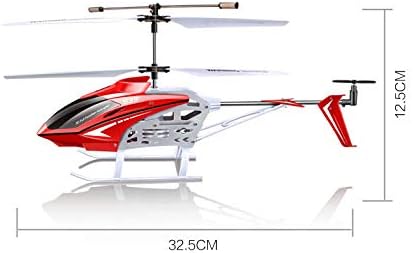
| Продукциянын өлчөмдөрү | 14.25 x 2.24 x 6.1 дюйм (36.2 x 5.7 x 15.5 см) |
| Элемент Салмагы | 15.2 унция (430 грамм) |
| Башкаруу каналдары | 3.5 Channels (Up/Down, Forward/Backward, Left/Right Turn) |
| Турукташтыруу | Built-in Gyro Stabilizer |
| Материал | Alloy Frame, High-strength Plastic Body |
| Алыстан башкаруу жыштыгы | 2.4 ГГц |
| Алыстан башкаруунун батареялары | 4 x AA 1.5V батарейкалар (киргизилген эмес) |
| Өндүрүүчүнүн сунуш кылган курагы | 8 жаш жана андан жогору |

10. Кепилдик жана колдоо
For warranty information and customer support, please contact the retailer where you purchased the SYMA S39 RC Helicopter or refer to the official SYMA webсайт. Ар кандай кепилдик дооматтары үчүн сатып алганыңыздын далилин сактаңыз.