1. Киришүү
This manual provides comprehensive instructions for the UGREEN Bluetooth 5.0 Audio Transmitter (Model 80188). This device is designed to enable wireless audio transmission from your Nintendo Switch or Switch Lite to Bluetooth-enabled headphones and speakers, utilizing aptX Low Latency technology for minimal audio delay.
Кутуда эмне бар:
- 1 x UGREEN Bluetooth Transmitter
- 1 х USB-C кубаттоо кабели
2. Продукт бүтүп калдыview
The UGREEN Bluetooth 5.0 Audio Transmitter offers a compact and efficient solution for wireless audio. Its design integrates seamlessly with the Nintendo Switch, providing a stable and low-latency audio experience.

Image: UGREEN Bluetooth Transmitter connected to a Nintendo Switch in handheld mode.
Негизги өзгөчөлүктөрү:
- Bluetooth 5.0: Туруктуу жана натыйжалуу зымсыз байланышты камсыз кылат.
- aptX Төмөнкү кечигүү: Minimizes audio delay for synchronized sound, crucial for gaming.
- Dual Streaming: Supports connecting two wireless headphones simultaneously.
- Компакт дизайн: Integrates discreetly with the Nintendo Switch and Switch Lite.
- Батареянын узак иштөө мөөнөтү: Up to 8 hours of playing time on a single charge.

Image: Nintendo Switch Lite displaying a game, with the UGREEN Bluetooth transmitter connected, illustrating the aptX Low Latency feature for minimal audio delay.
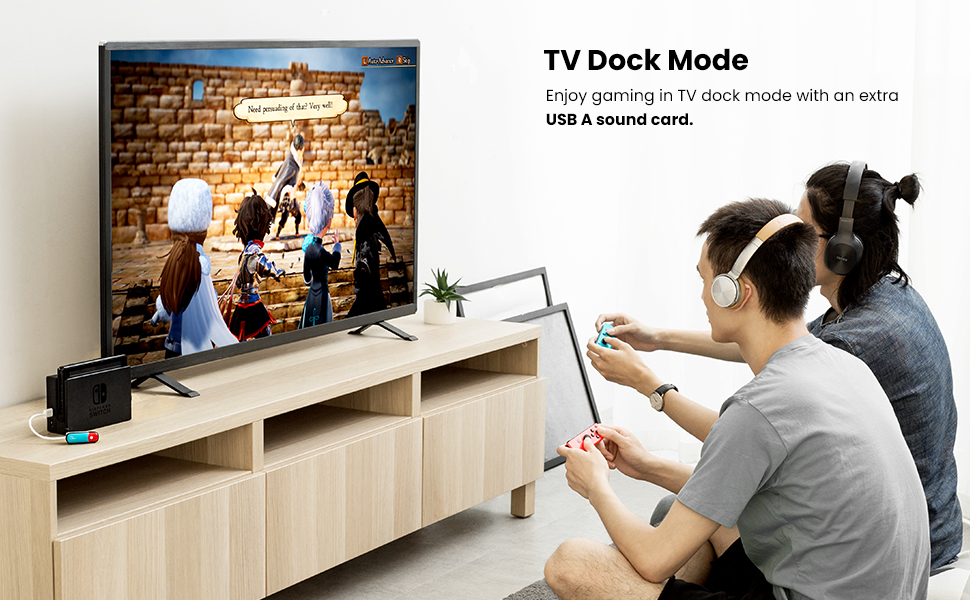
Image: A graph comparing aptX Low Latency audio delay with other codecs (aptX, AAC, SBC), showing aptX LL as the best with less than 40ms delay.
Компоненттин идентификациясы:

Image: Close-up of the UGREEN Bluetooth transmitter, highlighting its components: 1. 3.5mm audio jack, 2. Indicator light, 3. USB-C charging port, 4. Power button, 5. UGREEN logo.
3. Орнотуу нускамалары
Connecting to Nintendo Switch/Switch Lite:
- Ensure your UGREEN Bluetooth Transmitter is charged.
- Insert the 3.5mm audio jack of the transmitter into the headphone port of your Nintendo Switch or Switch Lite. The transmitter's flexible joint allows for adjustment to fit with some protective cases.
- Press and hold the power button on the transmitter for 3 seconds to turn it on. The white indicator light will flash every 5 seconds.
- Set your Bluetooth headphones or speaker to pairing mode. Refer to your audio device's manual for specific pairing instructions.
- Double-press the power button on the UGREEN transmitter to enter pairing mode. The red and blue lights will flash alternately.
- Once connected, the white light on the transmitter will flash once every 10 seconds, indicating successful pairing.

Image: A four-panel image demonstrating the easy pairing process: 1. Set earphone to pairing mode. 2. Press and hold transmitter button for 3s to turn on. 3. Plug in and double-press button for pairing. 4. Pairing successful.
Using in TV Dock Mode:
To use the transmitter in TV dock mode, an additional USB audio card (not included) is required. Connect the USB audio card to the Nintendo Switch dock, then connect the UGREEN Bluetooth Transmitter to the audio card's 3.5mm output. This allows for wireless audio while playing on a TV.

Image: Two people playing Nintendo Switch in TV dock mode, using wireless headphones connected via the UGREEN Bluetooth transmitter and an additional USB audio card.
4. Иштөө нускамалары
Күйгүзүү/өчүрүү:
- Күйгүзүү: Кубат баскычын 3 секунд басып туруңуз.
- Өчүрүү: Кубат баскычын 3 секунд басып туруңуз.
Dual Streaming:
The transmitter supports connecting two Bluetooth headphones simultaneously. After successfully pairing the first device, put the second Bluetooth headphone into pairing mode and then double-press the transmitter's power button again to pair the second device.

Image: Two people playing Nintendo Switch in tabletop mode, each wearing wireless headphones connected via the UGREEN Bluetooth transmitter, demonstrating dual streaming.
Өткөргүчтү заряддоо:
Connect the provided USB-C charging cable to the transmitter's USB-C port and a power source. The transmitter can be charged while in use, and the Nintendo Switch can also be charged simultaneously.

Image: A Nintendo Switch Lite being charged via USB-C while the UGREEN Bluetooth transmitter is connected, showing pass-through charging.
5. Техникалык тейлөө
- Keep the device dry. Moisture can damage the internal circuits.
- Аппаратты экстремалдуу температурага дуушар кылбаңыз.
- Аппаратты түшүрүүдөн же катуу таасирлерден сактаныңыз.
- Clean the device with a soft, dry cloth. Do not use harsh chemicals or detergents.
- Store the device in a clean, dust-free environment when not in use.
6. Кыйынчылыктарды
- Үн жок/жупташуу мүмкүн эмес:
- Ensure the transmitter is fully charged and powered on.
- Confirm your Bluetooth headphones/speaker are in pairing mode.
- Double-press the transmitter's power button to enter pairing mode.
- Check that the transmitter is securely plugged into the 3.5mm audio jack.
- If using in TV dock mode, ensure the USB audio card is correctly connected and functioning.
- Audio Lag/Delay:
- Ensure your Bluetooth headphones/speaker support aptX Low Latency for optimal performance.
- Өткөргүч менен аудио түзмөгүңүздүн ортосундагы аралыкты азайтыңыз.
- Minimize obstacles between the devices.
- Audio Popping/Crackling (especially with aptX-LL):
- Some users report occasional popping with aptX-LL. If this occurs, try switching to a different codec if your headphones support it, or consider using standard aptX if latency is not a critical concern.
- Low Volume with AirPods:
- AirPods may experience reduced volume when connected via this transmitter, as they typically use the SBC codec with this device. Adjust volume settings on both the Switch and the AirPods.
- Чектелген диапазон:
- The effective range is approximately 10 meters (33 feet) in open areas. Walls and other obstructions can reduce this range.
7. Техникалык шарттар
| Бренд | UGREEN |
| Модель номери | 80188 |
| Байланыш технологиясы | Bluetooth, USB |
| Bluetooth версиясы | 5.0 |
| Өзгөчө өзгөчөлүк | Built-in Microphone (Note: Some user reviews indicate this feature may not be present or functional for all setups) |
| Шайкеш түзмөктөр | Nintendo Switch, Nintendo Switch Lite, Speakers, Headphones, other devices with 3.5mm audio jack |
| Туташтыргыч түрү | 3.5mm Jack, USB Type-C |
| Аудио чыгаруу режими | Стерео |
| Көлөмдүү үн каналынын конфигурациясы | 2.0 |
| Каналдардын саны | 2 |
| Түс | Multicolor (Red/Blue) |
| Продукциянын өлчөмдөрү | 2.28 x 0.75 x 0.47 дюйм |
| Элемент Салмагы | 1.76 унция |
| Өндүрүүчү | UGREEN GROUP LIMITED |
8. Кепилдик жана колдоо
UGREEN продуктулары жогорку сапат стандарттарына жооп берүү үчүн иштелип чыккан. Кепилдик маалыматы, техникалык колдоо же кардарларды тейлөө суроолору үчүн расмий UGREENге кайрылыңыз webсайтына кириңиз же алардын кардарларды колдоо кызматына түз кайрылыңыз. Кепилдик боюнча дооматтар үчүн сатып алууну тастыктаган документти сактап коюңуз.


