Introduction
The SilverStone FARA B1 is an ATX tower chassis designed to provide efficient cooling and ample space for various hardware configurations. This manual provides detailed instructions for the assembly, operation, and maintenance of your FARA B1 chassis.

Figure 1: SilverStone FARA B1 ATX Chassis
Орнотуу жана орнотуу
1. Таңгактан чыгаруу жана текшерүү
Carefully remove the chassis from its packaging. Inspect for any damage that may have occurred during transit. Retain the packaging for future transport or storage.
2. Tempered Glass Side Panel Removal
To access the interior, unscrew the four thumb screws securing the tempered glass side panel. Gently pull the panel away from the chassis and set it aside on a soft, flat surface to prevent scratches.
3. Motherboard орнотуу
The FARA B1 supports ATX, Micro-ATX, and Mini-ITX motherboards. Ensure the standoffs align with your motherboard's mounting holes. Install the I/O shield into the rear opening of the chassis. Carefully place the motherboard onto the standoffs and secure it with screws.
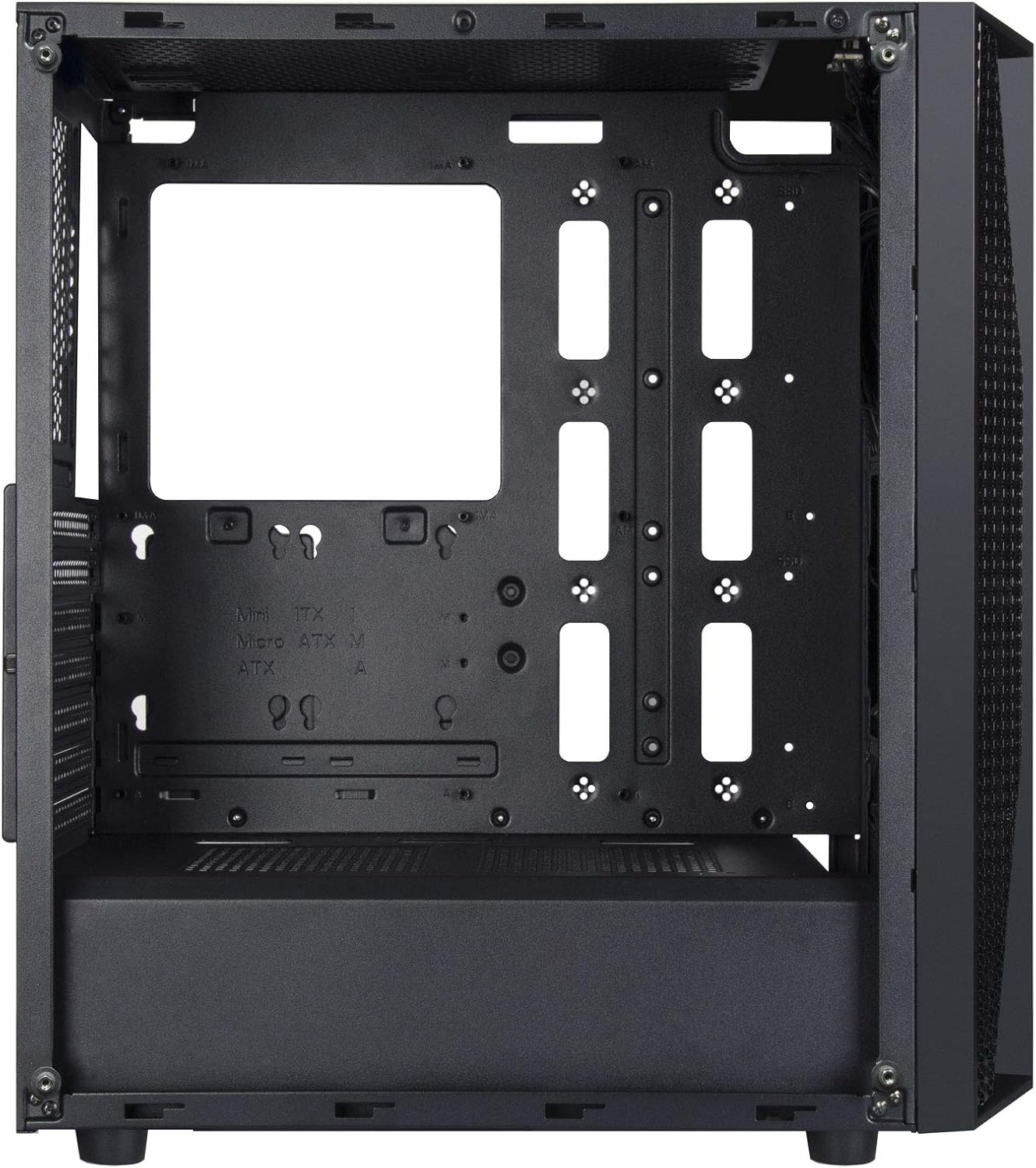
Figure 2: Chassis Interior with Motherboard Tray
4. Сактоочу дискти орнотуу
The chassis supports one 3.5" drive and four 2.5" drives.
- 3.5 дюймдук катуу диск: Locate the drive cage beneath the PSU shroud. Slide the 3.5" HDD into the drive tray and secure it with screws.
- 2.5 дюймдук SSD: Mount 2.5" SSDs to the dedicated mounting points behind the motherboard tray or on top of the PSU shroud. Secure with screws.

Figure 3: 3.5" HDD Drive Cage

Figure 4: 2.5" SSD Mounting Points
5. Электр энергиясы менен жабдууну орнотуу
Install the ATX power supply into the dedicated compartment at the bottom rear of the chassis. Secure it with screws from the rear of the case.
6. Видеокартаны жана кеңейтүү картасын орнотуу
Remove the necessary PCIe slot covers from the rear of the chassis. Insert your graphics card or other expansion cards into the motherboard's PCIe slots and secure them with screws.
7. Fan and Cooling System Installation
The FARA B1 supports multiple cooling options, including up to four 140mm fans or five 120mm fans. Install fans in the front, top, and rear positions as desired. Ensure proper airflow direction for optimal cooling.
8. Кабелдик башкаруу
Кабелдерди башкаруу үчүн энелик плата лотогунун артындагы кабелдерди өткөрүү кесиктерин жана байлоочу чекиттерди колдонуңуз. Бул аба агымын жана эстетиканы жакшыртат.
9. Front I/O Connections
Connect the front panel cables (USB 3.0, USB 2.0, HD Audio, Power, Reset, LED indicators) to the corresponding headers on your motherboard. Refer to your motherboard manual for specific header locations.

Figure 5: Top I/O Panel
Иштөө нускамалары
1. Күйгүзүү / Өчүрүү
Press the power button located on the top I/O panel to turn your system on or off. A short press typically initiates a soft shutdown, while a long press (several seconds) forces a hard shutdown.
2. Using Front Panel Ports
The front I/O panel provides convenient access to USB 3.0, USB 2.0 ports, and a combined 3.5mm audio jack for headphones or headsets with a microphone. Ensure all necessary drivers are installed for proper functionality.

6-сүрөт: Мисample of a Built System
Техникалык тейлөө
1. Чаң чыпкасын тазалоо
The FARA B1 features a magnetic dust filter on the top panel and a removable filter at the bottom for the power supply intake. Regularly clean these filters to maintain optimal airflow and prevent dust buildup inside the chassis.
- Gently lift the magnetic top filter for cleaning.
- Slide out the bottom filter from the rear of the chassis.
- Use compressed air or a soft brush to remove accumulated dust.

Figure 7: Removing Top Dust Filter
2. Жалпы тазалоо
Wipe the exterior of the chassis with a soft, damp кездеме. Каптоого же чыңалган айнекке зыян келтире турган катуу химиялык заттарды же абразивдүү материалдарды колдонуудан алыс болуңуз.
Проблемаларды чечүү
Система күйбөй жатат
- Ensure the power supply is switched on and properly connected to the wall outlet.
- Verify all power cables (24-pin ATX, 8-pin CPU, PCIe power) are securely connected to the motherboard and components.
- Алдыңкы панелдин кубат которгучу кабели эне платасынын алдыңкы панелинин башына туура туташтырылганын текшериңиз.
Аба агымынын начардыгы же ашыкча ысып кетүү
- Clean all dust filters regularly.
- Ensure case fans are installed with the correct orientation for intake and exhaust.
- Verify that CPU cooler and GPU fans are functioning correctly.
- Аба агымына тоскоолдуктарды азайтуу үчүн кабелдерди башкарууну жакшыртуу.
Front Panel Ports Not Working
- Check that the USB and audio cables from the front panel are securely connected to the corresponding headers on your motherboard.
- Ensure necessary drivers for USB and audio are installed and up to date.
Техникалык шарттар
| Өзгөчөлүк | Деталь |
|---|---|
| Бренд | SilverStone |
| Модель аты | FARA B1 |
| Элемент моделинин номери | SST-FAB1B-G |
| Иштин түрү | Ара Tower |
| Motherboard шайкештиги | ATX, Micro ATX, Mini ITX |
| Материал | Чыңалган айнек, болот |
| Өлчөмдөрү (LxWxH) | 15.79 x 8.15 x 17.56 дюйм (401 x 207 x 446 мм) |
| Элемент Салмагы | 13.12 фунт (5.95 кг) |
| Drive Bays | 1 x 3.5", 4 x 2.5" |
| Муздатуу ыкмасы | Аба, суу |
| Күйөрмандардын колдоосу | Up to four 140mm fans / five 120mm fans |
| Алдыңкы I / O порттору | USB 3.0 x 2, USB 2.0 x 1, Audio x 1 (combined 3.5mm) |
| Кубат менен камсыздоону орнотуу түрү | Төмөнкү тоо |
Кепилдик жана колдоо
For warranty information, technical support, or further assistance, please visit the official SilverStone Technology webсайтка же кардарларды тейлөө бөлүмүнө кайрылыңыз. Кепилдик дооматтар үчүн сатып алганыңыздын далилин сактаңыз.
Official SilverStone Webсайт: www.silverstonetek.com


