1. Киришүү
This manual provides detailed instructions for the installation, operation, and maintenance of your SONOFF Zigbee Smart Plug S31 Lite. Please read this manual thoroughly before using the product to ensure proper function and safety.
Негизги өзгөчөлүктөрү:
- Simple Setup and Use: Easy pairing with a compatible Zigbee hub.
- Smart Control: Control connected appliances via smartphone app and set schedules.
- Үн менен башкаруу: Колсуз иштөө үчүн Amazon Alexa жана Google Home менен шайкеш келет.
- Zigbee Repeater Function: Extends your Zigbee network range.
- ETL тастыкталган: Ensures product safety and quality.
- Компакт дизайн: Does not obstruct adjacent outlets.

Image 1.1: The SONOFF S31 Lite Zigbee Smart Plug in a standard wall outlet.

Сүрөт 1.2: Детальдуу view of the SONOFF S31 Lite Smart Plug, showing its components and safety features.
2. Орнотуу нускамалары
The SONOFF S31 Lite Zigbee Smart Plug requires a compatible Zigbee hub (e.g., SmartThings, Amazon Echo Plus) for smart functionality.
2.1 Pairing with a Zigbee Hub
- Plug the SONOFF S31 Lite Smart Plug into a standard wall outlet.
- Zigbee хабыңыз күйүк жана жупташтыруу режиминде экенин текшериңиз. Жупташтыруу режимин иштетүү боюнча так көрсөтмөлөрдү хабыңыздын колдонмосунан караңыз.
- Смартфонуңуздан eWeLink колдонмосун ачыңыз.
- Tap the "+" icon in the upper right corner to add a new device.
- Follow the on-screen instructions to discover and add the SONOFF S31 Lite Smart Plug to your network. This typically involves selecting the Zigbee device type and confirming the pairing process.
- Once successfully paired, the device will appear in your eWeLink App and be controllable through your Zigbee hub.

Image 2.1: Visual guide for adding a device using the eWeLink app.
2.2 Hub Compatibility
The SONOFF S31 Lite is designed to work with various Zigbee hubs, including:
- SmartThings Hub
- Amazon Echo Plus
- Amazon Echo Show (2nd Gen)
- Amazon Echo Studio

Image 2.2: Compatibility diagram for the SONOFF Zigbee Smart Plug.
3. Иштөө нускамалары
3.1 Колдонмону башкаруу
Once paired, you can control the smart plug and connected devices through the eWeLink app:
- Күйгүзүү/өчүрүү башкаруу: Tap the power icon in the app to toggle the connected appliance on or off.
- Пландаштыруу: Set custom schedules, timers, or countdowns for automatic operation.
- Кубаттын мониторинги: View real-time power consumption (if supported by your specific model and app version).

Image 3.1: Controlling a device via the eWeLink app interface.

Сүрөт 3.2: Мисample of setting a schedule for an appliance.
3.2 Үн менен башкаруу
Integrate your SONOFF S31 Lite with Amazon Alexa or Google Home for convenient voice commands. Ensure your Zigbee hub is linked to your voice assistant account.
- Amazon Alexa: After linking your eWeLink or SmartThings account to Alexa, you can use commands like "Alexa, turn on the [device name]" or "Alexa, turn off the [device name]."
- Google Home: Similar integration allows commands such as "Hey Google, turn on the [device name]."
Video 3.1: Demonstration of controlling SONOFF devices using Alexa voice commands.
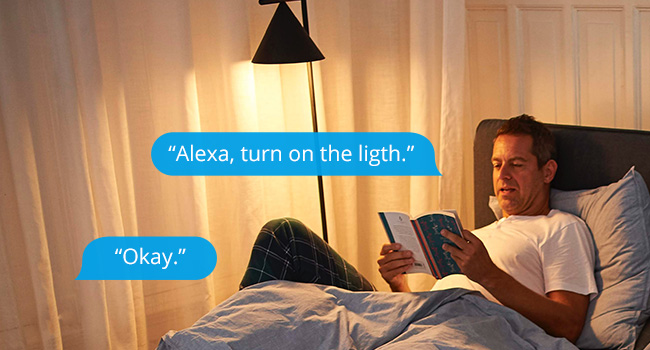
Сүрөт 3.3: Мисample of using Alexa to control a light connected to the smart plug.
3.3 Кол менен башкаруу
The smart plug features a physical button on its side. Press this button to manually toggle the power of the connected appliance on or off. This action will also update the status in your app.

Image 3.4: The SONOFF S31 Lite Smart Plug used with a lamp, illustrating its versatility.
4. Техникалык тейлөө
To ensure the longevity and optimal performance of your SONOFF Zigbee Smart Plug S31 Lite:
- Аппаратты таза жана чаңдан алыс кармаңыз. Тазалоо үчүн кургак, жумшак чүпүрөктү колдонуңуз.
- Аппаратты ашыкча нымдуулуктун же экстремалдык температуранын таасиринен сактаңыз.
- Аппаратты өз алдынча бөлүүгө же оңдоого аракет кылбаңыз. Жардам алуу үчүн кардарларды колдоо бөлүмүнө кайрылыңыз.
- Ensure the connected appliance's power consumption does not exceed the smart plug's maximum rating (15 Ampс).
5. Кыйынчылыктарды
If you encounter issues with your SONOFF Zigbee Smart Plug S31 Lite, consider the following:
- Түзмөк жооп бербейт:
- Check if the smart plug is properly plugged into the outlet and receiving power.
- Verify that your Zigbee hub is online and functioning correctly.
- Ensure the smart plug is within range of your Zigbee hub or another Zigbee repeater.
- Try re-pairing the device with your Zigbee hub.
- Колдонмонун туташуу маселелери:
- Confirm your smartphone has a stable internet connection.
- eWeLink колдонмосун кайра иштетиңиз.
- Колдонмонун жаңыртууларын текшериңиз.
- Үн менен башкаруу иштебей жатат:
- Ensure your Zigbee hub is correctly linked to your voice assistant (Alexa/Google Home) account.
- Verify the device name used in voice commands matches the name in your app.
- Check your voice assistant's settings for any connectivity issues.
If problems persist, please refer to the official SONOFF support resources or contact customer service.
6. Техникалык шарттар
| Өзгөчөлүк | Деталь |
|---|---|
| Модель номери | S31 Lite zb |
| Продукциянын өлчөмдөрү | 1.57 x 3 x 1.3 дюйм |
| Элемент Салмагы | 3.21 унция |
| Учурдагы рейтинг | 15 Amps |
| Материал | Copper (internal components), PC V0 (shell) |
| Байланыш | Zigbee Protocol (Hub Required) |
| Шайкештик | SmartThings, Amazon Echo Plus, Alexa, Google Home |
| Монтаж түрү | Plug-In Mount |
7. Кепилдик жана колдоо
For warranty information, technical support, or further assistance, please visit the official SONOFF website or contact their customer service department. Details can typically be found on the product packaging or the SONOFF official webсайт.


