1. Киришүү
This manual provides comprehensive instructions for the setup, operation, and maintenance of your Lorex N841A81 Series 8 Channel 4K Ultra HD Network Video Recorder (NVR). This NVR is designed to record and manage video surveillance from compatible cameras, offering advanced features for enhanced security monitoring.
2. Пакеттин мазмуну
Төмөндө тизмеленген нерселердин баары пакетиңизде бар экенин текшериңиз:
- Lorex N841A81 NVR Unit
- AC кубат адаптери
- USB чычкан
- Ethernet кабели
- HDMI кабели
- Quick Start Guide / Instruction Manual (this document)
3. Орнотуу
3.1 NVR Overview
Familiarize yourself with the front and rear panels of your NVR unit.

Figure 1: Front panel of the Lorex N841A81 NVR, showing the 4K Ultra HD NVR label and a front USB port.
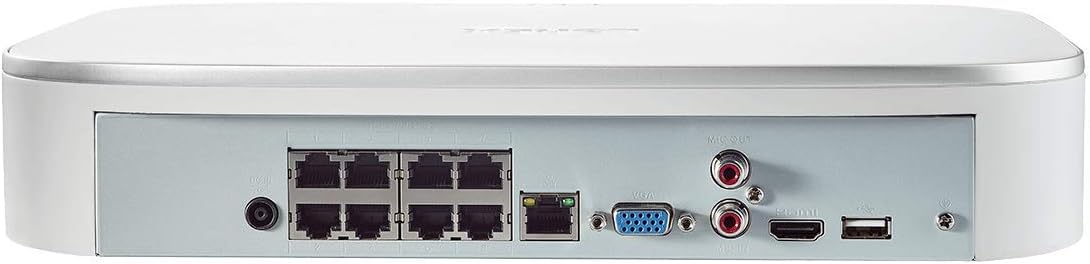
Figure 2: Rear panel of the Lorex N841A81 NVR, displaying multiple PoE ports, HDMI, VGA, USB, LAN, and audio output connections.
3.2 Баштапкы туташуу
- Дисплейге туташуу: Connect the NVR to a monitor or TV using the provided HDMI cable. Alternatively, use a VGA cable (not included).
- USB чычканды туташтыруу: Plug the USB mouse into one of the NVR's USB ports (front or rear).
- Тармакка туташуу: Connect the NVR to your router using the provided Ethernet cable. This enables remote viewing and network features.
- Камераларды туташтыруу: Connect your compatible IP cameras to the PoE ports on the rear of the NVR. The NVR provides power and data connection through these ports.
- Күйгүзүү: Connect the AC power adapter to the NVR's power input and then plug it into a power outlet. The NVR will power on automatically.
3.3 Биринчи жолу орнотуу устасы
Upon initial power-on, the NVR will guide you through a setup wizard to configure basic settings such as language, time zone, and password creation. Follow the on-screen prompts to complete the setup.
4. Иштөө нускамалары
4.1 Lorex Home Mobile App
The Lorex Home app allows you to remotely view your security system from your smartphone or tablet. It also provides control over active deterrence features and allows you to receive motion-activated push notifications and email alerts.
- Колдонмону жүктөп алыңыз: Download the free Lorex Home app from your device's app store.
- Түзмөк кошуу: Scan the QR code located on your NVR to add it to your account.
- Алыстан Viewing: Кошулгандан кийин, сиз төмөнкүлөрдү жасай аласыз view live or recorded video streams from your cameras.
- Эскертмелер: Configure push notifications and email alerts for motion detection events.
4.2 Smart Motion Detection
The NVR features advanced smart motion detection to reduce false alarms. It can differentiate between motion caused by people or vehicles, sending only the most relevant alerts.
- Конфигурация: Access the NVR's menu via a connected display to configure motion detection zones and sensitivity for each camera.
- Эскертүүлөр: Receive push notifications or email alerts when people or vehicles are detected in configured zones.
4.3 Акылдуу издөө
Use the Smart Search feature to quickly review footage by filtering motion events based on area, time/date, and the type of detection (person or vehicle).
- Мүмкүнчүлүк: Navigate to the playback or search menu on your NVR.
- Чыпка: Apply filters for specific events to efficiently locate relevant recordings.
4.4 Voice Control & Smart Home Compatibility
The NVR is compatible with Amazon Alexa, Google Assistant, Apple TV, and Chromecast, allowing for hands-free control and viewing.
- Интеграция: Follow the instructions provided by your smart home assistant or streaming device to link your Lorex account.
- Үн буйруктары: Use simple voice commands to activate camera features or view live/recorded footage on your smart TV.
5. Техникалык тейлөө
5.1 Катуу дискти башкаруу
The NVR includes a local built-in security-grade 1TB hard drive, expandable up to 10TB. Regular maintenance ensures optimal recording performance.
- Сактоо сыйымдуулугу: Monitor the remaining storage space through the NVR's system settings.
- Үстүнө жазуу: The NVR is configured to overwrite the oldest footage when the hard drive is full, ensuring continuous recording.
- камдык: Маанилүү азык-түлүктөрдүн камдык көчүрмөсүн үзгүлтүксүз сактап туруңузtagтышкы USB дискке же тармактык сактагычка.
5.2 Жалпы кам көрүү
- Ашыкча ысып кетүүдөн сактоо үчүн NVRди жакшы желдетилген жерде сактаңыз.
- Clean the exterior of the NVR with a soft, dry cloth. Avoid using harsh chemicals.
- Бардык кабелдик байланыштар коопсуз экенин текшериңиз.
6. Кыйынчылыктарды
If you encounter issues with your Lorex NVR, consider the following:
- Видео дисплей жок: Check HDMI/VGA cable connections and ensure the display is set to the correct input source.
- Тармак туташуусу жок: Verify the Ethernet cable is securely connected to both the NVR and your router. Check your router's internet connection.
- No Camera Footage: Ensure cameras are properly connected to the PoE ports and powered on. Check camera compatibility with the NVR.
- Кыймылды аныктоо маселелери: Review motion detection zone settings and sensitivity levels in the NVR menu or Lorex Home app.
- System Freezing/Unresponsive: Try rebooting the NVR. If the issue persists, consult the Lorex support website for firmware updates or further assistance.
7. Техникалык шарттар
| Өзгөчөлүк | Спецификация |
|---|---|
| Модель номери | N841A81 |
| Video Resolution | Up to 4K (8MP) Ultra HD |
| Каналдар | 8 IP Channels with built-in PoE ports |
| Катуу дисктин өлчөмү | 1 TB (Preinstalled) |
| Эстутум сактоо сыйымдуулугу (макс) | 10 ТБ |
| Байланыш технологиясы | Зымдуу |
| Шайкеш түзмөктөр | Smartphone, Tablet, Television, Smart Home Assistants |
| Пакеттин өлчөмдөрү | 15.7 x 13.1 x 5.5 дюйм |
| Элемент Салмагы | 6.93 фунт |
8. Кепилдик жана колдоо
For warranty information, technical support, or to access the latest firmware and documentation, please visit the official Lorex website or contact Lorex customer service. Keep your product's model number and serial number handy when seeking support.


