Introduction
The Hyperkin Armor3 NuWave Controller is designed to provide accurate and fluid motion control for your Nintendo Wii U and Wii consoles. Featuring built-in Nu+ technology, this controller enhances your gaming experience by offering a wider range of motion in compatible titles. This manual provides essential information on setting up, operating, maintaining, and troubleshooting your NuWave Controller.
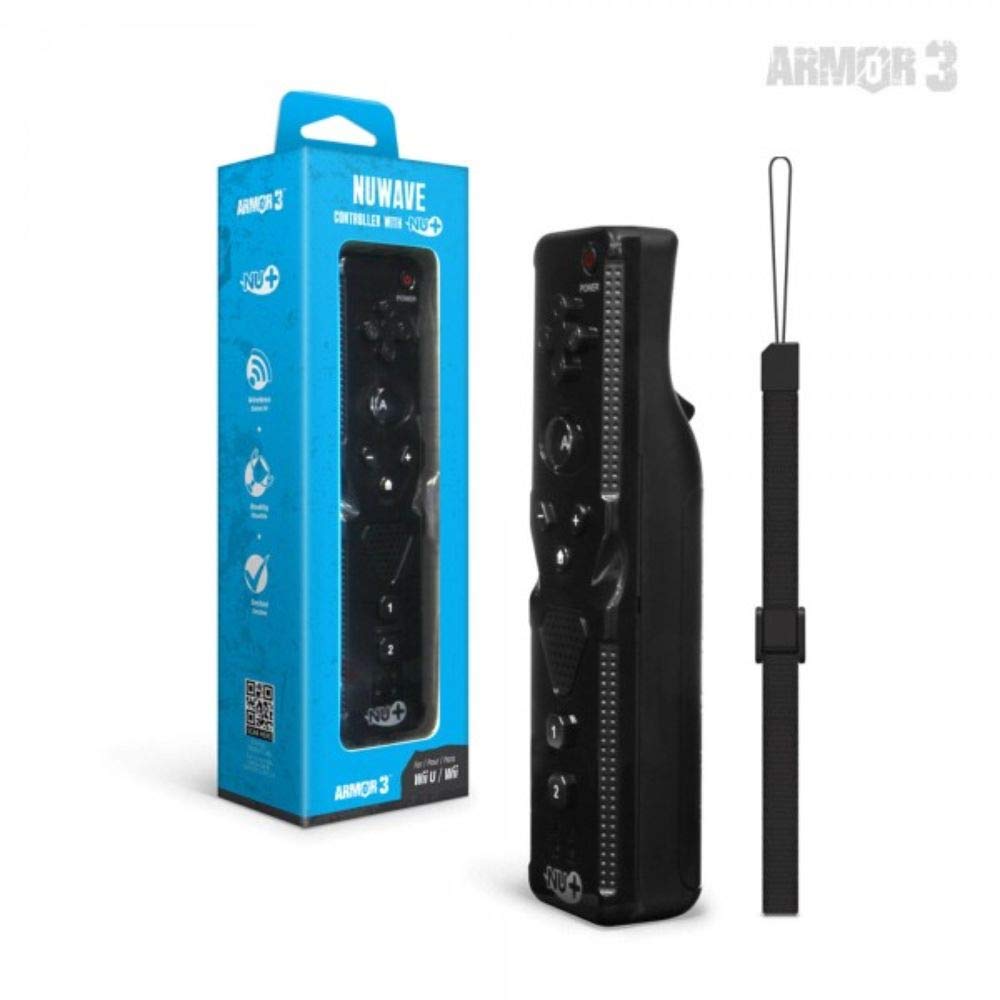
1-сүрөт: Hyperkin Armor3 NuWave Controller and its packaging. The controller is black with a wrist strap, and the packaging highlights its Nu+ technology and compatibility with Wii U and Wii.
Продукт бүттүview
The Armor3 NuWave Controller is a motion-sensing controller compatible with both Wii U and Wii systems. It integrates advanced Nu+ technology for enhanced motion detection and precision in supported games.
Негизги өзгөчөлүктөрү:
- Шайкештик: Fully compatible with Nintendo Wii U and Nintendo Wii consoles.
- Nu+ Technology: Built-in technology for a wider range of motion and improved accuracy in compatible titles.
- Эргономикалык дизайн: Designed for comfortable grip and extended gameplay sessions.
- Кубат булагы: 2 AA батарейканы талап кылат (киргизилген эмес).
Жайгашуу
1. Батареяны орнотуу
- Контроллердин арткы бетиндеги батарея бөлүмүн табыңыз.
- Батареянын капкагын ачуу үчүн ылдый жылдырыңыз.
- Бөлүмдүн ичинде көрсөтүлгөндөй туура полярдуулукту (+/-) камсыз кылып, эки (2) AA батарейкасын салыңыз.
- Батареянын капкагын ордуна чыкылдаган үн чыкканча өйдө жылдырып, кайра жаап коюңуз.
2. Connecting to Your Console
To connect the NuWave Controller to your Wii U or Wii console, follow these steps:
- Ensure your console is powered on.
- On your Wii U or Wii console, press the SYNC button (usually located near the SD card slot or battery compartment).
- On the NuWave Controller, open the battery cover and locate the small red SYNC button inside the battery compartment.
- Press and release the SYNC button on the controller.
- The player indicator lights on the bottom of the controller will flash. Once a single light remains lit, the controller is successfully connected.
- If connection fails, repeat steps 2-5. Ensure the controller is within range of the console.
Иштөө нускамалары
Негизги башкаруу элементтери:
- Багыттоочу такта (D-Pad): Used for menu navigation and character movement.
- Баскыч: Primary action button, often used for selection or interaction.
- B Button (Trigger): Located on the underside, typically used for grabbing or firing.
- 1 & 2 Buttons: Auxiliary action buttons, functions vary by game.
- Үй баскычы: Returns to the console's Home Menu.
- Plus (+) & Minus (-) Buttons: Often used for zooming, adjusting settings, or specific in-game actions.
- Кубат баскычы: Turns the controller on/off.
Motion Sensing with Nu+ Technology:
The built-in Nu+ technology provides enhanced motion tracking. For games that support it, you will experience more precise and responsive movements. Hold the controller firmly and ensure clear line of sight to the sensor bar for optimal performance.
- Калибрлөө: Some games may require initial calibration. Follow on-screen prompts.
- Билек боосу: Always use the included wrist strap to prevent accidental drops during active gameplay.
Техникалык тейлөө
Тазалоо:
- Wipe the controller with a soft, dry cloth.
- өжөр кир үчүн, бир аз гampчүпүрөктү суу менен. Катуу химиялык заттарды же абразивдүү тазалагычтарды колдонбоңуз.
- Ensure no liquid enters the controller's openings.
Сактагыч:
- Контроллерди түз күн нурунан жана экстремалдык температурадан алыс салкын, кургак жерде сактаңыз.
- Узак мөөнөткө сактасаңыз, акып кетпеш үчүн батарейкаларды алып салыңыз.
Батареяга кам көрүү:
- Always use new, high-quality AA batteries.
- Эски жана жаңы батарейкаларды же ар кандай типтеги батареяларды аралаштырбаңыз.
- Колдонулган батарейкаларды жергиликтүү эрежелерге ылайык таштаңыз.
Проблемаларды чечүү
| Көйгөй | Мүмкүн себеп | Чечим |
|---|---|---|
| Контроллер күйбөйт. | Өлүк же туура эмес салынган батарейкалар. | Туура полярдуулукту камсыз кылуу менен батарейкаларды жаңы AA батарейкалары менен алмаштырыңыз. |
| Controller does not sync with console. | Incorrect syncing procedure; out of range; console interference. | Ensure console is on. Repeat syncing steps (press SYNC on console, then on controller). Move closer to console. Check for other wireless device interference. |
| Баскычтар жооп бербей жатат же кечигип басылып жатат. | Low battery; connection issue; physical obstruction. | Replace batteries. Re-sync the controller. Ensure buttons are not stuck. |
| Motion control is inaccurate. | Sensor bar obstruction; improper calibration; environmental factors. | Ensure clear line of sight to the sensor bar. Re-calibrate in-game if prompted. Avoid strong light sources directly facing the sensor bar. |
Техникалык шарттар
- Модел: M07399-bk
- Бренд: Гиперкин
- Шайкештик: Nintendo Wii U, Nintendo Wii
- Кубат булагы: 2 x AA батарейкалар (киргизилген эмес)
- Өлчөмдөрү: 2.8 x 1.8 x 8 дюйм (болжол менен)
- Салмагы: 3.88 унция (болжол менен, батарейкаларсыз)
- Технология: Built-in Nu+ motion technology
- Түсү: Кара
Кепилдик жана колдоо
For specific warranty information and terms, please refer to the documentation included with your purchase or visit the official Hyperkin website. Hyperkin provides customer support for their products.
Онлайн колдоо: Visit the official Hyperkin webКөп берилүүчү суроолор, көйгөйлөрдү чечүү боюнча колдонмолор жана байланыш маалыматы үчүн сайт. www.hyperkin.com
Байланыш: Refer to the Hyperkin website for the most current customer service contact methods (phone, email, etc.).


