1. Introduction and Overview
The OSD Audio MX1680 GEN2 is a high-performance, multi-channel amplifier designed for distributed audio systems. This Class D amplifier provides 16 channels across 8 independent zones, delivering 80 Watts per channel into 4 Ohms or 50 Watts per channel into 8 Ohms. It is suitable for both residential and commercial audio installations, serving as a main amplifier for multi-room audio or integrating into home theater systems.
Key features include front-panel on/off buttons for each zone, efficient Class D amplification for low distortion, and built-in protection circuitry against thermal overload and short circuits. Its slim, 2U rack-mountable design (hardware included) allows for flexible installation.

Сүрөт 1.1: Алдыңкы жана арткы view of the OSD Audio MX1680 GEN2 Multi-Zone Digital Ampөмүрлүү.
2. Коопсуздук маалыматы
Сураныч, бул аппаратты иштетүүдөн мурун бардык коопсуздук нускамаларын окуп, түшүнүңүз. Бул колдонмону келечектеги маалымат үчүн сактаңыз.
- Кубат булагы: туташтыруу ampкөтөргүчтү түзмөктө көрсөтүлгөн кубат булагынын түрүнө гана коюңуз.tage сиздин аймак үчүн туура.
- Вентиляция: Эч кандай желдетүүчү тешиктерди жаап албаңыз. Өндүрүүчүнүн көрсөтмөлөрүнө ылайык орнотуу. Аба агымынын туура болушу үчүн аппараттын айланасында жетиштүү мейкиндикти сактаңыз.
- Суу жана ным: Бул шайманды жамгырга же нымга тийгизбеңиз. Ваза сыяктуу суюктуктар толтурулган нерселерди аппараттын үстүнө койбоңуз.
- Жылуулук: Радиаторлор, жылуулук регистрлери, мештер же башка аппараттар (анын ичинде) сыяктуу жылуулук булактарынын жанына орнотпоңуз ampкөтөргүчтөр) жылуулукту пайда кылуучу.
- Негиздөө: This appliance must be grounded. Ensure the power cord is connected to a properly grounded outlet.
- Тейлөө: Бул продуктту өзүңүз тейлөөгө аракет кылбаңыз. Бардык тейлөөнү квалификациялуу тейлөө кызматкерлерине тапшырыңыз.
- Тазалоо: Тазалоодон мурун түзмөктү розеткадан сууруп алыңыз. Тазалоо үчүн кургак чүпүрөктү колдонуңуз.
3. Орнотуу жана орнотуу
3.1 Пакеттен чыгаруу
Кылдаттык менен алып салуу amplifier from its packaging. Verify that all components listed in the 'What's in the Box' section are present. This includes the MX1680 GEN2 amplifier and the Quick Start Guide.
3.2 Орнотуу
The MX1680 GEN2 is designed for rack mounting (2U height) or placement on a flat, stable surface. Ensure adequate ventilation around the unit to prevent overheating. Avoid placing it near other heat-generating equipment.
3.3 Байланыштар
Refer to the rear panel diagram for all input and output connections.
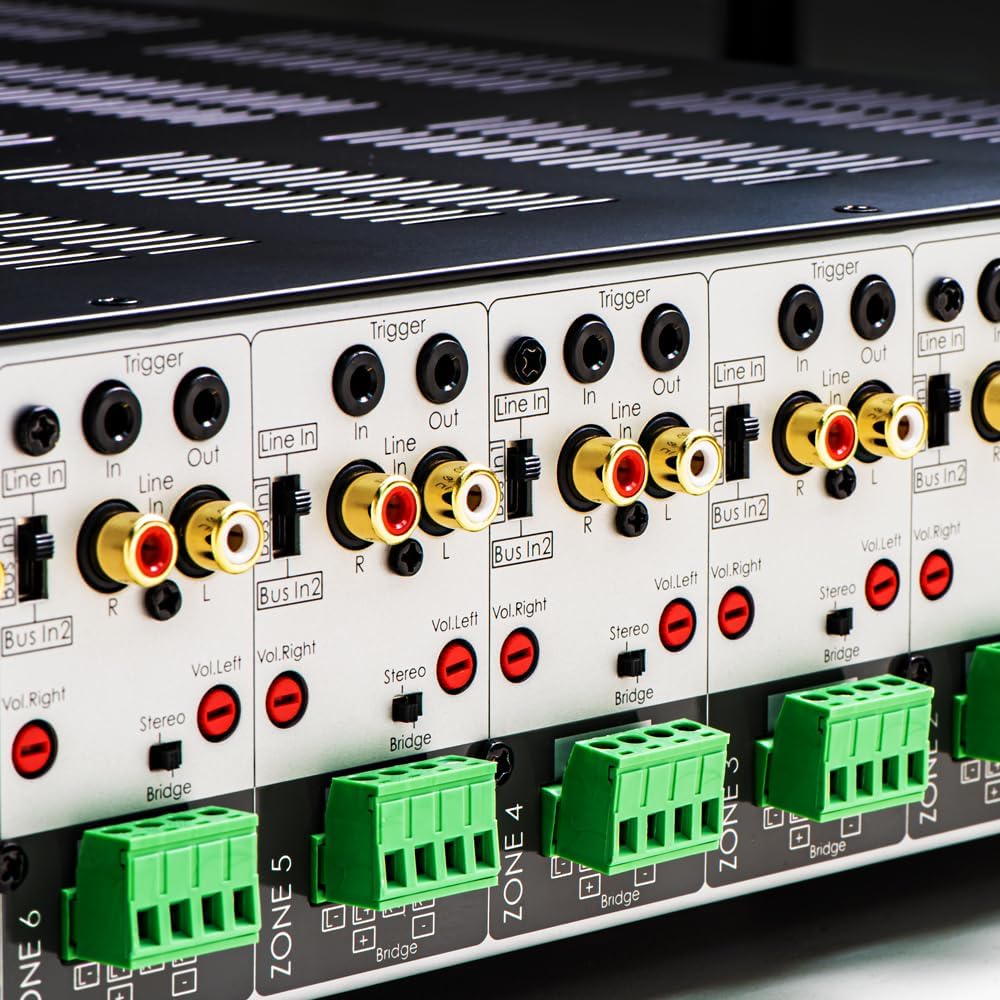
Сүрөт 3.1: Детальдуу view of the rear panel input and output connections.
- Динамиктин чыгышы: Connect your speakers to the corresponding zone terminals. Ensure correct polarity (+ to + and - to -). The amplifier supports both 4-ohm and 8-ohm speakers. For bridged mode operation, refer to section 4.3.
- Line Inputs (RCA): Each zone has a dedicated stereo RCA Line In. Connect your audio sources (e.g., pre-amplifier, media player) to these inputs.
- Bus Inputs (RCA): The amplifier features two stereo Bus Inputs (Bus In 1, Bus In 2). These allow a single audio source to be distributed to multiple zones.
- Line Outputs (RCA): Each zone also has a stereo RCA Line Out, allowing the audio signal from that zone to be passed to another ampкөтөргүч же аудио аппарат.
- Триггер Кирүү/Чыгуу: The 12V Trigger In allows the amplifier to be turned on/off by an external device. The 12V Trigger Out can be used to control other devices.
- AC кубаттуулугун киргизүү: Connect the supplied power cord to the AC IN receptacle and then to a suitable wall outlet.

Сүрөт 3.2: Детальдуу view of Bus inputs and Trigger connections on the rear panel.
4. Иштөө нускамалары
4.1 Күйгүзүү/өчүрүү
күйгүзүү үчүн алдыңкы панелдеги негизги кубат баскычын басыңыз amplifier on or off. A red LED indicator will illuminate when the unit is powered on.

Image 4.1: Front panel power button.
4.2 Зоналык башкаруу
Each of the 8 zones has a dedicated button on the front panel. Pressing a zone button will activate or deactivate that specific audio zone. The corresponding LED will indicate the zone's status.

Image 4.2: Front panel zone selection buttons.
4.3 Input Selection and Volume Adjustment
On the rear panel, each zone features switches for input selection and rotary controls for volume adjustment:
- Киргизүү тандагыч: A slide switch allows you to select the audio input for each zone: Line In (dedicated input for that zone), Bus In 1, же Bus In 2.
- Көлөмдү көзөмөлдөө: Separate rotary controls for Left and Right channels (Vol. Left, Vol. Right) allow for precise volume balancing within each zone.
- Stereo/Bridge Switch: A switch allows you to configure the zone for stereo operation or bridged mono operation. In bridged mode, two amplifier channels combine to deliver higher power to a single speaker. Ensure the speaker impedance is appropriate for bridged mode (typically 8 ohms minimum).
4.4 Audio Sensing
The amplifier incorporates an audio sense feature that automatically activates a zone when an input signal is detected and turns it off after a period of no signal. This helps conserve power and prolong the unit's lifespan.

Сүрөт 4.3: Мисample of multi-zone audio distribution with the ampөмүрлүү.
5. Техникалык тейлөө
The OSD Audio MX1680 GEN2 amplifier requires minimal maintenance. Follow these guidelines to ensure optimal performance and longevity:
- Тазалоо: Periodically wipe the exterior surfaces with a soft, dry cloth. Do not use liquid cleaners or aerosol sprays, as they may damage the finish or internal components.
- Вентиляция: Ensure that the ventilation openings on the top and sides of the unit remain clear of dust and obstructions. Dust accumulation can impede airflow and lead to overheating.
- Байланыштары: Occasionally check all cable connections to ensure they are secure and free from corrosion. Loose connections can lead to signal loss or degradation.
- Сактагыч: сакталган болсо ampкөтөргүчтү узак убакытка күйгүзүп койсоңуз, аны электр тармагынан сууруп, салкын, кургак жерде, күн нуру түз тийбеген жана өтө жогорку температурадан алыс сактаңыз.
6. Кыйынчылыктарды
If you experience issues with your MX1680 GEN2 amplifier, consult the following troubleshooting guide. For problems not resolved here, please contact OSD Audio support.
| Көйгөй | Мүмкүн себеп | Чечим |
|---|---|---|
| Күч жок | Электр шнуру үзүлдү; Розетка бузулган; Ampкөтөргүчтүн сактагычы күйүп кетти | Check power cord connection; Test outlet with another device; Contact service for fuse replacement. |
| Зонадан үн чыкпайт | Zone not activated; Incorrect input selected; Source device off/muted; Speaker wires loose/incorrectly connected; Volume too low | Press the zone button on the front panel; Verify input selector switch position; Check source device; Inspect speaker connections; Adjust zone volume controls. |
| Бурмаланган үн | Input signal too high; Speaker impedance mismatch; Faulty speaker cable; Ampкөтөргүчтүн ысып кетиши | Reduce source device output level; Ensure correct speaker impedance (4 or 8 ohms, or 8 ohms for bridged); Check speaker cables; Ensure proper ventilation. |
| Amplifier shuts off unexpectedly | Overheating; Short circuit in speaker wiring; Protection circuit activated | Ensure proper ventilation; Check all speaker wiring for shorts; Allow unit to cool down before restarting. |
7. Техникалык шарттар
| Өзгөчөлүк | Спецификация |
|---|---|
| Модель номери | MX1680-GEN2 |
| Каналдар | 16 Channels (8 Zones) |
| Чыгуу кубаттуулугу (4 Ом) | 80 Watts per channel (1KHz) |
| Чыгуу кубаттуулугу (8 Ом) | 50 Watts per channel (1KHz) |
| Ampжашоо класс | Д классы |
| Продукциянын өлчөмдөрү (L x W x Y) | 16.81 x 16.14 x 3.46 дюйм |
| Элемент Салмагы | 23 фунт |
| Стойкага орнотулган | Yes (2U, hardware included) |
| Өндүрүүчү | OSD аудио |
| Дата биринчи жеткиликтүү | 31-январь, 2020-жыл |
8. Кепилдик маалыматы
Warranty information for the OSD Audio MX1680 GEN2 amplifier is typically provided with your purchase documentation or can be found on the official OSD Audio webсайт. Кепилдик камтууга, шарттарга жана шарттарга байланыштуу чоо-жайын билүү үчүн бул ресурстарды караңыз.
9. Колдоо
For technical assistance, product inquiries, or service requests, please contact OSD Audio customer support. You can typically find contact information, including phone numbers and email addresses, on the official OSD Audio webсайт:
Please have your model number (MX1680-GEN2) and purchase details ready when contacting support.


