Introduction
This manual provides essential information for the safe and efficient operation of your Dual MCR 4 Portable DAB+/FM Radio. This device offers both digital DAB+ and analog FM radio reception, ensuring a wide range of listening options. Its color TFT display enhances usability by showing station names and additional information. With intuitive controls, auxiliary input, and headphone jack, the MCR 4 is designed for versatile and enjoyable audio experiences.
Коопсуздук маалыматы
- Аппаратты колдонуудан мурун бардык нускамаларды кылдат окуп чыгыңыз.
- Аппаратты суудан, нымдан жана жогорку температурадан алыс кармаңыз.
- Агрегатты ажыратууга же өзгөртүүгө аракет кылбаңыз. Бардык тейлөөлөрдү квалификациялуу кызматкерлерге тапшырыңыз.
- Use only the provided power adapter or recommended battery types.
- Иштеп жаткан учурда аппараттын айланасында туура желдетүүнү камсыз кылыңыз.
- Батареяларды жергиликтүү эрежелерге ылайык таштаңыз.
Пакеттин мазмуну
Пакетте бардык буюмдар бар экенин текшериңиз:
- Dual MCR 4 Main Unit
- Кубаттуу адаптер
- User Manual
Продукт бүттүview
The Dual MCR 4 features a compact design with intuitive controls for easy access to its functions. Key components include:
- Color TFT Display: Станция маалыматын, убакытты жана меню параметрлерин көрсөтөт.
- Ротари баскычы: For tuning, volume control, and menu navigation.
- Эстутум баскычтары: To save and recall your favorite radio stations.
- Телескопиялык антенна: For optimal radio signal reception.
- Көмөкчү киргизүү (AUX-IN): Located at the back, for connecting external audio devices.
- Гарнитура уячасы: Located at the back, for private listening.
- Mechanical On/Off Switch: Located at the back, for direct power control.
- Passive Membrane: Located at the back, contributing to exceptional sound quality.
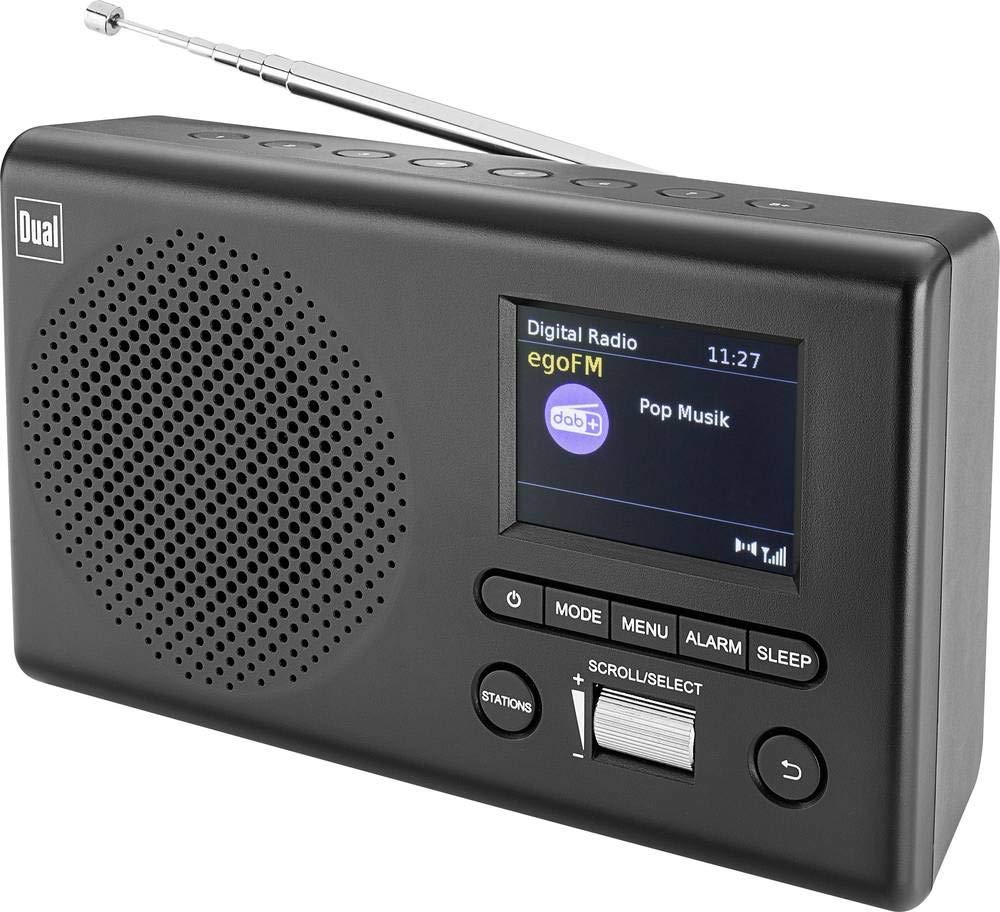
Сүрөт: алдыңкы view of the Dual MCR 4 Portable DAB+/FM Radio, showing the color TFT display, rotary knob, and control buttons. The radio has a black and silver finish.
Жайгашуу
1. Аппаратты кубаттоо
The Dual MCR 4 can be powered by either the included AC power adapter or batteries, offering portability.
- AC адаптерин колдонуу: Connect the power adapter to the DC IN port on the back of the radio and plug the other end into a standard wall outlet.
- Батареяларды колдонуу: Open the battery compartment on the bottom/back of the radio and insert the required batteries (type and quantity usually specified inside the compartment or in the full manual). Ensure correct polarity.
2. Антеннаны тууралоо
Extend the telescopic antenna fully for optimal reception of both DAB+ and FM radio signals. Adjust its position for the best signal quality.
3. Initial Power On and Station Scan
After connecting power, switch on the radio using the mechanical ON/OFF switch at the back. The radio will typically perform an automatic station scan upon first use, searching for available digital (DAB+) and analog (FM) radio stations. This process may take a few moments.
Иштөө нускамалары
1. Негизги операция
- Күйгүзүү/өчүрүү: Use the mechanical switch at the back. For standby, a dedicated button on the front might be available (refer to physical unit).
- Үндү көзөмөлдөө: Rotate the main rotary knob to adjust the listening volume.
2. DAB+ Radio Mode
- Selecting DAB+ Mode: Press the MODE button (if available) or navigate through the menu using the rotary knob until DAB+ mode is selected.
- Станцияны тандоо: After an automatic scan, use the rotary knob to scroll through the list of available DAB+ stations. Press the knob to confirm your selection.
- Алдын ала орнотууларды сактоо: Tune to your desired station. Press and hold a memory button (e.g., 1-5) until the display confirms the station is saved.
- Алдын ала орнотууларды эстөө: Briefly press the corresponding memory button to recall a saved station.
- Маалыматты көрсөтүү: The color TFT display will show station name, program information (DLS), and potentially station logos or slideshows.
3. FM радио режими
- FM режимин тандоо: Press the MODE button or navigate through the menu until FM mode is selected.
- Кол менен жөндөө: Rotate the tuning knob to manually adjust the frequency.
- Автоматтык сканерлөө: Press and hold the tuning knob or a dedicated scan button to automatically search for the next available FM station.
- Алдын ала орнотууларды сактоо: Tune to your desired FM station. Press and hold a memory button until the display confirms the station is saved.
- Алдын ала орнотууларды эстөө: Briefly press the corresponding memory button to recall a saved station.
4. Auxiliary Input (AUX-IN)
Connect an external audio device (e.g., smartphone, MP3 player) to the AUX-IN port on the back of the radio using a 3.5mm audio cable. Select AUX mode on the radio to play audio from the connected device.
5. Кулакчынды колдонуу
For private listening, plug standard 3.5mm headphones into the headphone jack located on the back of the unit. The internal speaker will automatically mute.
Техникалык тейлөө
- Тазалоо: Радиону жумшак, кургак чүпүрөк менен сүртүңүз. Абразивдүү тазалагычтарды же эриткичтерди колдонбоңуз.
- Сактагыч: If storing for an extended period, remove batteries and store the unit in a cool, dry place.
- Антеннага кам көрүү: Телескопиялык антеннаны бузуп албаш үчүн этият кармаңыз.
Проблемаларды чечүү
| Көйгөй | Мүмкүн чечим |
|---|---|
| Күч жок |
|
| Радио кабыл алуу начар |
|
| Динамиктерден үн жок |
|
Техникалык шарттар
| Бренд | Dual |
| Модель номери | 76074 |
| Түс | Кара, күмүш |
| Тюнинг технологиясы | DAB+, FM |
| Байланыш технологиясы | Auxiliary (AUX-IN) |
| Өзгөчөлүктөр | Portable, Color TFT Display |
| Шайкеш түзмөктөр | Headphones, External Audio Devices (via AUX-IN) |
| Power Source | Электр тармагынан (AC адаптер), батареядан иштейт |
| Камтылган компоненттер | Main Unit, Power Adapter, User Manual |
| Сунушталган колдонуу | Музыка |
Кепилдик жана колдоо
For warranty information and technical support, please refer to the specific warranty card included with your product or contact Dual customer service. The included user manual provides detailed instructions and contact information.