1. Киришүү
Thank you for choosing the VANTRUE N4 3 Channel Dash Cam. This manual provides detailed instructions for the installation, operation, and maintenance of your dash cam. Please read this manual thoroughly before use to ensure proper functionality and to maximize your device's potential.
The VANTRUE N4 is designed to provide comprehensive surveillance for your vehicle, featuring three channels for simultaneous recording of the front, interior, and rear views. Its advanced capabilities include high-resolution video capture, infrared night vision, and intelligent parking modes, offering reliable protection and peace of mind on the road and while parked.

Image: The VANTRUE N4 dash cam, highlighting its 3-channel recording capability as an optimal solution for road safety.
2. Кутуда эмне бар
Сураныч, пакеттин мазмунун текшерип, бардык буюмдар бар экенин текшериңиз:
- VANTRUE N4 Dash Cam with Suction Cup Mount
- Унаа заряддагыч
- USB маалымат кабели
- Орнотуу куралы
- Колдонуучунун Колдонмосу (бул документ)
3. Продукт бүтүп калдыview
The VANTRUE N4 features a compact design with multiple cameras to cover various angles. Below is an overview of the main unit and its components.
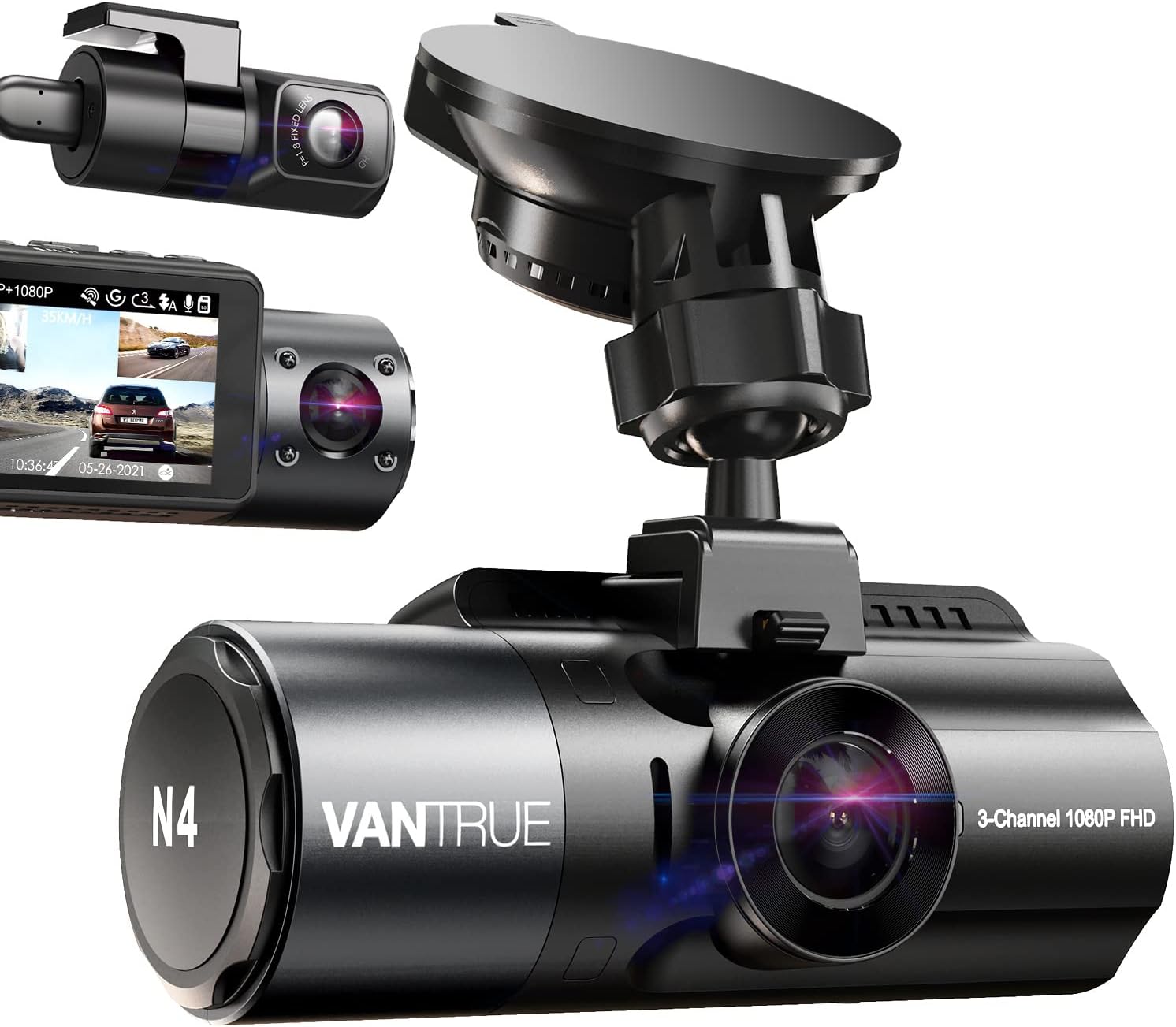
Image: The VANTRUE N4 dash cam, showing its main unit, suction cup mount, and separate interior and rear camera modules.
Негизги өзгөчөлүктөрү:
- Three Channel Recording: Simultaneously records front (155°), interior (165°), and rear (160°) views.
- Жогорку чечим: Up to 1440P + 1440P + 1080P in 3-channel mode, or 4K when front camera is used alone.
- Инфракызыл түнкү көрүнүш: Equipped with STARVIS CMOS sensor, F1.4/F1.8 aperture lenses, and 4 IR LED lights for clear low-light recording.
- 24 Hours Parking Mode: Supports low bitrate, motion detection, and collision detection parking modes (requires hardwire kit).
- Супер конденсатор: Heat resistant, operating from 14°F to 158°F (-10°C to 70°C), extending lifespan.
- G-сенсор жана циклдик жаздыруу: Фунтту автоматтык түрдө кулпулайтtage upon impact and overwrites oldest fileэстутум картасы толгондо.
4. Орнотуу жана орнотуу
Follow these steps to properly install your VANTRUE N4 Dash Cam in your vehicle.
4.1. Монтаждоо ордун тандоо
Алдыңкы айнегиңизге тоскоол болбогон жерди тандаңыз view of the road. The ideal position is usually behind the rearview күзгү.
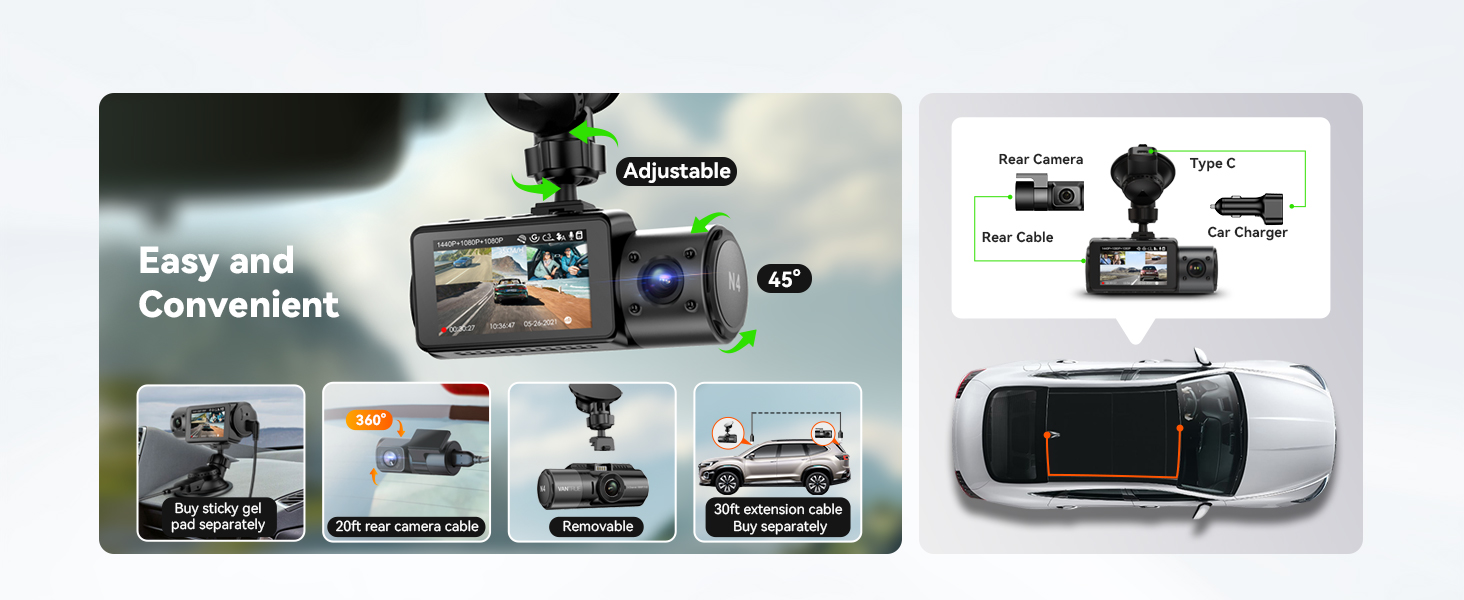
Image: Visual guide for easy installation, showing the adjustable mount, removable camera, and cable routing for the rear camera.
4.2. Installing the Front Dash Cam
- Clean the windshield area where the suction cup mount will be attached.
- Attach the suction cup mount to the windshield and secure it by flipping the lever.
- Slide the main dash cam unit onto the mount until it clicks into place.
- Adjust the angle of the front camera to ensure it captures the road ahead clearly.
4.3. Арткы камераны орнотуу
The rear camera connects to the main unit via a 20ft extension cable, suitable for most vehicles.
- Арткы камеранын кабелин негизги видеорегистратор блогуна туташтырыңыз.
- Кабельди унаанын үстүн жана мамысынын төшөгүн унаанын артына чейин тыкан өткөрүңүз.
- Арткы камераны арткы маңдайкы айнекке орнотуп, тазалыгын камсыз кылыңыз view of the road behind. The rear camera can be adjusted up to a full 360° angle.
4.4. Power Connection
Connect the car charger to your vehicle's cigarette lighter socket and the other end to the dash cam's power input. For 24-hour parking mode functionality, a hardwire kit (sold separately, ASIN B083XB8T7T) or an external battery is required.
5. Иштөө нускамалары
This section details how to use the various recording modes and features of your N4 Dash Cam.
5.1. Жазуу режимдери
The N4 offers flexible recording configurations:
- Three Channel Mode: Records front, interior, and rear simultaneously at 1440P + 1440P + 1080P.
- Front and Rear Dual Channel: Records front at 4K (2160P) and rear at 1080P.
- Front and Inside Dual Channel: Records front and interior at 1440P + 1440P.
- Алдыңкы гана: Records front camera only at up to 4K resolution.

Image: Diagram illustrating the different high-resolution recording modes available: 3-channel, front+rear, front+cabin, and front only.
5.2. Инфракызыл түнкү көрүнүш
The N4 is equipped with advanced night vision capabilities to capture clear footage in low-light conditions, both outside and inside the vehicle.

Image: Illustration of Super Night Vision, showing clear front, rear, and interior views in dark environments, supported by WDR and IR lights.
5.3. 24 Hours Parking Mode
To enable 24-hour parking mode, the dash cam must be connected to a hardwire kit (ASIN B083XB8T7T) or an external battery. This mode offers several options:
- Кыймылды аныктоо: The camera automatically starts recording when motion is detected around your vehicle.
- Кагылышууну аныктоо: Utilizes the G-sensor to detect impacts or scratches and automatically records the event.
- Төмөн битрейттик жаздыруу: Continuously records at 720P, saving storage space while providing constant surveillance.
- Low Frame Rate (Time Lapse): Records at 1 or 5 frames per second, suitable for monitoring changes in the parking environment over time.

Image: Depiction of 24-hour Motion Detection Parking Mode, showing the dash cam's ability to record when movement is detected around the car.

Image: Illustration of Collision Detection Parking Mode, demonstrating how the G-sensor detects and records impacts.

Image: Visual explanation of Low Bitrate Recording Parking Mode, showing continuous recording at lower quality to save space.

Image: Depiction of Low Frame Rate Parking Mode, capturing changes in the parking environment with 1 or 5 frames per second.
5.4. Loop Recording & G-Sensor
The dash cam continuously records, overwriting the oldest files when the memory card is full. The G-sensor detects sudden shakes or collisions and automatically locks the current footage to a separate event folder to prevent it from being overwritten.

Image: Visual representation of Loop Recording and G-Sensor functionality, showing how videos are continuously recorded and locked upon impact.
5.5. Time Lapse жаздыруу
In Time Lapse mode, the dash cam captures photos at set intervals (1s or 5s) and stitches them into a video, ideal for documenting long journeys or monitoring parking over extended periods.

Сүрөт: Мисample of Time Lapse recording, showing a scenic view captured over time.
5.6. Optional GPS Functionality
An optional GPS mount (sold separately, ASIN B083XBS88L) allows the dash cam to track your route, location, and speed (in KM/H or MP/H). VANTRUE provides a free GPS player software for viewing this data on your computer, enabling effective capture of license plate details with a zoom-in function.
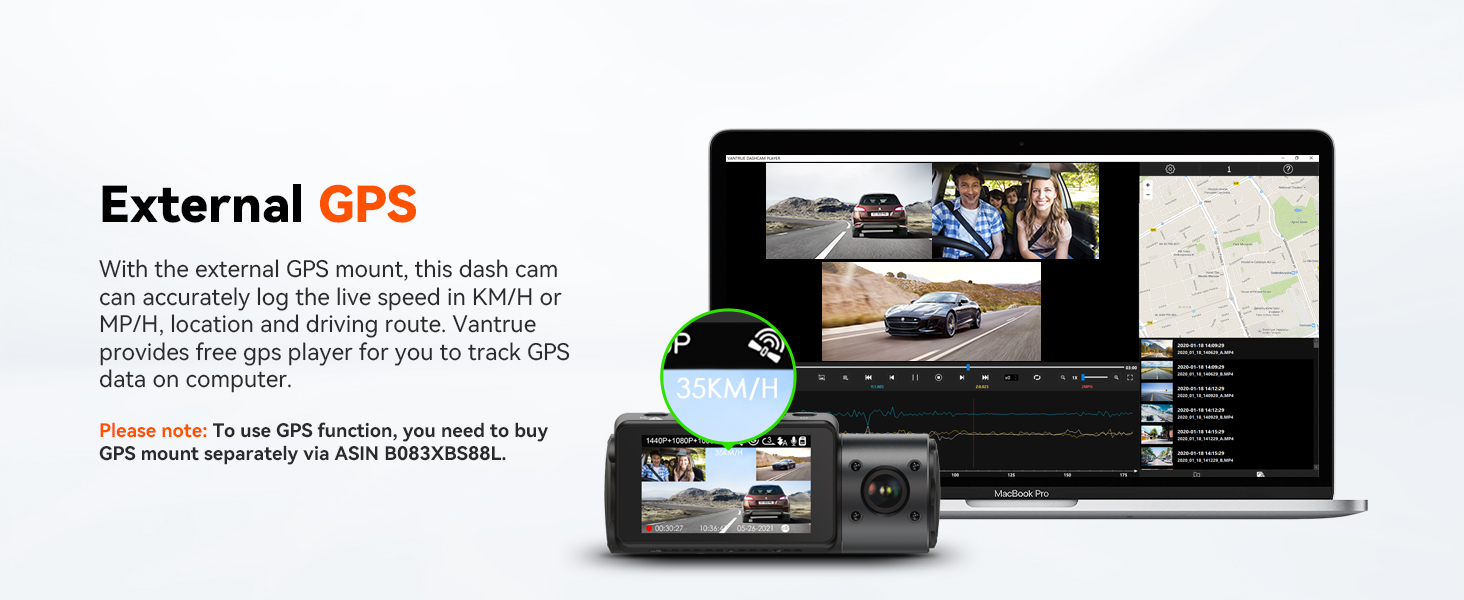
Image: Display of the external GPS feature, showing how route, location, and speed data can be viewвидео азык-түлүк менен бирге редtage компьютерде.
5.7. Memory Card Support
The N4 supports external memory cards up to 512GB (not included). A Vantrue SD card (ASIN B09SNRFSS3) is recommended for optimal performance.

Image: Chart showing supported memory card sizes (64GB, 128GB, 256GB, 512GB) and their corresponding recording durations.
6. Техникалык тейлөө
Тийиштүү техникалык тейлөө сиздин видеорегистраторуңуздун узак мөөнөттүү иштешин жана оптималдуу иштешин камсыз кылат.
6.1. Аспапты тазалоо
- Панель камерасынын корпусун тазалоо үчүн жумшак, кургак чүпүрөктү колдонуңуз.
- For lenses, use a lens cleaning cloth and specialized lens cleaning solution to avoid scratches.
- Катуу химиялык заттарды же абразивдүү тазалоочу каражаттарды колдонбоңуз.
6.2. Температураны эске алуу
The N4 is built with a super capacitor, making it resistant to extreme temperatures from 14°F to 158°F (-10°C to 70°C). This design enhances durability compared to traditional lithium-ion batteries.

Image: Illustration of the built-in supercapacitor, highlighting its ability to withstand temperatures from -20°C to 70°C.
6.3. Микропрограмманы жаңыртуу
Periodically check the VANTRUE official website for firmware updates. Updates can provide continuous improvements and new features for your device.
7. Кыйынчылыктарды
If you encounter issues with your VANTRUE N4 Dash Cam, refer to the following common problems and solutions:
| Көйгөй | Мүмкүн чечим |
|---|---|
| Dash камерасы күйбөйт. | Ensure the car charger is properly connected to both the dash cam and the vehicle's power outlet. Check if the vehicle's cigarette lighter socket is functioning. |
| Жаздыруу күтүлбөгөн жерден токтойт. | Check if the memory card is full; enable loop recording. Ensure the memory card is a high-speed (Class 10 or U3) card and is formatted correctly. The camera may shut off if ambient temperature exceeds operating limits. |
| Video footage бүдөмүк же түшүнүксүз. | Clean the camera lenses. Ensure the protective film has been removed from the lenses. Check if the camera is securely mounted and not vibrating. |
| Унаа токтотуучу жай режими иштебей жатат. | Parking mode requires a continuous power supply via a hardwire kit (sold separately) or an external battery. Ensure the hardwire kit is correctly installed and providing power. |
| Dash cam gets hot during operation. | It is normal for the dash cam to get warm during operation, especially in high-resolution modes or hot environments. The super capacitor design helps manage heat. If it overheats and shuts down, allow it to cool before resuming use. |
If the problem persists, please contact VANTRUE customer support.
8. Техникалык шарттар
| Өзгөчөлүк | Деталь |
|---|---|
| Модель аты | ONDASH N4 |
| Продукциянын өлчөмдөрү | 4.1 x 1.57 x 5 дюйм |
| Элемент Салмагы | 1.76 фунт |
| Видео тартуунун резолюциясы | Up to 4K (Front only), 1440P+1440P+1080P (3-channel) |
| Lens Angle | Front: 155°, Inside: 165°, Rear: 160° |
| Өзгөчөлүктөр | Built-In Microphone, Infrared Night Vision, G-Sensor, Loop Recording, Parking Mode |
| Сактоо колдоо | Up to 512GB external memory (MicroSD card, not included) |
| Power Source | Super Capacitor (14°F to 158°F / -10°C to 70°C) |
| Байланыш технологиясы | Cigarette Lighter Connected (No WiFi or Bluetooth) |
| Монтаж түрү | Соруу Тоосу |
9. Кепилдик жана колдоо
VANTRUE is committed to providing high-quality products and excellent customer service.
9.1. Кепилдик маалыматы
This product comes with an extendable 18 айлык кепилдик. Please register your product on the official VANTRUE website to activate and extend your warranty.
9.2. Кардарларды колдоо кызматы
For any questions, technical assistance, or warranty claims, please contact VANTRUE customer support:
- Электрондук почта: support@vantrue.net (24 сааттын ичинде жооп)
- Телефон: 510-666-4086
VANTRUE also offers a 30 күндүк кайтаруу саясаты жана а 100% канааттануу кепилдиги.

Image: Information on VANTRUE's 18-month extended warranty, 30-day return policy, and 24-hour customer support.


