1. Киришүү
This manual provides essential information for the proper use and maintenance of your Xtrike Me KB-302 Luminous Multicolor Gaming Keyboard. Please read these instructions carefully before using the product to ensure optimal performance and longevity.
2. Продукт бүтүп калдыview
The Xtrike Me KB-302 is a wired membrane gaming keyboard designed for durability and responsive input. It features a full 104-key layout with vibrant rainbow backlighting, enhancing the user experience.
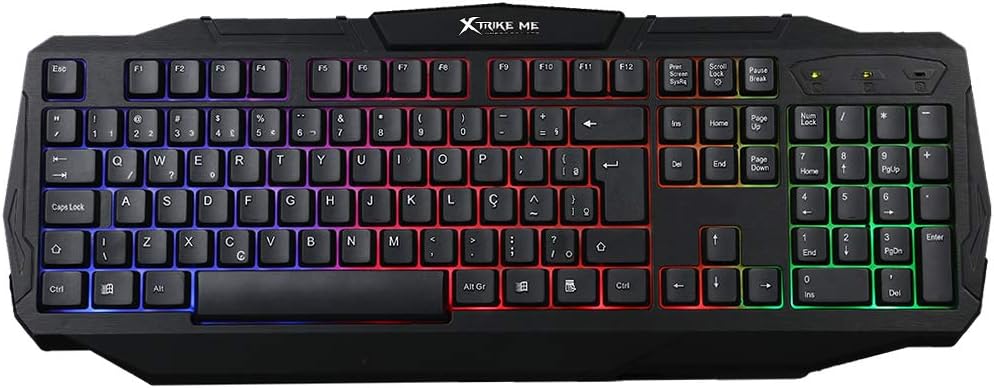
1-сүрөт: Жогорку view of the Xtrike Me KB-302 Luminous Multicolor Gaming Keyboard, showcasing its full 104-key layout and rainbow backlighting.
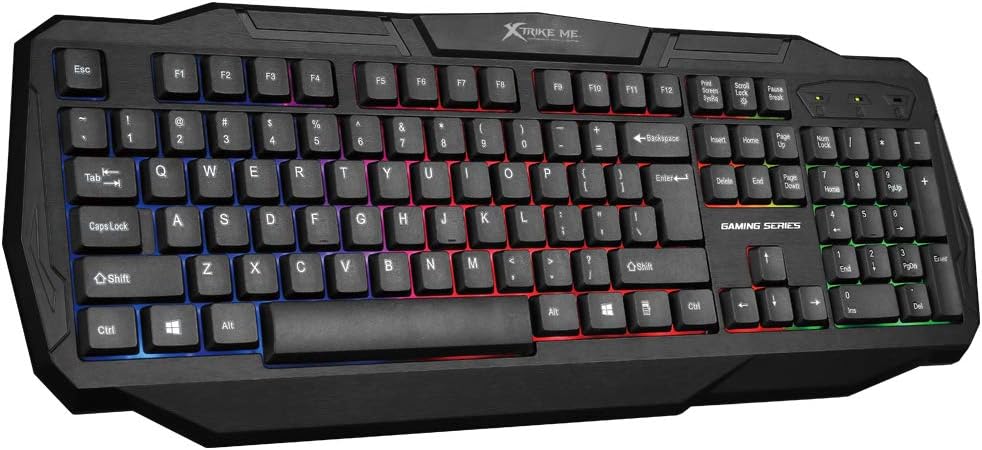
2-сүрөт: Бурчтуу view of the Xtrike Me KB-302 keyboard, highlighting its ergonomic design and keycap profile.
Негизги өзгөчөлүктөрү:
- 104-Ачкыч жайгашуусу: Full-size keyboard for comprehensive functionality.
- Membrane Switches: Designed for 10 million presses, offering durability.
- Rainbow Backlighting: Mixed color backlighting for visual appeal and low-light visibility.
- USB 2.0 Plug and Play: Easy connection without requiring additional drivers.
- Соккуга чыдамдуу дизайн: Узак мөөнөткө колдонуу үчүн күчөтүлгөн туруктуулук.
- Suspended Keycaps: Тазалоону жана тейлөөнү жеңилдетет.
Продукциянын видеосу:
Видео 1: Бүттүview of the Xtrike Me Luminous Multicolor Gaming Keyboard, demonstrating its features and backlighting effects.
3. Орнотуу нускамалары
- Баскычтопту таңгактан чыгаруу: Carefully remove the keyboard from its packaging. Ensure all components, including the keyboard and attached USB cable, are present.
- Компьютерге туташуу: Locate an available USB 2.0 port on your computer. Insert the USB connector of the keyboard into the USB port.
- Драйверди орнотуу: The Xtrike Me KB-302 is a plug-and-play device. Your operating system (Windows XP or newer) should automatically detect and install the necessary drivers. This process may take a few moments.
- Функционалдуулугун текшерүү: Once the drivers are installed, the keyboard's backlighting should illuminate. Open a text editor or any application that accepts text input and test typing to ensure all keys are functioning correctly.
4. Иштөө нускамалары
Basic Keyboard Functions:
The KB-302 functions as a standard 104-key keyboard. All alphanumeric keys, function keys (F1-F12), navigation keys, and the numeric keypad operate as expected within your operating system and applications.
Арткы жарыкты башкаруу:
The keyboard features rainbow (mixed color) backlighting. To control the backlighting:
- Арткы жарыкты күйгүзүү/өчүрүү: басыңыз Scroll Lock key to toggle the backlighting on or off.
- Эскертүү: The backlighting is a fixed rainbow pattern and does not offer customizable colors or effects.
Арбактарга каршы:
The keyboard is designed with anti-ghosting capabilities to ensure accurate registration of multiple key presses simultaneously, which is beneficial for gaming.
5. Техникалык тейлөө
Regular maintenance helps prolong the life of your keyboard and ensures optimal performance.
- Баскычтопту тазалоо:
- Тазалоодон мурун клавиатураны компьютерден ажыратыңыз.
- Бир аз жумшак, түксүз кездемени колдонуңуз dampклавиатураны жана бетти сүртүү үчүн суу же жумшак тазалоо эритмеси менен жабыңыз.
- For debris between keys, use compressed air or a small brush. The suspended keycap design allows for easier access.
- Катуу химиялык заттарды, абразивдүү тазалагычтарды же ашыкча нымдуулукту колдонуудан алыс болуңуз.
- Кабельге кам көрүү: Зыяндын алдын алуу үчүн USB кабелин курч ийилүүдөн же ашыкча тартуудан алыс болуңуз.
- Сактагыч: Узак мөөнөткө колдонулбаганда, клавиатураны таза, кургак чөйрөдө күн нурунан жана экстремалдык температурадан алыс сактаңыз.
6. Кыйынчылыктарды
If you encounter issues with your Xtrike Me KB-302 keyboard, refer to the following common solutions:
- Баскычтоп жооп бербейт:
- USB кабели клавиатурага жана компьютерге бекем туташып турганын текшериңиз.
- Баскычтопту компьютериңиздин башка USB портуна туташтырууга аракет кылыңыз.
- Компьютериңизди өчүрүп күйгүзүңүз.
- Көйгөй клавиатурада же тутумуңузда экенин аныктоо үчүн баскычтопту башка компьютерде сынап көрүңүз.
- Арткы жарык иштебей жатат:
- басыңыз Scroll Lock key to ensure the backlight is toggled on.
- Verify the keyboard is properly connected and receiving power.
- Keys Not Registering or Sticking:
- Clean the affected keys and the area around them using compressed air or a small brush.
- Ачкыч капкактарынын астында эч кандай таштандылар калбаганын текшериңиз.
Эгер бул кадамдар көйгөйдү чечпесе, кошумча жардам алуу үчүн Xtrike Me кардарларды колдоо кызматына кайрылыңыз.
7. Техникалык шарттар

Figure 3: Marketing image displaying key specifications and features of the Xtrike Me KB-302 keyboard.
| Өзгөчөлүк | Деталь |
|---|---|
| Модел | KB-302 |
| Ачкычтар | 104 |
| Которуу түрү | Мембрана |
| Которуу рейтинги | 10 миллион пресс |
| Негизги маршрут | 2.0 ± 0.3 мм |
| Иштеп жаткан күчтөр | 55 ± 7г |
| Арткы жарык | Mixed color (Rainbow) |
| Интерфейс | USB 2.0 |
| Кабелдин узундугу | 1.5 м |
| Өлчөмдөрү (L x W x Y) | 46.99 x 19.05 x 3.56 см |
| Салмагы | 680 г |
| OS колдоо | Windows XP же жаңыраак |
| Байланыш технологиясы | USB-A |
| Түс | Кара |
8. Кепилдик жана колдоо
For warranty information and customer support, please refer to the documentation included with your product or visit the official Xtrike Me webсайт. Сатып алуу квитанциясын кепилдик дооматтары үчүн сатып алуунун далили катары сактаңыз.
Өндүрүүчү: Xtrike Me
Биринчи жеткиликтүү болгон күнү: 5-май, 2020-жыл


