1. Киришүү
Thank you for choosing the WorkPro LED Desk Lamp. Бул ар тараптуу лamp is designed to enhance your workspace with adjustable illumination, convenient wireless charging, and a USB charging port. Please read this manual thoroughly to ensure proper setup, operation, and maintenance of your new desk lamp.

Image 1.1: The WorkPro LED Desk Lamp, featuring a modern brushed metal finish and adjustable arm.
2. Продукциянын өзгөчөлүктөрү
- Жөнгө салынуучу жарыктандыруу: 5 color temperatures and 6 brightness levels for customized lighting.
- Зымсыз кубаттоо: Integrated wireless charging pad on the base for compatible mobile devices.
- USB кубаттоо порту: A 2.4-amp USB port located at the back of the base for additional device charging.
- Ийкемдүү дизайн: Adjustable arm, head, and rotatable base for precise light positioning.
- Сенсордук башкаруу каражаттары: Intuitive touch control panel with memory function.
- Таймер функциясы: Built-in 1-hour timer for automatic shut-off.
- Түнкү жарык: Integrated night light feature.
- Энергияны үнөмдөөчү LED: Pre-wired 10-watt LEDs with an average life of approximately 50,000 hours.
- Туруктуу курулуш: Brushed metal body with a modern design.

Image 2.1: The WorkPro LED Desk Lamp integrated into a modern workspace, highlighting its functional design.
3. Пакеттин мазмуну
Сураныч, пакетте төмөнкү нерселерди текшериңиз:
- WorkPro LED үстөлү Lamp бирдиги
- Кубаттуу адаптер
- Колдонуучунун Колдонмосу (бул документ)
4. Коопсуздук маалыматы
Өрт, электр шок же жаракат алуу коркунучун азайтуу үчүн, төмөнкү коопсуздук чараларын сактаңыз:
- l иштетпеңизamp бузулган шнур же сайгыч менен.
- l колдонбоңузamp нымдуу же гamp шарттар.
- Кубат адаптери жергиликтүү электр менен камсыздооңузга шайкеш келерин текшериңиз.
- l-ди ажыратууга же оңдоого аракет кылбаңызamp. Contact qualified service personnel for assistance.
- l сактаңызamp жылуулук булактарынан жана түздөн-түз күн нурунан алыс.
- The LED light source is not replaceable. Do not attempt to replace the LEDs.
- l коюңузamp кыйроонун алдын алуу үчүн туруктуу, жалпак бетке.
5. Орнотуу
Follow these steps to set up your WorkPro LED Desk Lamp:
- Таңылганын ачуу: Бардык компоненттерди таңгактан кылдаттык менен алып салыңыз.
- Кызмат орду: l коюңузamp туруктуу, жалпак бетинде негизи.
- Туташуу кубаты: Кубат адаптеринин кабелин l артындагы кубат киргизүү портуна сайыңызamp Кубат адаптерин стандарттуу электр розеткасына сайыңыз.
- Тууралоо: L ны акырындык менен тууралаңызamp arm and head to your desired position. The lamp features multiple pivot points for flexibility.

Image 5.1: Lamp adjustability, showing 90-degree head rotation, 120-degree arm articulation, 90-degree base rotation, and 145-degree head tilt.
6. Иштөө нускамалары
6.1. Touch Control Panel Overview
лamp is operated via a touch-sensitive control panel located on the base. The icons represent various functions:
- Кубат баскычы: l буратamp күйгүзүү/өчүрүү.
- Жарыктыкты жөндөө: Adjusts light intensity (6 levels).
- Түс температурасын жөндөө: Changes light color (5 modes).
- Таймер баскычы: Activates the 1-hour timer.
- Түнкү жарык баскычы: Activates the night light feature.
6.2. Күйгүзүү/өчүрүү
басыңыз Кубат баскычы бир жолу л буруш үчүнamp on. Tap it again to turn the lamp off. The lamp will remember your last brightness and color temperature settings.
6.3. Жарыктыкты жөндөө
л мененamp on, tap the Жарыктыкты жөндөө icons ( /
/  ) to cycle through the 6 available brightness levels.
6.4. Түс температурасын жөндөө
л мененamp on, tap the Түс температурасын жөндөө сөлөкөтү ( ) to cycle through the 5 available color temperature modes (e.g., warm white to cool white).

Image 6.1: Visual representation of the 5 color temperature modes and 6 brightness levels.
6.5. Таймерди колдонуу
басыңыз Таймер баскычы ( ) to activate the 1-hour timer. The lamp will automatically turn off after 60 minutes. Tap again to deactivate.
6.6. Activating the Night Light
басыңыз Түнкү жарык баскычы ( ) to turn on the integrated night light. Tap again to turn it off.
6.7. Зымсыз заряддоо
Place your Qi-compatible mobile device directly onto the wireless charging pad on the lamp base. Ensure the device is centered for optimal charging. A charging indicator (if present on your device) will confirm charging has begun.

Image 6.2: A smartphone being charged wirelessly on the lampнегизи.
6.8. USB кубаттоо
Connect your mobile device's USB charging cable to the 2.4-amp USB port located on the back of the lamp base. Plug the other end into your device to begin charging.
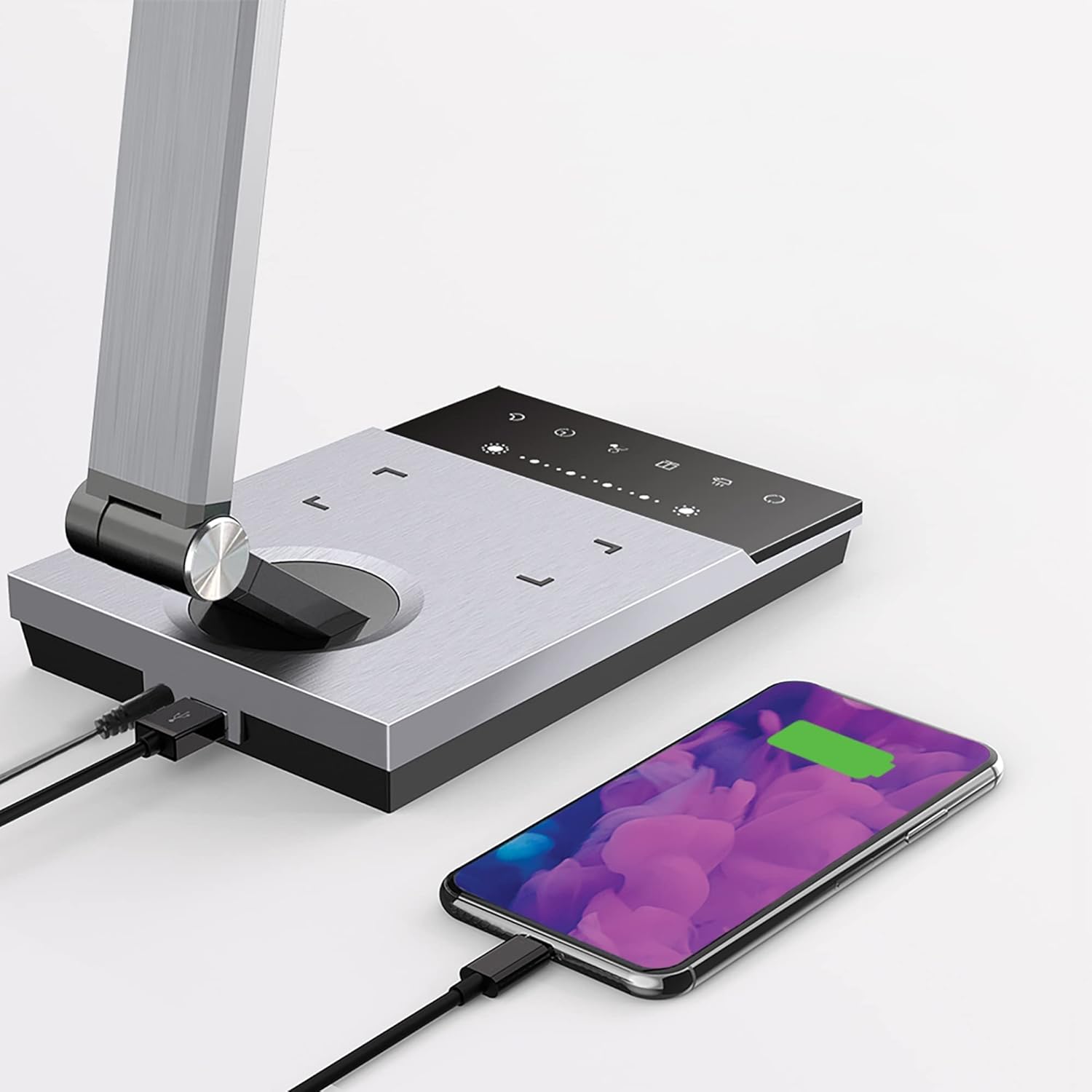
Image 6.3: Simultaneous charging of devices via the USB port and wireless charging pad.
7. Техникалык тейлөө
To keep your WorkPro LED Desk Lamp оптималдуу абалда:
- Тазалоо: Тазалоодон мурун электрди өчүрүңүз. lamp with a soft, dry cloth. Do not use abrasive cleaners, solvents, or harsh chemicals.
- Сактагыч: Эгерде лamp узак убакытка күйгүзүп койсоңуз, аны электр тармагынан сууруп, салкын, кургак жерде сактаңыз.
- LED кам көрүү: Интегралдык LED жарык булагы узак мөөнөттүү колдонуу үчүн иштелип чыккан жана алмаштырууну талап кылбайт.
8. Кыйынчылыктарды
| Көйгөй | Мүмкүн себеп | Чечим |
|---|---|---|
| Lamp күйбөйт. | Электр байланышы жок. | Кубат адаптери l'ге бекем сайылганын текшериңизamp жана розетка. |
| Зымсыз кубаттоо иштебей жатат. | Device not Qi-compatible or not positioned correctly. | Verify your device supports Qi wireless charging. Reposition the device on the charging pad to ensure proper alignment. Remove any thick phone cases. |
| USB кубаттоо иштебей жатат. | USB cable or device issue. | Try a different USB cable or device to isolate the problem. Ensure the lamp күйгүзүлгөн. |
| Жарык бүлбүлдөп же күңүрт. | Unstable power supply or internal issue. | l'ди туташтырууга аракет кылamp башка розеткага салыңыз. Эгерде көйгөй чечилбесе, кардарларды тейлөө кызматына кайрылыңыз. |
9. Техникалык шарттар
| Модель номери | WP3000S |
| Жарык булагы | Интегралдык LED |
| Ватtage | 10 Ватт |
| Lumen Output | 600 Lumens |
| Түс температурасы | 5 деңгээл |
| Жарыктык деңгээли | 6 деңгээл |
| USB чыгышы | 2.4 Amp |
| Материал | Brushed Metal |
| Өлчөмдөрү (L x W x Y) | 17.5 x 6.5 x 4 дюйм |
| Элемент Салмагы | 5.45 фунт |
| Power Source | Электр зымдары |
| Башкаруу ыкмасы | тийүү |
10. Кепилдик жана колдоо
WorkPro products are manufactured to high-quality standards. For warranty information or technical support, please refer to the warranty card included with your purchase or visit the official WorkPro webсайт. Кепилдик дооматтары үчүн сатып алганыңыздын далилин сактап коюңуз.
For further assistance, you may contact the retailer or manufacturer directly.


