Introduction
This manual provides detailed instructions for the setup, operation, and maintenance of your ONN ONA18CH901 HD Outdoor Antenna. This antenna offers a 150-mile range, 360-degree motorized rotation, and supports 1080P and 4K transmission for high-quality viewing. It is designed for durability and includes pre-assembled mounting hardware for various placement options, making it suitable for rural or suburban areas.
Кутуда эмне бар
Сураныч, орнотууну баштоодон мурун бардык компоненттер бар экенин текшериңиз:
- ONN ONA18CH901 HD Outdoor Antenna Unit
- Mounting Pole (extends from 20 - 51 inches)
- Motorized Rotator
- Control Box
- Алыстан башкаруу
- Башкаруу кутусу үчүн кубат адаптери
- Коаксиалдык кабель
- Mounting Hardware and Cable Clips

Орнотуу жана орнотуу
Туура орнотуу оптималдуу аткаруу үчүн абдан маанилүү болуп саналат. Бул кадамдарды кылдаттык менен аткарыңыз:
Антенна чогултуу
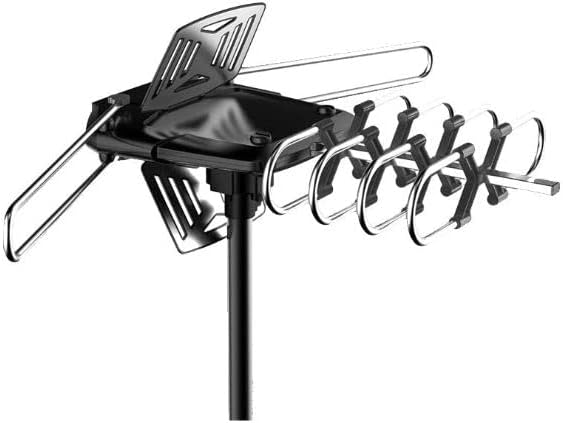
Assemble the main antenna unit according to the diagrams provided in the included manual. Ensure all elements are securely fastened. The antenna features a pre-assembled design for ease of setup.

Figure 3: The fully assembled ONN ONA18CH901 HD Outdoor Antenna mounted on its pole, ready for installation. Антеннаны орнотуу
Choose a suitable outdoor location for mounting, such as a wall, roof, or balcony. The included mounting pole extends from 20 to 51 inches. Securely attach the antenna unit to the mounting pole using the provided hardware. Ensure the pole is stable and the antenna has a clear line of sight to broadcast towers if possible.

Figure 4: The ONN ONA18CH901 antenna installed on a residential roof, highlighting its UV-coated and weather-resistant design for outdoor durability. Коаксиалдык кабелди туташтыруу
Connect one end of the coaxial cable to the antenna unit. Run the cable to the indoor control box, securing it along the path with cable clips to prevent damage.
Control Box Орнотуу
Connect the other end of the coaxial cable from the antenna to the 'ANT IN' port on the control box. Plug the power adapter into the control box and then into a power outlet. Connect a separate coaxial cable from the 'TV OUT' port on the control box to the 'ANT IN' or 'CABLE IN' port on your television.
Иштөө нускамалары
Каналды скандоо
Turn on your television and navigate to the TV's menu. Select 'Antenna' or 'Air' as the input source. Perform a channel scan or auto-tune function. This will allow your TV to detect and save all available over-the-air channels.
Motorized Rotation
Use the included remote control to rotate the antenna 360 degrees. This allows you to fine-tune the antenna's direction to achieve the best possible signal reception for various channels. Experiment with different orientations to maximize your channel count and signal quality.

Figure 5: The remote control for the ONN ONA18CH901 antenna, demonstrating its 360-degree motorized rotation capability for optimal signal reception.
Техникалык тейлөө
- Мезгилдүү текшерүүлөр: Regularly inspect the antenna, mounting pole, and coaxial cable for any signs of wear, damage, or loose connections.
- Тазалоо: Keep the antenna free from dirt, debris, and ice buildup. Use a soft cloth and mild detergent if necessary.
- Аба ырайын коргоо: The antenna is designed to be lightning protected and weather-resistant. However, in severe weather conditions, consider additional precautions if possible.
Проблемаларды чечүү
- Сигнал жок/кабыл алуу начар:
- Бардык кабелдик байланыштар коопсуз экенин текшериңиз.
- Re-scan for channels on your TV.
- Adjust the antenna's direction using the remote control.
- Check for any obstructions (trees, buildings) blocking the line of sight to broadcast towers.
- Алыстан башкаруу иштебейт:
- Пульттун батареяларын текшериңиз.
- Башкаруу кутучасы күйгүзүлгөнүн текшериңиз.
- Антенна айланбайт:
- Verify the control box is receiving power.
- Check the connection between the antenna and the control box.
Техникалык шарттар
| Өзгөчөлүк | Деталь |
|---|---|
| Модель номери | ONA18CH901 |
| Бренд | ОНН |
| Максималдуу диапазон | 150 миль |
| Айлануу | 360° Motorized with Remote |
| Колдоого алынган резолюция | 1080P, 4K |
| Mounting Pole Extension | 20 - 51 дюйм |
| Продукциянын өлчөмдөрү | 17 x 3.4 x 14 дюйм |
| Элемент Салмагы | 4.75 фунт |
| UPC | 681131084062 |
Кепилдик жана колдоо
For warranty information or technical support, please refer to the documentation included in your product packaging or visit the official ONN webсайт. Кепилдик дооматтары үчүн сатып алуу дүмүрчөгүңүздү сактаңыз.


