Introduction
This manual provides detailed instructions for the FILA Unisex Digital Watch, Model 38-163-001. Please read this manual carefully before using your watch to ensure proper operation and to maximize its lifespan. This watch is designed for both men and women, featuring a comfortable silicone material suitable for sports and casual wear. It includes various functions such as chronograph, calorie consumption, pedometer, timer, lap timer, alarm, time signal, and EL backlight. It is water-resistant for daily life (5 ATM).
Продукт бүттүview
Familiarize yourself with the watch's components and button functions.

Сүрөт 1: Алдыңкы View of FILA Digital Watch 38-163-001. This image displays the watch face with the digital display showing time (10:38), day (WED), and date (23). The four control buttons are visible around the bezel, labeled 'LIGHT / RESET' (top left), 'MODE' (bottom left), 'ST./STP./LAP' (top right), and 'EXERCISE' (bottom right). The FILA logo is prominently displayed above the digital screen.
- LIGHT / RESET Button (Top Left): Activates the EL backlight and is used for resetting functions.
- MODE баскычы (төмөнкү сол): Cycles through different modes (Time, Chronograph, Pedometer, Timer, Alarm).
- ST./STP./LAP Button (Top Right): Starts/stops functions and records lap times.
- EXERCISE Button (Bottom Right): Activates exercise-related functions like pedometer and calorie consumption.
Жайгашуу
Убакыт жана дата орнотуу
- Убакыт режиминен баскычын басыңыз РЕЖИМ button repeatedly until the time setting screen appears (usually indicated by flashing digits).
- колдонуу ST./STP./LAP жарк эткен цифраны (саат, мүнөт, секунд) тууралоо үчүн баскыч.
- басыңыз Көнүгүү button to move to the next setting (e.g., minutes, year, month, day).
- Repeat steps 2 and 3 until all desired settings are configured.
- басыңыз РЕЖИМ button to exit the setting mode and return to Timekeeping.
Иштөө нускамалары
Хронографты (секундомерди) колдонуу
- басыңыз РЕЖИМ button until the Chronograph mode is displayed. The display will show "00:00:00".
- басыңыз ST./STP./LAP секундомерди баштоо үчүн баскыч.
- Айланган убакытты жаздыруу үчүн басыңыз ST./STP./LAP button while the stopwatch is running. The lap time will be displayed briefly.
- басыңыз ST./STP./LAP секундомерди токтотуу үчүн кайра баскычын басыңыз.
- To reset the stopwatch to "00:00:00", press the LIGHT / RESET баскычы.
Pedometer and Calorie Consumption
This watch features a built-in pedometer to track your steps and estimate calorie consumption.
- басыңыз РЕЖИМ button until the Pedometer mode is displayed.
- басыңыз Көнүгүү button to start or pause the pedometer function.
- The display will show your current step count and estimated calories burned.
- To reset the pedometer data, press and hold the LIGHT / RESET button in Pedometer mode.
Сигналды орнотуу жана колдонуу
- басыңыз РЕЖИМ button until the Alarm mode is displayed.
- басыңыз ST./STP./LAP саатты жөндөө үчүн баскычын басыңыз, андан кийин Көнүгүү мүнөткө жылдыруу.
- басыңыз ST./STP./LAP мүнөттөрдү жөндөө үчүн баскычты басыңыз.
- басыңыз РЕЖИМ button to confirm and activate the alarm. An alarm icon will appear on the display.
- Ойготкучту КҮЙГҮЗҮҮ/ӨЧҮРҮҮ үчүн басыңыз Көнүгүү button in Alarm mode.
EL Backlight
To illuminate the display in low light conditions, press the LIGHT / RESET button. The backlight will stay on for a few seconds.
Техникалык тейлөө
Саатыңызды тазалоо
The watch case and silicone strap can be cleaned with a soft, damp cloth. For stubborn dirt, use a mild soap solution and rinse thoroughly with clean water. Ensure the watch is completely dry before wearing it again. Avoid using harsh chemicals or abrasive cleaners.
Суу каршылык
This watch is rated for 5 ATM (50 meters) daily life water resistance. This means it is suitable for everyday use and can withstand splashes, rain, and brief immersion in water. It is жок сууда сүзүүгө, сууга түшүүгө же ысык суу менен душка түшүүгө ылайыктуу, анткени буу жана температуранын өзгөрүшү пломбаларды бузушу мүмкүн.
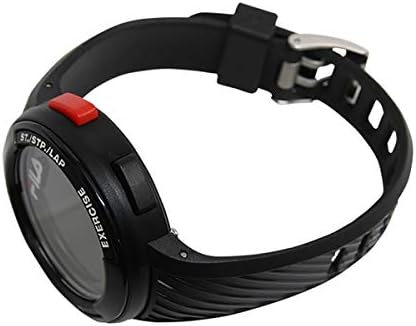
2-сүрөт: Каптал View of FILA Digital Watch 38-163-001. This image shows the right side of the watch, highlighting the 'ST./STP./LAP' button (red) and the 'EXERCISE' button (black). The textured silicone strap is also visible, extending from the watch case.
Батареяны алмаштыруу
The watch is powered by a quartz battery. When the display becomes dim or functions become erratic, it may be time to replace the battery. Battery replacement should be performed by a qualified watch technician to ensure the water resistance seal is maintained. Attempting to replace the battery yourself may void the warranty and damage the watch.
Проблемаларды чечүү
| Көйгөй | Мүмкүн себеп | Чечим |
|---|---|---|
| Дисплей бош же күңүрт. | Батарея аз. | Батареяны алмаштырыңыз (кесипкөй тейлөө сунушталат). |
| Баскычтар жооп бербейт. | Temporary system glitch. | Try pressing all buttons firmly. If issue persists, a soft reset might be needed (refer to professional). |
| Убакыт туура эмес. | Time not set correctly or battery low. | Re-set the time and date as per "Setting Time and Date" section. If problem persists, consider battery replacement. |
| Сааттын ичиндеги суу. | Сууга туруктуулугу бузулган. | Stop using the watch immediately and take it to a qualified watch repair service. Do not attempt to dry it yourself. |
Техникалык шарттар
- Бренд: FILA
- Модель номери: 38-163-001
- Кыймыл: Кварц (батарея менен иштейт)
- Суу каршылык: Daily life water resistance (5 ATM / 50 meters)
- Функциялары: Chronograph, Calorie Consumption, Pedometer, Timer, Lap Timer, Alarm, Time Signal, EL Backlight
- Иштин кеңдиги: Approximately 44mm (excluding crown)
- Боонун материалы: Силикон
- Билектин айланасы: Approximately 13cm (min) to 19.5cm (max)
Кепилдик жана колдоо
Кепилдик маалымат
This FILA watch comes with a 1 жылдык кепилдик from the date of purchase. The warranty covers manufacturing defects under normal use. It does not cover damage resulting from accidents, improper use, unauthorized repairs, or normal wear and tear of the strap or battery.
Кепилдик дооматтары үчүн сатып алганыңыздын далилин сактап коюңуз.
Кардарларды колдоо
For further assistance, technical support, or warranty service, please contact your retailer or the authorized FILA service center. Refer to the contact information provided with your purchase documentation.


