1. Киришүү
The Celly Pantone PTBS001L is a portable Bluetooth speaker designed for an optimal audio experience both indoors and outdoors. Featuring an elegant fabric-covered body and a 5W output, it delivers clear sound. This manual provides detailed instructions for setting up, operating, and maintaining your speaker.
Негизги өзгөчөлүктөр төмөнкүлөрдү камтыйт:
- 8 сааттык батареянын иштөө мөөнөтү: Enjoy extended playback on a single charge.
- 5 Вт аудио чыгышы: Provides maximum sound for various environments.
- Кош байланыш: Connect via Bluetooth 5.0 or the included 3.5mm auxiliary cable.
- Портативдик дизайн: Compact and stylish, making it easy to carry.
2. Коопсуздук маалыматы
Сураныч, бул продуктуну колдонуудан мурун бардык коопсуздук нускамаларын окуп чыгыңыз. Бул нускамаларды аткарбоо электр шокуна, өрткө же башка коркунучтарга алып келиши мүмкүн.
- Динамикти экстремалдык температурага, түз күндүн нуруна же жогорку нымдуулукка дуушар кылбаңыз.
- Динамикти сууга же башка суюктуктарга салбаңыз.
- Спикерди түшүрүүдөн же катуу таасирлерге дуушар кылуудан качыңыз.
- Динамикти бөлүктөргө бөлүүгө, оңдоого же өзгөртүүгө аракет кылбаңыз. Бул кепилдикти жокко чыгарат.
- Берилген заряддоо кабелин же тастыкталган эквивалентти гана колдонуңуз.
- Балдар жетпеген жерде сактаңыз.
- Продукцияны жергиликтүү эрежелерге ылайык таштаңыз.
3. Пакеттин мазмуну
Пакетте бардык буюмдар бар экенин текшериңиз:
- Celly Pantone PTBS001L Bluetooth Speaker
- USB заряддоо кабели
- 3.5 мм көмөкчү (AUX) кабель
- Колдонуучунун Колдонмосу (бул документ)
4. Продукт бүтүп калдыview
The Celly Pantone PTBS001L speaker features a minimalist design with intuitive controls. Familiarize yourself with the speaker's components and controls before use.

1-сүрөт: Фронт view of the Celly Pantone PTBS001L Bluetooth Speaker. The speaker has a cylindrical shape, covered in a cyan fabric, with a white base featuring the 'PANTONE' logo. The top cap is also cyan.
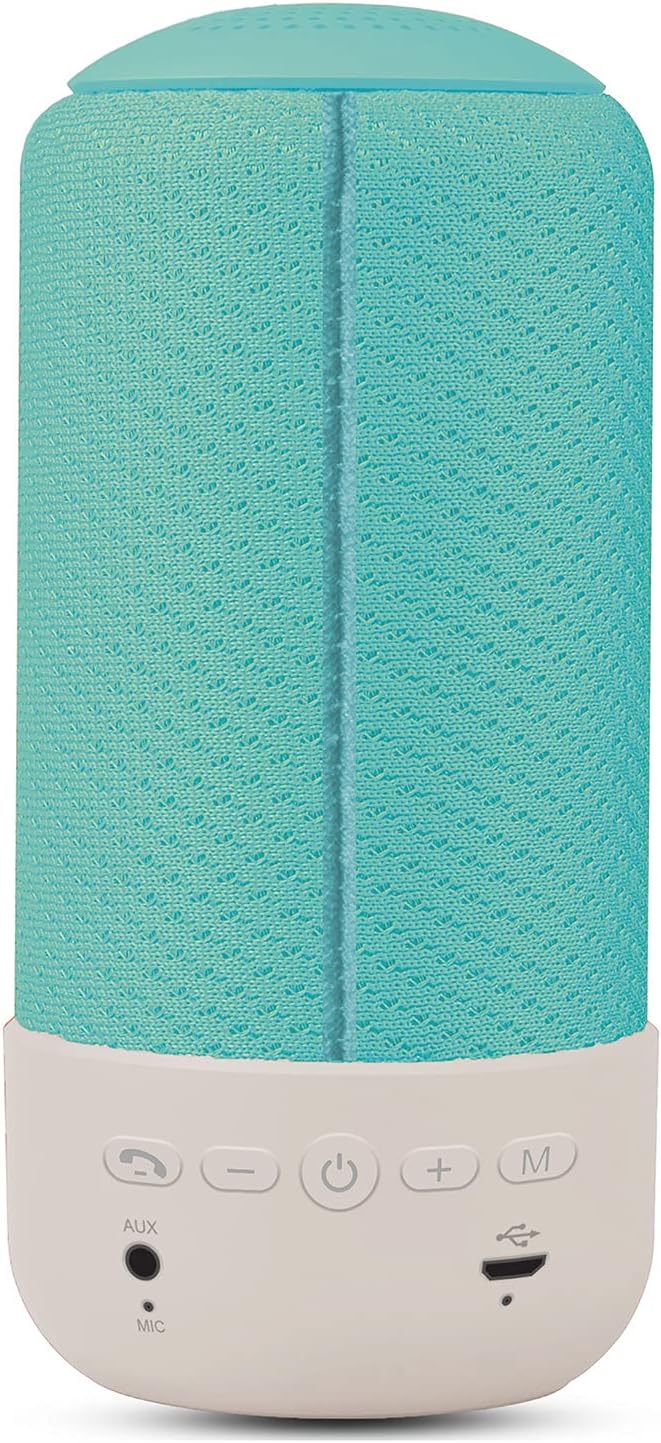
2-сүрөт: Арткы view of the Celly Pantone PTBS001L Bluetooth Speaker. This image highlights the control panel located on the white base. From left to right, the buttons are: Call/Play/Pause, Volume Down (-), Power On/Off, Volume Up (+), and Mode (M). Below these buttons are the AUX input, Microphone (MIC), and Micro USB charging port.
Башкаруу каражаттары жана порттор:
- Call / Play / Pause Button: Answer/end calls, play/pause music.
- Үндү азайтуу (-) баскычы: Үндү азайтыңыз. Мурунку трек үчүн басып, кармап туруңуз.
- Кубат баскычы (⏻): Power on/off the speaker.
- Үнүн жогорулатуу (+) баскычы: Үнүн катуулатыңыз. Кийинки тректи угуу үчүн басып, кармап туруңуз.
- Режим (M) баскычы: Switch between Bluetooth and AUX modes.
- AUX киргизүү: 3.5mm jack for wired audio connection.
- MIC: Handsfree чалуулар үчүн орнотулган микрофон.
- Микро USB кубаттоочу порт: Динамиктин ички батареясын заряддоо үчүн.
5. Орнотуу
5.1 Алгачкы заряддоо
Before first use, fully charge the speaker. Connect the Micro USB charging cable to the speaker's charging port and the other end to a USB power adapter (not included) or a computer's USB port. The charging indicator light will illuminate during charging and turn off once fully charged. A full charge takes approximately 2 hours.
5.2 Күйгүзүү/өчүрүү
- Күйгүзүү үчүн: Press and hold the Power button (⏻) for a few seconds until you hear an audible prompt or see an indicator light.
- Өчүрүү үчүн: Press and hold the Power button (⏻) for a few seconds until you hear an audible prompt or the indicator light turns off.
5.3 Bluetooth жупташтыруу
After powering on, the speaker will automatically enter Bluetooth pairing mode if no device is connected. An indicator light will flash, and you may hear an audible prompt.
- Динамиктин күйүп турганын жана Bluetooth жупташтыруу режиминде экенин текшериңиз.
- Мобилдик түзмөгүңүздө (смартфон, планшет ж.б.) Bluetooth функциясын иштетиңиз.
- Издөө available Bluetooth devices. The speaker will appear as "PTBS001L" же окшош.
- Select the speaker from the list to connect. Once connected, you will hear a confirmation sound, and the indicator light will stop flashing.
- Эгер сырсөз суралса, "0000" киргизиңиз.
The speaker will automatically attempt to reconnect to the last paired device when powered on, if that device is within range and has Bluetooth enabled.
6. Иштөө нускамалары
6.1 Bluetooth ойнотуу
- Once paired, open your music application on your device and start playback.
- Ойнотуу/тындыруу: Press the Call/Play/Pause button once.
- Кийинки трек: Үндү жогорулатуу (+) баскычын басып, кармап туруңуз.
- Мурунку трек: Үндү азайтуу (-) баскычын басып, кармап туруңуз.
6.2 AUX Mode Playback
For devices without Bluetooth, or if you prefer a wired connection:
- 3.5 мм AUX кабелинин бир учун динамиктеги AUX киргизүү портуна туташтырыңыз.
- Connect the other end of the AUX cable to the headphone jack of your audio device.
- басыңыз Режим (M) button on the speaker to switch to AUX mode. You will hear an audible prompt.
- Start playback from your audio device. Volume can be controlled via the speaker or your device. Track control buttons on the speaker may not function in AUX mode.
6.3 Чакыруу функциясы
When connected via Bluetooth, the speaker supports hands-free calling.
- Чакырууга жооп берүү: Press the Call/Play/Pause button once when an incoming call rings.
- Чакырууну аяктоо: Press the Call/Play/Pause button once during a call.
- Чакырууну четке кагуу: Press and hold the Call/Play/Pause button for 2 seconds when an incoming call rings.
- Акыркы номерди кайра терүү: Double-press the Call/Play/Pause button.
6.4 Үндү башкаруу
- Көлөмүн жогорулатуу: Үнүн жогорулатуу (+) баскычын басыңыз.
- Көлөмдү азайтуу: Үндү азайтуу (-) баскычын басыңыз.
7. Динамикти кубаттоо
The speaker is powered by an internal rechargeable battery. When the battery is low, you may hear an audible warning, and the indicator light may flash.
- Micro USB кубаттоо кабелин динамиктин кубаттоо портуна туташтырыңыз.
- Кабелдин экинчи учун USB кубат булагына туташтырыңыз (мисалы, дубал адаптери, компьютердин USB порту).
- The charging indicator light will be active during charging.
- Charging typically takes less than 2 hours for a full charge.
- A fully charged speaker provides approximately 8 hours of playback time.
8. Техникалык тейлөө
8.1 Тазалоо
- Wipe the speaker with a soft, dry, lint-free cloth.
- Абразивдүү тазалоочу каражаттарды, спиртти же химиялык эриткичтерди колдонбоңуз, анткени алар бетке зыян келтириши мүмкүн.
8.2 Сактоо
- Динамикти түз күн нурунан жана өтө температурадан алыс салкын, кургак жерде сактаңыз.
- If storing for an extended period, charge the battery every few months to maintain its lifespan.
9. Кыйынчылыктарды
| Көйгөй | Мүмкүн себеп | Чечим |
|---|---|---|
| Динамик күйбөйт. | Батарея түгөнүп калды. | Динамикти кеминде 30 мүнөткө заряддаңыз. |
| Динамиктен үн чыкпайт. | Үн өтө төмөн; Түзмөк туташкан эмес; Туура эмес режим. | Increase speaker and device volume; Ensure Bluetooth is paired or AUX cable is connected; Press 'M' button to switch modes. |
| Bluetooth аркылуу жупташтыруу мүмкүн эмес. | Speaker not in pairing mode; Device Bluetooth off; Too far from device. | Ensure speaker is on and flashing (pairing mode); Turn on Bluetooth on your device; Move speaker closer to your device (within 10m). |
| Үн сапаты начар. | Батареянын заряды аз; Түзмөк өтө алыс; Интерференция. | Charge the speaker; Move device closer; Avoid obstacles between speaker and device. |
10. Техникалык шарттар
| Өзгөчөлүк | Спецификация |
|---|---|
| Модель аты | PTBS001L |
| Бренд | Pantone (by Celly) |
| Байланыш технологиясы | Bluetooth, Көмөкчү (3.5 мм уяча) |
| Bluetooth версиясы | 5.0 |
| Иштөө Дистанциясы | 10 метрге чейин (33 фут) |
| Динамик чыгаруу күчү | 5 Ватт |
| Динамик спецификациялары | 52mm - 4 Ohm |
| Жыштык диапазону | 60Гц - 20КГц |
| бурмалоо | <3% |
| Батарея сыйымдуулугу | 1200mAh |
| Заряддоо убактысы | 2 сааттан аз |
| Ойнотуу убактысы | 8 сааттан ашык |
| Өзгөчөлүктөр | Bluetooth, Portable, Hands-free Call Function |
| Өлчөмдөрү (L x W x Y) | 7 x 7 x 15 см (2.76 x 2.76 x 5.91 дюйм) |
| Салмагы | 340 грамм (0.75 фунт) |
| Түс | Сиан |
11. Кепилдик жана колдоо
This product is covered by a standard manufacturer's warranty. Please refer to the warranty card included with your purchase or visit the official Celly webдеталдуу кепилдик шарттары жана шарттары үчүн сайт.
For technical support, troubleshooting assistance, or warranty claims, please contact Celly customer service through their official webсайт же продукт таңгагында көрсөтүлгөн байланыш маалыматы.


