1. Киришүү
This manual provides detailed instructions for the installation, configuration, and operation of your Lorex 2K Dual Lens Indoor Wi-Fi Security Camera, model W463AQD-E. Please read this manual thoroughly before using the product to ensure proper functionality and safety. Keep this manual for future reference.

Image 1.1: Lorex 2K Dual Lens Indoor Wi-Fi Security Camera with its retail packaging.
2. Пакеттин мазмуну
Verify that all items listed below are included in your package. If any items are missing or damaged, please contact Lorex customer support.
- 1 × 2K Dual-Lens Indoor Pan-Tilt Camera
- 1 × 32GB MicroSD Card (pre-installed)
- 1 × 6.5 ft (2 m) Power Cable
- 1 × Монтаждык кронштейн
- 3 × Анкерлер жана буроолор
- 1 × Кубат адаптери
3. Продукт бүтүп калдыview
Familiarize yourself with the components and features of your Lorex security camera.
3.1 Камеранын компоненттери

Сүрөт 3.1: Алдыңкы view of the camera, showing the dual lenses and call button.

Сүрөт 3.2: Каптал view of the camera, highlighting its dome shape.

Сүрөт 3.3: Артка view of the camera, showing the power input and reset button.

Image 3.4: Bottom label displaying model number W463AQD-E and other regulatory information.
3.2 Негизги өзгөчөлүктөрү
- 2K Quad HD Video: Так жана деталдуу видеону тартатtage.
- Кош линзалуу дизайн: Provides enhanced surveillance capabilities.
- 360° Pan-Tilt: Камераны алыстан тууралоо viewing angle to cover a full 360-degree area.
- Автоматтык түрдө көзөмөлдөө: Automatically follows detected movement within its field of view.
- Smart Person & Pet Detection: Differentiates between human and pet activity to reduce false alerts.
- IR Түнкү Көрүнүшү: Provides clear video in low-light conditions up to 33 feet.
- Эки тараптуу сүйлөшүү: Allows for real-time communication through the camera's built-in microphone and speaker.
- Quick Call Button: Enables visitors to initiate a call to your connected device.
- Ийкемдүү сактагыч: Supports local storage via an included 32GB MicroSD card and optional cloud storage or Lorex Fusion recorders.
- Купуялык режими: Physically hides the camera lens for enhanced privacy when needed.
- Wi-Fi туташуусу: Connects to your home network wirelessly (2.4GHz).
4. Орнотуу
4.1 Баштапкы орнотуу жана колдонмо туташуу
- Күйгүзүү: Кубат адаптерин камерага туташтырып, розеткага сайыңыз. Камера күйүп, ишке киргизүү ыраатын баштайт.
- Lorex Home тиркемесин жүктөп алыңыз: Lorex Home тиркемесин смартфонуңузга же планшетиңизге App Store'дон (iOS) же Google Play Store'дон (Android) жүктөп алыңыз.
- Эсеп түзүү: Open the Lorex Home app and follow the on-screen instructions to create a new account or log in to an existing one.
- Түзмөк кошуу: Tap the '+' icon in the app to add a new device. Scan the QR code located on the bottom of your camera or on its packaging.
- Wi-Fi'га туташуу: Follow the app's prompts to connect the camera to your 2.4GHz Wi-Fi network. Ensure your mobile device is connected to the same Wi-Fi network during setup.
- Толук орнотуу: Once connected, follow the remaining steps in the app to name your camera and finalize the setup process.

Image 4.1: The Lorex Home application interface for managing camera feeds.
4.2 Камераны орнотуу
The camera can be placed on a flat surface or mounted to a ceiling or wall using the included mounting bracket.
- Жайгашкан жерди тандоо: Select a suitable indoor location with a clear view and within range of your Wi-Fi network.
- Марк Тешиктер: Place the mounting bracket at the desired location and mark the screw holes with a pencil.
- Бургулоо тешиктери: Drill pilot holes at the marked spots. If mounting on drywall, insert the included anchors.
- Коопсуз кашаа: Монтаждык кронштейнди тешиктерге тууралаңыз жана берилген бурамалар менен бекитиңиз.
- Камераны тиркөө: Twist the camera onto the mounting bracket until it clicks securely into place.
5. Операция
5.1 Live View жана Controls
Түз эфирге кирүү view of your camera through the Lorex Home app. From the live view screen, you can control various camera functions.
- Панорама жана жантайтуу: Use the directional controls in the app to remotely adjust the camera's horizontal (pan) and vertical (tilt) angles.
- Digital Zoom: Түз эфирдеги видео түрмөктү чоңойтуу же кичирейтүү үчүн чымчып коюңуз.
- Кош линза View: The app may offer options to switch between or combine views from the dual lenses.

Image 5.1: Camera shown with a smartphone displaying the dual lens live view Lorex Home колдонмосунда.
5.2 Two-Way Talk and Call Button
The camera features two-way audio for communication and a physical call button.
- Эки тараптуу сүйлөшүү: Түз эфирде view, tap the microphone icon to speak through the camera's speaker. Tap again to end.
- Чалуу баскычы: A person near the camera can press the physical call button on the camera to initiate a call to your connected mobile device.

Image 5.2: Demonstrating two-way talk functionality via the Lorex Home app.

Image 5.3: A user pressing the quick call button on the camera.
5.3 Кыймылды аныктоо жана эскертүүлөр
The camera uses smart detection to identify important events.
- Акылдуу аныктоо: The camera can detect and differentiate between people and pets, sending specific alerts to your phone.
- Автоматтык түрдө көзөмөлдөө: When motion is detected, the camera can automatically pan and tilt to follow the subject.
- Ыңгайлаштыруу: Adjust motion detection zones and sensitivity settings within the Lorex Home app to minimize unwanted alerts.

Image 5.4: Auto-tracking feature following a baby's movement.

Сүрөт 5.5: Башка view of the auto-tracking feature in action.

Image 5.6: Smart motion detection alerting to a person's presence.

Image 5.7: Pet detection and auto-tracking following a dog.
5.4 Night Vision and Smart Lighting
The camera provides clear surveillance even in low-light conditions.
- IR Түнкү Көрүнүшү: Infrared LEDs provide black and white video up to 33 feet in complete darkness.
- Акылдуу коопсуздук жарыктандыруу: The camera features integrated lighting that can be configured to activate upon motion detection or on a schedule.

Image 5.8: Comparison of daytime and IR night vision footage of a sleeping baby.

Image 5.9: Clear night vision image of a baby sleeping.

Image 5.10: The camera's smart security lighting feature in action.
5.5 Жазуу жана сактоо
Your camera offers multiple options for storing recorded video footage.
- Жергиликтүү сактагыч: A 32GB MicroSD card is pre-installed for local recording. This ensures your footage is stored directly on the device.
- Булуттагы сактагыч: Optional cloud storage plans are available for off-site backup of your recordings. Refer to the Lorex Home app for details.
- Lorex Fusion Recorders: The camera is compatible with Lorex Fusion recorders for integrated system storage.

Image 5.11: The included 32GB MicroSD card for private and secure local storage.
5.6 Купуялык режими
Activate Privacy Mode to physically conceal the camera lens when surveillance is not desired.
- Жандандыруу: Privacy Mode can be activated through the Lorex Home app. When active, the camera lens will rotate downwards, blocking its view.
- Өчүрүү: Deactivate Privacy Mode via the app to resume normal operation.
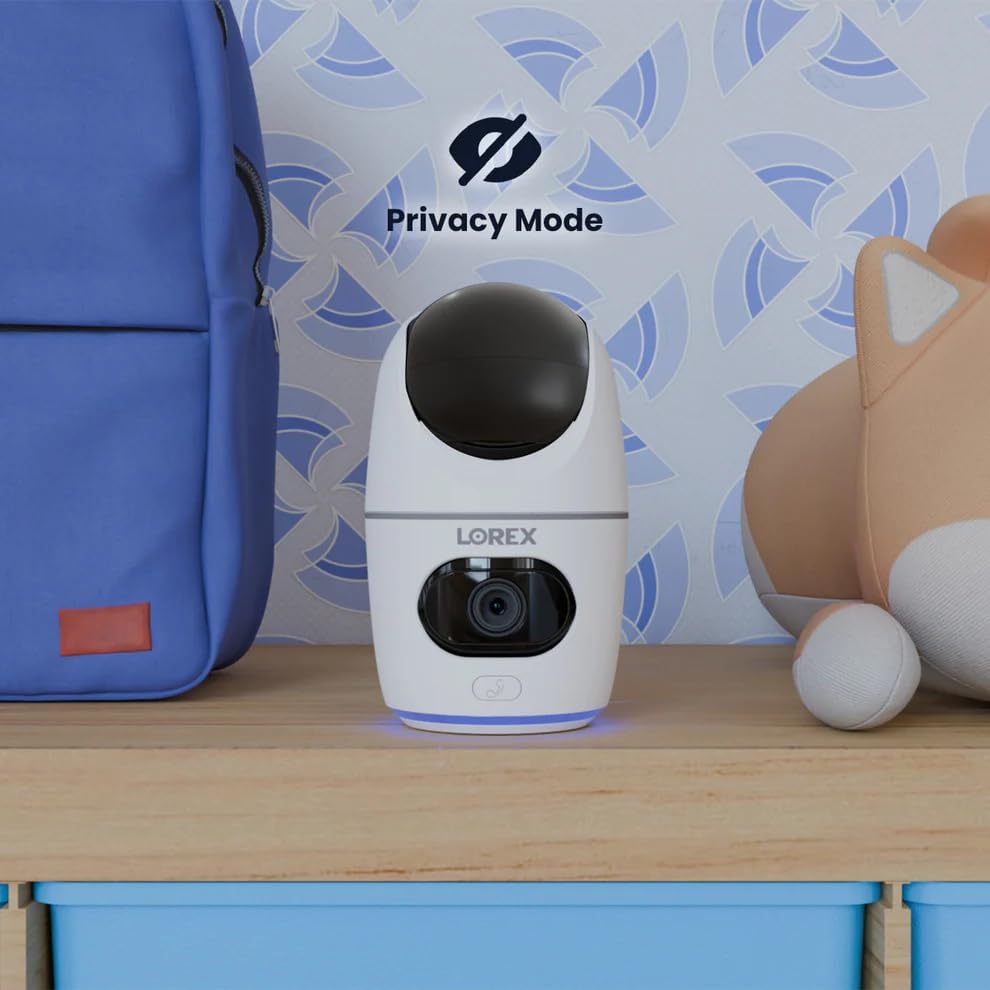
Image 5.12: The camera in Privacy Mode, with the lens retracted.
6. Техникалык тейлөө
- Тазалоо: Камера линзасын жана корпусун тазалоо үчүн жумшак, кургак чүпүрөктү колдонуңуз. Абразивдүү тазалоочу каражаттарды же эриткичтерди колдонбоңуз.
- Программалык камсыздоонун жаңыртуулары: Regularly check the Lorex Home app for available firmware updates to ensure optimal performance and security.
- MicroSD картасы: Periodically check the status of the MicroSD card in the app. If the card is full and continuous recording is enabled, older footage will be overwritten. Back up important footagэ керек болсо.
- Электр камсыздоо: Ensure the camera is connected to a stable power source. Avoid using third-party power adapters that are not specified for this device.
7. Кыйынчылыктарды
| Көйгөй | Чечим |
|---|---|
| Camera is offline or disconnected. |
|
| Wi-Fi'га туташпай жатат. |
|
| No video or poor video quality. |
|
| Кыймыл жөнүндө эскертүүлөр өтө көп же алынбайт. |
|
8. Техникалык шарттар
| Өзгөчөлүк | Деталь |
|---|---|
| Модель номери | W463AQD-E |
| Video Resolution | 2K (1440p) |
| Натыйжалуу дагы эле чечим | 4 депутат |
| Viewбурч | 360 Degrees (Pan-Tilt), 135 Degrees (Field of View) |
| Түнкү көрүү диапазону | 33 Feet (IR Night Vision) |
| Байланыш | Wi-Fi (2.4 ГГц) |
| Сактагыч | 32GB MicroSD Card (included), supports up to 256GB, Cloud Storage (optional), Lorex Fusion compatible |
| Аудио | Эки тараптуу сүйлөшүү (орнотулган микрофон жана динамик) |
| аныктоо | Smart Person & Pet Detection, Auto-Tracking |
| Power Source | Corded Electric (5V=2A) |
| Өлчөмдөрү (L x W x Y) | 5 x 6 x 5 дюйм |
| Элемент Салмагы | 15.2 унция |
| Ички/тышкы колдонуу | Ичинде гана |
| Камтылган компоненттер | Camera, 32GB MicroSD Card, Power Cable, Mounting Bracket, Power Adapter |
9. Кепилдик жана колдоо
For warranty information, technical support, or additional resources, please visit the official Lorex webсайтка же кардарларды тейлөө бөлүмүнө кайрылыңыз.
- lorex Webсайт: www.lorex.com
- Кардарларды колдоо: Refer to the Lorex website for contact details and support hours.
Product registration is recommended to receive updates and support.


