Introduction
Сатып алганыңыз үчүн рахматasing the Dolphin RETROBOX SP-411BT Portable Bluetooth AM/FM Radio. This manual provides essential information for the safe and efficient operation of your device. Please read it thoroughly before use and retain it for future reference.
Коопсуздук маалыматы
- Өрт же электр тогуна урунуп калбаш үчүн аппаратты жамгырга же нымга тийгизбеңиз.
- в ачпагылаasinг. Бардык тейлөөлөрдү квалификациялуу кызматкерлерге тапшырыңыз.
- Аппаратты жылуулук булактарынын жанына же тике күн нуруна коюудан алыс болуңуз.
- Туура желдетүүнү камсыз кылыңыз жана желдетүү тешиктерин жаап албаңыз.
- Белгиленген кубат адаптерин жана аксессуарларды гана колдонуңуз.
Продукт бүттүview
The Dolphin RETROBOX SP-411BT combines classic design with modern audio capabilities. It features AM/FM radio, Bluetooth connectivity, and playback from USB drives and TF cards, all in a portable form factor.

1-сүрөт: Фронт view of the Dolphin RETROBOX SP-411BT radio, showing the main controls, speakers, and frequency display.
Негизги өзгөчөлүктөрү
- Көп диапазондуу радио: AM/FM/SW reception.
- Bluetooth байланышы: Зымсыз аудио агым.
- Медиа ойнотуу: USB and TF (Micro SD) card support for MP3 files.
- Портативдик дизайн: Lightweight with a shoulder strap and AC cable included.
- Кубат параметрлери: Operates on AC power or built-in rechargeable battery.
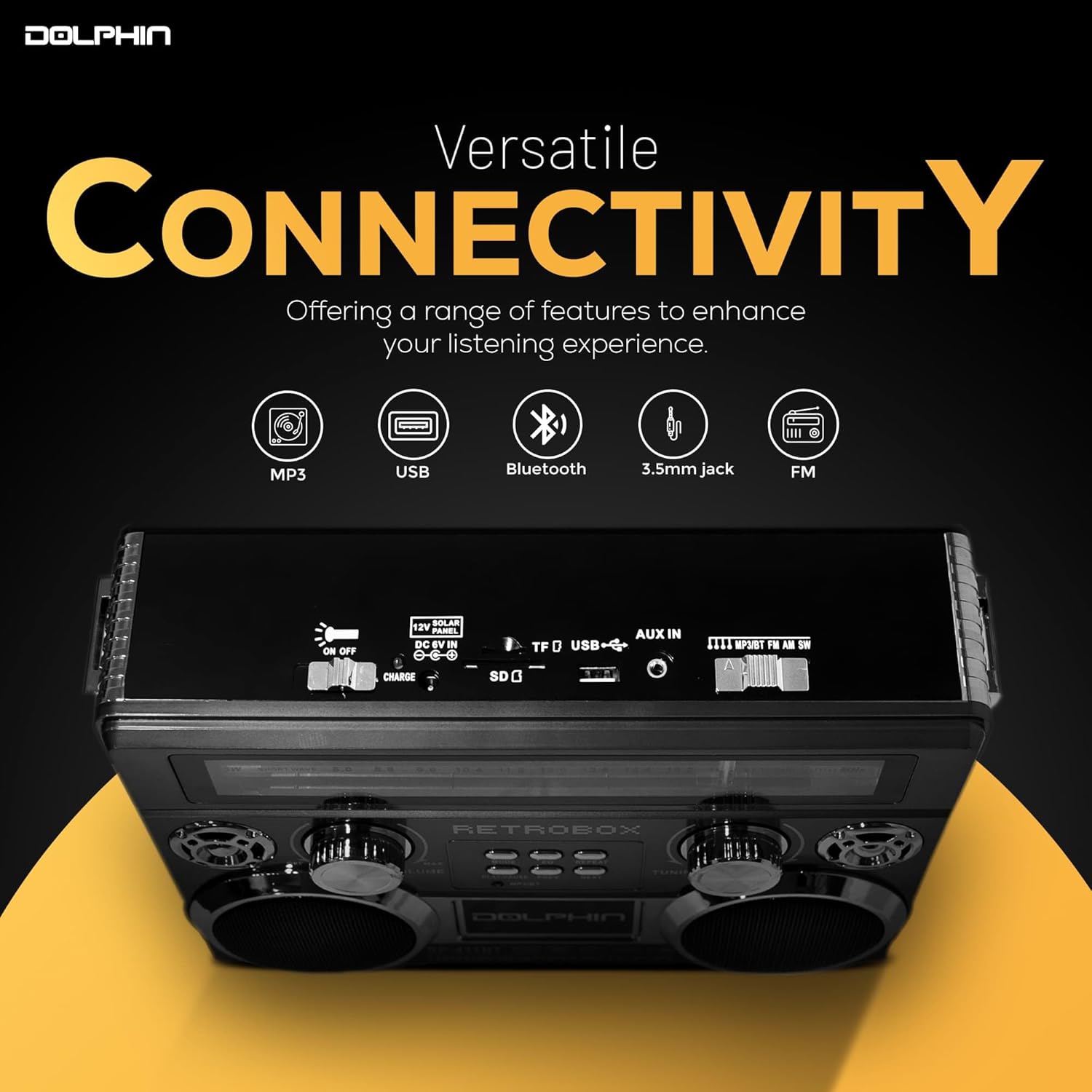
2-сүрөт: Жогорку view of the radio highlighting various connectivity ports including USB, TF card slot, and AUX in.
Жайгашуу
Пакеттен чыгаруу
Carefully remove the radio and all accessories from the packaging. Verify that all components are present:
- Dolphin RETROBOX SP-411BT Radio
- AC кубат кабели
- Погон
- Колдонуучунун Колдонмосу (бул документ)
Аппаратты кубаттандыруу
The RETROBOX SP-411BT can be powered by its internal rechargeable Lithium Ion battery or directly from an AC power source.
- AC кубаттуулугу: Connect the supplied AC power cable to the AC input port on the back of the radio, then plug the other end into a standard wall outlet. The unit will operate and charge the internal battery.
- Батарея кубаттуулугу: The radio includes a built-in rechargeable Lithium Ion battery. Ensure the battery is charged before portable use. A full charge is recommended for optimal performance.

3-сүрөт: Illustration of the radio's battery power capability, suitable for outdoor use or during power outages.
Иштөө нускамалары

4-сүрөт: Жакын план view of the radio's control panel, including volume, tuning, and playback buttons.
Күйгүзүү/өчүрүү
айлантыңыз VOLUME knob clockwise to turn the radio on. Rotate it counter-clockwise until it clicks to turn the radio off.
Режим тандоо
басыңыз РЕЖИМ button repeatedly to cycle through available modes: FM, AM, SW (Shortwave), Bluetooth, USB, and TF Card.
AM/FM/SW Radio Tuning
- Extend the telescoping antenna for optimal FM and SW reception. For AM, the internal antenna is generally sufficient, but rotating the unit may improve reception.
- Select the desired band (FM, AM, or SW) using the РЕЖИМ баскычы.
- айлантыңыз TUNING knob to scan for radio stations. The frequency will be displayed on the front panel.

5-сүрөт: The telescoping antenna, which can be extended for improved radio signal reception.
Bluetooth Жупташтыруу
- радиону Bluetooth режимине которуу үчүн РЕЖИМ button. The unit will indicate it is ready for pairing (e.g., a voice prompt or flashing indicator).
- Мобилдик түзмөгүңүздө Bluetooth иштетип, жеткиликтүү түзмөктөрдү издеңиз.
- Select "RETROBOX" from the list of devices. Once paired, the unit will confirm the connection.
- You can now play audio from your mobile device through the radio.
USB/TF картасын ойнотуу
- Insert a USB drive or TF (Micro SD) card into the corresponding slot. Ensure the card contains MP3 audio files.
- Switch the radio to USB or TF Card mode using the РЕЖИМ button. The unit will automatically begin playing the first compatible audio file.
- колдонуу ОЙНОО/ТЫНЫТТЫРУ, ПРЕВ, жана КИЙИНКИ ойнотууну башкаруу үчүн баскычтар.
- басыңыз КАЙТАЛОО кайталоо режимдери (мисалы, бирин кайтала, баарын кайтала) баскычын басыңыз.
Үндү көзөмөлдөө
Adjust the overall volume by rotating the VOLUME knob. Rotate clockwise to increase volume, counter-clockwise to decrease.
Эквалайзер (EQ) функциясы
басыңыз EQ button to cycle through different equalizer presets, adjusting the audio output to your preference.
Техникалык тейлөө
Тазалоо
- Тазалоодон мурун ар дайым электр кабелин сууруп алыңыз.
- Аппараттын сыртын сүртүү үчүн жумшак, кургак чүпүрөктү колдонуңуз.
- Абразивдүү тазалагычтарды, момдорду же эриткичтерди колдонбоңуз, анткени алар финишке зыян келтириши мүмкүн.
Батареяга кам көрүү
- To prolong battery life, fully charge the battery before first use.
- Батареяны бат-баттан толук түгөтүп коюудан алыс болуңуз.
- If storing the unit for an extended period, charge the battery to approximately 50% and recharge every 3-6 months.
Сактагыч
Store the radio in a cool, dry place away from direct sunlight and extreme temperatures. Disconnect the AC cable if not in use for prolonged periods.
Проблемаларды чечүү
| Көйгөй | Мүмкүн себеп | Чечим |
|---|---|---|
| Күч жок | Unit is off; AC cable not connected; Battery drained. | Rotate VOLUME knob clockwise; Connect AC cable; Charge battery. |
| Үн жок | Volume too low; Incorrect mode selected; Source device not playing. | Increase volume; Select correct mode; Ensure source device is playing audio. |
| Радио кабыл алуу начар | Антенна узартылган эмес; Сигнал аймагы алсыз; Интерференция. | Extend telescoping antenna; Reposition unit; Move away from electronic devices. |
| Bluetooth туташпай жатат | Radio not in Bluetooth mode; Device not discoverable; Already paired to another device. | Switch to Bluetooth mode; Ensure device Bluetooth is on and discoverable; Disconnect from other devices. |
| USB/TF Card Not Playing | Туура эмес режим; Шайкеш келбейт file format; Corrupted card/drive. | Switch to USB/TF mode; Ensure files are MP3; Try a different card/drive. |
Техникалык шарттар
| Өзгөчөлүк | Деталь |
|---|---|
| Бренд | Дельфин |
| Модель номери | SP-411BT |
| Продукциянын өлчөмдөрү | 11 x 3.5 x 8.5 дюйм (11"L x 3.5"W x 8.5"H) |
| Элемент Салмагы | 3.25 фунт |
| Байланыш технологиясы | Bluetooth |
| Tuner Technology | FM, AM, SW (3-диапазондуу) |
| Power Source | Battery Powered (1 Lithium Ion battery included), AC Cable |
| Өзгөчө өзгөчөлүк | Жеңил |
| Камтылган компоненттер | Shoulder Strap, AC Cable |
Кепилдик жана колдоо
For warranty information or technical support, please refer to the documentation provided with your purchase or contact Dolphin customer service directly. Contact details can typically be found on the manufacturer's official webсайтында же продуктунун таңгагында.
Сураныч, кириңиз Дельфин дүкөнү көбүрөөк маалымат алуу үчүн.




