1. Киришүү
Thank you for choosing the TechniSat DIGITRADIO 371 CD BT. This versatile stereo digital radio system offers a wide range of audio entertainment options, including DAB+ digital radio, FM radio, a CD player, Bluetooth audio streaming, and USB playback. This manual provides detailed instructions to help you set up, operate, and maintain your device for optimal performance.
2. Маанилүү коопсуздук нускамалары
- Аппаратты иштетүүдөн мурун бардык нускамаларды кылдат окуп чыгыңыз.
- Бул колдонмону келечекте маалымат алуу үчүн сактаңыз.
- Өрт же электр тогуна урунуп калбаш үчүн аппаратты жамгырга же нымдуулукка дуушар кылбаңыз.
- Туура желдетүүнү камсыз кылыңыз. Эч кандай желдетүүчү тешиктерди жаап албаңыз.
- Аппаратты туруктуу, тегиз бетке коюңуз.
- Өндүрүүчү тарабынан көрсөтүлгөн тиркемелерди/аксессуарларды гана колдонуңуз.
- Аппаратты чагылгандуу бороондордо же узак убакыт бою колдонбогондо электр розеткасынан ажыратыңыз.
- Бардык тейлөөлөрдү квалификациялуу тейлөө кызматкерлерине тапшырыңыз.
- The device may only be operated within the specified environmental conditions.
3. Пакеттин мазмуну
Пакетте бардык буюмдар бар экенин текшериңиз:
- TechniSat DIGITRADIO 371 CD BT unit
- Алыстан башкаруу
- Колдонуучунун колдонмосу (бул документ)
- 2 AAA батарейка (алыстан башкаруу үчүн)
4. Продукт бүтүп калдыview
4.1 алдыңкы панели

The front panel features a clear color display, control buttons for mode selection, information, menu navigation, and preset access. Two rotary knobs are provided for volume control and tuning/entering selections.
4.2 Арткы панель
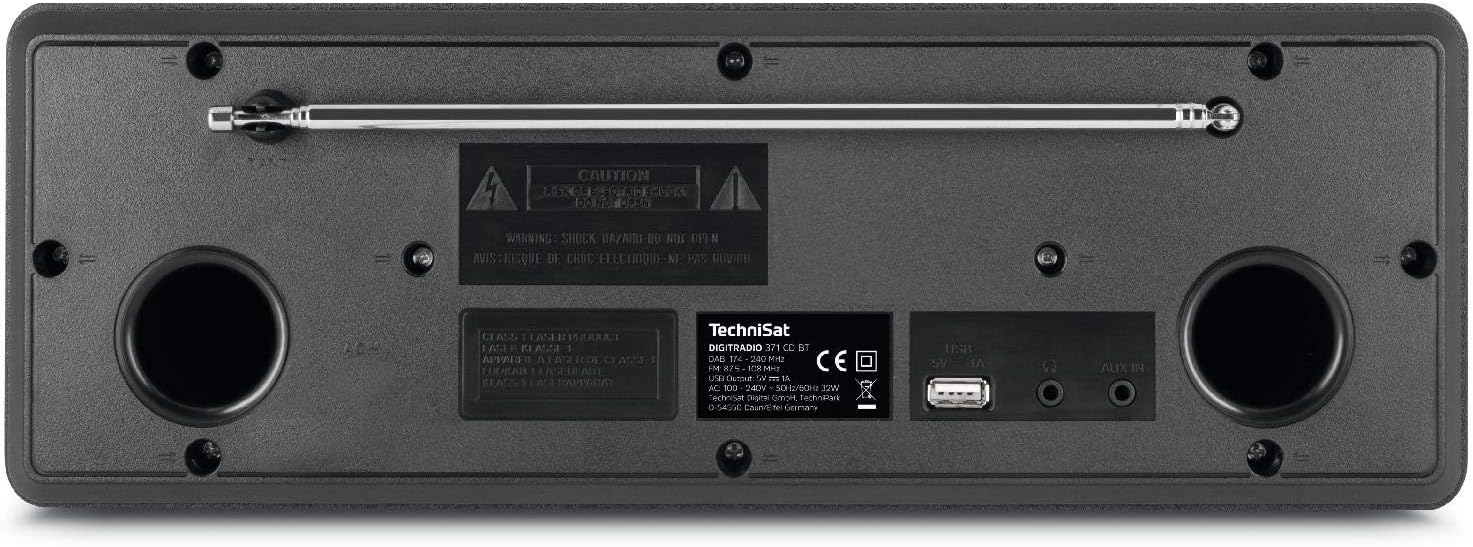
The rear panel includes the telescopic antenna for radio reception, a USB port for MP3 playback and device charging, and a 3.5mm AUX input for connecting external audio sources.
4.3 Алыстан башкаруу

The included remote control provides convenient access to all functions of the DIGITRADIO 371 CD BT, including power, mode selection, volume, tuning, and preset management.
5. Орнотуу
5.1 Кубат туташтыруу
- Аппараттын туруктуу бетке коюлганын текшериңиз.
- Connect the power cable to the AC inlet on the rear of the unit.
- Plug the other end of the power cable into a standard wall outlet (230V).
5.2 Антеннаны тууралоо
For optimal DAB+ and FM radio reception, fully extend the telescopic antenna located on the rear of the unit. Adjust its position and angle to achieve the best signal quality.
5.3 Баштапкы күйгүзүү жана сканерлөө
- Press the Power button on the front panel or remote control to turn on the device.
- Upon first use, the radio will typically initiate an automatic scan for DAB+ stations. This process may take a few minutes.
- Once the scan is complete, the first available DAB+ station will begin playing.
6. Иштөө нускамалары
6.1 Режимди тандоо
басыңыз РЕЖИМ button on the front panel or remote control to cycle through available modes: DAB+, FM, CD, Bluetooth, and AUX.
6.2 DAB+ радиосу
- колдонуп, DAB+ режимин тандаңыз РЕЖИМ баскычы.
- If an automatic scan has not been performed or you wish to rescan, navigate to the menu and select 'Full Scan'.
- колдонуу TUNING/ENTER knob or the navigation buttons on the remote to browse available stations. Press ENTER бекет тандоо.
- Станцияны алдын ала коюлган катары сактоо үчүн, баскычын басып, кармап туруңуз АЛДЫН АЛА button, then select a preset number (1-20) and confirm.
6.3 FM радиосу
- аркылуу FM режимин тандаңыз РЕЖИМ баскычы.
- To automatically scan for stations, press the SCAN button on the remote or navigate through the menu.
- Кол менен жөндөө үчүн, айландырыңыз TUNING/ENTER баскыч.
- Станцияны алдын ала коюлган катары сактоо үчүн, баскычын басып, кармап туруңуз АЛДЫН АЛА button, then select a preset number (1-20) and confirm.
6.4 CD ойноткуч
- колдонуп, CD режимин тандаңыз РЕЖИМ баскычы.
- Gently insert an audio CD or MP3 CD into the CD slot. The device will automatically load and begin playback.
- Use the playback control buttons (Play/Pause, Skip Forward/Backward) on the front panel or remote control.
6.5 Bluetooth аудио агымы
- колдонуп, Bluetooth режимин тандаңыз РЕЖИМ button. The display will show 'Pairing'.
- On your Bluetooth-enabled device (e.g., smartphone, tablet), search for available Bluetooth devices and select 'DIGITRADIO 371 CD BT'.
- Once paired, you can stream audio from your device to the DIGITRADIO 371 CD BT.
6.6 USB ойнотуу жана заряддоо
- MP3 камтыган USB флэш-дискти салыңыз fileарткы панелдеги USB портуна сайыңыз.
- Select USB mode (if available, otherwise it may automatically switch).
- Use the navigation and playback controls to browse and play MP3 files.
- The USB port also provides a charging function for compatible devices like smartphones.
6.7 AUX киргизүү
- Connect an external audio device (e.g., MP3 player) to the 3.5mm AUX IN jack on the rear panel using an appropriate audio cable (not included).
- колдонуп, AUX режимин тандаңыз РЕЖИМ баскычы.
- Audio from the external device will now play through the DIGITRADIO 371 CD BT speakers. Control playback from the external device.
6.8 Ойготкуч саат жана уйку таймери
- Ойготкуч саат: Ойготкуч жөндөөлөрүнө төмөнкү аркылуу кириңиз МЕНЮ button. Follow the on-screen prompts to set alarm time, source (buzzer, radio), and volume.
- Уйку таймери: Access the sleep timer settings via the МЕНЮ button. Set a duration after which the radio will automatically turn off.
7. Техникалык тейлөө
7.1 Тазалоо
- Тазалоодон мурун ар дайым аппаратты розеткадан сууруп алыңыз.
- Сырткы беттерди сүртүү үчүн жумшак, кургак чүпүрөктү колдонуңуз.
- Абразивдүү тазалагычтарды, момдорду же эриткичтерди колдонбоңуз, анткени алар финишке зыян келтириши мүмкүн.
- For the display, use a soft, lint-free cloth.
7.2 CD ойноткучту тейлөө
- Handle CDs by their edges to avoid fingerprints.
- CD дисктерди жумшак, мамыксыз чүпүрөк менен ортосунан сыртка карай сүртүп тазалаңыз.
- Do not use scratched or damaged CDs, as they may harm the player mechanism.
8. Кыйынчылыктарды
| Көйгөй | Мүмкүн себеп | Чечим |
|---|---|---|
| Күч жок | Электр кабели туташкан эмес; Электр розеткалары активдүү эмес | Электр кабелинин туташуусун текшериңиз; Башка розетканы колдонуп көрүңүз |
| Радио кабыл алуу начар | Антенна узартылган эмес; Сигнал аймагы алсыз | Fully extend and adjust antenna; Try repositioning the unit |
| CD ойнобой жатат | CD inserted incorrectly; CD is dirty or scratched | Reinsert CD correctly; Clean or replace CD |
| Bluetooth туташпай жатат | Device not in pairing mode; Bluetooth disabled on external device | Ensure radio is in Bluetooth mode; Enable Bluetooth on your device and search again |
| No sound from AUX | Cable not connected; Incorrect mode selected | Check AUX cable connection; Select AUX mode |
9. Техникалык шарттар
- Модель номери:
- DIGITRADIO 371 CD BT (0000/2948)
- Өлчөмдөрү (W x Y x D):
- 34.5 x 12.3 x 21 см
- Салмагы:
- 2.7 килограмм
- Кубат булагы:
- Wired, internal power supply
- Тtage:
- 230 вольт
- Ватtage:
- 10 watts (speaker output)
- Спикерлердин саны:
- 2 (Стерео)
- Радио тюнер:
- DAB+, FM
- Байланыш:
- Bluetooth (reception), USB (MP3 playback, charging), 3.5mm AUX In, 3.5mm Headphone Jack
- Дисплей:
- 2.4 inch color display (dimmable)
- CD ойноткуч:
- Plays Audio CDs, MP3 CDs, CD-R, CD-RW
- Өзгөчөлүктөрү:
- Alarm clock, Sleep timer, Station memory (20x DAB+/20x FM), EQ Predefined
- OSD тилдери:
- Англис, немис, француз, италия
10. Кепилдик жана колдоо
For warranty information, please refer to the warranty card included with your product or contact your local TechniSat dealer or customer support. If you encounter any issues not covered in the troubleshooting section, please visit the official TechniSat webсайтка же жардам үчүн кардарларды тейлөөгө кайрылыңыз.


