1. Introduction and Overview
Thank you for choosing the WORKPRO 20V Cordless Drill/Driver Kit. This manual provides essential information for the safe and efficient operation, maintenance, and troubleshooting of your new tool. Please read it thoroughly before use and keep it for future reference.
This 20V Drill Driver is designed for general-purpose drilling and driving tasks, offering powerful torque and versatile speed settings. Its cordless design provides maximum portability and convenience for various projects.
Video: WORKPRO 20V Cordless Drill/Driver Kit Overview
Бул видеодо толук маалымат берилетview of the WORKPRO 20V Cordless Drill/Driver Kit, showcasing its features and accessories.
2. Эмнелер камтылган
Your WORKPRO 20V Cordless Drill/Driver Kit includes the following components:
- 1 х 20V зымсыз бургулоочу
- 1 x 20V Li-ion Battery (2000mAh)
- 1 x 2.4A Quick Charger
- 10 x 2-inch Screwdriver bits (SL3/16, 1/4; PH1, PH2, PH3; H5/32, H3/16, H1/4; T15, T25)
- 6 x Twist Drill Bits (1/8", 5/32", 3/16", 1/4", 5/16", 3/8")

Image: Kit Contents
The image displays the WORKPRO 20V Cordless Drill/Driver, along with its included 2.0Ah Li-ion battery, 2.4A fast charger, various screwdriver bits, and twist drill bits.
3. Орнотуу
3.1 Батареяны заряддоо
The 20V Li-ion battery requires charging before first use. Connect the 2.4A Quick Charger to a power outlet. The red indicator light on the charger will illuminate. Insert the battery into the charger. The red light will blink while charging and turn solid green when fully charged. A full charge takes approximately 1 hour.

Image: Battery and Charger
This image shows the 20V Li-ion battery and the 2.4A fast charger, highlighting the 1-hour fast charging capability.
3.2 Attaching the Battery to the Drill
Align the battery with the base of the drill handle and slide it in until it clicks securely into place. To remove, press the release buttons on the sides of the battery and slide it out.
3.3 Кур кыстыргычты бекитүү
The included belt clip can be attached to either side of the drill's base using the provided screw. This allows for convenient carrying during work.

Image: Belt Clip Attachment
The image illustrates the location for attaching the belt clip to the drill for easy access.
4. Иштөө нускамалары
4.1 Өзгөрмө ылдамдыктагы триггер
The drill features a variable speed trigger, allowing you to control the drilling/driving speed based on the application. Press the trigger gently for slower speeds and apply more pressure for higher speeds.
4.2 2 ылдамдыктагы трансмиссия
Select between two-speed settings using the gear selector switch located on top of the drill:
- Төмөн ылдамдык (0-360 RPM): Айдоо бурамалар же чоң тешиктерди бургулоо сыяктуу жогорку моментти колдонуу үчүн идеалдуу.
- Жогорку ылдамдык (0-1300 RPM): Suitable for fast drilling in softer materials or smaller holes.
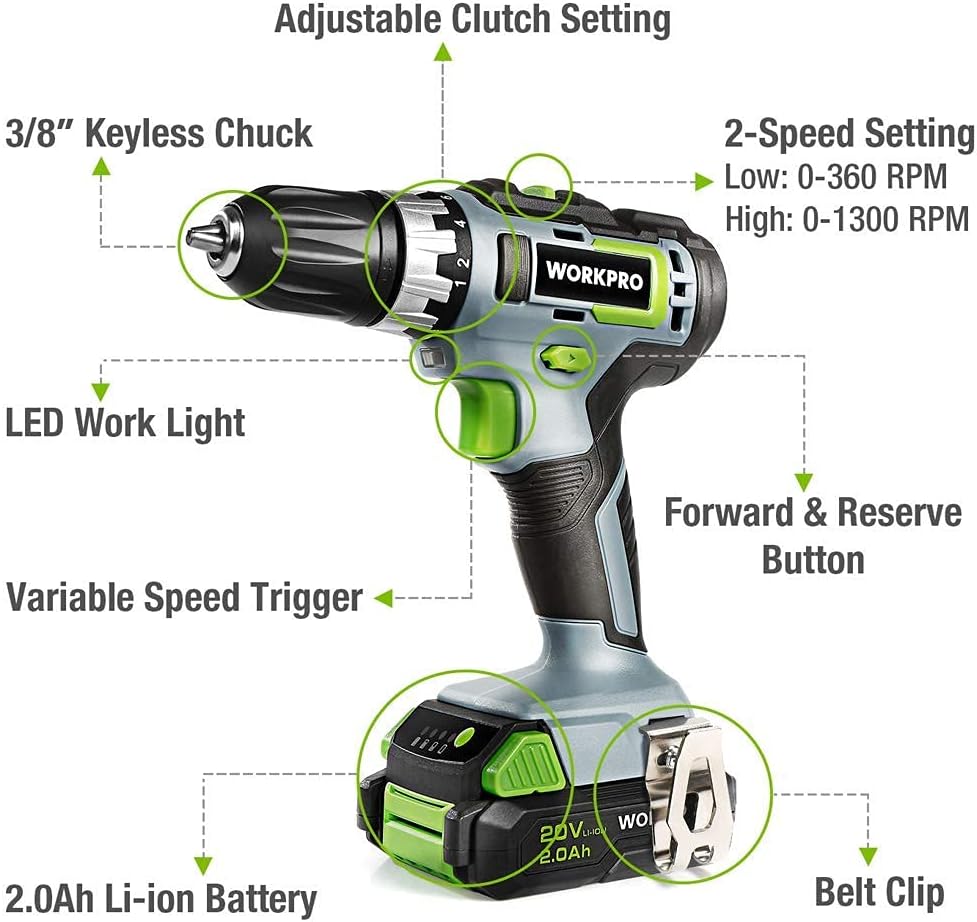
Image: 2-Speed Transmission
This image demonstrates the two-speed transmission settings on the drill, allowing for versatile use.
4.3 18+2 Torque Adjustment
The clutch offers 18 different torque settings plus 2 modes (driving and drilling). Rotate the torque collar to select the desired setting. Higher numbers provide more torque, preventing over-driving screws or damaging materials.
- Айдоо режими: Use settings 1-18 for driving screws.
- Бургулоо режими: Use the drill icon setting for drilling applications, providing maximum torque.

Image: Torque Adjustment
The image highlights the 18+2 torque adjustment collar, showing the various settings for driving and drilling.
4.4 3/8 inch Keyless Chuck
The 3/8 inch keyless ratcheting chuck allows for quick and easy bit changes without the need for a chuck key. To insert a bit, twist the chuck counter-clockwise to open the jaws, insert the bit, and then twist clockwise to tighten securely.

Image: Keyless Chuck
This image focuses on the 3/8 inch keyless chuck, illustrating its design for easy bit insertion and removal.
4.5 Алдыга/Артка жылдыруу баскычы
The forward/reverse button, located above the trigger, controls the direction of rotation. Push it to the left for forward (clockwise) rotation and to the right for reverse (counter-clockwise) rotation. Center position locks the trigger for safety.
4.6 LED иш жарык
The drill is equipped with a trigger-delay LED work light that illuminates the work area when the trigger is pressed. It stays on for approximately ten seconds after the trigger is released, providing continued visibility in dimly lit spaces.

Image: LED Work Light and Variable Speed Trigger
The image shows the integrated LED work light and the variable speed trigger on the drill.
5. Техникалык тейлөө
Regular maintenance ensures the longevity and optimal performance of your WORKPRO drill.
- Тазалоо: Куралдын вентиляция тешиктерин таза жана таштандылардан тазалаңыз. жумшак колдонуу, damp сыртын тазалоо үчүн кездеме. Катуу химиялык заттарды же абразивдүү тазалагычтарды колдонбоңуз.
- Батареяга кам көрүү: Store the battery in a cool, dry place away from direct sunlight and extreme temperatures. Do not store fully discharged batteries for extended periods.
- Бит сактагыч: Store drill bits and screwdriver bits in a dry place to prevent rust.
- Текшерүү: Periodically inspect the drill for any signs of damage, loose screws, or worn parts. If any issues are found, discontinue use and contact customer support.
6. Кыйынчылыктарды
If you encounter issues with your WORKPRO drill, refer to the following common troubleshooting tips:
- Бургулоочу иштебей жатат: Ensure the battery is fully charged and securely attached to the drill. Check that the forward/reverse button is not in the center (locked) position.
- Батарея кубатталбай жатат: Verify that the charger is properly plugged into a working power outlet and that the battery is correctly seated in the charger. Check for any visible damage to the charger or battery.
- Иш учурунда электр энергиясын жоготуу: Батареянын заряды аз болушу мүмкүн. Батареяны кайра заряддаңыз.
- Чактын ичинде бит тайып: Ensure the chuck is tightened securely around the bit. The bit shank should be clean and free of oil or debris.
For persistent issues or problems not listed here, please contact WORKPRO customer support.
7. Техникалык шарттар
| Өзгөчөлүк | Спецификация |
|---|---|
| Бренд | WORKPRO |
| Модель номери | W122035A |
| Power Source | Батарея менен иштейт |
| Тtage | 20 вольт (ток) |
| Ampөчүрүү | 2 Amps |
| Батарея сыйымдуулугу | 2 Amp Hours (Li-ion) |
| Максималдуу айлануу ылдамдыгы | 1300 RPM |
| Ылдамдыктын саны | 2 (0-360 RPM / 0-1300 RPM) |
| Чактын максималдуу өлчөмү | 3/8 inch (10 Millimeters) |
| Максималдуу момент | 25 Ньютон метр (220 дюйм-фунт) |
| Элемент Салмагы | 2.93 фунт (1.33 килограмм) |
| Продукциянын өлчөмдөрү | 16"L x 9.21"W x 3.5"H |
| Материал | ABS |
8. Кепилдик жана колдоо
For detailed warranty information and customer support, please refer to the official WORKPRO user manual or contact WORKPRO directly.
You can download the full User Manual in PDF format here: WORKPRO 20V Cordless Drill/Driver User Manual (PDF)
Кошумча жардам алуу үчүн, сураныч, баш багыңыз WORKPRO Amazon дүкөнү.


