1. Киришүү
Thank you for choosing the Genesis 20-Inch Box Fan. This fan is designed to provide powerful and efficient cooling for various indoor spaces, including bedrooms and offices. Its durable construction and user-friendly features ensure reliable performance.
This manual provides important information regarding the safe operation, setup, maintenance, and troubleshooting of your new Genesis Box Fan. Please read it thoroughly before use and retain it for future reference.

Сүрөт 1.1: Алдыңкы view of the Genesis 20-inch Box Fan. The fan features a black square frame with a protective grille and a central Genesis logo on the fan blades.
2. Коопсуздук боюнча маанилүү маалымат
Өрт, электр шок же жаракат алуу коркунучун азайтуу үчүн, төмөнкү коопсуздук чараларын сактаңыз:
- Тазалоодон же тейлөөдөн мурун дайыма желдеткичти сууруп алыңыз.
- Желдеткичти шнур же сайгыч бузулган менен иштетпеңиз. Эгерде шнур же сайгыч бузулуп калса, квалификациялуу тейлөө кызматкерлерине кайрылыңыз.
- Keep the fan away from water or other liquids. Do not immerse the fan in water.
- Оңдоп кетпеш үчүн желдеткич туруктуу, жалпак бетке коюлганын текшериңиз.
- Вентилятор иштеп жатканда манжаларыңызды же башка буюмдарды торчого киргизбеңиз.
- This fan is equipped with overload safety protection and a fuse in the plug for added safety. If the fuse blows, replace it only with a fuse of the correct type and rating.
- This product is ETL listed and UL approved, ensuring it meets recognized safety standards.
- Үйдүн ичинде гана колдонууга болот. Көчөдө колдонбоңуз.

Image 2.1: ETL Listed and Approved Logo, indicating the product meets safety standards.
3. Орнотуу жана жайгаштыруу
The Genesis 20-Inch Box Fan requires no assembly and is ready for use right out of the box.
- Пакеттен чыгаруу: Carefully remove the fan from its packaging. Retain packaging for storage or future transport.
- Жайгашкан жери: Place the fan on a firm, level surface such as a floor, dresser, or table. Ensure there is adequate space around the fan for optimal airflow and to prevent obstruction of the air intake/output.
- Кубат туташуу: Желдеткичтин шнурун стандарттуу 120V AC электр розеткасына сайыңыз.

Image 3.1: The Genesis Box Fan positioned on the floor in an office environment, demonstrating suitable placement.

Image 3.2: The Genesis Box Fan placed on the floor near a doorway in a home, illustrating its versatility for various room types.
4. Иштөө нускамалары
Your Genesis Box Fan features a simple rotary control knob for power and speed selection.
- Күйгүзүү/өчүрүү: Rotate the control knob clockwise from the "OFF" position to turn the fan on. Rotate it counter-clockwise back to "OFF" to turn the fan off.
- Ылдамдык тандоо: The fan offers three energy-efficient speed settings:
- Орнотуу 1 (Төмөн): For gentle airflow and quiet operation.
- Орнотуу 2 (Орто): For moderate cooling.
- Орнотуу 3 (Жогорку): For maximum airflow and rapid cooling.

Сүрөт 4.1: Жакын пландан view of the fan's control knob, located on the top right corner, used to select power and fan speed settings.
5. Кароо жана тейлөө
Үзгүлтүксүз тазалоо желдеткичиңиздин иштешин сактап, анын иштөө мөөнөтүн узартууга жардам берет.
- Тазалоо: Тазалоодон мурун желдеткичти ар дайым сууруп алыңыз. Жумшак,amp cloth to wipe the exterior surfaces of the fan. Do not use abrasive cleaners or chemicals.
- Грильди тазалоо: To clean dust from inside the grilles and blades, use a vacuum cleaner with a brush attachment or compressed air. Do not attempt to disassemble the fan for cleaning.
- Сактагыч: If storing the fan for an extended period, cover it to protect it from dust and store it in a cool, dry place.

Сүрөт 5.1: Арткы view of the Genesis Box Fan, showing the back grille which should be kept clean for optimal airflow.
6. Кыйынчылыктарды
If you encounter issues with your Genesis Box Fan, please refer to the following common problems and solutions:
| Көйгөй | Мүмкүн себеп | Чечим |
|---|---|---|
| Желдеткич күйбөйт. | Not plugged in; power outlet not working; fuse blown in plug; control knob not set to a speed. | Ensure fan is securely plugged into a working outlet. Check household circuit breaker. Inspect the fuse in the plug and replace if necessary (refer to safety section). Rotate the control knob to speed setting 1, 2, or 3. |
| Алсыз аба агымы. | Fan set to low speed; grilles are obstructed by dust. | Increase the fan speed setting. Clean the front and back grilles as described in the maintenance section. |
| Адаттан тыш ызы-чуу же шылдырак. | Fan not on a level surface; foreign object caught in grille. | Ensure the fan is on a stable, flat surface. Unplug the fan and carefully check for any obstructions in the grilles. |
Бул чечимдерди колдонуу аракетинен кийин көйгөй чечилбесе, кардарларды колдоо кызматына кайрылыңыз.
7. Продукттун спецификациялары
| Өзгөчөлүк | Спецификация |
|---|---|
| Бренд | Башталыш |
| Модель номери | G20BOX-BLK |
| Түс | Кара |
| Электр желдеткич дизайн | Floor Fan / Box Fan |
| Power Source | AC/DC |
| Продукциянын өлчөмдөрү (D x W x Y) | 4.5"D x 20"W x 20"H |
| Сунушталган Колдонуулар | Cooling (Indoor) |
| Ызы-чуу деңгээли | 73 дБ |
| Ватtage | 53 ватт |
| Blades саны | 1 |
| Blade Length / Size | 20 дюйм |
| Тtage | 120V |
| Камтылган компоненттер | Күйөрман бирдиги |
| Өзгөчө өзгөчөлүк | Manual Control, Durable Copper Motor, Overload Safety Protection with Fuse in Plug |
| Натыйжалуулук | Энергияны үнөмдүү |
| Сертификаттар | ETL Listed, UL Approved |
| Элемент Салмагы | 8.13 фунт |
| Ассамблея талап кылынат | Жок |
| Care Instructions | Таза сүртүңүз |
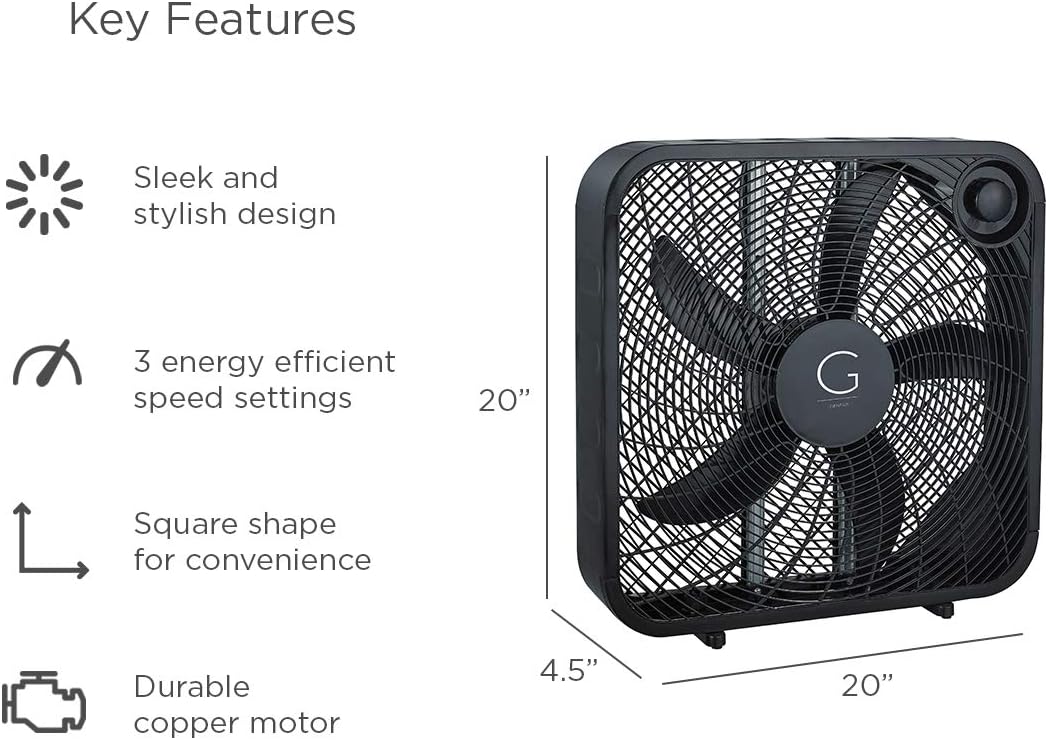
Image 7.1: Visual representation of key features and dimensions (20"W x 20"H x 4.5"D) of the Genesis Box Fan.
8. Кепилдик маалыматы
Specific warranty details for your Genesis 20" Box Fan may vary. Please refer to the warranty card included with your product or visit the official Genesis website for the most up-to-date warranty policy and registration information.
Typically, Genesis products are covered by a limited warranty against defects in materials and workmanship under normal use. Keep your purchase receipt as proof of purchase for warranty claims.
9. Кардарларды колдоо кызматы
If you have any questions, require technical assistance, or need to report an issue with your Genesis 20" Box Fan, please contact Genesis customer support.
For the most current contact information, please visit the official Genesis webсайтка же продуктунун таңгагында көрсөтүлгөн байланыш маалыматына кайрылыңыз.
Сиз да зыярат кылсаңыз болот Genesis Store on Amazon көбүрөөк продукт маалымат жана колдоо ресурстар үчүн.


