1. Киришүү
The LAUNCH CRP239 is an intelligent and networkable automotive diagnostic tool designed for passenger cars. It offers comprehensive OBD II full functionality and rapid testing capabilities for four major vehicle systems: Engine, Automatic Transmission (A/T), Anti-lock Braking System (ABS), and Supplemental Restraint System (SRS). Additionally, the CRP239 includes advanced reset functions such as Oil Reset, Steering Angle Reset, Brake-Pad Reset, Battery Matching, Throttle Adaptation, and Diesel Particulate Filter (DPF) Regeneration, catering to the needs of professional technicians and DIY enthusiasts.
2. Коопсуздук маалыматы
Always observe the following safety precautions when operating the LAUNCH CRP239:
- Диагностикалык куралды туташтыруудан же ажыратуудан мурун, унаанын от алдыруу системасы өчүрүлгөндүгүн текшериңиз.
- Куралды нымдуу шарттарда же тез күйүүчү суюктуктардын же газдардын жанында иштетпеңиз.
- Wear appropriate personal protective equipment, such as safety glasses, when working on vehicles.
- Диагностикалык процедуралардын жана коопсуздук боюнча эскертүүлөрдүн конкреттүү варианттары үчүн унаанын тейлөө колдонмосун караңыз.
- Keep the tool away from strong magnetic fields.
- Берилген кабелдерди жана аксессуарларды гана колдонуңуз.
3. Пакеттин мазмуну
Пакетте бардык буюмдар бар экенин текшериңиз:
- LAUNCH CRP239 Main Unit
- OBD II диагностикалык кабели
- USB кабели
- User Manual
- Ташуу кутусу

Figure 3.1: Contents of the LAUNCH CRP239 package, showing the diagnostic tool, cables, and storage case.
4. Продукт бүтүп калдыview
The LAUNCH CRP239 features a robust design with a 5.0-inch 720p touch screen for intuitive navigation. It includes physical buttons for common operations and a durable rubber exterior for protection.

Сүрөт 4.1: Алдыңкы view of the LAUNCH CRP239, highlighting the touch screen display and navigation buttons.
4.1. Компоненттер
- 5.0 дюймдук сенсордук экран: High-resolution display for clear data presentation and touch input.
- Чабыттоо баскычтары: Directional pad, OK button, and Return button for menu navigation.
- OBD II туташтыргычы: Standard 16-pin connector for vehicle communication.
- USB порт: For connecting to a computer for updates or data transfer.
- Күч көрсөткүчү: Кубаттуулуктун абалын көрсөткөн LED индикатору.
5. Орнотуу
Follow these steps for initial setup of your LAUNCH CRP239:
- Аппаратты заряддоо: Connect the CRP239 to a power source using the provided USB cable to ensure the internal 4000mAh lithium-polymer battery is fully charged before first use.
- Күйгүзүү: Түзмөктү иштетүү үчүн кубат баскычын басып, кармап туруңуз.
- Тил тандоо: On the initial setup screen, select your preferred language. The device supports multilingual operation.
- Wi-Fi туташуусу: Navigate to the 'Settings' menu and select 'Wi-Fi'. Connect to an available wireless network to enable online updates and diagnostic report sharing.
- Программалык камсыздоону жаңыртуу: It is recommended to perform a software update immediately after connecting to Wi-Fi to ensure you have the latest features and vehicle coverage. Navigate to the 'Update' section and follow the on-screen prompts.

Figure 5.1: The LAUNCH CRP239 with its diagnostic cable connected, ready for vehicle communication.
6. Иштөө нускамалары
The LAUNCH CRP239 provides a comprehensive suite of diagnostic functions. Below are instructions for common operations.
6.1. Унаага туташуу
- Locate the vehicle's 16-pin OBD II diagnostic port (usually under the dashboard).
- Унаанын от алдыруу системасы ӨЧҮК экенин текшериңиз.
- Connect the OBD II diagnostic cable to the vehicle's OBD II port and to the CRP239.
- Turn the vehicle's ignition to the ON position (engine off). The CRP239 will power on automatically.
6.2. Негизги меню навигациясы
Негизги менюдан сиз ар кандай функцияларга кире аласыз:
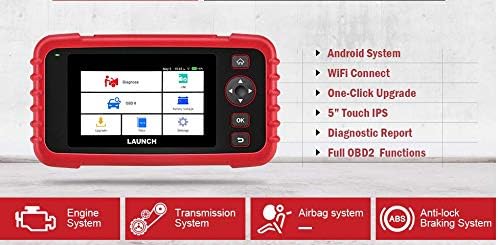
Figure 6.1: The main menu interface of the LAUNCH CRP239, providing access to all primary functions.
- Диагноз коюу: For full system diagnostics (Engine, A/T, ABS, SRS).
- I/M: Readiness status for emissions.
- OBD II: Standard OBD II functions (read/clear DTCs, live data, freeze frame, O2 sensor test, etc.).
- Кайтаруу: Access various maintenance reset functions.
- Батарея Voltage: Displays real-time vehicle battery voltage.
- Жаңыртуу: For software and firmware updates via Wi-Fi.
- Маалыматтар: Review saved diagnostic data and reports.
- Орнотуулар: Configure device settings such as language, Wi-Fi, and display.
6.3. Диагностикалык сканерлөөнү жүргүзүү
- Негизги менюдан тандаңыз "Diagnose".
- The tool will attempt to automatically identify the vehicle via VIN scan. If unsuccessful, you may need to manually select the vehicle make, model, and year.
- Диагноз коюуну каалаган системаны тандаңыз (мисалы, кыймылдаткыч, трансмиссия, ABS, SRS).
- Тандоо "Read Fault Codes" чейин view Diagnostic Trouble Codes (DTCs).
- Тандоо "Clear Fault Codes" to erase DTCs after repairs have been made. Caution: Clearing codes without addressing the underlying issue will result in the codes reappearing.
- Тандоо "Read Data Stream" чейин view live sensor data.
6.4. Using Reset Functions
The CRP239 supports several common maintenance reset functions:
- Майды калыбына келтирүү: Май алмаштырылгандан кийин майдын иштөө мөөнөтүн эстеткичти баштапкы абалга келтирет.
- Руль бурчун баштапкы абалга келтирүү: Resets the steering angle sensor after alignment or component replacement.
- Brake-Pad Reset (EPB): Тормоздук аянтчаны алмаштыргандан кийин электрондук токтоочу тормоз системасын баштапкы абалга келтирет.
- Батареяны дал келтирүү (BMS): Registers a new battery with the vehicle's Battery Management System.
- Дроссельди адаптациялоо: Тазалагандан же алмаштыргандан кийин дроссель корпусунун абалын кайрадан үйрөнөт.
- DPF калыбына келтирүү: Дизель бөлүкчөлөрүнүн чыпкасын калыбына келтирүү процессин баштайт.
To use a reset function, select "Reset" from the main menu, then choose the desired function and follow the on-screen instructions.
6.5. Программалык камсыздоону жаңыртуу
The CRP239 supports one-click Wi-Fi updates for software and vehicle coverage, ensuring you always have the latest diagnostic capabilities.
- Түзмөктүн туруктуу Wi-Fi тармагына туташканын текшериңиз.
- Негизги менюдан тандаңыз "Жаңыртуу".
- The device will check for available updates. Select the updates you wish to install and confirm.
- Allow the update process to complete without interruption. The device may restart during this process.

Figure 6.2: The update screen on the LAUNCH CRP239, showing available software updates for various vehicle brands.
6.6. Диагностикалык отчет түзүү
The CRP239 can automatically generate diagnostic reports, which can be shared via email.
- After completing a diagnostic session, the tool will prompt you to generate a report.
- Confirm to generate the report.
- дегенге өтүңүз "Data" меню үчүн view saved reports.
- Select a report and choose the option to share via email. Ensure your Wi-Fi is connected and email settings are configured in the 'Settings' menu.
7. Техникалык тейлөө
Proper maintenance ensures the longevity and optimal performance of your LAUNCH CRP239:
- Тазалоо: Аппаратты тазалоо үчүн жумшак, кургак чүпүрөктү колдонуңуз. Абразивдүү тазалагычтарды же эриткичтерди колдонбоңуз.
- Сактагыч: Түзмөктү колдонбогон учурда, аны көтөрүүчү сумкасында, салкын, кургак жерде сактаңыз. Ашыкча температурадан алыс болуңуз.
- Батареяга кам көрүү: Charge the battery regularly, even if the device is not in frequent use, to maintain battery health. Avoid fully discharging the battery for extended periods.
- Кабелдик текшерүү: Periodically inspect the diagnostic and USB cables for any signs of damage. Replace damaged cables immediately.
8. Кыйынчылыктарды
This section addresses common issues you might encounter with the LAUNCH CRP239.
| Көйгөй | Мүмкүн себеп | Чечим |
|---|---|---|
| Түзмөк күйбөйт. | Low battery; faulty connection to vehicle. | Charge the device fully. Ensure the OBD II cable is securely connected to both the CRP239 and the vehicle. Check vehicle's ignition is ON. |
| Cannot communicate with vehicle. | Incorrect vehicle protocol; faulty OBD II port; damaged cable. | Verify vehicle compatibility. Check the vehicle's OBD II port for power. Try a different vehicle or cable if available. Ensure vehicle ignition is ON. |
| Программалык камсыздоону жаңыртуу ишке ашпай жатат. | Туруксуз Wi-Fi байланышы; сактагыч жетишсиз. | Ensure a strong and stable Wi-Fi connection. Check available storage space on the device. Restart the update process. |
| Экран жооп бербей жатат. | Программанын катасы; физикалык зыян. | Perform a soft reset by holding the power button until the device restarts. If the issue persists, contact customer support. |
9. Техникалык шарттар
| Өзгөчөлүк | Деталь |
|---|---|
| Модел | CRP239 (CREADER PROFESSIONAL 239) |
| Дисплей | 5.0-inch 720p Touch Screen |
| Батарея | 4000mAh кайра заряддалуучу литий полимери (кошулган) |
| Байланыш | OBD II, Wi-Fi, USB |
| Унаа камтуу | Domestic, Asian, European vehicles (1996 and newer OBD2) |
| Колдоого алынган системалар | Engine, Automatic Transmission (A/T), ABS, SRS |
| Атайын функциялар | Oil Reset, Steering Angle Reset, Brake-Pad Reset (EPB), Battery Matching (BMS), Throttle Adaptation, DPF Regeneration |
| Өлчөмдөр | 32.4 x 25.4 x 8 см (Пакет) |
| Элемент Салмагы | 560 г |
| Сырткы материал | Каучук |
10. Кепилдик маалыматы
The LAUNCH CRP239 comes with a standard manufacturer's warranty. For specific warranty terms and conditions, please refer to the warranty card included in your product package or visit the official Launch webсайт. Сатып алуу квитанциясын кепилдик дооматтары үчүн сатып алуунун далили катары сактаңыз.
Кеңейтилген кепилдик параметрлери үчүнчү тараптын провайдерлеринде жеткиликтүү болушу мүмкүн. Мисалы үчүнampБул продукт үчүн Salama Care компаниясынын 1 жылдык жана 2 жылдык узартылган кепилдиктери сунушталат.
11. Колдоо
For technical assistance, product inquiries, or support, please contact Launch customer service through their official website or the contact information provided in your product documentation. Ensure you have your product model number (CRP239) and serial number ready when contacting support.
Кошумча ресурстар үчүн, баш багыңыз Launch Official Webсайт.


